These engines only escalate to a Human Pillar when logic bounds are exceeded. Routine queries never touch a human inbox in this configuration. Modern support tools focus on how seamlessly these pillars communicate. ### Why teams are moving away from Freshdesk in 2026 Complexity in deployment has become a primary friction point for scaling enterprises. According to data from [SoftwareCompare](https://softwarecomparedata.com/freshdesk-vs-zendesk-2026/), Freshdesk requires a setup time of **8.3 units** for large teams. This represents a significant period of operational downtime during migration.  ### What is an implementation unit in migration A unit in this context represents a standard eight-hour workday dedicated to technical configuration and data mapping. When a platform requires 8.3 units, it demands over **66 hours of active labor** from your systems administrator. This metric allows IT directors to calculate the total cost of ownership by multiplying the units by their internal hourly engineering rate. While this is faster than the 12.7 units required by [Zendesk](https://www.zendesk.com/dk/service/ai/customer-service-software/) or the 10 to 16 units demanded by Salesforce Service Cloud, Clonepartner notes it still lags behind the instant-on capabilities of API-first tools. Teams are leaving these legacy systems because a setup time of 8.3 means nearly two work weeks of configuration. You must complete this entire phase before a single automated workflow can even be tested against live traffic.  ### Essential features for high-growth support teams High-growth teams now require deep extensibility to connect their help desk to internal product databases without custom middleware. Native AI Orchestration allows teams to swap models. They might use Gemini 3.8 Flash for rapid chat and Claude Opus 5.5 for complex technical debugging. This ensures the right reasoning power is applied to the right cost bracket. 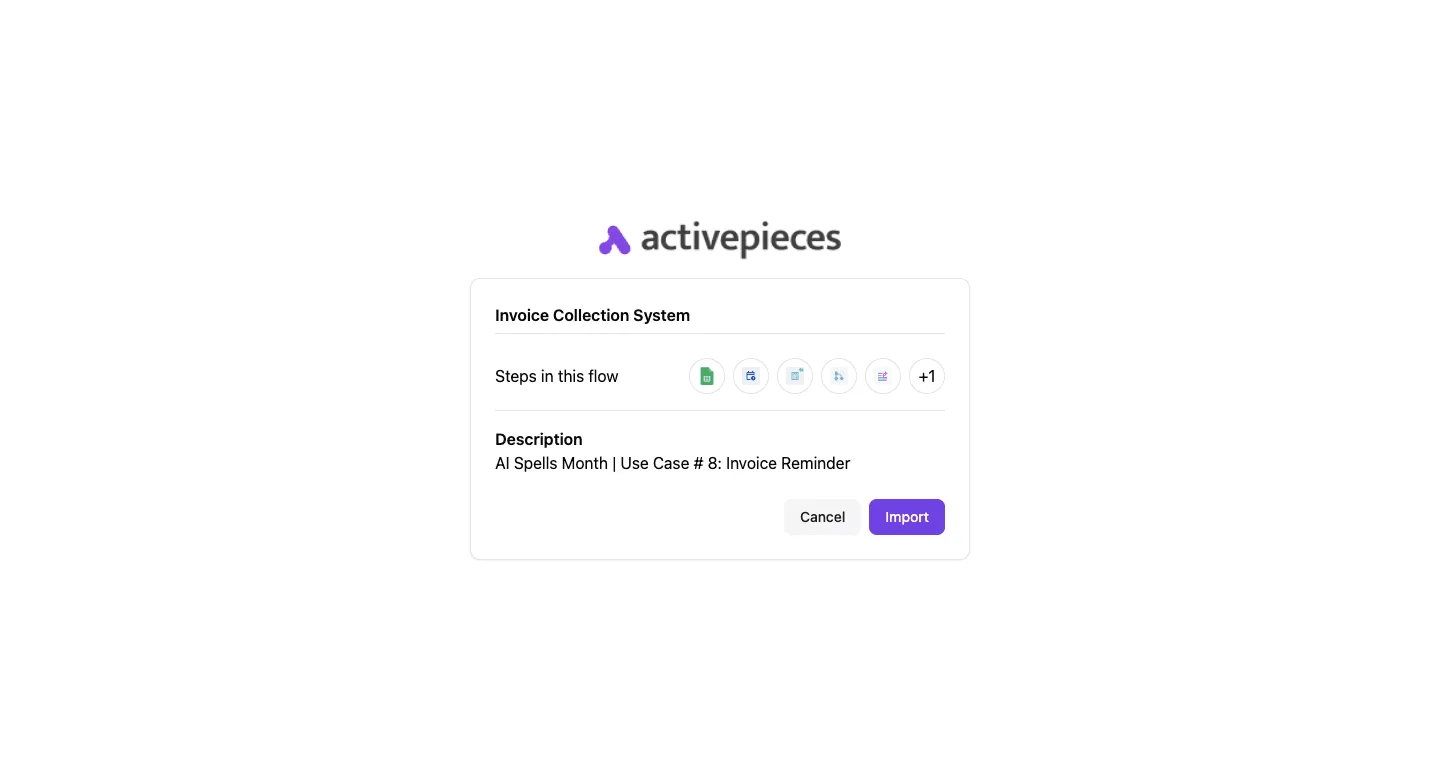 Workflow Automation via an [Activepieces](https://www.activepieces.com) integration or similar low-code engine is necessary to sync customer health scores from a CRM like HubSpot directly into the support sidebar. A Unified Schema provides support for JSON-based event logging. This ensures every customer interaction is readable by an external data warehouse for churn prediction. ## Top 13 Freshdesk alternatives compared by use case Modern support leaders select alternatives based on whether they prioritize CRM depth, collaborative shared inboxes, or the ability to orchestrate custom AI workflows. While Freshdesk offers a broad baseline, the current market is fragmented into specialized tools that solve specific architectural bottlenecks. 28% of IT budgets are typically allocated to software against the 8% reserved for support operations, according to the [IT Budget Calculator](https://itbudgetcalculator.com/breakdown). This 28% software spend means that for every $100,000 in your budget, $28,000 is locked into licensing. With 30% of budgets going to personnel, the IT Budget Calculator reports that a platform saving five minutes per ticket directly impacts your largest expense category. Infrastructure accounts for 22%, so choosing a SaaS-heavy alternative like Zendesk or HubSpot shifts the maintenance burden away from your internal DevOps team. Security consumes 12% of the budget according to the IT Budget Calculator, leaving a smaller portion of funds available for innovation and growth. Salesforce’s Shield or Zendesk’s Advanced Compliance are necessary expenditures to protect the data of a scaling user base. 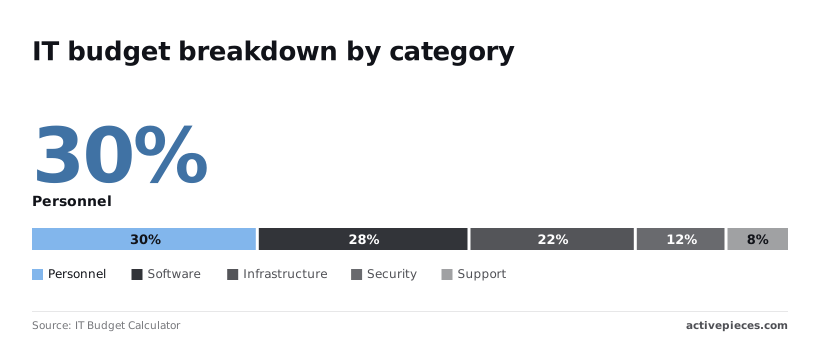 The following table compares the leading contenders across price, core strengths, and the specific trade-offs inherent in their architecture. | Alternative | Core Strength | Main Limit | Ideal User Profile | | :--- | :--- | :--- | :--- | | Zendesk | Enterprise scalability | High total cost of ownership | Global support teams | | Intercom | Proactive chat & AI agents | High volume-based pricing | B2B SaaS companies | | Front | Collaborative shared inboxes | Limited legacy CRM features | Relationship-driven teams | | Help Scout | Simplicity & UX | Limited complex automation | Small to mid-market teams | | Gorgias | Shopify/E-commerce depth | Niche outside of retail | E-commerce brands | | Kustomer | Timeline-based data views | Steep learning curve | High-growth B2C | | Gladly | Person-centered threading | High per-seat pricing | Customer-obsessed retail | | Hiver | Gmail-native interface | Tied strictly to Google Workspace | Teams living in Gmail | | Zoho Desk | Integrated Zoho ecosystem | Interface can feel cluttered | Zoho One power users | | Salesforce | Deepest CRM integration | Requires dedicated admin | Large enterprise Salesforce users | | HubSpot | Unified marketing/sales view | Service features trailing Sales | Mid-market growth teams | | Dixa | Multi-channel flow builder | Higher entry price point | European-centric scale-ups | ## Enterprise-scale support platforms for complex organizations Enterprise platforms solve fragmentation by centralizing disparate data streams. Crm notes that while smaller competitors like Help Scout, which serves 12,000 organizations, or Groove, also at 12,000 organizations, provide streamlined interfaces, they often lack the architectural depth required for global logic.  [Front](https://hiltonsoftware.co/compare/front-vs-groove) supports 9,000 organizations and prioritizes the shared inbox experience over heavy-duty compliance frameworks. The Enterprise Scale Requirements: Multi-brand support with distinct SLAs. Advanced data residency and HIPAA compliance. Custom object mapping for complex product hierarchies. Granular role-based access controls (RBAC) for global teams. ### Zendesk for high-volume enterprise support teams Zendesk functions as the infrastructure layer for support, handling millions of tickets through a highly customizable API-first architecture. Its Advanced Data Privacy and Protection (ADPP) add-on provides granular encryption at rest. This means that even in the event of a database breach, customer identifiers remain unreadable to unauthorized parties. ### Salesforce Service Cloud: The choice for CRM-heavy workflows Salesforce Service Cloud eliminates the "swivel-chair" effect by embedding support tools directly within the primary customer database. This native integration allows for complex routing based on Lifetime Value (LTV). For instance, a ticket from a "Platinum" account can automatically bypass the standard queue to reach a dedicated account manager. ### Kustomer for data-driven B2C customer support Kustomer replaces the traditional ticket-based model with a continuous timeline, treating every interaction as a single data point in a lifelong customer journey. A retail brand can see a customer’s real-time shipping status and recent returns without opening a second tab. By connecting Claude Opus 5.5 to this timeline, the platform can predict churn risk based on sentiment changes across the last five interactions. This alerts a manager before the customer even submits a formal complaint. ## Collaborative help desks for lean teams and startups Collaborative help desks prioritize a unified view of the customer journey. They replace the siloed ticket numbers of Freshdesk with shared workspaces that feel like a standard email client. This approach eliminates the collision of two agents replying to the same thread. ### Front as a powerful shared inbox tool Front centralizes fragmented communication channels into a single interface so that no teammate has to toggle between tabs to find a customer’s history. These channels include email, SMS, and WhatsApp. By treating every incoming message as a collaborative object, it allows agents to @mention colleagues in internal comments directly on a live thread. The platform’s rule engine can trigger automated tagging based on keywords. High-priority leads are routed to a specific folder rather than sitting in a general queue. The administrative controls allow for granular access management.  The SSO configuration panel provides a clear view of how teams manage secure access across the organization. By enabling SAML 2.0 or Google authentication, administrators ensure that a departing employee’s access is revoked across all support channels instantly.  ### Help Scout for simple human-centric support Help Scout removes the "ticket" terminology entirely, presenting every interaction as a personal email. The platform uses a "Docs" knowledge base that integrates directly into the chat widget. Customers can find answers to common questions before they ever reach an agent’s inbox. Its "Beacon" tool suggests relevant articles based on the page a user is currently visiting, reducing the volume of repetitive inquiries. The interface remains clean for teams using Gemini 3.8 Flash to summarize long threads. ### Gorgias for e-commerce and Shopify support Gorgias integrates deeply with Shopify and BigCommerce to pull order data and tracking numbers directly into the sidebar of every conversation. This native connectivity allows agents to process a return or update a shipping address without leaving the help desk. The platform's "Intent Detection" uses machine learning to categorize messages like "Where is my order?" automatically. By centralizing social media comments alongside direct emails, it ensures that a brand's public reputation is managed in the same workflow as its private support. ## Activepieces for custom support automation and AI workflows Activepieces runs a company's chosen AI models and automations across its own apps and data, providing an MIT-licensed core for support operations that require complex, multi-step logic that standard help desk triggers cannot execute. By utilizing an open-source framework, it allows teams to build modular connectors that link customer conversations to internal databases, proprietary APIs, and LLM providers. This avoids being locked into a single vendor's ecosystem.  ### Automating beyond the help desk's native triggers A closed integration catalogue is a ceiling on your support strategy, forcing you to wait for a vendor's roadmap to include the internal database or niche tool you use. Activepieces treats its **735+ integrations** as a floor instead, allowing you to use AI to generate missing connectors and deploy them privately to your own instance.When the human agent becomes the exception rather than the rule, the industry has successfully shifted from managing "tickets" to orchestrating "resolutions.
This capability, supported by an MIT-licensed core where roughly **60% of integrations** are community-contributed, ensures that verifying a customer’s lifetime value in a custom SQL warehouse never requires a ticket in a vendor's development queue. This granular control means a "Refund Requested" tag doesn't just send an email. It can simultaneously check a Stripe billing history and verify shipping status in a logistics platform. ### Building custom AI support agents with your own data Activepieces allows you to place an Agent step alongside deterministic automation steps in the same flow, enabling the construction of sophisticated support agents by piping ticket content directly into high-reasoning models. 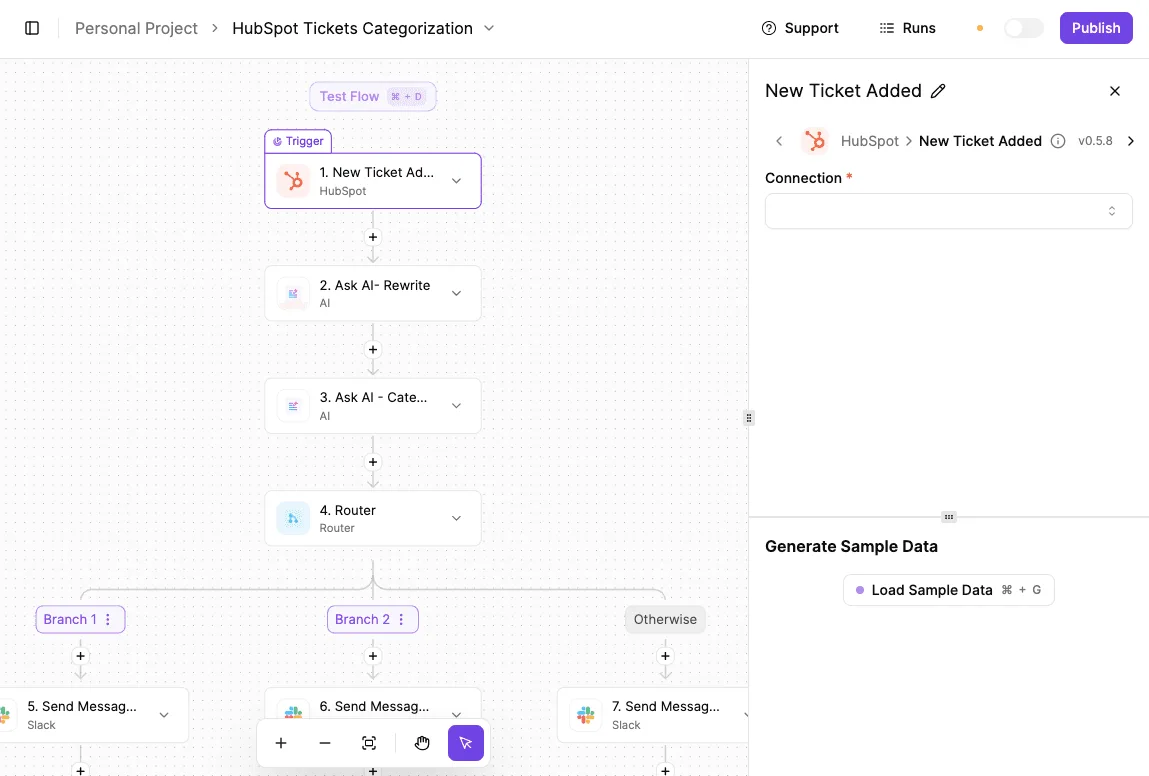 These include Claude Opus 5.5 for complex troubleshooting or GPT-6 Sol for agentic task execution. Unlike the "black box" AI features found in legacy suites, this setup allows you to define exactly how your knowledge base is indexed and retrieved. This ceiling ensures that a mid-sized team can deploy an automated triage agent that runs hundreds of times a month without triggering a massive subscription upgrade. ### Syncing support tickets with internal engineering tools Bridging the gap between a customer’s bug report and a developer’s sprint board is often the primary source of friction in technical support. MoneyGram and Moneypenny run Activepieces in production to automate these handoffs by mapping specific ticket fields directly to issues in GitHub or Jira. Because the platform supports bidirectional syncing, a developer closing a task in their own environment can automatically trigger a status update and a personalized reply to the customer. While closed ecosystems limit support strategies to a pre-defined roadmap, Activepieces provides an extensible foundation that treats its integration library as a starting point rather than a limit. By allowing teams to generate and deploy their own connectors to an open-source core, the platform ensures that custom data sources and complex logic are never blocked by vendor constraints. Activepieces is the better choice for organizations that require total control over their automation infrastructure and refuse to be capped by a static integration catalogue. ## Help desk migration checklist and planning steps A successful migration begins by freezing the current state of your helpdesk to prevent configuration drift while you build the new environment. ### Auditing your current ticket volume and complexity Auditing your ticket landscape ensures you don't migrate redundant tags or obsolete automation rules. Start by identifying which custom fields are mandatory for reporting. Use this sequence to clean the slate: 1. Audit current custom fields and tags. 2. Export historical ticket data to CSV/JSON. 3. Map Freshdesk statuses to the new platform's workflow. 4. Set up the API connections for the destination environment. ### Mapping Freshdesk integrations before you migrate Mapping your stack prevents the "silent failure" of critical workflows during the switch. You must document every webhook and native app currently connected to your Freshdesk instance, specifically identifying those that rely on the `freshdesk.com/api/v2` endpoint. Teams moving toward a collaborative shared inbox like Front must verify that their CRM can still link conversations to the correct contact record via email headers. If you utilize AI for automated drafting, ensure your new platform supports modern reasoning models like Claude Sonnet 5.5. ### Running a side-by-side helpdesk trial test Running a side-by-side trial allows you to validate your routing logic under real-world pressure. Connect a secondary support alias to your new platform and BCC it on all incoming Freshdesk traffic to see how the new system handles your specific volume. This reveals if your new triggers are correctly identifying high-priority customers before you point your main MX records away from the old incumbent. ## FAQs about switching help desks or providers ### Can I migrate my Freshdesk ticket history to a new provider? You can move your historical data to most modern platforms by using the Freshdesk API to extract ticket fields, notes, and attachments into a JSON or CSV format. Because different providers use different database schemas, you'll need to map your Freshdesk "Status" and "Type" fields to the corresponding attributes in your new tool. This ensures your reporting remains consistent. If you choose a platform with a native import tool, the system typically handles the API handshake for you. Your team can access old conversations without switching between two browser tabs. ### Which alternative is best for small teams on a budget? Small teams often find the most value in platforms that offer a permanent free tier for a limited number of agents. They also benefit from those that charge per conversation rather than per seat. A per-seat model can become expensive if you have occasional contributors, such as developers or product managers, who only need to answer one ticket a week. Look for providers that include essential automation features in their entry-level plans. Basic round-robin routing should be included so you don't have to pay for an enterprise tier just to keep your inbox organized. ### Do these alternatives support WhatsApp and Instagram integration? Most modern help desks support these social channels either through direct API integrations or through a third-party aggregator like Twilio. Twilio is a communication platform that connects software to global networks. Direct integrations are preferable because they usually sync message status in real-time. This prevents an agent from replying to a DM that a colleague has already archived. If you rely heavily on Instagram, ensure the provider supports "Story Mentions" as tickets. Otherwise, you may miss customer engagement that happens outside of direct messages. ### How long does a typical help desk migration take? The duration of a migration depends on the volume of your historical data and the complexity of your existing automation rules. A basic setup involving a few mailboxes and no data import can be completed in a single afternoon. a full migration with thousands of legacy tickets and custom API integrations requires several weeks of testing. You should run your new system in parallel with the old one during the transition period. This ensures no customer emails are lost while you verify that your new triggers are firing correctly. ## Related reading - [10 MuleSoft Alternatives and Competitors in 2026](https://www.activepieces.com/blog/10-mulesoft-alternatives-and-competitors-in-2025) - [Best Zapier Alternatives in 2025](https://www.activepieces.com/blog/best-zapier-alternatives-in-2025) - [Best ElevenLabs Alternatives in 2026 Compared](https://www.activepieces.com/blog/best-elevenlabs-alternatives-in-2026-compared) ## References - [IT Budget Calculator](https://itbudgetcalculator.com/breakdown) - [SoftwareCompare](https://softwarecomparedata.com/freshdesk-vs-zendesk-2026/) - [Hilton Software](https://hiltonsoftware.co/compare/front-vs-groove)A closed integration catalogue is a ceiling on your support strategy, forcing you to wait for a vendor's roadmap to include the internal database or niche tool you use.