| | What it records | Who sees it | Question it answers | Plan needed | Retention | |---|---|---|---|---|---| | Audit log | Platform activity by users, such as changes to flows and settings | Platform admins | Who changed this, and when? | Paid enterprise tier | Separate from run data | | Flow run history | Each execution of a flow and its outcome | Members working on the flow | Did this run succeed or fail? | Any edition, including Community | 30 days of run data on Cloud | | Step-level run log | Inputs and outputs of each step in one run | Whoever opens that run | Which step broke, and with what data? | Any edition, including Community | 30 days of run data on Cloud | According to Activepieces, the 30-day limit means a failure you notice in week six has no run data left to inspect on Cloud. Nothing in that limit tells you who edited the flow. A reviewer asking whether edits are attributable shouldn't have to take the platform's maturity on faith: Activepieces has an MIT-licensed core you can clone, with the queue and worker architecture open to read and load-test, and it runs self-hosted or fully air-gapped.  On a self-hosted or team rollout, audit logs come with the Ultimate plan and with Enterprise control, which runs on your own servers, air-gapped if you need it. Team at $200 a month does not include them, and both of the plans that do are priced through the sales form at https://www.activepieces.com/sales. ## Events Activepieces audit logs record, as listed in the docs Once you have the feature, what it captures is a short list of administrative actions, not executions: flow create, update and delete, connection changes, sign-in, and user and project changes. This list is the confirmed set. Treat anything outside it as unverified until you see it in your own log. If your compliance question maps to one of these, the log can probably answer it. If it doesn't, assume it can't. ### Workflow and connection events At 2am the question is "who changed this flow before it broke?", and flow events answer it by telling you that someone created, edited or removed a workflow. They don't tell you what a given run did with its data. For that you need run history, which is a different record with a different purpose. When a flow starts failing authentication and nobody admits touching it, connection changes are the entries to check. They cover the credentials a flow uses to reach other services. Sign-in, user and project changes are the access-control trail: who got in, who someone added or altered, and what changed in the project that holds the flows. I can't confirm the fields each entry carries, so I won't list any. Read the docs page, then export a few real entries before you promise an auditor a specific field. Individual flow runs, step inputs and outputs, and run failures belong to run history, not the audit log. I can't confirm that other administrative actions, such as changes to API keys, installed integrations or SSO settings, are logged. Treat them as unverified: perform one and check whether an entry appears. ## Where to find audit logs in the Activepieces dashboard The audit log's a tab under Settings in the platform admin console, visible only to a platform admin. If you perform an action and find no tab, check your role and your plan before assuming the log's empty. 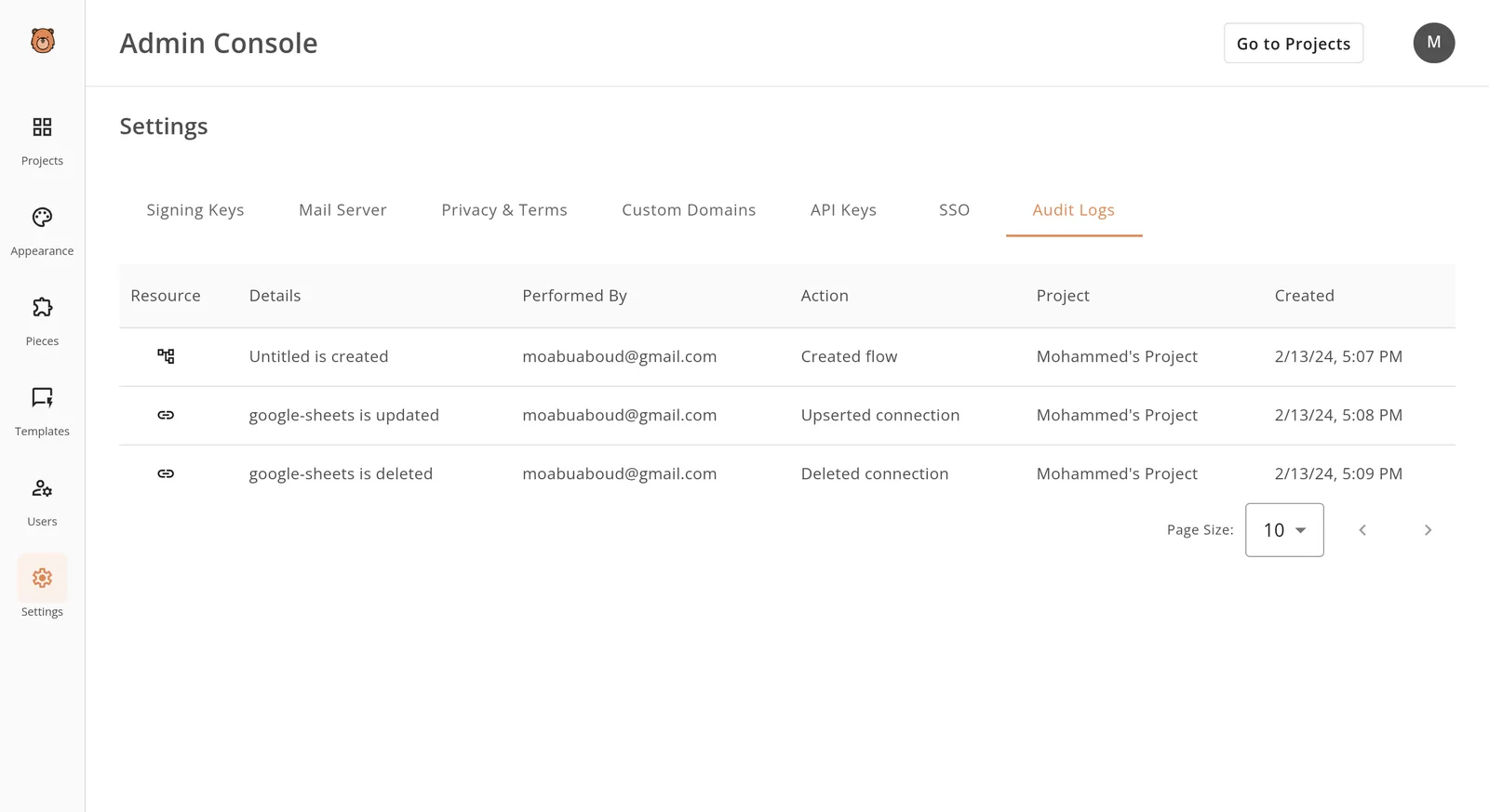 ### Open the Platform Admin area If you are a project member without platform admin rights, you won't see this route, and a plan without the feature won't show the tab at all. As a platform admin, get there in three steps: 1. Sign in as the platform admin and open the admin console. 2. In the left sidebar, which lists Projects, Appearance, Integrations, Templates, Users and Settings, choose Settings. 3. Choose the Audit Logs tab. 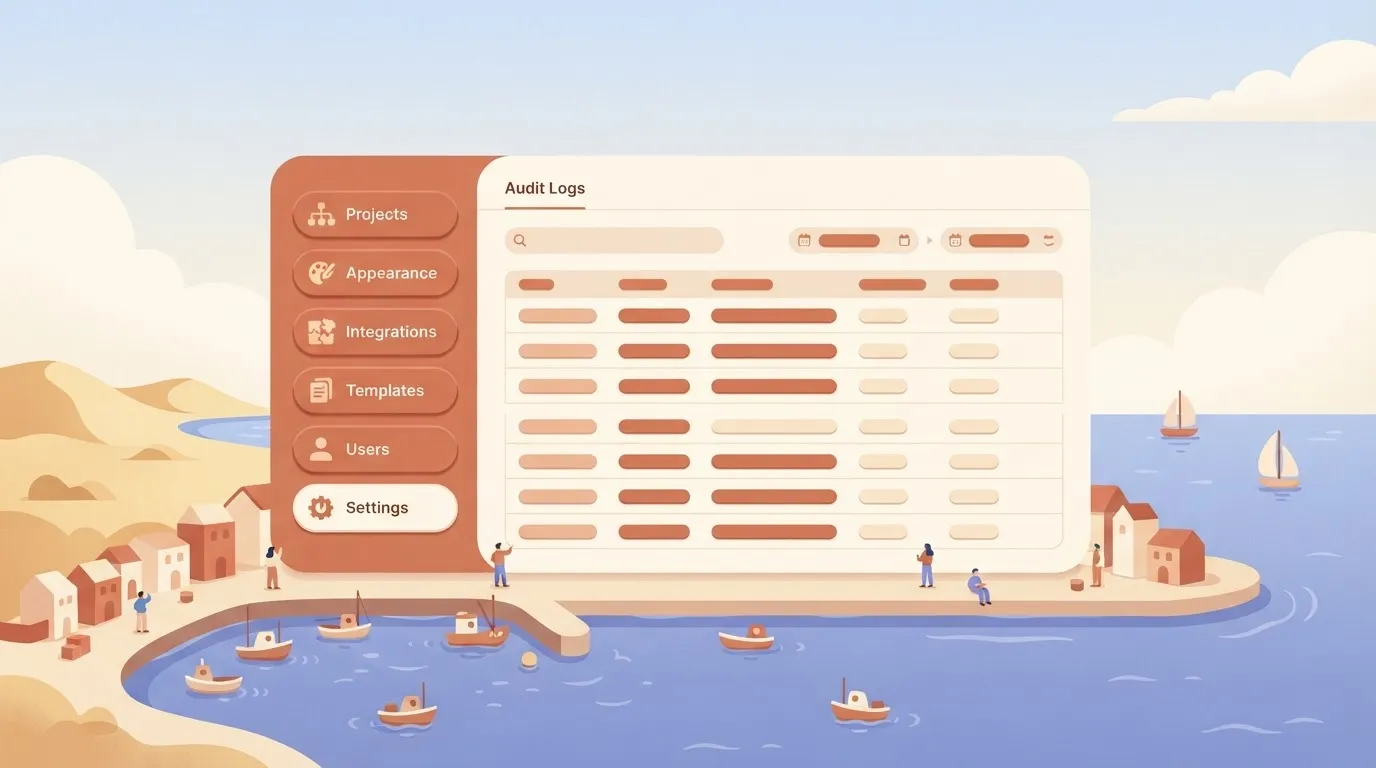 Each row is one change, with columns for Resource, Details, Performed By, Action, Project and Created. The rows here show someone creating a flow, upserting a connection and then deleting that connection, all in one project. Notice that nothing in them says whether a flow ran or what it returned. *(The screenshot sits here.)* That gap's the point: you read this table to learn who altered a flow or connection, and you read run history to learn what the flow did. ### Filter by event, user or date Action is the event type, Performed By is the user, and Created is the timestamp, so the columns map onto the three questions you'll ask most. Sort or scan those columns first. I can't confirm from the view above which dedicated filter controls your version offers, so open the tab and see what sits above the table before you write a procedure that depends on one. The page has a page-size control, so widen it before scanning a long stretch of changes. ### Exporting or forwarding entries I can't confirm a documented export button or API for audit entries, and the view shows none. Until you have seen one in your own deployment or in the current docs, treat the on-screen table as the only record you can rely on, and don't promise an auditor a feed into your SIEM. Test it the same way as everything else: perform a change, find the entry, then look for a way to get it out. ## Which editions include audit logs If your test finds no entry to export, check the edition before you blame the configuration. **The free MIT-licensed Community Edition doesn't include audit logs, and they sit above the $200 Team tier.** ### Comparison table of editions and audit log access Audit logs appear only at the top of the ladder, as the table shows. A team that buys on price alone will find the gap after it's rolled out.  | Edition | Audit logs | SSO | Hosting | Price | Sales form | |---|---|---|---|---|---| | Community Edition (MIT) | No | No | Self-hosted | Free | No | | Team | No | Yes | Cloud | $200/month | No | | Business | Confirm with sales | Confirm with sales | Confirm with sales | Quoted | Yes | | Enterprise | Yes | Yes, beyond Team | Self-hosted or cloud | Quoted | Yes | The [Activepieces pricing page](https://www.activepieces.com/pricing) lists Free at $0 per month, Plus at $20 and Team at $200. That's a **tenfold jump from Plus to Team**, so budget for the step before you compare features. Per Activepieces, neither of the two cheapest paid tiers gets you a record of who changed what, which means a $200 Team plan still leaves an audit gap. You won't find a checkout button for audit logs or self-hosted enterprise deployments. They go through the [sales form](https://www.activepieces.com/sales). Plan on a conversation before a pilot, not after it. **SOC 2 is in progress, not certified**. Don't write it into a vendor questionnaire as a held attestation. ### Self-hosting and where the log data lives Self-hosting the Community Edition gives you control of the servers, but not the audit feature. The code's MIT-licensed, so you can run it, yet the log's a paid capability. When a self-hosted free install changes a flow, it **silently leaves no platform-level record**. If you need the log data inside your own infrastructure, you need self-hosted enterprise, and that's a sales-form conversation. Ask two things there: where the entries are stored, and whether you can export them. Without the second answer, the log's only a screen you can look at. ## Mistakes teams make when relying on audit logs Five mistakes recur, and each fails quietly until someone asks for a record that was never kept: wrong edition, wrong log, shared logins, short retention, and logs mistaken for certification. Run a free, MIT-licensed Community Edition and you have no audit logs; they come with a paid plan. A team that self-hosts and assumes otherwise finds the gap after the incident. Fix: confirm the plan before you promise anyone a change record, and if you need one, use the [sales form](https://www.activepieces.com/sales). ### Treating run logs as an audit trail Run history records what a flow did. An audit log records who changed the flow. Evidence of the first doesn't answer questions about the second.  Retention widens the gap: according to [AuditKit](https://auditkit.dev/blog/audit-log-retention-policies), SOC 2 Type II and PCI DSS each expect 12 months of logs, and HIPAA expects 72 months. Run data is kept for 1 month. So run history covers about one-twelfth of the SOC 2 and PCI DSS window and a seventy-second of the HIPAA one. Fix: use run history for debugging only, and keep the audit log as your compliance record. If five people log in as one admin, the log faithfully reports that "admin" deleted a connection, and nobody knows which person did it. Fix: one named account per person, and as few admin roles as the work needs.  ### Ignoring audit log retention and export If a log rolls off before the audit period ends, you have a gap in your evidence. Check how long entries are kept and export them on a schedule to storage you control, so the 12-month and 72-month windows are met by your own archive. The fifth mistake is treating the logs as certification. They're one input to a control, not proof that you're compliant. Fix: pair them with a written review process, and say so plainly when a customer asks. ## Use Activepieces audit logs for access reviews and change tracking "Who changed this, and when" is what audit logs answer. Use them for two jobs: finding the person behind a broken workflow and proving, on a schedule, that the right people hold the right access. The log is a paid, platform-level record. On the free MIT-licensed Community Edition you won't have it, so the first step of any review is confirming your plan includes it. Activepieces lists audit logs on the Ultimate plan and on Enterprise control, both priced through the sales form at https://www.activepieces.com/sales, while Team at $200 a month does not include them. Below, the diagram shows the flow. The platform emits an audit log list that an admin reviews by hand, while a separate dashed arrow to a SIEM is marked unavailable, because the documentation shows no streaming option. Take from it that the log's something a person opens and reads, not a feed that pushes events somewhere else. ### Investigating a broken workflow Yesterday the flow ran fine; today it fails or has vanished. Start with that symptom. The run history tells you that it failed and at which step. It doesn't tell you why the flow is different. Open the audit log, filter to the time just before the first failure, and look for an edit, a publish, or a delete on that flow. The entry gives you the actor and the action, which turns "someone broke it" into a name to ask. Keep the limits in view. The log records the event, not a before-and-after comparison of your steps. Once you know who and when, you still restore from your own backup or version notes. ### Quarterly access review with audit logs Once a quarter, export or read the entries for membership and permission changes. Check each one against a written approval, and flag any account that changed roles without a ticket. Save the reviewed list as evidence for internal security review. When you need alerts in real time, retention across many systems, or correlation with other logs, a SIEM fits better. The audit log docs show no streaming, though the Ultimate plan lists event streaming separately from audit logs, so ask sales what it covers before you count on it. Until then, treat the log as one source you review on a schedule. ## Frequently asked questions A log you review on a schedule raises a few narrow questions, and some of the answers below end at "ask sales" because that's where the confirmed detail lives. ### Editions and access Do Activepieces audit logs work in the free Community Edition? No. Audit logs are a paid feature, so the MIT-licensed Community Edition doesn't include them. Self-hosting the free edition gets you run history for your flows, which records what executed, not who changed what. If you need the change record, plan for a paid plan from the start. Who can view audit logs in Activepieces? Because audit logs are a platform-level record, they sit above any single flow or project. A builder looking at their own runs won't see them there. Team at $200 a month includes standard roles, but audit logs arrive on the Ultimate plan alongside custom roles (custom RBAC), so confirm with sales which roles can open them. ### Retention and certification How long does Activepieces keep audit log entries? There's no confirmed retention period to quote here, and the 30 days quoted above applies to run data on Cloud, not to the audit log, so don't build a compliance policy on a guess. If your auditors require a specific window, get it in writing from the sales team before you commit, and review the log on your own schedule so a gap never matters. Is Activepieces SOC 2 certified? Not yet. The SOC 2 programme is in progress, which means you can't cite a certification today. If a vendor questionnaire demands one, say the programme is underway and ask sales what documentation they can share. ### Exporting to a SIEM Can I send Activepieces audit logs to a SIEM? I can't confirm a native SIEM integration. The Ultimate plan lists event streaming separately from audit logs, but what it covers is unconfirmed, so treat SIEM export as unconfirmed too. Ask sales whether export or streaming is supported on your plan before you design around it. Until then, assume the log is something you open and read, not something that feeds your alerting. ## Next steps - Builders can start free at https://cloud.activepieces.com/sign-up: $0, 1,000 credits a month, unlimited flows and up to 5 users. - Compare plans at https://www.activepieces.com/pricing, where Free is $0, Plus is $20 and Team is $200 a month. - For self-hosted enterprise, SSO beyond Team, audit logs (Ultimate plan and Enterprise control) or embedding, use https://www.activepieces.com/sales. ## Related reading - [FedRAMP Audit Success: Workflow Automation for Compliance](https://www.activepieces.com/blog/fedramp-audit-success-workflow-automation-for-compliance) - [Evaluate Workflow Automation Tools: A 2026 Audit Guide](https://www.activepieces.com/blog/evaluate-workflow-automation-tools-a-2026-audit-guide) - [How to Automate SEO Site Audit With Activepieces](https://www.activepieces.com/blog/how-to-automate-seo-site-audit-with-activepieces) ## References - [Activepieces](https://www.activepieces.com/pricing) - [AuditKit](https://auditkit.dev/blog/audit-log-retention-policies)The question that matters is who edited the flow before the failures began, and run history doesn't record that.