# Activepieces Human in the Loop: A Complete 2026 Guide
By Joaquín Bartra · 2026-10-25 · Source: https://www.activepieces.com/blog/activepieces-human-in-the-loop-a-complete-2026-guide
---
In [Activepieces](https://www.activepieces.com/pricing), human in the loop means a workflow stops at one step, asks a named person to approve or supply input, and carries on only when that person responds.
The claim this article makes is narrower than the feature: put that pause only where a wrong automated action is costly to undo.
The details here reflect the platform's docs as of 2026-10-25, so verify any later changes to the step.
## Human in the loop is a pause-and-approve step
### What human in the loop means in automation
In any automation tool, a human in the loop step is a point where the run halts and waits for a person before anything downstream happens.
The person sees what the automation is about to do, then picks a path: go ahead, stop, or change something first.
If the message says "Approve?" with no detail, they click yes. If it shows the amount, the recipient and the account about to be charged, they can make a real decision.
That's why the gate belongs at only a few steps: each one spends a person's attention, and attention wears out.
### How approval steps Pause and resume workflows
Drop the pause into the flow like any other step. The run stops there, the person gets a link, and the flow resumes with whatever they chose.
Steps after it can branch on that answer, so Approve continues the run and Reject sends it to a different path, such as a cleanup step or a notice to the requester.

The diagram shows:
- a trigger on the left
- automated steps next to it
- one highlighted approval step where a person at a laptop holds Approve and Reject buttons
- two branches leading off to later steps
The single pause sits right before the branch where a mistake would be hard to reverse.
### Approval steps versus plain notifications
A plain notification tells someone something already happened. An approval step tells them something is about to happen and holds it until they answer.
If you send a Slack message saying "refund issued," the refund is gone and the message is a receipt. If the flow pauses before the refund and asks for approval, the person can still stop it.
That also means a gate is a place where the run can sit unfinished.
## Workflow pause and resumption
When a flow reaches the approval step, it stops and generates a resume URL. It does nothing until the approver opens that URL, and if you build a deadline into the flow, a forgotten request ends instead of hanging.
The sequence below shows the whole round trip. The approver's click is only a web request the paused flow is waiting for.
1. The flow reaches the approval step and pauses; nothing after it runs.
2. A resume URL is generated, unique to this run.
3. A link or a form carrying that URL goes to the approver.
4. The approver clicks Approve or Reject.
5. The click hits the resume URL, and the choice becomes data for later steps.
6. If no one replies, the timeout fires and the flow takes its fallback branch.
### Delivery channels compared
Email, a chat message and a form all carry the same resume URL. They differ in how fast the request gets noticed, what record survives, and how easily someone approves the wrong thing.
| Channel | Speed | Audit trail | Ease of mistakes |
|---|---|---|---|
| Email | Slowest; sits in an inbox | Good: the message and reply time are kept | Low, but long threads bury the details |
| Chat message | Fastest; seen in the channel | Weaker unless the flow logs who clicked | Highest: a shared channel invites a stray click |
| Form | Medium; needs a link opened | Best: the form can require a name and a reason | Lowest: the approver types a decision |
Pick the chat message when speed matters and the action is easy to reverse. For the costly steps, use the form, because it makes the approver write a reason.
### Using the answer in later steps
Once the approver responds, the flow resumes and the decision arrives as a field on the approval step's output. A branch step then checks that field: Approve continues to the real action, and Reject or timeout goes to a cleanup path.

If the form captured a reason, store it with the run so the audit trail shows who decided and why.
## Where approval gates matter most
Money movement, AI-drafted output that reaches customers, and irreversible changes are where approval gates belong, because a wrong action at those steps costs real effort to undo.
Most teams are paying for errors whether or not they have a gate: **54% of organisations reported an AI agent mistake** in the past 90 days, and **65% reported an agent action outside its scope**, so errors are the norm rather than an exception.
The open question is which of those errors a person can realistically catch, and that depends on where the gate sits.
### Approval gates for refunds and payouts
Put the gate directly before the step that issues the refund or payout. The approval message should show the amount, the customer, the order ID, and the reason the agent gave.
Gate only refunds above a threshold you choose; smaller ones can run on their own.
### Approval gates for AI-drafted output
Gate the send step for customer emails and the publish step for generated content, not the drafting step. Drafting is cheap to redo, but sending is not.
Volume is the constraint here. [Strange Lab](https://strangelab.ai/research/agent-oversight/screening-measurements/) scored 16,054 agent items and flagged 1,113, about 7%, which means roughly one in every fourteen items warranted closer examination. **Only 35 of those reached a human reviewer**, 0.2% of scored AI Village runs.
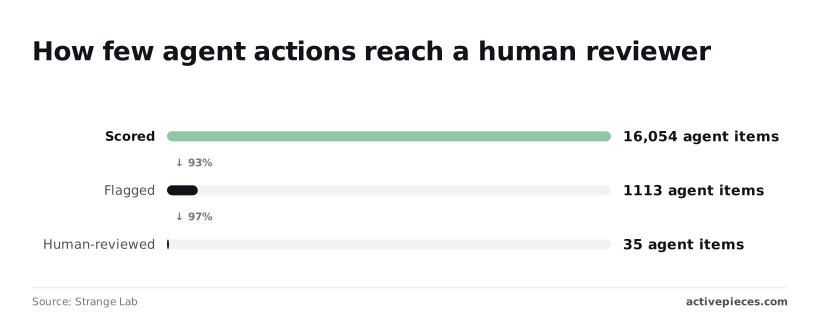
Watch the approval rate, though. If reviewers approve nearly every item they see, a near-zero rejection rate weakens the case that the gate catches anything. Either too much is being routed to them, or the message is too vague to judge.
Deleting records, closing accounts and revoking access should wait for a named approver. Set a timeout, and make the timeout outcome "do not delete." An unanswered request then leaves the data in place, and the run ends with a note saying nobody decided.
## Automation slowdown from approval gates
### Rubber-stamp approvals in human in the loop
The critics are right that a gate slows automation down, and the timeout above only handles the request nobody answers, not the one everybody answers too fast. The objection starts with the approver's screen.
Picture the message: a title, a record ID, and two buttons, Approve and Reject. After the tenth identical request, nobody opens the record. They click Approve, **and the gate becomes a rubber stamp** that records a name next to a decision no one made.

Approval rates sit very high from the start, and the rate at which reviewers override the automation falls as the weeks go on.
Critics read this as reviewers learning to stop looking. Defenders read it as the automation being right. The data alone can't tell you which.
### Approval latency and approver fatigue
Latency is the second cost. A flow that finished in seconds now waits on a person who is in a meeting, on leave, or in another time zone.
That's the bottleneck: **throughput is capped by the slowest human**, not by the flow.
Fatigue compounds both. The more requests a person gets, the less attention each one receives, so adding gates lowers the quality of the gates you already have.
### When validation rules beat approval gates
The sharpest version of the objection is that a human is the wrong tool for most of these checks. A validation rule that rejects a record when the amount exceeds a limit, or a required field is empty, runs every time and never gets tired.

Sampling a fraction of outcomes after the fact catches drift without holding up each run. If the failure can be written as a condition, a condition is faster and more consistent than a click.
That's a strong case, and it holds for any step where a wrong action is cheap to undo.
If the failure can be written as a condition, a condition is faster and more consistent than a click.
The gates that survive that test still need a record of who answered, and the best setup keeps the pause in the same flow as the rules that filter it.
The audit log that records the answer is a paid, platform-level feature, available on the Ultimate plan and Enterprise control, with SSO, SCIM and custom roles, and it is priced through sales.
MoneyGram, Moneypenny, Alan and FundingSocieties run it in production.
## Narrow approval gates versus full autonomy
**Full autonomy loses to a narrow gate**. The steps you leave ungated can be covered by cheaper controls, and the few you gate stay small enough that the approver still reads them.
The objection is that gating only a few steps leaves the rest unwatched. It doesn't, and the measurements show why wide gating would fail anyway.
[Strange Lab](https://strangelab.ai/research/agent-oversight/screening-measurements/) scored agent activity across several datasets and tracked two things: how much got flagged, and how much ended up with a human.
Flagging swung widely. On Open-SWE, a set of agent software-engineering runs, 27.7% of scored items were flagged, but only 1.2% reached human review, so the vast majority of flagged items never reach human evaluation.

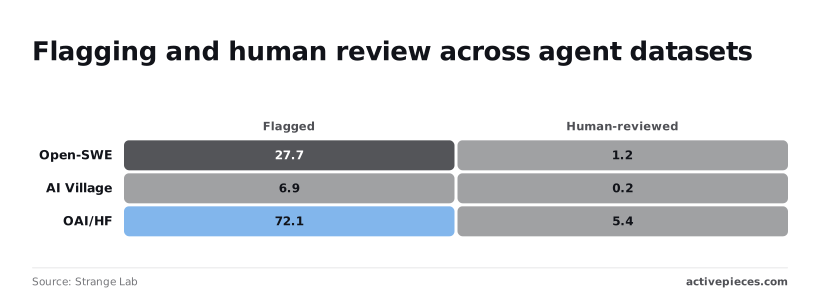
On AI Village, flagging was 6.9% and human review 0.2%, which means almost no flagged items receive human review. On OAI/HF, flagging hit 72.1% while human review stayed at 5.4%, meaning the system detects issues at a rate far exceeding human review capacity.
A flag rate of 72% would bury any approver if every flag became a click.
The takeaway: you can't predict the flag rate in advance, so don't let it set your approval queue size.
### Controls to add beside approval gates
What it asks of you is to pick the gate by cost of undoing, then put other controls beside it.
Those controls, in the order I'd add them:
- Validation rules that settle routine cases, so only odd ones reach a person
- Sampling audits of the steps that ran without approval
- Spend limits that cap what any single run can commit
- A timeout on every approval, with a named owner who gets the request
- An escalation path for when the owner doesn't answer
- A periodic review of the rejection rate
That last one decides when a gate goes. If an approver has said yes to nearly every request for a quarter, the gate isn't catching anything, and the validation rule can replace it. Retire it and keep the sampling audit.
## What Activepieces requires, includes and charges for this
The MIT-licensed Community Edition is free to self-host, Plus costs $20/month, and the docs cover how a paused approval flow behaves. That's the whole budget for the approval gate the audit above leaves in place.
### Community Edition versus paid plans
The table below, checked on 2026-10-25, shows what each tier costs and where it runs. It states no figure for how long a paused flow waits; the docs cover pause behaviour.
| | Price | Hosting | Included | Caveats |
|---|---|---|---|---|
| MIT Community Edition | Free | Self-hosted | The open-source flow builder | You run upgrades and uptime |
| Plus | $20/month flat | Activepieces cloud | 10,000 credits a month, bring your own AI keys, unlimited flows | Self-serve; see the docs for pause behaviour |
| Higher paid tiers | See the pricing page | Cloud or self-hosted by agreement | Features beyond Plus | SSO beyond Team, audit logs and embedding go through sales |
A flow waiting on an approver shouldn't depend on a default you haven't read. Check the docs for how a paused flow behaves, set your own timeout, and name the person who owns the answer.
Because the Community Edition is MIT-licensed, you can self-host it on your own infrastructure with your data on your side. The cost is that patching and availability are yours. If a gated step must survive a restart, test that before you trust it.
### Current limits
The integration library holds the connectors to other apps. It [grew from about 100 pieces to 285, then 400, then 600+, and now 744](https://www.linkedin.com/posts/ashrafsam_400-pieces-by-300-contributors-just-activity-7371636480894640128-3ccq).
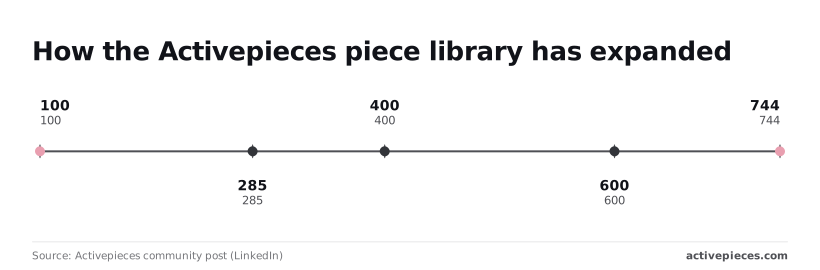
That breadth means your approval message probably has somewhere to land, but a count is not coverage. Open the integration for your own chat or ticketing app and check it has the action you need.
SOC 2 certification is in progress, not held, so don't cite it in a vendor review. Teams needing audit logs, SSO beyond Team or self-hosted enterprise should use the [sales form](https://www.activepieces.com/sales); compare plans on the [pricing page](https://www.activepieces.com/pricing); builders can [start free](https://cloud.activepieces.com/sign-up).
## Frequently asked questions
### Where can approval requests be sent?
Yes: the approval step produces approve and disapprove links, and you put them in a Slack message or an email step placed right before it.
Put the amount, the recipient and the record name in the message body, so the approver can decide without opening anything else.
If they have to click through to understand the request, they'll click yes.
### Is human in the loop available when self-hosting?
Yes, a self-hosted flow can pause for a person like any other flow. The MIT-licensed Community Edition covers building and running flows on your own server.
Audit logs, SSO beyond Team and self-hosted enterprise need a paid plan. One practical check: the approver's browser must be able to reach the link, so a server on a private network needs a URL your approvers can open.
### What happens when nobody responds
If nobody responds to an approval, the flow stays paused unless you build a deadline into it.
Add a branch that fires after a set wait, notifies a named backup owner, and defaults to the safe outcome, which for a costly-to-undo action means not doing it.
A silent approval that auto-proceeds is just automation with extra steps.
Human in the loop works with AI agents. Put the approval on the tool call that is costly to undo, such as sending a refund or deleting a record, not on every step the agent thinks through.
Show the approver the exact values the agent is about to send. Reviewing a vague summary of the agent's reasoning is how approvals turn into rubber stamps.
Builders should start on a free tier, build one flow with a single approval before the irreversible step, and test it with a real message in Slack or your inbox.
Compare plans on the vendor's pricing page before you commit. Teams needing self-hosted enterprise, SSO beyond Team, audit logs or embedding should go through the vendor's sales team.
## Related reading
- [Why your AI agents need human approval gates](https://www.activepieces.com/blog/why-your-ai-agents-need-human-approval-gates)
- [Multi-step Approval Workflows for Donor Data Governance](https://www.activepieces.com/blog/multi-step-approval-workflows-for-donor-data-governance)
- [How to design AI approval workflows that reduce legal liability](https://www.activepieces.com/blog/how-to-design-ai-approval-workflows-that-reduce-legal-liability)
## References
- [Strange Lab](https://strangelab.ai/research/agent-oversight/screening-measurements/)
- [Activepieces community post (LinkedIn)](https://www.linkedin.com/posts/ashrafsam_400-pieces-by-300-contributors-just-activity-7371636480894640128-3ccq)