# Activepieces MCP Server: How to Set It Up (2026 Guide)
By Gustavo Peixoto · 2026-10-24 · Source: https://www.activepieces.com/blog/activepieces-mcp-server-how-to-set-it-up-2026-guide
---
The [Activepieces](https://www.activepieces.com/pricing) MCP server is an endpoint that lets MCP clients such as Claude Desktop or Cursor call Activepieces integrations, of which there are **770+**, as tools, behind a token you issue.
By the end you'll have an assistant that runs a short list of tools you chose and nothing else.
Details here match the Activepieces MCP documentation as of 2026-10-24.
## Activepieces MCP server: what it is and exposes
### MCP in plain terms
When an AI client wants to ask a server "what can you do?" and then call those things, MCP (Model Context Protocol) is the standard way to do it. The server answers with named tools and their inputs.
That standard spread fast. [Dataku](https://dataku.ai/blog/mcp-server-ecosystem-4000-tools-counting) counted about 50 public MCP servers in November 2024, 180 by January 2025 and 520 by March. It reached 1,100 in May, **1,800 in July and 2,600 in September 2025**.

### What an AI client can call through it
You get the tools you select, not your whole account. The assistant connects with the server URL and token, lists what's behind the door, and calls those tools.
The layout below shows the assistant on the left, one door labelled "MCP server + token", and three tools on the shelf behind it:
- Slack
- Google Sheets
- HTTP
Slack lets the assistant post messages to a channel. Google Sheets lets it read and write rows in a spreadsheet.
HTTP lets it call any API you point it at, which makes it the broadest of the three and the one to scope most carefully.
### What it is not: a replacement for a workflow
Don't expect a trigger, a schedule, retries or a run history from MCP by itself. A flow still does that. The assistant is a caller that sits beside your automations, not a substitute for them.
If the token reaches a Sheets tool, it reaches whatever that connection can see, because MCP doesn't solve permissions inside a tool. Expose less than you think you need.
## Scope what an assistant can reach
The protocol describes tools; it does not decide which ones a given caller should see. In practice the limit can be drawn in three places, and a sound setup uses more than one of them.
### Where to enforce MCP server access limits
**The strongest place is the server's own allowlist**, because a tool the model never sees is a tool it cannot misuse.
Next is the credential behind each tool: a narrow API key or a read-only database role caps the damage even when the tool list is wrong. Weakest is the client's approval prompt, since people click through prompts they have seen fifty times.
### Alternatives to a dedicated doorway
Some teams put a gateway proxy in front of several servers to filter and log every call in one place. Others skip the protocol and let the assistant run a command-line tool or a single API under a restricted key.
The real trade is who maintains the allowlist as things change.
A command-line tool is the easiest to audit, because the command sits as plain text in the transcript, but the assistant needs a shell and the key lives on that machine.
A gateway adds a hop and a service to run, in exchange for one log and one policy.
A doorway onto a workflow engine sits between the two: the model gets named actions, and the engine supplies the retries and run history that neither of the others provides.
## Stage 1: Create the MCP server in Activepieces
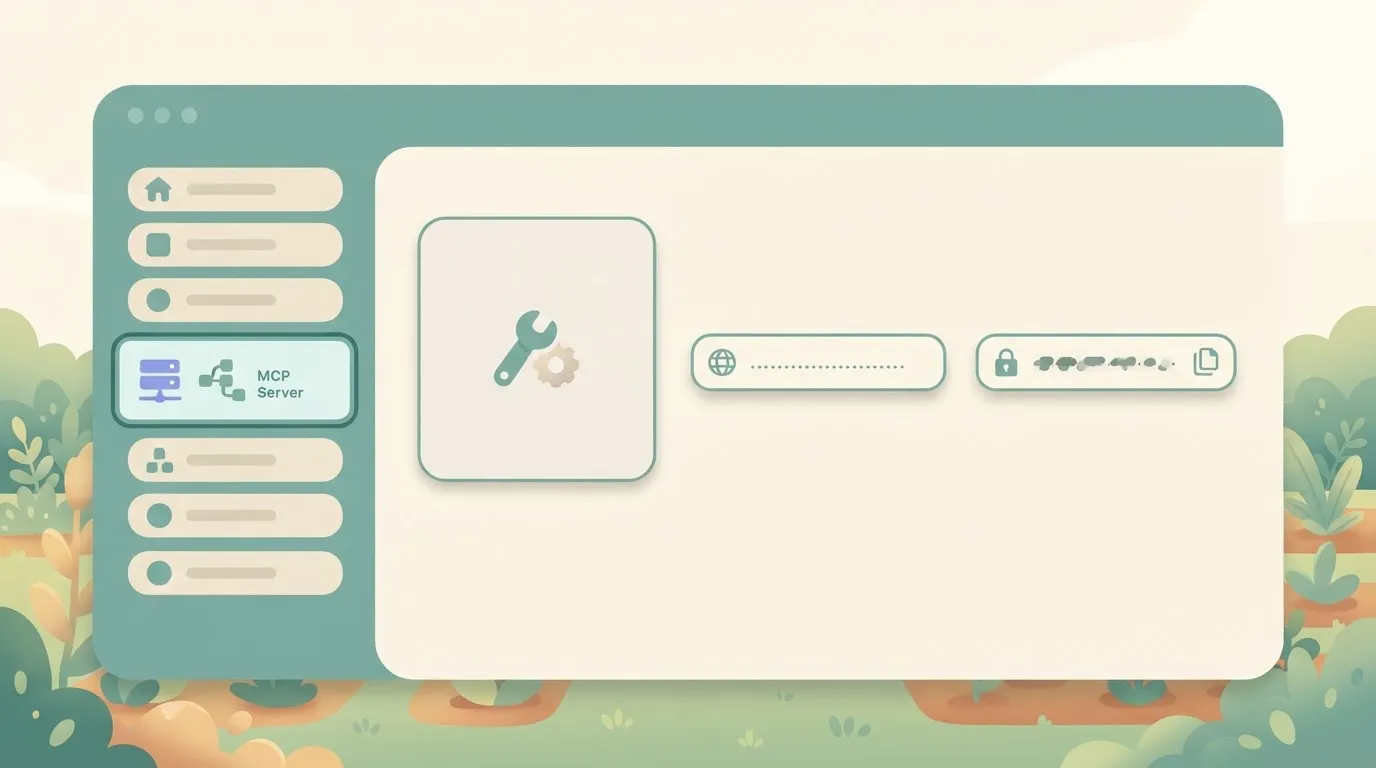
Open MCP Server in the dashboard's left sidebar, add a single tool, and copy the server URL and token the page shows you. That gives you a working doorway before you widen anything.
### Open the MCP page and choose tools
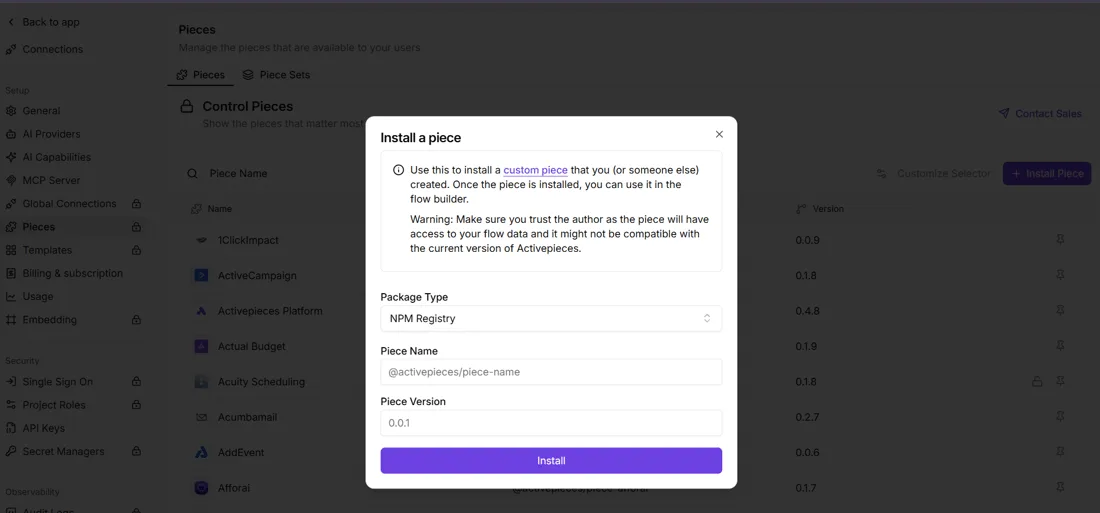
In the sidebar, MCP Server sits just above Integrations, and the two go together: the tools your assistant sees come from the integrations your project can use.
The Integrations page also lets an admin install extra integrations from the npm registry by package name and version.
On the MCP page, work through these in order:
1. Add one tool.
2. Pick the integration.
3. Pick the action.
4. Attach the connection it should run under.
Choose something boring and reversible, like a read-only lookup or a message to a test channel. If the first thing your assistant can do is delete records, you picked wrong.
### Copy the server URL and token
Once a tool is listed, the page gives you a server URL and a token. Paste both into your coding assistant's MCP configuration and ask it to list its tools. If it lists the one you added, you're done with this stage.
If it doesn't, you'll usually see something like this in the client:
```
MCP error: 401 Unauthorized
```
That's almost always a truncated token or one pasted into the wrong field. Recopy it first.
Treat the token like a password. **Anyone holding it can call every tool on the server with whatever the attached connection is allowed to do.**
### Keep the tool list short on purpose
A server with one tool is a feature. Every tool you add is another description the model has to read, another way it can pick the wrong action, and another line to check in the run trace afterward.
Add a second tool only when you've watched the first one run end to end and can find its calls in the trace. Then add the next.
## Connect Claude Desktop, Cursor or another client
Connecting a client means putting the server URL and token from stage 1 into its MCP config and restarting it. The clients differ mostly in where that file lives and how they take the credential.
### Add the server to the client config
Most people hit `Server disconnected`, or a server that never shows up, first. Almost always the cause is a config file in the wrong place, or a token pasted into a field the client doesn't read.
The table shows where each client looks and what to check.
| | Claude Desktop | Cursor | Other MCP clients |
|---|---|---|---|
| Config file location | `claude_desktop_config.json`, opened from Settings, Developer, Edit Config | `.cursor/mcp.json` in the project, or `~/.cursor/mcp.json` for all projects | Wherever that client keeps its MCP settings; read its docs |
| How the URL or token is supplied | Under `mcpServers`; it launches local commands, so a remote URL usually goes through a bridge such as `mcp-remote`, with the token as an argument or environment variable | Under `mcpServers`, a `url` entry with the token in `headers` | Either a `url` plus headers, or a command plus environment variables, depending on the transport it supports |
| Confirm the tool appears | The tools indicator in the chat input lists the server and its tool | Settings, MCP shows the server with a tool count and a green state | Its tool-listing view or command |
| Restart needed | Yes, quit fully and reopen | Usually no; toggle the server off and on | Assume yes until proven otherwise |

Keep the token out of any project config you commit; the global Cursor file is the safer home for it.
### Test the MCP server with a first prompt
Restart if the table says to, then ask for the one tool by name. Something like "Use the tool from this server to run the flow, and tell me what it returned" works.
If the model answers from its own knowledge without calling anything, the server isn't attached, and no wording will fix that. Go back to the tool list in the table.
### Confirm the call in Activepieces run history
Don't trust the chat reply: it only proves the model said something. The run history proves the flow executed. Open the flow's runs and look for a new entry timed to your prompt. The trace shows the tool call and the input the assistant sent.

If the chat claims success and no run appears, the assistant never reached your server, and you debug the client config rather than the flow.
## What the Activepieces MCP server costs and requires
Widening access has a bill attached: the Community Edition is MIT-licensed and free to run in Docker, and the cloud plans meter usage in monthly credits.
Here is what each tier costs and how much monthly usage it allows. The takeaway is that the price steps are steep and the allowance is the number to watch, because every run your assistant triggers draws on it.
| Plan | How you run it | Price | Monthly credits |
|---|---|---|---|
| Community Edition | Docker, on your own host | $0 licence (MIT) | None; you host it |
| Free | Cloud | $0 | 1,000 |
| Plus | Cloud | $20/mo | 10,000 |
| Team | Cloud | $200/mo | 50,000 |
When an assistant gets stuck retrying a failing flow, it will eat a small allowance faster than a schedule would. Self-hosting removes that meter and replaces it with chores: you own upgrades, backups and uptime.
I left out the SSO/audit-log columns on purpose. I can't confirm per-plan availability for them, and a guessed cell is worse than a missing one. Read both off the [pricing page](https://www.activepieces.com/pricing) before you commit.
### What needs a paid or enterprise plan
Anything beyond the credit tiers goes through sales. That covers self-hosted enterprise deployments, SCIM and custom roles, audit logs and embedding [Activepieces](https://www.activepieces.com/pricing) in your own product, which starts from $36,000 a year, limiting adoption to organizations with significant IT budgets.

The [sales form](https://www.activepieces.com/sales) is where those questions go.
Here, audit logs matter more than usual. The run trace shows the assistant's tool calls per flow, but it isn't an organisation-wide record of who changed what. If a compliance reviewer will ask for that, confirm it before the rollout, not after.
SOC 2 certification is in progress, not complete, so don't put it in a security questionnaire as done.
### AI client and model costs you cover yourself
You get the doorway from Activepieces, and MCPs are included on the Free plan ($0, 1,000 credits a month), but not the assistant, so the barrier to entry is zero but scaling requires paid plans.
You bring an MCP-capable client, such as a coding assistant, and you pay for its model separately, whether that's a subscription or an API key.
Start with a few flows you'd be comfortable seeing re-run by accident.
To try it, [start free](https://cloud.activepieces.com/sign-up) on the cloud plan. If you're planning a team or self-hosted rollout, check the pricing page first and use the sales form for the enterprise items.
## Mistakes teams make with the Activepieces MCP server
### Why tool scope breaks MCP server setups
Nearly every bad MCP rollout **fails on scope, not code**: too many tools, unchecked writes, one shared token, or MCP used where a plain trigger would do.
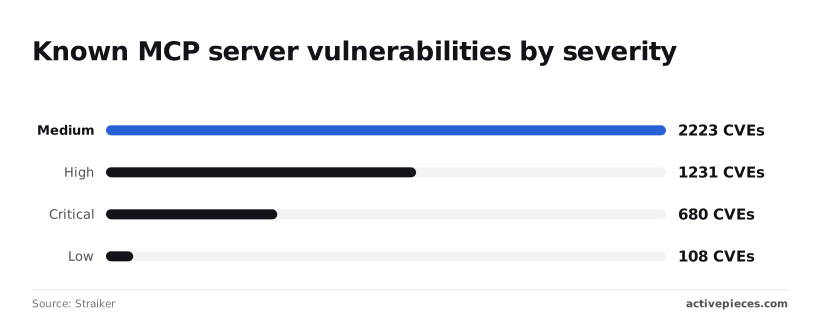
To see why this matters, look at the wider ecosystem. [Straiker](https://www.straiker.ai/report/threat-research-vol-i/06-mcp-supply-chain)'s [supply-chain research](https://www.straiker.ai/report/threat-research-vol-i/06-mcp-supply-chain) counts these CVEs in MCP servers: 680 critical, 1,231 high, 2,223 medium and 108 low.
Nearly every bad MCP rollout fails on scope, not code: too many tools, unchecked writes, one shared token, or MCP used where a plain trigger would do.
That makes **1,911 critical or high out of 4,242**, so nearly half of known flaws are serious, and you should assume any server you add carries some of that risk.
On authentication it gets worse.
Three scans of public servers found 40.55% of 7,973 registry servers, 64% of 5,381 graded servers and 91.8% of 414 audited servers exposing tools with no login, per [the arXiv studies](https://arxiv.org/html/2605.22333), meaning the security problem is prevalent even in the subset most carefully examined.

Take from it that **"no login" is the ecosystem's default**, so your setup has to add authentication deliberately.
### Exposing too many tools
Name and description are all the assistant has to pick a tool by. Expose forty flows called `update_record_2` and it will call the wrong one, confidently. Expose five or six, each with a description saying what it does and what it must not touch.
### Skipping approval on MCP server write actions
A flow that sends email or edits a CRM record is expensive to get wrong.
Put an approval step inside the flow before any destructive action, so the model can ask but a person decides. Check the run trace afterward to confirm which tool calls fired.
### Sharing one MCP server token across a team
With a single token, the trace shows "the assistant did it" and nobody can tell whose session it was. Revoking it also locks out the whole team. Issue one per person or per environment, and rotate on departures.
### Using MCP where a trigger-based workflow fits better
If a webhook or schedule starts the job every time, MCP adds a model decision you don't need. Keep the trigger. Use MCP for work that begins with a human request, like "rerun last night's sync for this customer."
## Frequently asked questions
You can start free on Activepieces Cloud, and the MIT-licensed Community Edition costs nothing to run yourself. Plan limits and which features sit behind paid tiers change, so read the pricing page (https://www.activepieces.com/pricing) before you commit a team to it.
### Can I self-host the Activepieces MCP server?
Yes. Self-hosting the Community Edition means running the same product on your own infrastructure, and the MCP doorway is part of what you run. You own the uptime, upgrades and secrets, and you decide which flows are exposed.
Self-hosted enterprise features such as audit logs or SSO beyond the Team plan are paid and go through sales. Running it yourself also doesn't make you SOC 2 certified. That programme is in progress, not finished.
### Which AI clients work with the Activepieces MCP server?
If a coding assistant or chat client can connect to an MCP server, it should work. You give the client the server address and a token, and it lists the tools you exposed.
Setup details differ per client, and MCP client support is uneven, so test with a single harmless flow first. If the client can't see the tool, the fault is almost always in the connection config, not your flow.
### Does the Activepieces MCP server work with custom integrations?
You can build your own integration for an internal API; that's what Activepieces calls its integrations, and
Once an integration is available in your workspace, its actions can be used in flows like any other.
The assistant still only reaches what you deliberately expose, so a custom integration is not automatically a custom tool. Expose it on purpose, and keep the set small enough that you could list it from memory.
If you're a builder, start free at https://cloud.activepieces.com/sign-up (1,000 credits a month, unlimited flows, no card needed), expose one flow and watch the tool call appear in the run trace.
If you're comparing plans, the pricing page lays out the cloud tiers from $0 to $200 a month.
Talk to sales (https://www.activepieces.com/sales) if you need self-hosted enterprise, SSO beyond the Team plan, audit logs, or embedding Activepieces in your own product from $36,000 a year, which means only larger enterprises can justify the expenditure.
## Related reading
- [Granola MCP Server Setup for Claude, ChatGPT, Cursor](https://www.activepieces.com/blog/granola-mcp-server-setup-for-claude-chatgpt-cursor)
- [Exa MCP Setup for Claude and Cursor: $7 per 1,000 Searches](https://www.activepieces.com/blog/how-to-set-up-the-exa-mcp-server-for-ai-search)
- [Twilio MCP Server Setup for Claude in 2026](https://www.activepieces.com/blog/twilio-mcp-server-setup-for-claude-and-ai-agents-2026)
## References
- [Straiker](https://www.straiker.ai/report/threat-research-vol-i/06-mcp-supply-chain)
- [Dataku](https://dataku.ai/blog/mcp-server-ecosystem-4000-tools-counting)
- [arXiv](https://arxiv.org/html/2605.22333)