# Activepieces on Kubernetes: How Self-Hosting Works in 2026
By Casimir Dranoff · 2026-10-24 · Source: https://www.activepieces.com/blog/activepieces-on-kubernetes-how-self-hosting-works-in-2026
---
## Activepieces on Kubernetes: what it is and when it fits
### The direct answer
Running [Activepieces](https://www.activepieces.com/docs/install/configure-operate/production-setup) on Kubernetes means self-hosting the open-source automation platform as containers on a cluster you operate. It's a documented route, and it pays off only if you already run a cluster. Facts here were checked on 24 October 2026.
Activepieces on Kubernetes is the practice of deploying the open-source Activepieces workflow automation platform as containerized services, alongside its supporting database and queue components, on a Kubernetes cluster that your own team provisions, configures, and maintains.
**82% of container users run Kubernetes in production**, according to the [CNCF survey as reported by Fairwinds](https://www.fairwinds.com/blog/kubernetes-eating-production-why-usage-keeps-climbing) (January 2026), so most teams already shipping containers have the platform in place.
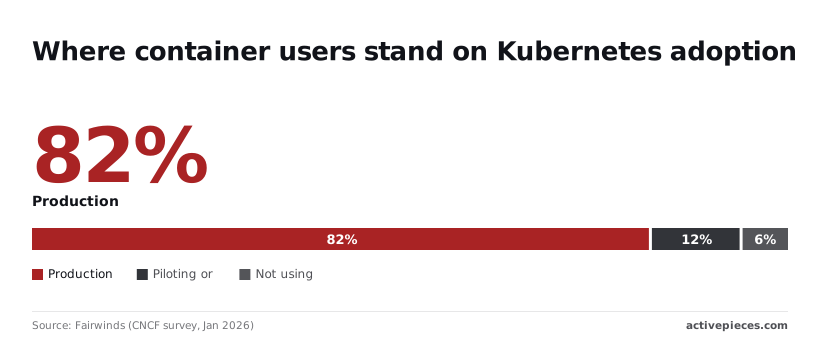
Another 12% are piloting or testing it, according to the same CNCF survey reported by [Fairwinds](https://www.fairwinds.com/blog/kubernetes-eating-production-why-usage-keeps-climbing) (January 2026), which means 94% are at least past "never touched it".
You will know right away if you are in the remaining 6% who don't use it, because that's the group the rest of this article is for.
### Community Edition versus paid plans
You can read all of the self-hosted code in the source tree; that is the MIT-licensed Community Edition. Single-host Docker or a cluster is your choice, and you carry the upgrades, backups and uptime.
If you want hosting and credits, that is what the paid plans add. Self-hosted enterprise needs, SSO beyond the Team plan, audit logs and embedding, go through the [sales form](https://www.activepieces.com/sales). Exact prices and allowances are on the [pricing page](https://www.activepieces.com/pricing).
| Option | Price | Users included | Monthly credits | Who it fits |
|---|---|---|---|---|
| Community Edition (MIT) | Free licence; you pay for your own infrastructure | Not metered by the licence | Not applicable; you supply the compute | Teams that can operate and patch their own deployment |
| Free cloud | Free | See pricing page | See pricing page | One builder trying flows |
| Plus | See pricing page | See pricing page | See pricing page | Individuals or small groups who want hosting without ops |
| Team | See pricing page | See pricing page | See pricing page | Teams on the hosted service needing collaboration |
| Embed | From $36k a year, quoted by sales | See pricing page | See pricing page | Products that put automation inside their own app |
### Who should not bother with a cluster
If nobody on your team owns a cluster today, skip Kubernetes. Standing one up for a single automation tool adds ingress, storage and upgrade work that the tool itself never asks of you.
Start on free cloud at [cloud.activepieces.com/sign-up](https://cloud.activepieces.com/sign-up), which costs $0 with no card and includes unlimited flows, 1,000 credits a month and up to 5 users, which means you can start building immediately.
Or run the MIT-licensed Community Edition on one Docker host and read its compose file before you trust it. Move to a cluster when the cluster already exists.
## How self-hosted automation is run in general
Any workflow automation tool that you host yourself has the same shape: a stateless service that receives triggers and runs steps, a database that remembers flows and history, and a queue that hands work to workers.
The deployment question is only where those integrations live and who keeps them alive.
Teams usually pick one of four homes. A single Docker host is the cheapest and easiest to reason about. A managed container service from a cloud provider removes the servers but keeps you writing service definitions.
Kubernetes adds independent scaling and rolling upgrades, and a vendor's hosted cloud removes the work entirely.
Whichever home you choose, the dependable pattern is to keep state outside the containers. Put the database on a managed service or a backed-up volume, keep secrets in a store rather than in images, and treat the application containers as disposable.
That discipline is what makes a move from one home to another a small job.
## Architecture: the components a Kubernetes deployment needs
Three things run: the app container, a PostgreSQL database and a Redis instance. Everything else in a cluster deployment is wrapping around those three, so a team that can already run them elsewhere has most of the work done.

Execution stalls if Redis is lost, even when the database is healthy, because Redis carries the job queue. The app container serves the UI and API and runs flows; PostgreSQL holds flows, runs and connections.
Read the install docs' environment variable list before writing a manifest. Two matter most: `AP_ENCRYPTION_KEY`, which encrypts stored connection credentials, and `AP_JWT_SECRET`, which signs sessions.
**Lose the first and every saved connection is unreadable, so keep both in your secret store and back them up with the database.**
### Worker scaling and benchmark results
Treat [the official benchmark page](https://github.com/activepieces/activepieces/blob/6b04e9e9/docs/install/architecture/benchmark.mdx) as a scaling shape rather than a cluster sizing guide: it charts throughput against apps and workers, but it was run on Docker Compose, not Kubernetes.
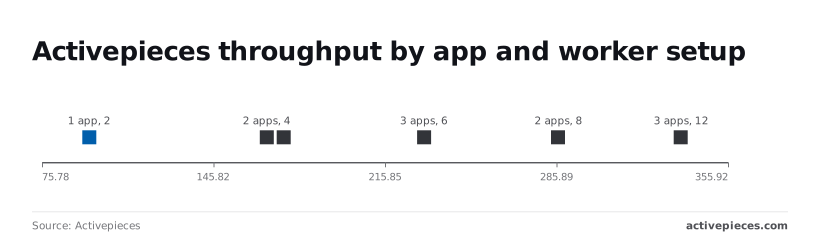
**Doubling workers nearly doubled throughput**. One app with 2 workers handled 95.1 requests per second; with 4 workers it handled 174.5, so workers are the first thing to add.
When workers followed, throughput rose again: 286.5 for 2 apps with 8 workers, and 231.8 for 3 apps with 6 workers.
The three-app run with 12 workers reached 336.6. Each step costs more machines for a smaller gain, so size to your actual flow volume.
| Option | Operational effort | Worker scaling | High availability | Who maintains upgrades |
|---|---|---|---|---|
| Docker Compose | Low: one compose file you can read in full | Raise the worker count on one host | None beyond restarting containers | You, by pulling new images |
| Single VM | Low to moderate: you also patch the OS and back up the disk | Limited by the machine's size | None; the VM is the single point of failure | You, plus OS patching |
| Kubernetes | High unless a cluster already exists | Add replicas independently of the app | Possible with replicated pods and managed data stores | Your platform team, through manifests or charts |
Without hand-built failover, Kubernetes is the option that gives you high availability. If you have no one to own that cluster, the extra capability is unused weight.
## Deploy Activepieces on Kubernetes step by step
If you do own the cluster, the job is eight steps, each a manifest you can read before you apply it. The result's a working instance behind TLS that accepts a webhook.
1. Create a namespace.
2. Create a Secret holding the encryption key, the JWT secret and the database password.
3. Deploy PostgreSQL and Redis.
4. Deploy the app and expose it with a Service.
5. Add an Ingress with a TLS certificate.
6. Set the frontend URL to the public address.
7. Create the first user.
8. Send a test webhook.
### Stage 1: namespace and secrets
Put everything in its own namespace so one delete removes the lot. Generate the encryption key, the JWT secret and the database password with `openssl rand -hex`, and store them in a single Secret.

Back up the encryption key outside the cluster: it protects stored connection credentials, and a lost or regenerated key means every saved connection must be re-entered. Reference the Secret from the pod spec rather than pasting values into the Deployment.
### Stage 2: database, Redis and the app
Run PostgreSQL and Redis as StatefulSets with persistent volume claims, or point the app at managed services if your cluster already has them.
Set the app's environment to use PostgreSQL as its database and Redis as its queue, pass the Secret values in, and check the variable names against the current self-hosting docs before applying.
Then add a ClusterIP Service in front of the Deployment. Wait for all three pods to report Ready. A pod that restarts in a loop here is almost always a wrong database host or password, and `kubectl logs` will show which.
For ingress and TLS, create an Ingress for your hostname and attach a certificate, through cert-manager if you run it.
Then set the frontend URL variable to the exact `https://` address users will type. Webhook URLs and email links are built from that value, so a mismatch produces addresses that look right and fail from outside. Restart the Deployment after changing it.
### Stage 4: first workflow and a webhook test
Open the public address and sign up. The first account becomes the admin of the instance, so do this before sharing the URL.
Build a workflow with a webhook trigger and one trivial action, publish it, and copy the webhook URL. Call it with `curl` from a machine outside the cluster.
One request proves DNS, TLS, ingress, the app, the queue and the database: a run appearing in the history.
## What running it yourself costs and requires
Although the Community Edition is free under the MIT licence, the cluster, its idle capacity and an engineer's hours aren't.
### Licence and plan boundaries
Check the vendor's [pricing page](https://www.activepieces.com/pricing) rather than trusting a summary: as of 24 October 2026 it is the only authority on plans. **The MIT-licensed Community Edition costs nothing to run**, so any licence fee you budget is for a paid plan, not for the code.
Although the Community Edition is free under the MIT licence, the cluster, its idle capacity and an engineer's hours aren't.
If your security review requires SSO beyond the Team plan, audit logs or embedding, the free edition won't pass it, and all three go through the [sales form](https://www.activepieces.com/sales). SOC 2 is in progress, not certified, so don't enter it as held on a vendor questionnaire.
Buying those controls doesn't mean accepting a lesser build because you host it yourself. Activepieces runs SSO and SCIM, custom RBAC, audit logs, release management and secret manager integration identically on your own servers, fully air-gapped, and on its managed cloud.
Regulated and public-sector organisations already operate the air-gapped edition in production, and MoneyGram, Moneypenny, Alan and FundingSocieties run Activepieces as well. Those features live in `packages/ee/` under a separate commercial licence, outside the MIT-licensed core.
### Infrastructure and people costs
Before a single node exists, the managed control plane is already billed. The chart sets the monthly fee for each cloud's Kubernetes service beside the hosted plans.
Take from it that the cluster fee alone can exceed a whole hosted subscription: $73 on EKS is more than three times the $20 Plus plan and about a third of the $200 Team plan, which means infrastructure alone costs more than an entire service tier.
Most of what you provision sits idle, and nodes are the larger line. [Cast AI](https://cast.ai/press-release/cast-ai-analysis-finds-only-13-percent-of-provisioned-cpus-and-20-percent-of-memory-is-utilized/) found that **provisioned CPU is mostly unused**: 11% used on AWS, 11% on Azure and 17% on GCP, which means you're paying to maintain capacity that sits mostly idle.
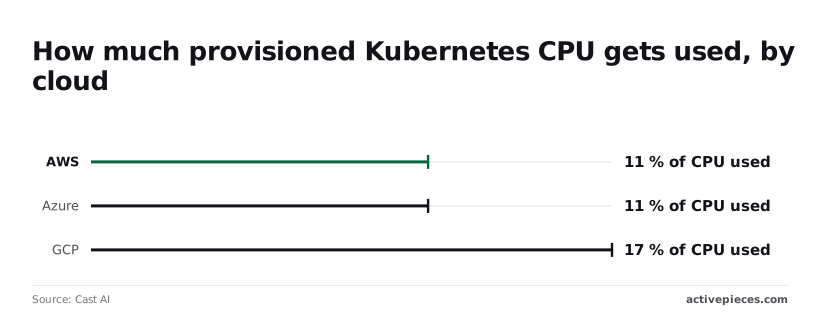
Even on the best of those, over four-fifths of the cores you pay for do nothing.
Somebody has to patch the cluster, rotate certificates and answer the page at 3am. Neither the pricing page nor the chart carries that cost, and you must price it yourself.
### Where the hosted cloud is the better choice
If nobody on the team already operates a cluster, **the control-plane fee is only part of the cost** of what you'd be buying.
The hosted cloud at $20 or $200 a month replaces the cluster, the upgrades and the on-call rota, sparing your team from these three operational burdens, so they redirect those hours to building features instead.
Start on the hosted plan to test your flows, and return to the cluster question only when a requirement such as data residency or an audit log forces it. Builders can [start free](https://cloud.activepieces.com/sign-up); teams that need self-hosted enterprise features should use the sales form.
## Mistakes teams make running Activepieces on Kubernetes
When a cluster deployment fails, it is usually one of seven configuration gaps rather than Kubernetes itself, and each one can be checked by reading your manifests or Helm values before go-live.
- A lost encryption key leaves stored connection credentials unreadable, so keep the key in a secret store and copy it somewhere outside the cluster.
- A missing persistent database means flows and run history vanish when a pod restarts, so give the deployment persistent storage, either a managed PostgreSQL instance or a StatefulSet with persistent volume claims.
- A wrong frontend URL makes webhook addresses point somewhere unreachable, so set it to the public hostname that outside services actually resolve.
- Undersized limits cause evicted pods and killed runs, so raise memory and CPU requests until a heavy flow finishes without restarts.
- No backups means one bad volume or one bad migration is permanent, so schedule database dumps and test a restore.
- An unread changelog lets a breaking change reach production unannounced, so read the release notes before every version bump.
- No TLS exposes webhook payloads and logins in plain text, so terminate HTTPS at the ingress.
### A lost encryption key
Nothing in the database holds the key; it is a value in your environment configuration.
If a pod is rebuilt from a template that generates a fresh one, the stored connections still exist but can't be decrypted, and every integration has to be re-authorized by hand.
Read the secret out of the running deployment, store it in your secret manager, and confirm that the manifest references it rather than generating a new one on each apply.
### Webhooks that can't reach the instance
Triggers fail without any error on your side when the frontend URL is left at an internal or default value; the editor shows addresses that third parties can't call.
Set the URL to the public hostname, put TLS in front of it, and send a test request from outside the cluster to prove the path works.
### Upgrades and backups
Take a database dump before any version change, restore it into a scratch environment, and only then read the changelog against what you run.
During an upgrade, when migrations and restarts load the pods hardest, undersized limits tend to surface, so watch resource use through the first rollout.
## Frequently asked questions
### Is there an official Helm chart for Activepieces?
Yes. The source repository carries a Helm chart, and the self-hosting documentation describes installing with it.
Read the chart's values file before you install anything, because it shows exactly which settings you're expected to supply: database, cache, secrets and ingress. Pin the chart version in your change ticket so the next upgrade is a diff and not a surprise.
On cost, the software's free to self-host on Kubernetes; the cluster isn't. The Community Edition is MIT-licensed, so you can run it on your own infrastructure without a license fee.
You still pay for the nodes, the database, storage and the engineer-hours to patch and monitor it.
### Can I scale Activepieces workers horizontally?
Activepieces self-hosts on Docker, Compose or Kubernetes from an MIT-licensed core, and the cloud runs unlimited flows on every plan including free, so a cluster is one route among several.
How many workers you need depends on your flows, so size and load-test against your own before settling on a layout.
If you need audit logs or SSO, the Community Edition doesn't include them. Audit logs and SSO beyond what the Team plan covers are paid features, and self-hosted enterprise is arranged through sales.
Nobody can cite a SOC 2 certification yet: Activepieces isn't certified. If a vendor-review form demands a report, say so plainly and ask the sales team what documentation exists now.
Pick the next step that matches your situation:
- Builders who want to try flows without running anything: [start free at cloud sign-up](https://cloud.activepieces.com/sign-up).
- Teams comparing plans: the [pricing page](https://www.activepieces.com/pricing).
- Self-hosted enterprise, SSO beyond Team, audit logs or embedding: the [sales form](https://www.activepieces.com/sales).
## Related reading
- [Activepieces vs Boomi for Self-Hosting and Embedding](https://www.activepieces.com/blog/activepieces-vs-boomi-for-self-hosting-and-embedding)
- [Activepieces On Premise: Pricing & Self-Hosting Guide](https://www.activepieces.com/blog/activepieces-on-premise-pricing-self-hosting-guide)
- [Cost of Self-Hosting AI: Staffing and TCO in 2026](https://www.activepieces.com/blog/cost-of-self-hosting-ai-staffing-and-tco-in-2026)
## References
- [Activepieces](https://github.com/activepieces/activepieces/blob/6b04e9e9/docs/install/architecture/benchmark.mdx)
- [Fairwinds (CNCF survey, Jan 2026)](https://www.fairwinds.com/blog/kubernetes-eating-production-why-usage-keeps-climbing)
- [Cast AI](https://cast.ai/press-release/cast-ai-analysis-finds-only-13-percent-of-provisioned-cpus-and-20-percent-of-memory-is-utilized/)