Tools answer them in a few different ways. The simplest is a short list of fixed roles, such as admin, editor and viewer, applied per project or workspace. It is easy to reason about and covers most small teams. Finer systems let you build custom roles from individual permissions, which suits larger organisations but takes upkeep. Underneath any of these sit the same supporting controls. Single sign-on and group sync from an identity provider keep membership current, audit logs show who changed what, and a central credential store lets builders use a connection without ever seeing the secret. The design question is the same everywhere: grant the narrowest access that still lets people work, and keep production apart from experiments. That is the lens for everything Activepieces does below. ## How Activepieces RBAC assigns roles inside projects **Activepieces meters by consumption, not seats**: credits track usage and every plan ships unlimited flows, so adding a person costs nothing until they run automation. Each team works in its own project, with the apps a platform admin has allowed and credentials held centrally, and Alan and Funding Societies run production automation this way. ### Project-level roles and what each permits Team includes SSO and standard roles, and Ultimate adds custom roles (custom RBAC) through sales. The [permissions docs](https://www.activepieces.com/docs/admin-guide/guides/permissions) are where the exact permissions behind each role are listed. Standard roles arrive with Team at $200 a month, so separating the people who administer a project from the people who build or only look inside it needs no sales call. Projects stay isolated from one another, so a role applies inside the project where it was granted. When the standard roles are too coarse for your design, custom RBAC on Ultimate is the route, and it is quoted by sales. If you hand everyone the top role, you give away the separation the plan pays for, and the plan you paid for does nothing. Pick the lowest role that lets each person do their job, then raise it only when someone is blocked. ### Who can see and use connections Of everything a role can touch, **connections are the most sensitive**, because they hold the credentials a workflow uses to reach other tools. The docs list connection management among the permissions, and the roles differ in how much of it they get.  Before you roll this out, check the exact connection rows in the permissions table on the day you buy, because the table can change. Run a simple test. Invite a throwaway account as Viewer, then try to open and edit a connection. Repeat as Editor. What each account can and cannot do tells you more than the table does, and it takes ten minutes. ### How SSO and invitations fit in You assign the role when you invite someone to a project and choose it at that moment, so a rushed invite with the top role selected is how the "everyone is Admin" problem starts.  SSO changes how people sign in, not what they can do. Team includes SSO, so you can have central login and still keep roles tight, but a person who signs in through SSO still needs a project role. Check how your identity provider's users are assigned roles at the check date, and confirm that a new SSO user doesn't land with more access than intended. ## Setting up roles in Activepieces, step by step Three moves set up a role by hand: create a project for one team, invite each person with the lowest role that does their job, then sign in as them and try to break something.  ### 1. Create a project for one team Make one project per team, not one shared project for everyone. Roles are assigned inside a project, so the project is the boundary that keeps one team's flows and connections away from another's. Once the project exists, open its settings. The General tab holds the project name and a Max Concurrent Jobs field, which here reads "Default (5)": at most that many of this project's flows run at once, so a busy team's flows start to queue behind each other. Leave it alone for now. You need the sidebar to the left, because Members is where the next step happens.  ### 2. Invite a user and pick a role Open Members, choose the invite option, and enter the person's email address. The role dropdown sits in the same dialog, and it's the one choice here that matters. Pick the role for the job, not for convenience. Someone who builds flows but shouldn't change project settings gets Editor. Someone who only needs to read flows and check runs gets Viewer. 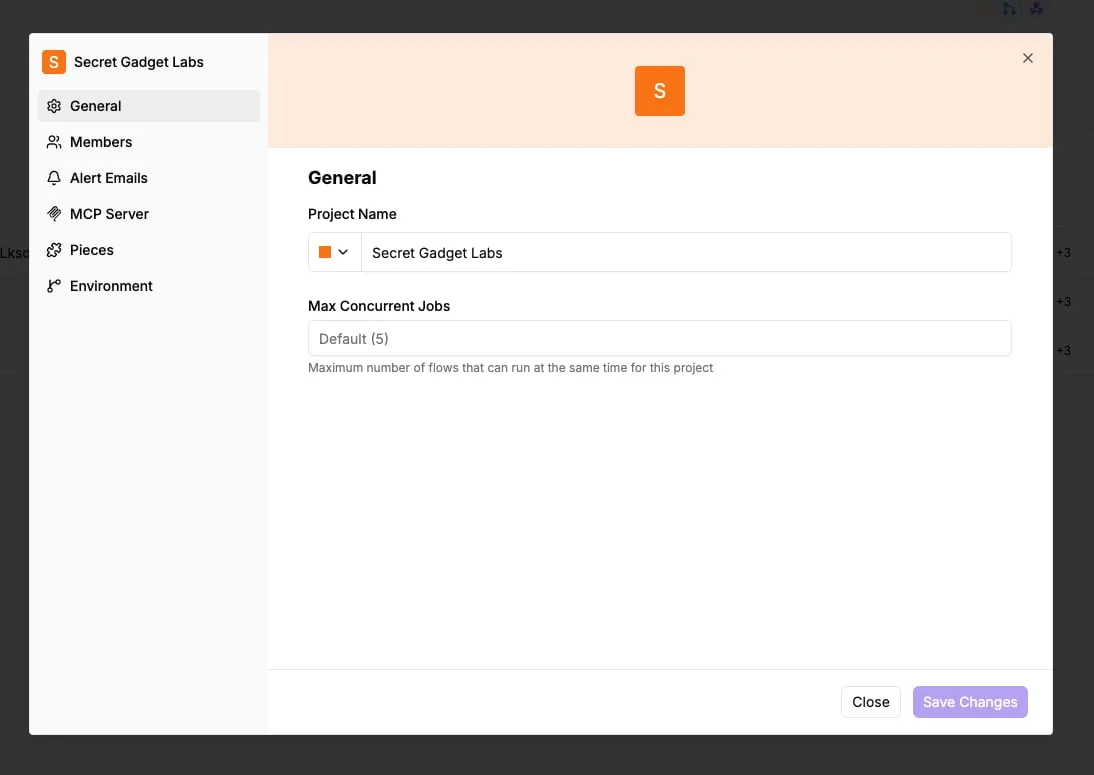 When people are unsure, they reach for Admin. If you can't say why a person needs Admin, they don't. Invite two people if you can, one as Editor and one as Viewer. You need both for the test. ### 3. Test the role from the user's side Accept each invitation and sign in as that user, in a private browser window or a second browser so your own session doesn't interfere. Then run the same short checklist for each account: 1. Open an existing flow. A Viewer should be able to look but not change it. 2. Create a new flow. An Editor should be able to; a Viewer shouldn't. 3. Open the project's settings. An Editor should be refused or find the options locked. 4. Open Members. Neither role should be able to add or remove people. If the Editor can change settings, or the Viewer can edit a flow, you chose the wrong role. Go back to Members, change it, and rerun the checklist from the top. ## Free Community Edition limitations and upgrade requirements If one person, or a few people who trust each other completely, own every workflow, the free tier is enough. Once someone else touches production, or anyone asks who changed a flow, it stops being enough. Five things decide this, and the table shows what each tier gives you on them. Read the role controls and SSO columns first, because they are the only ones that change who can break what. | Tier | Role controls | SSO | Users | Support | Hosting | |---|---|---|---|---|---| | Community Edition | None to speak of | Not included | Whoever you invite | Community channels | Self-hosted by you | | Team | Built-in roles | Included | A small team allowance | Plan support | Cloud | | Self-hosted enterprise / Ultimate | Fuller role controls | Beyond Team | Quoted | Quoted | Self-hosted, licensed | | Embed | Quoted | Quoted | Your customers' usage | Quoted | Agreed in the quote | Everything else says "contact sales" because the quote moves with users, credits, deployment and support. When you're the only builder, or the team is two or three people who would all be Admin anyway, stay on Free or Community. If a bad edit costs you an afternoon, not a customer, roles buy you nothing. When a contractor, analyst or colleague needs to run or edit flows but shouldn't see every connection or delete production, move to Team. Team is also the point where SSO matters, because shared passwords on a tool that holds your credentials are a worse risk than any role mistake. It's the cheapest step where "Editor, not Admin" becomes something you can actually set. ### Talk to sales when You need to self-host with a paid licence, SSO beyond what Team covers, the Ultimate tier, or Embed so your own customers build flows inside your product. Don't guess a number for any of these. Bring your user count, expected usage, deployment model and support needs to the call, since those four set the quote. Compliance questions belong there too: the SOC 2 programme is in progress, not certified. The self-serve prices are published on the pricing page, https://www.activepieces.com/pricing: Free at $0, Plus at $20 a month and Team at $200 a month. Self-hosted enterprise, Ultimate, SSO beyond Team and Embed (from $36,000 a year) go through the sales form, https://www.activepieces.com/sales.  ## Six RBAC mistakes teams make with workflow tools Even on the tier that has roles, the setup isn't safe by default: the same six mistakes turn up on almost every workflow tool, and each has a short fix. - Everyone is Admin. Someone hits a "you don't have access" wall, grants Admin to make it go away, and the role system is now decoration. Fix: start each person at the lowest role that lets them do their job, and raise it only when a specific task fails. - Shared logins. One account used by three people means **the audit trail says "the team did it."** Fix: one seat per person, including contractors, so every change has a name on it. - One giant project. Every flow, from the experimental to the one that sends invoices, sits together, so any editor can touch all of it. Fix: split by risk or by owner, so production lives apart from scratch work. - Connections with full credential access. Anyone who can use a connection can often see or reuse the key behind it, which turns an editor into someone who can walk off with your CRM or payment credentials. Fix: limit who can create and view connections, and give flows a narrowly scoped key rather than your own. - Departed users never removed. A former contractor's account keeps working long after the contract ends. Fix: add "remove from the workflow tool" to the offboarding checklist, and review the member list on a schedule. - Roles untested. The settings page says Editor, but nobody has checked what an Editor can do. Fix: sign in as each role and try the one thing that role shouldn't be able to do. That last one is where I'd start. My test is blunt: log in as the least-privileged account and try to delete a production flow, open a connection, and invite a new member. If any of those works, the role isn't doing what its name says. ## Frequently asked questions No, the Free plan doesn't include RBAC. Roles are a paid feature, and Team is the first self-serve tier this article recommends for them. On Free, anyone you invite has the same level of access, so the habits from the misconfiguration section matter even more there. Don't plan around custom roles. The roles this article covers are Admin, Editor and Viewer, and those are what you can count on. If your design needs a role that sits between them, such as an editor who can't touch connections, ask sales before you buy. A guess in either direction costs you a migration later. ### Is RBAC the same as SSO? No. SSO decides how people sign in, and RBAC decides what they can do once they're in. Team includes both, but they solve different problems. You can have SSO with everyone as Admin, which is a tidy login in front of an unrestricted workspace. If your concern is who can edit or run production flows, RBAC is the feature that answers it. ### Does self-hosting change what RBAC costs? Yes. The free Community Edition is enough when one person or a very small, fully trusted group runs the workflows. Once several people touch production and you need to limit them, you're in paid territory. You won't see a list price for self-hosted enterprise, because sales quotes it. The quote depends on how many users you have, how many credits you expect to use, how you deploy, and what support you need. Don't assume the self-serve price carries over. ### Should I start at the pricing page or the sales form? Start at the pricing page if Free, Plus or Team covers you. That means a hosted workspace, a modest team, and SSO at the Team level. Use the sales form if you need self-hosted enterprise, SSO beyond what Team offers, Ultimate, or Embed, since all four are quoted individually. Self-serve plans, from Free at $0 to Team at $200 a month, are on [activepieces.com/pricing](https://www.activepieces.com/pricing); self-hosted enterprise, extended SSO, Ultimate and Embed (from $36,000 a year) go through [activepieces.com/sales](https://www.activepieces.com/sales), which means you can jump directly to the right option. ## Related reading - [n8n RBAC Explained: How Roles Work and One Costly Miss](https://www.activepieces.com/blog/n8n-rbac-explained-how-roles-work-and-one-costly-miss) - [Snowflake Pricing Explained for 2026 Data Teams](https://www.activepieces.com/blog/snowflake-pricing-explained-for-2026-data-teams) - [Activepieces vs Zapier Pricing for Self-Hosted Teams](https://www.activepieces.com/blog/activepieces-vs-zapier-pricing-for-self-hosted-teams) ## References - [Activepieces](https://www.activepieces.com/docs/admin-guide/guides/permissions)An automation tool is a pile of stored credentials with a scheduler attached.