# Adobe Acrobat MCP Server: What It Does (2026 Guide)

By Doreen Achterberg · 2026-11-17 · Source: https://www.activepieces.com/blog/adobe-acrobat-mcp-server-what-it-does-2026-guide

---
<aside class="tldr"><p class="tldr-label">Summary</p><p>Adobe Acrobat MCP is a connector that lets an AI assistant call Adobe's PDF tools, with no judgment or intelligence of its own.</p><ul><li>Menu includes 13 tools that change data and 8 read-only tools.</li><li>Only extraction is confirmed; editing, conversion and signing are unconfirmed.</li><li>Annual billing: Standard $14.99 per month, Studio $24.99 per month via eSignSimple.</li></ul></aside>

**Not an assistant and not an editor**, Adobe Acrobat MCP is a connector that lets an AI assistant call Adobe's PDF tools on your behalf. The intelligence stays with whichever assistant you connect, and the PDF work stays with Adobe's tools.

## Acrobat MCP definition and actual capabilities

### MCP in one paragraph

For an assistant to discover and call tools exposed by an outside service, it needs a standard way to do so, and that standard is MCP, the Model Context Protocol. An MCP server sits between the two and translates.

![Three plain boxes in a row: an assistant window, a small connector box, and a stack of PDF tools, joined by lines with an…](https://ap-marketing-media.fra1.cdn.digitaloceanspaces.com/uploads/8f2b8509-662d-435e-abc4-1091c06f4b2c/adobe-acrobat-mcp-server-what-it-does-2026-guide-e6b36ff4.webp)

[Activepieces](https://www.activepieces.com) exposes its integrations to assistants in the same way, through a per-project MCP server over 750 integrations in an MIT-licensed core, so the pattern isn't unique to Adobe.

In the arrangement shown next, a request travels from the assistant through the connector to the PDF tools, and the result returns by the same route. Only the middle layer is new.

Ask what the connector contributes and the answer is nothing of its own. It decides what the assistant is permitted to ask for, and Adobe's tools decide what can be done.

![A tiny doorman's booth with a clipboard between a big bright workshop and the street.](https://ap-marketing-media.fra1.cdn.digitaloceanspaces.com/uploads/27832af8-ce40-4f3f-8a30-d25371133a5b/adobe-acrobat-mcp-server-what-it-does-2026-guide-833dbaa8.webp)

### What Adobe's own page claims, and the date checked

On 2026-11-17 we read Adobe's Acrobat MCP page. Its framing matches the definition above: it presents the server as a way for a connected assistant to reach Adobe's PDF capabilities. It doesn't present a new version of Acrobat or a model built by Adobe.

Because Adobe revises these pages, treat this as a snapshot. Before anyone builds a workflow on it, confirm three things on the current page:
- which operations are in scope
- who is granted access
- what the usage costs

When people are disappointed, it usually starts at a gap between expectation and scope on any of those three.

## Acrobat MCP connection steps and mechanics

Expect a short, permissioned exchange: your AI assistant asks Adobe's server what tools it has, you sign in, and the assistant calls one tool at a time. Each of those steps is a boundary, and each one decides what the assistant can touch.

You type into the client, the AI assistant. Adobe's side is the server, which publishes a menu of tools. One request runs like this:

1. You ask the client to act on a PDF.
2. The client lists the server's tools.
3. You sign in and grant permission.
4. The client calls one tool, such as extract.
5. The result returns to the client.

Nothing in that sequence makes the assistant better at reading PDFs; it only lets it request Adobe's existing functions.

### How sign-in and file access work

Read the permission prompt at step three as an access grant, not a formality, because whatever you approve there defines the assistant's reach.

The tool count shows why. [AgentReady](https://agentready.co/connectors/adobe-acrobat) lists **13 tools that change data**, against 8 that only read. Most of the menu can write, so a broad grant exposes more than a viewing session would.

Somewhere in that menu sits a tool classed as deleting or irreversible. **A single mistaken call there can't be undone, so confirm what that tool is before granting write access.**

Of the jobs named above, **only extraction is confirmed**. Treat any other capability, including editing, conversion or signing, as unconfirmed until it appears on Adobe's current tool list.

## Acrobat MCP requirements, costs, and pricing plans

I could confirm only Acrobat plan prices, and they come from a third party. Plan requirements, credentials, limits and the client list for the connector aren't confirmed here.

Ask which Acrobat plan the connector needs, or what credentials it asks for, and no source cited here answers. Treat the plan as unknown until Adobe says otherwise.

### Acrobat MCP usage limits and pricing figures

Don't size a batch job against Adobe's PDF Services page limits. They exist, but I have no confirmed figures and none are confirmed as MCP limits.

Not from Adobe: the prices below come from [eSignSimple](https://esignsimple.com/compare/adobe-sign-pricing), a comparison site.

| Plan | Annual billing | Monthly billing |
|---|---|---|
| Standard | 14.99 $ per month | 24.99 $ per month |
| Pro | 19.99 $ per month | 29.99 $ per month |
| Studio | 24.99 $ per month | 34.99 $ per month |

viz type=step title="What Acrobat plans cost per month by billing option" unit="$ per month" source="eSignSimple - https://esignsimple.com/compare/adobe-sign-pricing"4.99 to $24.99 a month; paying monthly runs $24.99 to $34.99 for the same three plans."
Standard annual: 14.99
Pro annual: 19.99
Studio annual: 24.99
Standard monthly: 24.99
Pro monthly: 29.99
Studio monthly: 34.99

Pay monthly and every tier costs 10 $ more per month, or 120 $ a year, which is the price of flexibility. **Annual Studio costs the same as monthly Standard**.

Read the table below for what's published and what isn't. Price is the only row with a figure, and that figure isn't tied to the connector.

| Item | What Adobe publishes | Source page URL | Date checked |
|---|---|---|---|
| Plan needed | Not published | Not published | 2026-11-17 |
| Credentials | Not published | Not published | 2026-11-17 |
| Usage limits | Not published | Not published | 2026-11-17 |
| Supported clients | Not published | Not published | 2026-11-17 |
| Beta or GA status | Not published | Not published | 2026-11-17 |
| Price | Plan prices only, via eSignSimple | https://esignsimple.com/compare/adobe-sign-pricing | 2026-11-17 |

Before building on the connector, check Adobe's current pages for supported clients and availability status; neither is confirmed here. An unlabelled beta, or a client that's unsupported, is a dependency you can't escalate.

## Mistakes people make when they connect Acrobat MCP

Treat the connector as more than it's and nearly every failure follows. It's a channel that lets an assistant call Adobe's PDF tools, with no judgment, boundaries or guarantees of its own.

The six failure modes below each carry a one-line fix, so use them as a pre-launch checklist before any workflow touches real documents.

- Expecting reasoning from the connector: let the model reason and the connector only act.
- Broad file access: grant the narrowest folder and permission that does the job.
- Confidential files to a third-party model: confirm where the model provider processes and retains data before sending anything.
- Untested scans: run representative scanned documents first.
- Building on beta: check Adobe's current pages for status before depending on it.
- No human review: put a named person between output and anything consequential.

![What the Acrobat MCP server's tools can do to files](https://ap-marketing-media.fra1.cdn.digitaloceanspaces.com/uploads/ec1b862c-c5cb-42b8-b135-93f4cc27b2c4/adobe-acrobat-mcp-server-what-it-does-2026-guide-5ac2a368.svg "Source: AgentReady")

When a summary of a contract or invoice comes out wrong, the fault is the model's, not an Acrobat feature failing. The connector is confirmed only to extract; whether it converts or edits is unconfirmed, and any interpretation comes from the assistant's model. Verify output, and assign someone to sign off.

When convenience wins, people expose a whole drive. Every document the assistant can reach is a document that can be sent to the model provider. Limit access, and keep confidential files away from third-party models unless your data terms permit it.

<blockquote class="pull"><p>When convenience wins, people expose a whole drive.</p></blockquote>

Test your worst documents against the size and page limits stated on Adobe's current pages before launch, because image-only scans, odd layouts and long documents behave differently from clean digital files.

If a dependency sits on a beta, treat it as provisional, since beta terms can change scope, access and cost. Keep a manual fallback.

## Acrobat MCP versus other PDF automation methods

Four routes lead to automated PDF work, and Acrobat MCP is one of them; each differs in who operates it, what it can do and where your documents travel.

### Acrobat MCP versus alternatives comparison table

In the table below, the four options answer the same five questions. Read it for the trade each row makes: the routes with less setup generally hand more control over your documents to someone else.

Entries are described in general terms, so confirm specifics on Adobe's current pages before relying on them.

| Option | Who runs it | Setup effort | Cost model | Operations covered | Data handling |
|---|---|---|---|---|---|
| Adobe Acrobat MCP | Adobe hosts the connector; your AI assistant calls it | Low: connect the assistant and authorize | Tied to Adobe's current access terms | Adobe's PDF tools exposed to the assistant | Files pass through Adobe's service and your assistant |
| Adobe PDF Services API | Adobe hosts; your developers integrate it | Higher: credentials and code | Usage-based under Adobe's terms | Broad, defined by the API | Files go to Adobe; you control the calling code |
| Acrobat app AI Assistant | Adobe, inside the Acrobat app | Lowest: used in the app | Tied to Acrobat plans or add-ons | Reading, summarizing and questioning documents | Governed by Adobe's app terms |
| Third-party PDF MCP servers | The vendor or your own team | Varies widely | Varies: free, paid or self-hosted | Whatever the author built | Depends entirely on the operator; review it yourself |

Choose the AI Assistant for one-off reading inside the app. Choose the PDF Services API for fixed, repeatable pipelines, and Acrobat MCP when an assistant must trigger Adobe's PDF tools in conversation.

Treat third-party servers as unaudited code until you have reviewed their operator and data path.

## Where Activepieces fits around PDF work

When the PDF job has to run without anyone typing a prompt, Activepieces runs it from a trigger instead of a chat, across 750 integrations in an MIT-licensed core.

It's a workflow tool that reacts to events, and it sits beside Adobe's connector rather than replacing it.

### When a chat connector is the wrong shape

Inside a conversation, Acrobat MCP serves an assistant: a person asks, the assistant calls an Adobe tool, and the person reads the result. That suits ad hoc work, and it fails when the work is recurring.

A supplier contract that arrives by form at 2 a.m. will wait until someone opens a chat. Nobody records who approved what, either, because the approval lives in a conversation rather than a process.

![A lone contract sheet on a doorstep at night under a moon, outside a shut office door.](https://ap-marketing-media.fra1.cdn.digitaloceanspaces.com/uploads/b9c444e1-b36d-4f91-aaa1-dddcc002163a/adobe-acrobat-mcp-server-what-it-does-2026-guide-02869dc2.webp)

From a control standpoint, the gap is the audit trail. An unattended job needs a defined trigger, a defined step order and a named point where a human decides. Chat gives you none of these by default.

### Extract and approve form submission data

In the workflow below, a web form starts it, an AI step extracts structured data from the submission, and a to-do holds the result for human approval.

A router then checks that decision. An accepted item continues to a customer record in Stripe, the payment platform. A rejected one triggers an email through Gmail.

![Six-step Activepieces workflow built from its 750 integrations: form trigger, data extraction, approval to-do, status router, then Stripe customer creation or a Gmail rejection email](activepieces-approval-workflow.png)

Look at the approval step. The automation does the extraction, but a person authorizes the consequence, and both outcomes are handled. Activepieces can also expose workflows to MCP clients, so an assistant could trigger one of these flows rather than improvising.

![A six-step document workflow automation example showing a web form trigger, AI extraction, approval step, conditional…](https://ap-marketing-media.fra1.cdn.digitaloceanspaces.com/uploads/e28d0d25-7855-4a61-bf96-5d4f928c9033/best-ai-tools-for-insurance-agents-2026-privacy-540804cd.webp)

The Integrations Framework and MCP Server documentation describes the mechanism, and packages/integrations in the open source repo, an MIT-licensed core with 750 integrations, holds the code: a integration action that runs as a step in a flow is the same one an MCP client sees as a tool, so you write each integration once and it works in both flow and MCP.

Here too, each connection is a new liability line. The form, the extraction service, Stripe and Gmail each see the document's contents.

Before building, search the 750 integrations in the open source repo for PDF handling, and confirm whether Adobe's tools are available as a step. If they aren't, you're assembling a different toolchain, not extending Acrobat.

## Safe checklist for Acrobat MCP trials

Work through six steps in order, and treat the connector as a new liability until the last one says otherwise, meaning each step is required to eventually clear the connector for use.

1. Re-check Adobe's current pricing and documentation pages.
2. Pick one low-risk PDF task, such as extracting text from a public document.
3. Test on non-confidential samples only.
4. Record the limits you see.
5. Decide who may connect it.
6. Set a review date.

### Before connecting

Read Adobe's pages first, because they are the only authority on scope, access and cost. Then be strict about which server you connect to.

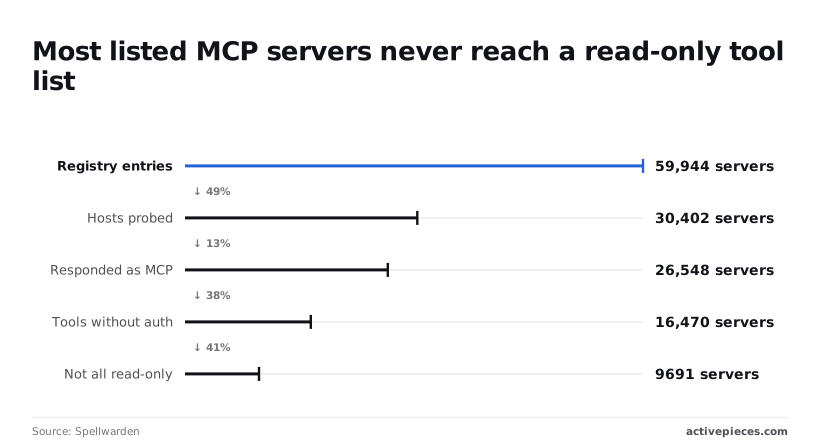
59,944 registry entries turned up in a [Spellwarden](https://spellwarden.ai/research/mcp-server-security-2026-11.pdf) survey, but only 30,402 hosts were probed and 26,548 responded as MCP servers. A registry listing therefore says little about whether a server is live or who runs it.
![Most listed MCP servers never reach a read-only tool list](https://ap-marketing-media.fra1.cdn.digitaloceanspaces.com/uploads/d6398c84-281e-4f74-98bd-2c6f18180867/adobe-acrobat-mcp-server-what-it-does-2026-guide-101b095a.svg "Source: Spellwarden (2026)")

Of those responders, **16,470 exposed tools without authentication**, so a connector that never asks who you are is an open door.

Another 9,691 weren't all read-only, which means some could change or delete files. Decide who may connect with that in mind, and allow only the vendor's documented route.

Use a PDF you would be content to see published, and a task whose failure costs nothing. A wrong summary of a public brochure is an annoyance. A wrong reading of a signed contract is an incident.

Write down what the assistant could and couldn't do, what it asked permission for, and what the plan cost you. Those notes are your evidence when someone asks for wider access.

Put a review date in the calendar before you finish, because Adobe's terms and the connector will both move, and **an unreviewed connection becomes an unowned one**.

## Frequently asked questions

### Cost and compatibility

Each answer below is a question the review date should force you to re-ask, because each one depends on terms Adobe and your assistant's vendor can change.

Is Adobe Acrobat MCP free? Don't assume so. Adobe sets the cost, and it may depend on your Acrobat plan or on API access, so treat it as an unbudgeted line until Adobe's current pricing page says otherwise.

Does Acrobat MCP work with ChatGPT or Claude? It works with any assistant that supports MCP connections and can reach Adobe's endpoint, but support varies by client and plan. Check Adobe's setup instructions and your assistant's connector settings before promising a team anything.

### Data and training

Is my PDF data used to train AI models? The answer sits in two sets of terms, not one: Adobe's for the PDF tools, and your assistant vendor's for the conversation that carries the file contents.

Read both, because the file passes through each, and the less protective one sets your real exposure.

### Setup and self-hosting

Do I need the Acrobat desktop app to use it? Don't assume the installed app is the requirement. The connector calls Adobe's PDF tools, so the question is what your account entitles you to, and Adobe's setup page is the place to confirm it.

Can I run an MCP server for Acrobat on my own machine? Adobe's connector is a service Adobe operates, so a server on your own machine would be a different product, likely from a third party.

That keeps files closer to home, but you then own the maintenance, the updates and the security review.

## Related reading

- [Adobe Acrobat Automation Without Code in 2026](https://www.activepieces.com/blog/adobe-acrobat-automation-without-code-in-2026)
- [Adobe Creative Cloud Automation: A 2026 Guide](https://www.activepieces.com/blog/adobe-creative-cloud-automation-a-2026-guide)
- [Envato Elements Pricing vs Adobe Stock in 2026](https://www.activepieces.com/blog/envato-elements-pricing-vs-adobe-stock-in-2026)

## References

- [Spellwarden](https://spellwarden.ai/research/mcp-server-security-2026-11.pdf)
- [AgentReady](https://agentready.co/connectors/adobe-acrobat)
- [eSignSimple](https://esignsimple.com/compare/adobe-sign-pricing)
