# Agents API by Recall.ai: What It Is (2026 Guide)
By Ines Kovač · 2026-11-18 · Source: https://www.activepieces.com/blog/agents-api-by-recallai-what-it-is-2026-guide
---
## Recall.AI Agents API: What Was Released and When
### What the Recall.ai Agents API is
Recall.ai, the company behind meeting-bot infrastructure, released a product named the Agents API.
Every claim in this integration comes from the maker's published material as read on 2026-11-18, and anything newer than that check may have changed the picture, much as it can for any workflow built on [Activepieces](https://www.activepieces.com) or similar tools.
The Agents API by Recall.ai is a developer interface from the meeting-bot infrastructure company Recall.ai, aimed at AI automation teams that want to build agents on top of Recall.ai's platform, and it is assessed here only by what the maker has documented.
I start from a timestamp because it's where a postmortem begins. A team that reads a vendor announcement, builds on it and then finds the docs moved has no way to tell which version they were reading.
Pinning the check date lets you do that comparison.
If a behaviour differs from what is written here, suspect the vendor's changes first and your own workflow second. Teams assembling this in a builder such as [Activepieces](https://www.activepieces.com) face the same question.
You can rely on three things here: the maker, the product name and the day of checking.
One gap matters more than the missing date. **I could not confirm** from Recall.ai's documentation what an agent can do that the bot endpoints cannot, or how a call to the Agents API differs from a Create Bot call.
This article therefore makes no claim that the Agents API changes what you can build. The four automation jobs and the rate limits below are documented bot features, and I label them that way.
The card below records what I could confirm, and it deliberately leaves out the announcement date, the maker's own one-sentence definition and a source link, because I couldn't confirm any of them. A guessed date would be worse than none.
| Fact | Value |
|---|---|
| Maker | Recall.ai |
| Product name | Agents API |
| Check date | 2026-11-18 |
_Prices and plan limits checked against [activepieces.com](https://www.activepieces.com/pieces/recall-ai) on November 18, 2026._
Because the card carries no announcement date, treat the maker's own documentation and changelog as the authority on timing. Read the definition there before you plan anything on top of it.
## Agent capabilities beyond meeting bots
### Recall.ai meeting bot API basics
A meeting-bot API lets your software send a participant into a video call. The bot joins as a named attendee, records the audio and video, produces a transcript, and can read and post chat messages.
You ask for all of that with HTTP calls instead of building a client for each meeting platform.
Recall.ai's existing bot endpoints work at this level. Create Bot, List Bots and Retrieve Bot, the three rows in the limits table further down, each act on one bot as a thing you create, look up and manage.
### What "agent" adds
In general usage, an agent is a bot that acts on what it hears instead of only capturing it. It can respond in the chat, take an instruction mid-call or hand a result to another system while the meeting is still running.
The maker's own one-sentence definition of the Agents API is missing from this article, so read that wording on their pages before treating my paraphrase as theirs.
That is the general distinction between a recorder and an agent. Whether the Agents API draws the line in its endpoints, with its own calls and parameters, is exactly what I could not confirm.
What I can say is that the maker presents it as its interface for putting automated agents into meetings.
### Which capabilities are confirmed, and for what
Capability by capability, the position is the following.
Joining a meeting, recording, transcription, chat send and receive, and calendar-scheduled recording are bot-only as far as my sources go: they are described for the bot endpoints, and I found no page stating that the Agents API adds to them or replaces them.
The rate limits are also bot-only, since they are published for Create Bot, List Bots and Retrieve Bot. Nothing I read is labelled Agents API only, so I list no capability under that heading.
If you find a documented Agents API request format or capability on the maker's pages, treat that as the missing half of this section.
### Bot endpoint rate limits and the Agents API
The rate limits tabled below are published for the bot endpoints. I have no published limit for the Agents API itself, so do not assume those figures apply to it.
Treat them as a guide to the sort of ceiling to expect, and confirm the Agents API numbers on the maker's reference pages.
## Why the Agents API Matters to Automation Teams
It matters only to the extent that its documented facts change what you can build. Four recurring automation jobs are worth checking against, and each one removes a piece of plumbing your team would otherwise build and then maintain.
Today those jobs rest on the bot features, not on anything confirmed as new.
Read the list below as a checklist: if a workflow on your board matches none of these, the API isn't your fix. It pairs each job with the bot capability Recall.ai documents for it.
- Transcript to CRM update: a finished meeting's transcript becomes field changes and notes on the customer record, with no one retyping them.
- A bot joining meetings across the supported platforms, so one integration covers calls your customers choose to host.
- Chat send and receive: the bot reads messages in the meeting and posts replies, so it can take instructions or share links mid-call.
- Calendar-scheduled recording: the bot joins because an event exists, not because someone remembered to invite it.

### Meeting integration problems before the Agents API
Before this, each of those jobs meant a separate integration, and each platform's meeting client behaved differently. A team that wired up one platform and then added a second typically found that join logic, chat handling and recording permissions didn't carry over.
The first build became a template for nothing. Schedule-driven recording added a calendar dependency on top.
The practical gain is fewer bespoke connectors to keep alive when a platform changes.
## Recall.ai API rate limits that are published
Check the limits before you count the saving from fewer connectors: the figures Recall.ai publishes that you can check are per-endpoint rate limits, not capability claims or a full price sheet.
I have no capability wording from [Recall.ai](https://www.recall.ai/startups) to quote, so I paraphrase none. The docs do pin down how much traffic each call tolerates.
**Recall.ai caps bot creation at [120 requests per minute](https://docs.recall.ai/reference/bot_create), so a rollout that launches bots in one burst fails at the 121st call in that minute and needs a queue.**
### Recall.ai Agents API limits and pricing
Read the rate rows as your retry budget, and the "not stated" cells as questions to settle before you commit. The table shows every figure confirmed for this article.
| Item | Published value | Source |
|---|---|---|
| Create Bot | 120 requests/min | [Recall.ai](https://docs.recall.ai/reference/bot_create) |
| List Bots | 60 requests/min | [Recall.ai](https://docs.recall.ai/reference/bot_create) |
| Retrieve Bot | 300 requests/min | [Recall.ai](https://docs.recall.ai/reference/bot_create) |
| Recording price | not stated | not stated |
| Transcription | — | — |
| Storage | not stated | not stated |

Poll one bot by ID instead of listing them all.
## Activepieces Support for Recall.AI Today
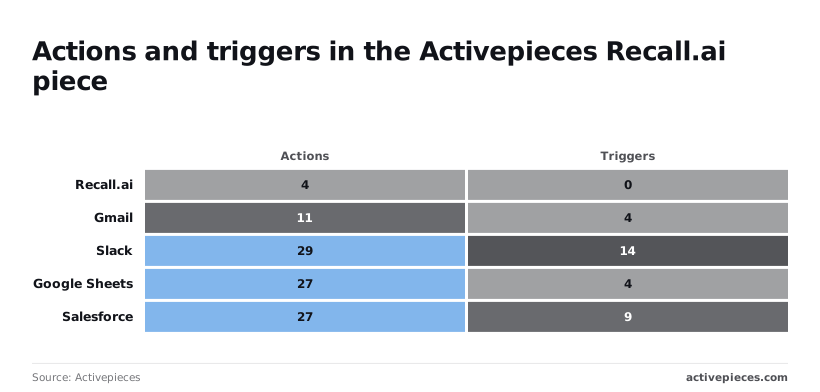
Four actions and no triggers: that is what [Activepieces](https://www.activepieces.com/pieces/recall-ai) ships for Recall.ai, so it can send commands to Recall.ai but **can't start a workflow when something happens there**. That follows from the limits above: anything event-driven has to arrive another way.
### What is already shipped
**4 actions and 0 triggers** is what the [Activepieces catalog entry for Recall.ai](https://www.activepieces.com/pieces/recall-ai) lists.
Each of those four is a integration action in packages/pieces of the open source repo, under the MIT-licensed core, and the Integrations Framework and MCP Server documentation describe that same action running as a flow step and as a tool schema on the per-project MCP server, reachable from Claude, ChatGPT, Cursor or an agent you built, so the four commands reach an agent without a second integration.

Set against the [other pieces in the catalog](https://www.activepieces.com/pieces), that's thin. In Activepieces' catalog, Gmail has 11 actions and 4 triggers, Slack 29 and 14, Google Sheets 27 and 4, Salesforce 27 and 9.
Every one of them can start a flow. Recall.ai can't, so a flow that must react to a meeting ending or a transcript landing has nothing native to listen on.
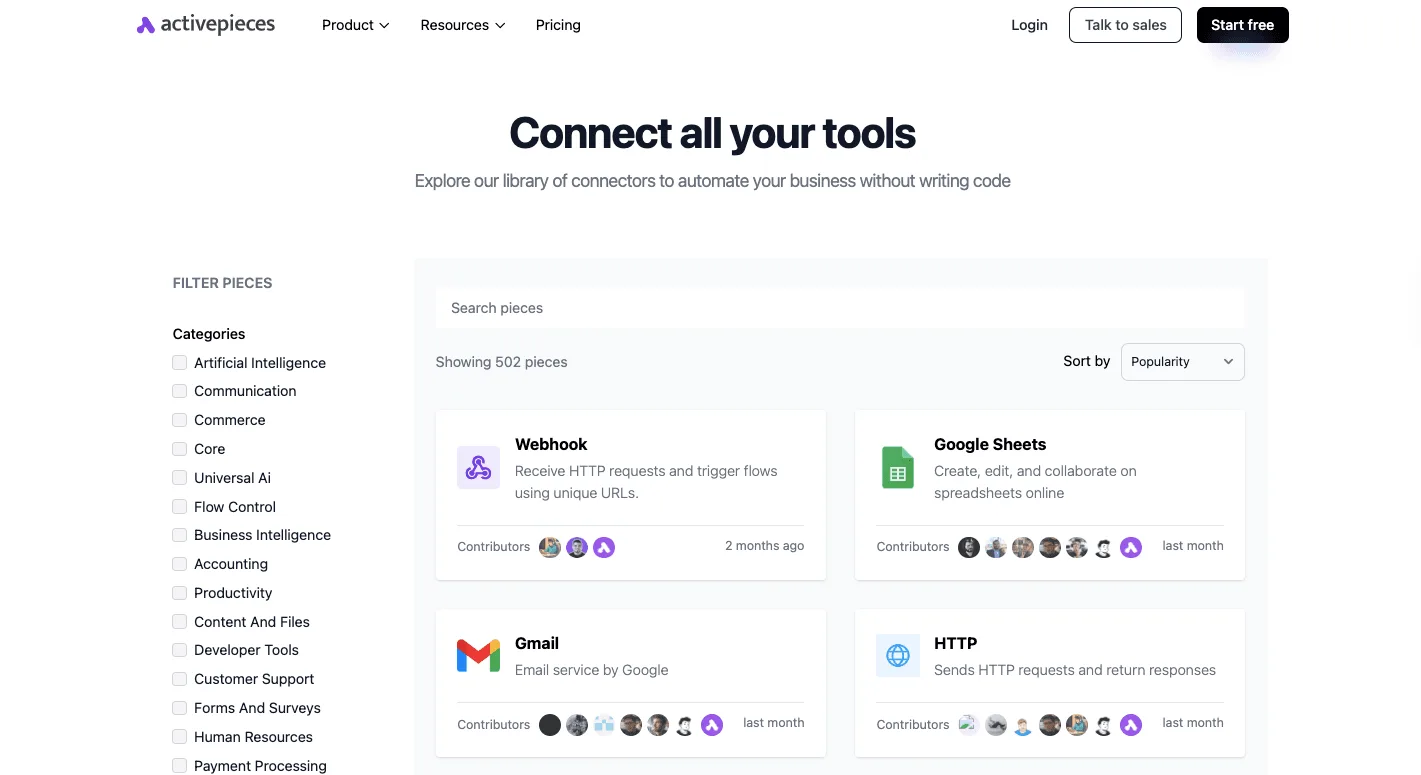
To confirm the Recall.ai integration shows up on your instance before you build on it, use the admin Integrations page in the screenshot below, where installed integrations appear with their package name and version.

Nothing in the catalog entry covers the Agents API itself, so treat that coverage as absent until you see it in the action list.
### Connecting it by HTTP and webhook
You don't need a new integration for this route, which has two parts. Start the flow with Activepieces' Catch Webhook trigger, which gives you a URL to register as the destination for Recall.ai's events.
Then add an HTTP step that calls the Agents API directly, with your API key in the headers.
1. Create a flow with a webhook trigger and copy its URL.
2. Register that URL on the Recall.ai side as an event destination.
3. Add an HTTP step that calls the Agents API with your key.
4. Test with one real event before enabling the flow.
We haven't run this. It's built from the catalog listing and the way Activepieces handles webhooks and HTTP steps, so check each step against a live event before trusting it.
## Recall.ai Agents API Cost and Speed Compared
After the live-event check, the invoice is usually the next failure.
A tier is a plan level: each one sets a price per meeting hour and decides who qualifies for it. Startup is the entry level, Launch is the plan above it and Enterprise is the top, sales-led level.
I have no published definition of what Launch or Enterprise include, so read the maker's pricing page before comparing them.
### Meeting bot cost per hour from published prices
Look at the gap between bot-based capture and a person typing, not the small gaps between bot vendors, because a plan tier or a usage band can erase those.
The chart plots each vendor's own published price per meeting hour: Recall.ai's tiers, MeetingBaaS's range, and human transcription, so readers can compare total costs for their usage.
Price per hour isn't cost per task. A task here is a transcript, a summary and a CRM update, so the bot hour is only one line on the bill.
The downstream model calls, storage and any retries come on top, and none of those are in the chart.
Work out your own meeting hours per month before comparing tiers, because the cheaper tier only helps if you qualify for it.
### Recall.ai Agents API latency figures
I have no vendor-published latency figure for the Agents API to quote, and I won't substitute a measured one. Without a stated figure you can't promise a customer when a transcript will land.
That makes the live-event test from the previous section the only source of timing. Record the gap between the meeting ending and your webhook firing, then set your automation's timeout from that gap, not from a guess.
## What to Watch Next With the Agents API
Watch four pages: the Recall.ai changelog, the docs reference pages, the pricing page, and the Launch and Enterprise tiers on it. A measured timeout is **only as good as the documentation** you measured against.
The failure chain is short. Recall.ai changes how a webhook fires or what a field returns, the changelog says so, nobody reads it, and your timeout is wrong on a day nothing in your own workflow changed.
Treat your measured gap as a dated reading, not a constant. The checklist below is what to compare it against.
Recall.ai changes how a webhook fires or what a field returns, the changelog says so, nobody reads it, and your timeout is wrong on a day nothing in your own workflow changed.
- Recall.ai changelog: the newest entry and its date, with any entry touching webhook timing or event payloads.
- [Docs](https://docs.recall.ai/docs/recallai-transcription) reference pages: the event names and payload fields your automation reads.
- Pricing page, Launch tier: what it includes and what Recall.ai charges for it. The pricing link in an earlier draft of this checklist pointed to MeetingBaaS, a different vendor, so I have removed it. Find the pricing page from Recall.ai's own site.
- Pricing page, Enterprise tier: what it adds over Launch, and whether it's sales-led.
Write down what you see on each page, with the date, in the same document as your measured gap. In that document, this checklist is the only way to tell later whether the vendor changed or you did.
As of 2026-11-18, everything here rests on the maker's published pages. Nothing was taken from third-party summaries, so each of those pages is where a changed value would show up first.
Monday action: open the four pages, record what each says, and file the notes next to your timeout setting.
## Frequently asked questions
Judge the Agents API only by what the maker has documented: it is Recall.ai's interface for putting automated agents into meetings. Anything the maker's pages don't state is marked as unstated here, so check it against those pages before you build on it.
On Activepieces availability, the maker states nothing in the pages used here. Trigger support is covered in its own section of this article, so confirm it there before planning a workflow around it.
### How much does the Agents API cost?
No price appears in this article, because the maker's pages used here don't state pricing for the Launch or Enterprise plans. Three other answers are also not stated by the maker in those pages:
- Join-time latency, meaning how long an agent takes to enter a meeting after you request it.
- The delay before a transcript arrives after a meeting ends.
- Any trigger behaviour you would depend on in a no-code tool.
Until the maker publishes them, a cost model or a response-time promise to a client rests on your own measurements. Record what you observe and date it.
If you are looking for a no-code path, the maker's documentation doesn't state one in the pages used here.
The Agents API is an interface you call, so assume some code or a connector you have verified yourself. Test with a single meeting before promising a client anything.
## Related reading
- [AI Agents for Legal Teams: What’s Possible Now](https://www.activepieces.com/blog/ai-agents-for-legal)
- [AI Agents for Sales: What Teams Are Using Today](https://www.activepieces.com/blog/ai-agents-for-sales)
- [Best Data Automation Tools of 2026 for Analytics Teams](https://www.activepieces.com/blog/best-data-automation-tools-of-2026-for-analytics-teams)
## References
- [Activepieces](https://www.activepieces.com/pieces)
- [Recall.ai](https://docs.recall.ai/reference/bot_create)