On the Airtable side, the bill is gentler. Its [support documentation](https://support.airtable.com/articles/1636857517-how-airtable-collaborators-impact-billing) lists: - Free costs $0 per user per month on monthly billing - Team costs $24 per user per month on monthly billing - Business costs $54 per user per month on monthly billing 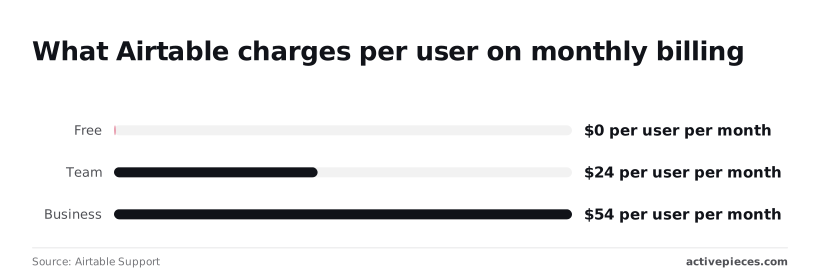 A Free workspace is enough to prove the connection with one table. Business costs 2.25 times Team for every paid seat, so upgrade only if a feature you need requires it. Prices change often, so confirm them on the vendors' pages.  Before opening the builder, have this ready: - An account in a no-code automation tool; the steps below use [Activepieces](https://www.activepieces.com). - A Salesforce edition with API access (not Starter Suite). - An [Airtable](https://airtable.com/pricing) personal access token with permission to read and write the base you'll use. - One test record in each app, so the first run uses real data rather than a sample. Take the fastest path in four moves. 1. Pick one trigger from the tool's listed Salesforce or Airtable triggers, such as a new or updated record. 2. Connect both accounts: sign in to Salesforce, and paste the Airtable token. 3. Map only the fields the destination requires, usually a name, an email and an ID that links the two records, or the destination won't know what to do with extra fields. 4. Run the test with your real record and check that it landed in the other app. viz type=distribution title="What Salesforce charges per user by edition" unit="$ per user per month" source="StackCostMatrix - https://stackcostmatrix.com/salesforce-api-access/"65 on Enterprise and $330 on Unlimited, the editions with API access by default." Starter Suite: 25 Pro Suite: 100 Enterprise: 165 Unlimited: 330 ## Six Salesforce and Airtable Workflows in Activepieces To cover the common Salesforce-to-Airtable traffic you need six workflows: three use only steps Activepieces lists by name, and three need a Custom API Call. Check any step below against the [Salesforce piece](https://www.activepieces.com/pieces/salesforce) and [Airtable piece](https://www.activepieces.com/pieces/airtable) pages; each integration publishes its triggers and actions. Read the last column first. It tells you whether you'll pick a step from a menu or configure a request yourself. | Salesforce step | Airtable step | What it does | Listed or Custom API Call | |---|---|---|---| | "New Lead" | "Create Airtable Record" | Copies each new lead into a base | Listed | | "Create Record" | "New Record" | Creates a Salesforce record from a new Airtable row | Listed | | "Update Record" | "New or Updated Record" | Updates the matching Salesforce record when a row changes | Listed | | "New or Updated Record" | "Update Airtable Record" | Keeps a reporting base current | Listed | | "New Field History Event" | "Update Airtable Record" | Flags a row when a tracked field changes | Listed | | "Custom API Call" | "Create Airtable Record" | Writes the result of a query Salesforce has no step for | Custom API Call | _Prices and plan limits checked against [activepieces.com](https://www.activepieces.com/pieces/salesforce) and [activepieces.com](https://www.activepieces.com/pieces/airtable) on November 16, 2026._ Start with "New Lead" and "Create Airtable Record". Map the name, email and source into matching Airtable fields, then test with one real lead. "New Contact" works the same way if contacts are what you track. ### Airtable row to Salesforce record or update On the Airtable side, Activepieces lists "New Record" for creation and "New or Updated Record" for edits. On the Salesforce side, I found no step in the integration's list that I could point at for creating or updating a lead, so use a Custom API Call against the Salesforce REST API.  Store the Salesforce ID in an Airtable field on creation, so the update flow has something to match on. Use "New or Updated Record" on the Salesforce side, then "Find Airtable Record" to look for an existing row. If it finds one, run "Update Airtable Record"; otherwise run "Create Airtable Record". Skipping the find step is how you end up with duplicate rows. When a tracked field changes, such as a stage moving, "New Field History Event" fires. Pass the event to "Update Airtable Record" to set a status column that an Airtable view or automation can filter on. Enable history tracking on that field in Salesforce first, or the trigger has nothing to report. ### When the step you want isn't listed If the integration doesn't list it, use a Custom API Call or a webhook, and say so in the flow's step name. A step you can't find in the integration's own list doesn't exist, however plausible its name sounds. ## Salesforce to Airtable workflow setup Build it in order: authorize both accounts, add one trigger and test it against a real record, map a few fields, then publish and read the first row. Add Salesforce as a connection and sign in through its login dialog. Use the same org that holds the records you want to sync, not a sandbox you happen to be logged into. Sign-in succeeds either way, so a wrong org only shows up later as an empty trigger test. Authorize Airtable and grant access to the specific base you're writing to. If the base isn't ticked in the consent dialog, it won't appear in the base dropdown later. ### Add and test the Salesforce trigger Pick one Salesforce trigger from the tool's own list, the one that fires on a new or changed record. Before running the trigger test, create or edit a real record in Salesforce so the test pulls live data rather than a canned sample. If the test returns nothing, the trigger is listening to the wrong object or org. ### Stage 4: Map fields into Airtable Add the Airtable create-record action, choose the base and table, and fill only a few fields. Start with a name, an email or other identifier, and the Salesforce record ID, so you can match rows back to their source. Each field gets a reference to a Salesforce trigger output, not typed text. Typing a literal value into one writes that same text into every row. ### Publish the workflow and check the Airtable row Publish, then change a record in Salesforce and open the Airtable table. Compare the new row against the source record field by field. Check three things: the row exists, the record ID matches, and no mapped field is blank. A blank field usually means the Salesforce field was empty on that record, or the reference points at the wrong output. **You don't need to hire a flow builder** for the sync, because you can describe it to Activepieces' built-in chat instead, say a closed-won opportunity that becomes a row in your Airtable onboarding table. It builds and publishes the flow as a live flow in your account, the same artifact you would have assembled by hand in the editor. That flow runs under the same RBAC and audit logs as every other flow on the platform, and each run leaves a run trace anyone can read, so the field-by-field comparison above works on a flow you never built yourself. MoneyGram, Moneypenny, Alan and FundingSocieties run Activepieces in production. ## Salesforce and Airtable Limits, Errors and Fixes When a run fails, it most often traces to one of three causes: **Airtable's 5 requests per second per base**, Salesforce's 24-hour API allowance, or a token missing a scope. Check them in that order. The table lists each limit, its source and its fix, as checked on 2026-11-16. ### Salesforce API access and request limits Point a connector at Salesforce's Starter edition and it fails on the first trigger however carefully you map fields, because that edition has no API access. The Salesforce ceiling is shared across the whole org, while Airtable's is per base. | Limit | Source | Check date | Fix | |---|---|---|---| | Airtable: 5 requests/sec per base | Airtable API documentation | 2026-11-16 | Batch writes; pace the workflow | | Airtable: monthly API calls, set by plan | Airtable plan page | 2026-11-16 | Read your plan's cap before polling on a schedule | | Salesforce Enterprise: 100,000 + 1,000 per licence per 24h | Salesforce documentation | 2026-11-16 | Prefer one trigger over polling | | Salesforce Starter: no API | Salesforce edition comparison | 2026-11-16 | Upgrade edition |  For the per-licence additions, the source is [TaskRhino](https://www.taskrhino.ca/salesforce-alternatives/api-limits/), a third party. On Unlimited and Performance, each user adds 5,000 calls; on Enterprise, 1,000. An Enterprise org with 20 licences therefore gets 120,000 calls a day per StackCostMatrix, while the same headcount on Unlimited adds 100,000 on top of its base. A workflow that polls every minute uses 1,440 calls a day per query, so polling is rarely what exhausts the allowance. Other integrations sharing the org are. ### Airtable rate limits and field types When a loop writes one row per call at full speed, it gets throttled with HTTP 429 errors, because Airtable allows 5 requests per second per base. Airtable's documentation says to wait 30 seconds before retrying, so the system can recover between attempts. Send records in batches instead. Field types fail more quietly. If a Salesforce picklist value doesn't exist as an option in an Airtable single select field, it is rejected, and the row isn't written. Map picklists to text fields first, then convert once the test record lands. On a 401, the token expired or was revoked: reconnect the account. On a 403, the token is valid but can't do the job. For Airtable, check that the personal access token has `data.records:read` and `data.records:write`, and that the specific base was added to it. For Salesforce, check that the connecting user's profile has "API Enabled" ticked. When a run is green but no row appears, the write usually went somewhere else or was filtered out. Check these in order: 1. Open the run log and read the output of the Airtable step, not just its status. 2. Confirm the step points at the right base and table, not a similarly named copy. 3. Look in the table's unfiltered view; your own view may hide the row. 4. Confirm no mapped field is computed, since Airtable ignores writes to formula fields. ## When Activepieces Is the Better Fit for This Connection Once the test record passes, Activepieces lets you keep that flow exactly as built: the MIT-licensed core runs on your own server, and every plan, including free, allows unlimited flows. Choose it if you want to self-host the automation, or if your flow needs many steps and you'd rather not budget for each one. ### Zapier and Make for Salesforce and Airtable You can also build this in Zapier or Make, two hosted automation platforms that both offer Salesforce and Airtable connectors. Everything in this guide works the same way in either. If your team already pays for one of them, use it. Switching tools to save one connection is a bad trade. ### Where Activepieces fits You can read the code and run it on your own server, because Activepieces is open source. Two situations make that matter here. Start with data handling. Salesforce records often hold customer details, and a self-hosted instance means the records pass through infrastructure you control, not a vendor's cloud. If your security review asks where the data travels between the two apps, you can answer with your own server. Then there is flow length. Activepieces doesn't limit how many steps a flow can have. A sync that looks up an account, checks for an existing Airtable row, branches on the result and then writes or updates costs the same as one that only writes. In a platform that bills per step, the same logic gets more expensive each time you add a check, and people start deleting safeguards to stay under the limit. You pay for self-hosting too: you maintain the server, apply updates and watch it when a flow fails. If nobody on your team wants that job, the hosted route is the more honest choice. 1. Pick the one record type you want to move, for example a Salesforce opportunity that becomes an Airtable row when it closes. 2. Build only that trigger and one action. Map three or four fields, not the whole object. 3. Run it with a real record and compare the Airtable row to the Salesforce original, field by field. 4. If a field comes through wrong, fix the mapping and rerun the same record before adding anything else. 5. Only after one clean run, decide whether the flow needs self-hosting or more steps. If it does, rebuild it in Activepieces using the same mapping. ## Frequently asked questions ### Does Salesforce have a native Airtable integration? Not one that I can point you to, so plan on a third-party automation tool sitting between the two. If you go looking for a "Connect to Airtable" button inside Salesforce setup, you won't find a documented one. What you'll find is that both apps expose triggers and actions in an automation platform, and that's where the connection lives. The steps in the body (one trigger, a few mapped fields, a test with a real record) are how you build it. ### Can Airtable and Salesforce sync both ways? Yes, but as two separate workflows, not a single two-way switch. One workflow fires when a Salesforce record changes and writes to Airtable. A second fires when an Airtable record changes and writes back to Salesforce. Test for the loop: if each workflow's write triggers the other, **a single edit bounces back and forth**. Pick one system as the owner of each field and map that field in one direction only. Run a real record through both workflows before you trust them together. ### Do I need a paid Salesforce edition to connect Airtable? It depends on whether your edition allows API access, and I'd check that before you build anything. Automation tools talk to Salesforce through its API. Some editions include it, some gate it behind an add-on or a higher tier, and the rules have changed over time. Try authenticating the connection in your automation tool; that is the quickest check. If the login succeeds and a test trigger returns a record, you have access. If it's refused with an API-not-enabled style error, that's your answer, and your Salesforce admin or account rep is the person who can say what unlocks it. ### Can I self-host the workflow that connects them? Yes, if you pick an automation tool that offers a self-hosted option. The workflow is the same either way: one trigger, mapped fields, a test record. What changes is who owns the uptime, the upgrades and the stored Salesforce and Airtable credentials. Self-hosting suits a team that already runs its own infrastructure. If nobody wants that job, the hosted version costs less in attention. ### What do I do when the action I need isn't available? Use the platform's generic HTTP request or webhook step to call the app's own API directly. Do not hunt for a lookalike step or assume one exists. If the action you want isn't in the tool's list for Salesforce or Airtable, it isn't a listed action, so treat it as an API call. Read the endpoint in that app's API documentation, send the request with the same authentication your connection uses, and test it against a real record before you rely on it. The result still sits inside your workflow, and you still write no code beyond the request fields. ## Related reading - [Salesforce Constant Contact Integration Without Code](https://www.activepieces.com/blog/salesforce-constant-contact-integration-without-code) - [DocuSign Salesforce Integration: Setup Guide (2026)](https://www.activepieces.com/blog/docusign-salesforce-integration-setup-guide-2026) - [Calendly Salesforce Integration: No-Code Setup (2026)](https://www.activepieces.com/blog/calendly-salesforce-integration-no-code-setup-2026) ## References - [StackCostMatrix](https://stackcostmatrix.com/salesforce-api-access/) - [Airtable Support](https://support.airtable.com/articles/1636857517-how-airtable-collaborators-impact-billing) - [TaskRhino](https://www.taskrhino.ca/salesforce-alternatives/api-limits/)**You can't connect the cheapest seat at all, because Starter Suite has no API access.