Read it as a question of who carries the risk. With usage billing you pay more when traffic spikes, and with machine billing you pay for capacity whether anyone searches or not. | | Pricing model | Entry price | Free tier | Who runs the infrastructure | |---|---|---|---|---| | Algolia | Search requests and records | Grow charges $0.50 per 1,000 searches past the free allowance | Build plan, free | Algolia | | Elastic Cloud | Resources you provision | Roughly $95 a month | Short trial | Elastic, or you if self-managed | | Typesense Cloud | Hourly, by cluster size | Set by the cluster you pick | Self-host the open-source version | Typesense, or you | | Meilisearch Cloud | Plan tiers by usage | Build plan, about $30 a month | Trial, or self-host | Meilisearch, or you | As volume grows, the gap shows up. At 100K searches a month, SV Premium's analysis puts Algolia Grow at about $45 and [Meilisearch](https://www.meilisearch.com/pricing) [Cloud](https://cloud.typesense.org/pricing/calculator) at about $50, so at small scale you're choosing on features, not cost. 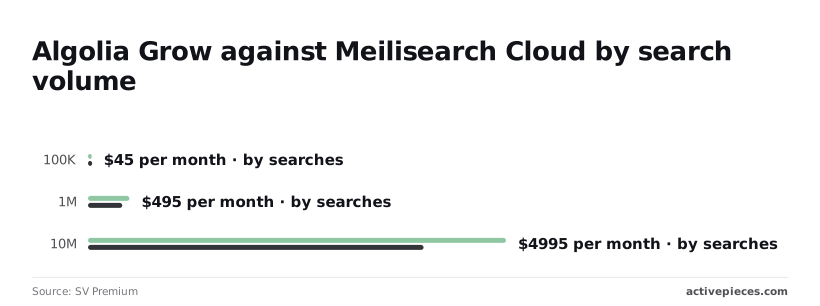 At 1M searches Algolia is $495 against $410. At 10M it's $4,995 against $4,010, which means **Algolia costs roughly $1,000 more each month** at the top end. You can't run Algolia on your own servers, but you can run Elastic, Typesense and Meilisearch. Self-hosting removes the per-search bill, but you take on the work: updates, backups and a 2 a.m. outage are yours. If nobody on your team wants that job, the hosted price is partly what you pay to avoid it. ## Choosing the right Algolia plan for your traffic Pick the plan by traffic first, catalog size second and features third. Search requests, not the sticker price, drive the bill, and paying someone else to run search only makes sense on a plan sized to your shape. Two terms matter here. A "search request" is each time a visitor's query reaches Algolia; a "record" is one item in your catalog, such as a product or an article. To find your row and see what would force a change, use the table below, which maps three traffic bands to a plan. | Traffic band | Catalog size | Features needed | Recommended plan | Trigger to negotiate or leave | |---|---|---|---|---| | Under the free allowance | Small, rarely changing | Basic keyword search | Free Build tier | Records or requests approach the cap and you cannot trim them | | Mid | Growing, updated often | Typo tolerance, filters, some ranking control | Pay-as-you-go Grow plan | Monthly bill climbs faster than the revenue search brings in | | High | Large, or many indexes | Personalization, merchandising, support commitments | Negotiated contract (Elevate or custom) | Quoted add-ons cost more than a self-hosted engine plus one engineer | Read across a row, not down a column. A small catalog with heavy traffic behaves like the next band up. ### When the free tier is enough Stay free longer than your instinct says. A brochure site, a docs portal or a small shop rarely needs more than basic search, and moving up early means paying for features nobody uses.  Leave a free plan too soon and the cost is a monthly bill for capacity you never touch. Stay too long and the cost is a move to a paid plan., so watch your usage dashboard monthly. Negotiate when your usage is steady and predictable, because a commitment trades flexibility for a lower rate. Leave when add-ons, not searches, drive the bill, or when nobody can explain a line item. Price a self-hosted option honestly, including the engineer's time, before you decide. ## Keeping an Algolia index synced in Activepieces If you pay for a full reindex every time a price changes, you're buying records you already own, so send Algolia only the rows that changed. Activepieces can run that flow for you, as in the four steps below, and its free plan costs $0 with 1,000 credits a month and unlimited flows. Credits meter AI usage, so a plain sync with no AI step isn't what they're spent on.  The four steps: 1. Point the trigger at your catalog source, whether that's a spreadsheet or a database table, so the flow starts only when a row is added or edited. Unchanged products never leave your system. 2. Map the row into the shape Algolia expects for a record: an ID, the searchable text, and any filter values such as price or stock. A badly shaped record is the usual reason an update fails, so fix it here. 3. Post the record to your index with an HTTP request step, then add as many steps as the job needs. Credits meter AI usage and this sync has no AI step, so the extra steps aren't what you'd spend them on. 4. Write any rejected record, with the error message, to a sheet or a channel your team reads. Otherwise a product quietly goes missing from search and nobody notices until a customer does. Done this way, your record count and update traffic follow your catalog's real changes rather than a nightly rebuild. You can build this flow on the Activepieces free plan, which costs $0, includes 1,000 credits a month and allows unlimited flows. ## What to gather before choosing Algolia Before choosing a plan, gather your own numbers, because the bill follows your traffic and your data, not the headline price. This checklist takes one sitting, and each step costs far less than guessing wrong. I'd work in this order, since each step feeds the next: 1. Pull last month's search volume from your Algolia dashboard, or from your site analytics if you haven't signed up yet. 2. Count your records, meaning every product, article or page you want searchable. 3. Find your largest record, since size limits can force you to split or trim content. 4. Estimate typeahead multiplication: if results update as people type, one visitor can generate many requests. 5. Price those numbers against the plan table on Algolia's pricing page. 6. Get one competitor quote, so you know whether Algolia's price is fair for your shape. 7. Set a usage alert, so a traffic spike reaches you before the invoice does. Do steps one through four and you have the inputs; the rest turn them into a decision. Open the pricing page with your numbers from steps one through four beside you. Check three things: what each plan includes before overage charges begin, what the overage rate is, and which features sit in add-ons rather than the base plan. Doing nothing about that last one is the expensive mistake, because a feature you assumed was included can arrive as a separate line on the bill. Your site may send more requests than your visitors think they made. A search request is a query sent to Algolia, and a record is one searchable item in your index. If suggestions refresh on each keystroke, a single search can be several requests, so count what your front end actually sends, not what people say they searched for. ## Frequently asked questions ### Does Algolia still have a free plan? Confirm on its pricing page before you build around it: Algolia has offered a free entry tier with capped requests and records, but plan names and caps change. Not checking is the expensive mistake: a project sized for the free tier can land on a paid plan the week traffic picks up. Treat the free tier as a place to test, and price your real request volume against the paid plans before launch. ### Is Algolia cheaper if I pay annually? Possibly, but I can't promise a discount, and you shouldn't assume one. Smaller plans are generally billed by usage month to month. Larger commitments are often negotiated, and that's where annual terms matter. Ask sales for both quotes in writing. If you commit to a year at a traffic level you never reach, you've paid for capacity you didn't use. ### What happens when I exceed my plan's limits? You usually pay for the excess rather than get cut off, and that's how **a modest bill turns into a surprise one**. Overage rates differ by plan, and the free tier behaves differently from paid ones, so read the terms for yours. Set a usage alert, watch the request count weekly for the first few months, and move up a plan when you cross the line regularly. Staying on a small plan and paying overage on every month is usually the costlier choice. ### Can I move from Algolia to another search service later? Yes, your records are your data, and you can export them through the API. The real cost is elsewhere. Your search page is written against Algolia's tools, and your ranking rules, synonyms and tuning settings don't carry over as they are. Plan for rebuilding the front end and redoing the relevance tuning. The longer you wait, the more of that work piles up, so decide early whether you'd want to leave. ## Related reading - [Gemini 4 Argon API Pricing: Tokens and Search (2026)](https://www.activepieces.com/blog/gemini-4-argon-api-pricing-tokens-and-search-2026) - [DeepSeek Search and Fetch API: Pricing and Reliability](https://www.activepieces.com/blog/deepseek-search-and-fetch-api-pricing-and-reliability) - [Best Glean Alternatives for Enterprise Search Teams](https://www.activepieces.com/blog/best-glean-alternatives-for-enterprise-search-teams) ## References - [SV Premium](https://svpremium.dev/search/compare/algolia-vs-meilisearch-cloud/) - [SV Premium](https://svpremium.dev/search/meilisearch-cloud/)Algolia bills by usage while its three closest rivals mostly bill by the size of the machine you rent.