# Amazon Bedrock Pricing (2026): Models and Token Costs

By Femi Adegoke · 2026-10-20 · Source: https://www.activepieces.com/blog/amazon-bedrock-pricing-2026-models-and-token-costs

---
<aside class="tldr"><p class="tldr-label">Summary</p><p>Amazon Bedrock charges per token with no flat plan, ranging from $0.035 to $75 per million depending on model choice.</p><ul><li>Input costs range from $0.035 (Micro) to $15 (Opus) per million tokens.</li><li>Output tokens cost more; Opus output rate reaches $75 per million tokens.</li><li>Provisioned throughput charges per hour whether idle; weigh hourly fees against token volume.</li></ul></aside>

You pay per use on Amazon Bedrock, because **there is no flat plan**, and the rate depends on the model and the pricing mode you call it in, which is worth remembering if you wire it into an automation tool like [Activepieces](https://www.activepieces.com) where calls can add up quietly.

Amazon Bedrock pricing is the pay-as-you-go, metered cost of running foundation models on AWS, set by the model you choose, the pricing mode you call it in, and any add-on features you enable.

Bedrock is AWS's managed service for calling models from many providers through one API. Some rates here come from Tickerr, and I couldn't verify every figure at aws.amazon.com/bedrock/pricing.

## Amazon Bedrock pricing and how the billing works

### Why Bedrock has pricing modes rather than plans

Bedrock meters consumption instead of selling seats, so the same model can cost different amounts depending on how you buy capacity. Pay-as-you-go suits uneven traffic, while reserved capacity suits steady load.

Which one fits your traffic shapes the bill as much as the rate card does.

### Input tokens, output tokens and other billing units

Each unit on the pricing page punishes a different habit, and the table of rates reduces to a handful of them:

- Input tokens, quoted per 1,000 or per 1M depending on the page, so check the denominator before comparing two models.
- **Output tokens, which are generally priced above input**, so long generated answers cost more than long prompts.
- Images generated, charged per image, so volume matters here and prompt length doesn't.
- Provisioned model units per hour, charged whether or not requests arrive, so **idle reserved capacity still costs money**.
- Per-call or storage charges for add-ons, which land on top of model usage and can outgrow it if left switched on.

![Two coin stacks, output taller than input](https://ap-marketing-media.fra1.cdn.digitaloceanspaces.com/uploads/0a99c828-c4c0-4e7c-a239-481128c9eb22/amazon-bedrock-pricing-2026-models-and-token-cos-2d727b2c.webp)

A model with a low token rate can still lose once output length, reserved hours or add-ons are counted, because these units add together on one invoice.

### Official Bedrock pricing page and date checked

The authoritative figures sit on the AWS Bedrock pricing page, listed by provider and model. This article was checked against it on 20 October 2026.

Rates and model lists change, so confirm the current entry for your model and region before you commit a budget to it.

## Every Bedrock pricing mode compared in one table

Bedrock sells five ways to pay, and each one meters something different: tokens, a discounted batch of tokens, reserved model units, or a training job.

The table below shows what each mode charges for and what it commits you to, so you can match your traffic pattern to a mode before you pick a model. Cells I couldn't confirm against AWS's pricing page are marked "unverified" rather than guessed.

| Mode | Charge basis | Price | Inclusions | Limits or commitment | Best fit |
|---|---|---|---|---|---|
| On-demand | Input and output tokens | Per model; see below | Pay-as-you-go inference | No commitment; quotas apply (unverified) | Spiky or unpredictable traffic |
| Batch | Input and output tokens | Unverified | Asynchronous processing | Results aren't immediate | Offline jobs such as bulk classification |
| Provisioned throughput | Model units per hour | Unverified | Reserved capacity | Commitment terms unverified | Steady, high-volume production load |
| Priority or flex tiers | Unverified | Unverified | Unverified | Unverified | Not assessed here |
| Customization | Training tokens plus storage (unverified) | Unverified | A tuned model | Typically needs provisioned throughput to serve (unverified) | Domain-specific behavior |

Read down the price column and you'll see most cells say "unverified." The table is useful for the structure of the decision, not for a quote.

### Per-model on-demand rates for representative models

The spread between models is the main cost lever, and on-demand is metered per million tokens, with separate input and output rates.

[Tickerr](https://tickerr.ai/provider/aws-bedrock) lists Nova Micro at $0.035 to $0.14 per 1M tokens, so a high-volume job on it costs pennies per million tokens processed. Nova Pro runs $0.80 to $3.20, **roughly 23 times Micro's low end**, so the cost of upgrading from Micro is substantial.

Tickerr's analysis shows the ends of the range are about 430 times apart on input (Micro's $0.035 against Opus's $15).

The lower figure in each pair is the input rate and the higher the output rate, so a chatty model that writes long answers pays the upper number on most of its volume.

Opus is only worth that premium where a cheaper model fails your quality bar.

### Bedrock batch and provisioned throughput discounts

I couldn't verify AWS's current discount or hourly rates, so I won't put numbers on them, even though batch and provisioned throughput both trade flexibility for a lower or more predictable bill.

The structure is what matters: batch suits work that can wait, and provisioned throughput bills for reserved capacity whether you use it or not.

That makes utilization the math to run. **Reserved capacity only beats on-demand if your traffic keeps it busy enough to cover the hourly charge.**

Take your monthly token volume, price it at the on-demand rates above, and compare it to the hourly rate multiplied by hours reserved.

Customization adds a further cost, because a tuned model generally has to be served on reserved capacity, which means a training bill and a standing hourly bill together.

## What Bedrock costs at realistic monthly usage

Without customization, the bill is simply monthly tokens multiplied by the rate for the pricing mode you pick, so one workload can produce three different totals.

The table below sets each workload's volume formula beside its cost under on-demand, batch and a smaller model, and shows the arithmetic without assuming a rate.

| Workload | Monthly input / output tokens | On-demand cost | Batch cost | Smaller-model cost | Arithmetic shown |
|---|---|---|---|---|---|
| Support chatbot | 10,000 conversations × input tokens per conversation; × output tokens per conversation | Input tokens × input rate + output tokens × output rate | Not usable: customers wait for replies | Same sum at the smaller model's rates | Input and output priced separately, then added |
| Summarisation batch job | Documents per night × nights × tokens per document in; × tokens per summary out | Same sum at on-demand rates | Same sum at batch rates | Same sum at the smaller model's rates | Batch changes only the rate, not the token count |
| 50-person assistant | 50 users × requests per day × working days × tokens per request, in and out | Same sum at on-demand rates | Not usable: users expect live answers | Same sum at the smaller model's rates | Output tokens usually cost more per token than input |

Check which columns apply before comparing rates, because a discount you can't use isn't a saving.

Every extra turn that resends history grows the input side, which makes conversation count the multiplier. Batch is ruled out, which leaves model choice as the main lever.

### Bedrock cost for a nightly document batch job

This is the one workload where all three columns are open. Nobody waits on the result, so batch and a smaller model can be tested together.

### Bedrock cost for a 50-person internal assistant

Users are waiting and volume is modest but uneven, so the saving has to come from the model tier rather than the pricing mode.

These formulas show where to insert your own measured token counts and the rates on the pricing page, and they make the comparison between modes a calculation instead of a guess.

## Finding hidden Bedrock costs and limits

Beyond the per-token rate, Bedrock bills add-on features, idle provisioned capacity, data movement and logging, and it caps throughput with default quotas you must ask to raise.

The list below names each cost and the unit it's metered in, so you can price it before enabling it.

- Knowledge Bases: the embedding and generation model calls, plus the vector store behind them, which is billed by its own service on its own meter and runs whether or not anyone queries it.
- Guardrails: billed by the amount of text each configured policy evaluates, so every extra policy on a request adds to that request's cost.
- Agents: no separate orchestration fee, but each user request can trigger several model calls and tool invocations, all metered as tokens.
- Provisioned throughput: billed per model unit per hour for the commitment term, used or not.
- Data transfer: standard AWS rates for traffic leaving a region or crossing regions.
- CloudWatch logs: billed for ingesting and storing every logged prompt and response.

Because they limit what you can run, quotas sit in the same budget conversation, even though they aren't a charge.

Two bills hide inside a Knowledge Base: model calls, and a vector store that accrues charges while idle. Guardrails and Agents multiply calls per request, so a test that looks cheap on one prompt can cost far more per user action in production.

![Model box and vector store with its own meter](https://ap-marketing-media.fra1.cdn.digitaloceanspaces.com/uploads/b8357ff3-bbf6-4fe7-a27d-1f092c607bd8/amazon-bedrock-pricing-2026-models-and-token-cos-680cd8b1.webp)

### Bedrock provisioned throughput idle hour costs

**Idle hours are the catch**, because provisioned throughput converts a per-token cost into an hourly one.

<blockquote class="pull"><p>Guardrails and Agents multiply calls per request, so a test that looks cheap on one prompt can cost far more per user action in production.</p></blockquote>

At low or uneven traffic you pay for capacity overnight and on weekends, so on-demand can be cheaper despite its higher per-token rate. Compare the hourly commitment against your measured token volume before signing a term.

### Bedrock default quotas and throttling limits

A launch that exceeds the default limits **gets throttled, not billed more**. Each model has default limits on tokens and requests per minute, set per account and region, so request increases through Service Quotas before traffic arrives, since approval isn't instant.

![Request cards queued at a narrow gate](https://ap-marketing-media.fra1.cdn.digitaloceanspaces.com/uploads/9ff70abc-7b26-4eac-95a1-3a75fb525003/amazon-bedrock-pricing-2026-models-and-token-cos-87f296d6.webp)

## Comparing Bedrock to OpenAI and Vertex AI

Don't expect a lower per-token rate than a maker's own API; Bedrock's case rests on one bill and one set of controls across many model makers.

The table compares the four on structure, which is stable. Per-token prices and discount percentages change often, so read each vendor's pricing page on the day you budget.

| | Billing model | Batch discount | Committed capacity | Model providers |
|---|---|---|---|---|
| Bedrock | Metered per token | Offered on supported models | Provisioned throughput | Many makers |
| OpenAI | Metered per token | Offered | Priority and scale options | OpenAI only |
| Azure OpenAI | Metered per token | Offered | Provisioned throughput units | OpenAI models |
| Vertex AI | Metered per token | Offered | Provisioned throughput | Google plus partner makers |

All four meter tokens, so none has a subscription that caps your spend. The differences that move a bill are who supplies the models and how you reserve capacity.

### Bedrock vs direct provider APIs

If you use one maker's models, the maker's own API is usually the simpler purchase. You get new models and features there first, and you carry no cloud-account layer between you and the meter.

Bedrock earns its place when you need several makers behind one invoice, one set of IAM permissions and one guardrail configuration. Price the consolidation against the real alternative, which is several vendor contracts and several sets of keys to rotate.

### Bedrock vs Azure OpenAI and Google Vertex AI

Azure OpenAI is the better fit when your estate already runs on Azure and your workload is OpenAI models. Vertex AI is the equivalent for Google Cloud, with Google's own models first and partner models beside them.

Bedrock sits in the same position on AWS. The comparison therefore mostly reduces to which cloud already holds your data, identity and committed spend, since moving workloads costs more than a rate difference saves.

## Calling Bedrock models from Activepieces workflows

Activepieces has 742 integrations, counted from its MIT-licensed open source monorepo, and you can call a Bedrock model from a no-code flow through an HTTP request or MCP step, which is where you can control the bill.

Activepieces has its own pricing, separate from Bedrock's: Plus is $20 a month and Team is $200, so the two meters run side by side.

### Routing tasks to the cheapest adequate model

Bedrock meters by tokens, so the unit to manage is the call, and a flow lets you decide per call which model receives it.

A branch step can send short, repetitive work such as tagging a support email or extracting a date to a small, cheap model, and reserve the expensive model for drafting or reasoning.

You pay the premium rate only on the branch that needs it, which is how a cheap-looking rate stops being the deciding number.

A platform that resells you its own model has already made that routing decision and priced it before you open the product.

Activepieces doesn't resell one: the Bedrock model you pick is called on your own provider key, so the tokens from that HTTP request step land on your AWS account at your rate, and you can reach it from Claude, ChatGPT, Cursor or any MCP client.

The free plan is $0 with unlimited flows, and Bring-Your-Own-Key availability by tier is on the pricing page, so you can start for free with no flow constraints, but Bring-Your-Own-Key access depends on your tier. MoneyGram, Moneypenny, Alan and FundingSocieties run Activepieces in production.

![Activepieces pricing page displaying four subscription tiers with features and costs.](https://ap-marketing-media.fra1.cdn.digitaloceanspaces.com/uploads/841ec84e-02e4-4761-aca2-e92f6d457f41/self-host-mistral-ai-enterprise-deployment-guide-c7d7dca9.webp)

Three habits keep the meter honest:

1. Cap input length before the call, with a text step that trims a long email thread or document to what the task needs. Input tokens are billed whether or not the model uses them.
2. Set a maximum output length in the request body, so a verbose answer can't run up output tokens, which usually cost more than input.
3. Write each call's model, token counts and timestamp to a Google Sheets row. Without that log, you learn which branch is expensive only when the invoice arrives.

### Sending model output to the apps you already use

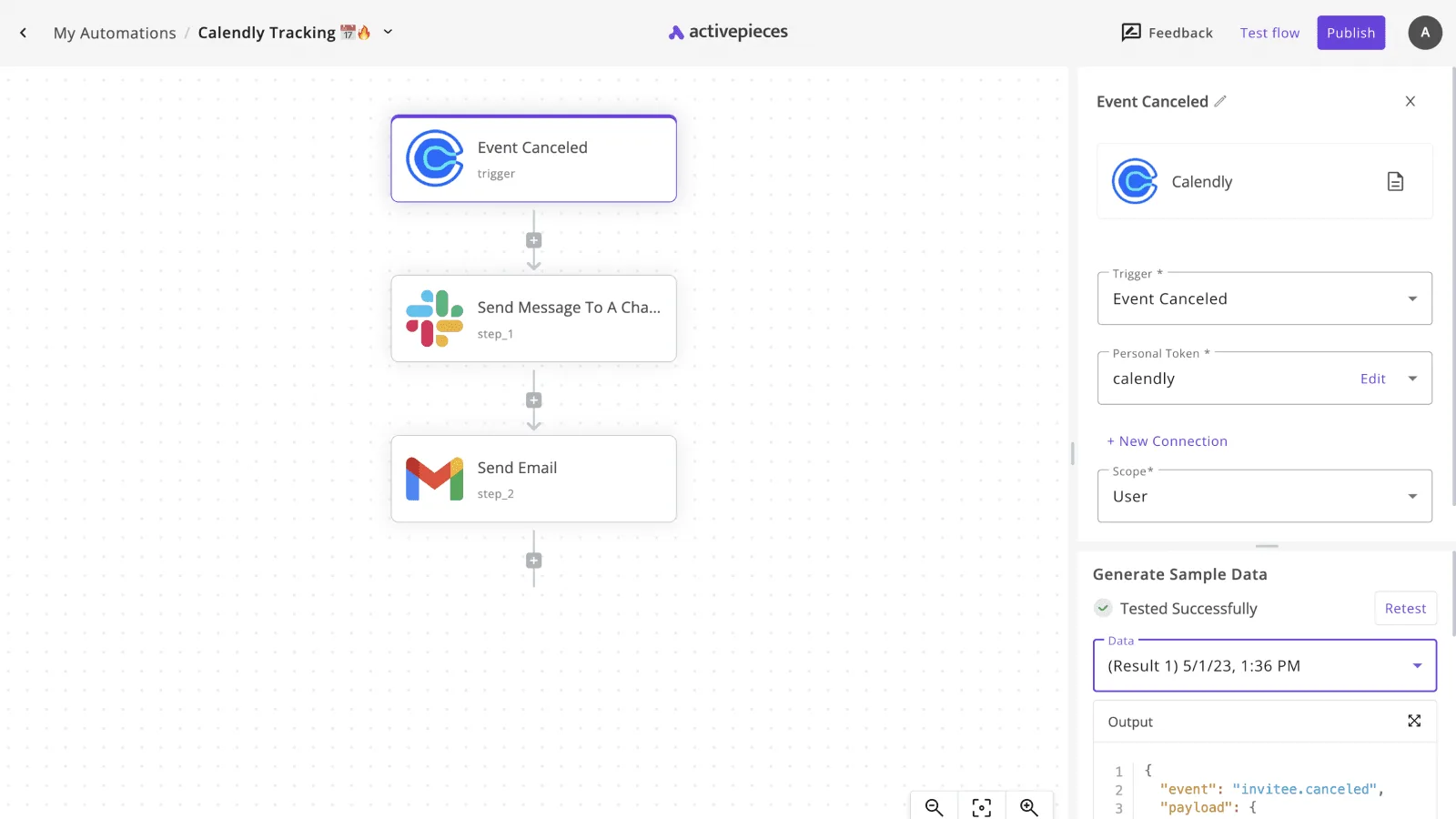
Once the model returns text, the flow passes it to the next step. The screenshot below shows the shape: a Calendly cancellation trigger feeds a Slack message step and a Gmail email step, so one event fans out to two destinations.
![Activepieces workflow builder showing a three-step automation connecting Calendly, Slack, and Gmail with an Event Canceled…](https://ap-marketing-media.fra1.cdn.digitaloceanspaces.com/uploads/57df6f6d-d916-41a0-af35-29f19ea1c3e6/trello-slack-integration-setup-and-limits-2026-s-2150fb50.webp)

Swap the trigger for a new support ticket and the HTTP request to Bedrock for the middle step, and the same layout posts a summary to a Slack channel, emails a draft reply through Gmail, or appends a row to a sheet.

That fan-out costs nothing extra on the Bedrock side, because the model is called once and its output is reused.

The cost to watch on the Activepieces side is credits: the free plan includes 1,000 a month, and when they run out flows wait for the next day's credits, so size long chains against that allowance.

## Cutting a Bedrock bill: the first week checklist

Metered pricing means the same discipline applies on Bedrock: measure what you are charged per input and output token, then change the model and the pricing mode only after you can see where the spend sits.

The seven steps below run in that order, and each one makes the next one safer.

1. Set AWS Budgets alerts and cost allocation tags.
2. Pull Cost Explorer grouped by model.
3. Move non-urgent work to batch.
4. Test a smaller model on real prompts.
5. Enable prompt caching where the model supports it.
6. Review idle provisioned throughput.
7. Recheck the pricing page monthly.

The first two steps change nothing in production, and the rest depend on them.

### Bedrock cost budgets, tags and alerts

Create a budget with an alert threshold so a runaway loop reaches your inbox before it reaches the invoice. Tag each application or team, then activate those tags for cost allocation. Without tags, the bill is one line per service and nobody owns the number.

Next, open Cost Explorer and group by model. This shows which model carries most of the token charges, which tells you where a switch pays off and where it's a rounding error.

### Midweek: model and mode changes

Anything nobody is waiting on, such as nightly summaries or document backfills, is a candidate for batch, which Bedrock prices below on-demand for supported models.

Then replay real prompts, not toy ones, against a smaller model. If quality holds on your own examples, the per-token difference applies to every call from then on.

Where prompts repeat a long shared prefix, prompt caching lets you pay less for the repeated part. It only helps where the model supports it, so check before building around it.

Finally, look at provisioned throughput. It bills for reserved capacity whether or not requests arrive, so an idle commitment costs the same as a busy one.

Close the week by rechecking the pricing page, and put that check on the calendar monthly, because rates and model options change.

## Frequently asked questions

Five questions come up after the pricing mechanics are clear, and the body doesn't settle them. Each answer below is short and names what to check, since rates change.

### Is there a free tier for Amazon Bedrock?

Don't plan around one. Bedrock is metered, so the working assumption is that every input and output token is billed from the first request.

Check the pricing page for any current promotional credits or trial offers on your account, and treat them as a bonus on top of your estimate, not a line in the budget.

### Do I pay extra for Anthropic or Meta models on Bedrock?

You pay the per-token rate listed for that model, and it arrives on your AWS bill. There's no separate seat or license fee to add on top.

Some models sold through AWS Marketplace can be billed differently, so confirm where the charge appears before you commit. The consequence is that your finance team may see the spend under AWS, not under a model maker's invoice.

### Is Bedrock cheaper than calling the model maker's API directly?

Not as a rule. Compare the same model, the same pricing mode, and the same feature set on both sides, then multiply by your real monthly token volume.

Bedrock can win when consolidated AWS billing or existing AWS commitments apply to the spend. It can lose when a feature you need is priced separately. The per-token rate alone doesn't settle it.

### When does provisioned throughput beat on-demand?

When your traffic is steady and high enough that you would use the reserved capacity most of the time. Provisioned throughput is a commitment, so idle hours are still paid for.

Spiky or unpredictable workloads usually cost less on-demand. Divide your expected tokens by the capacity you would reserve, and if utilization is low, stay on-demand.

### How do I estimate Bedrock costs before launching?

Run a pilot with realistic prompts and measure average input and output tokens per request. Multiply by expected requests per month and by each rate, then add any add-ons you plan to enable, such as retrieval or guardrails.

Build a low, expected and high case. The high case shows how much a traffic surge or a model swap would move the bill.

## Related reading

- [Asana Automations: A Quick Guide for Modern Teams](https://www.activepieces.com/blog/asana-automations)
- [GitLab Pricing in 2026: What Teams Pay](https://www.activepieces.com/blog/gitlab-pricing-in-2026-what-teams-pay)
- [HeyGen Pricing for Creators, Marketers and Teams](https://www.activepieces.com/blog/heygen-pricing-for-creators-marketers-and-teams)

## References

- [Tickerr](https://tickerr.ai/provider/aws-bedrock)
