### Where to find your API token in Console Sign in to Console, open Settings, and go to the API & Integrations tab. Your personal API token is listed there. Copy it into a secret store or an environment variable, never into source control, because anyone holding it can run Actors and spend credit on your account. If it leaks, regenerate it from the same page; every script or workflow using the old value will then fail with an authentication error, so rotate during a quiet window and update each consumer. Details are in the [Apify integration docs](https://docs.apify.com/platform/integrations/api).  ### Which plans include API access Whether you can call the API is not a plan question, because **Free, Starter and Scale all include API access**. The plan you pick is a question of usage and support. Where plans differ is monthly price, prepaid usage credit and support level. Those figures change, so read them on [apify.com/pricing](https://apify.com/pricing) rather than from a copy here. The practical consequence is that you can build and test the whole loop on Free, then move up only when run volume or support needs justify it. ## Stage 1: Authenticate your first Apify API request Before rate limits or run failures matter, one authenticated request has to succeed. On Apify that's your personal API token sent as a Bearer header to `GET /v2/users/me`. If that call returns your account as JSON, every later call authenticates the same way. Open Apify Console, go to Settings, then API & Integrations, and copy your personal API token. Put it straight into an environment variable rather than a script, because you'll paste it into more places than you expect: test scripts, CI settings, a teammate's setup notes. 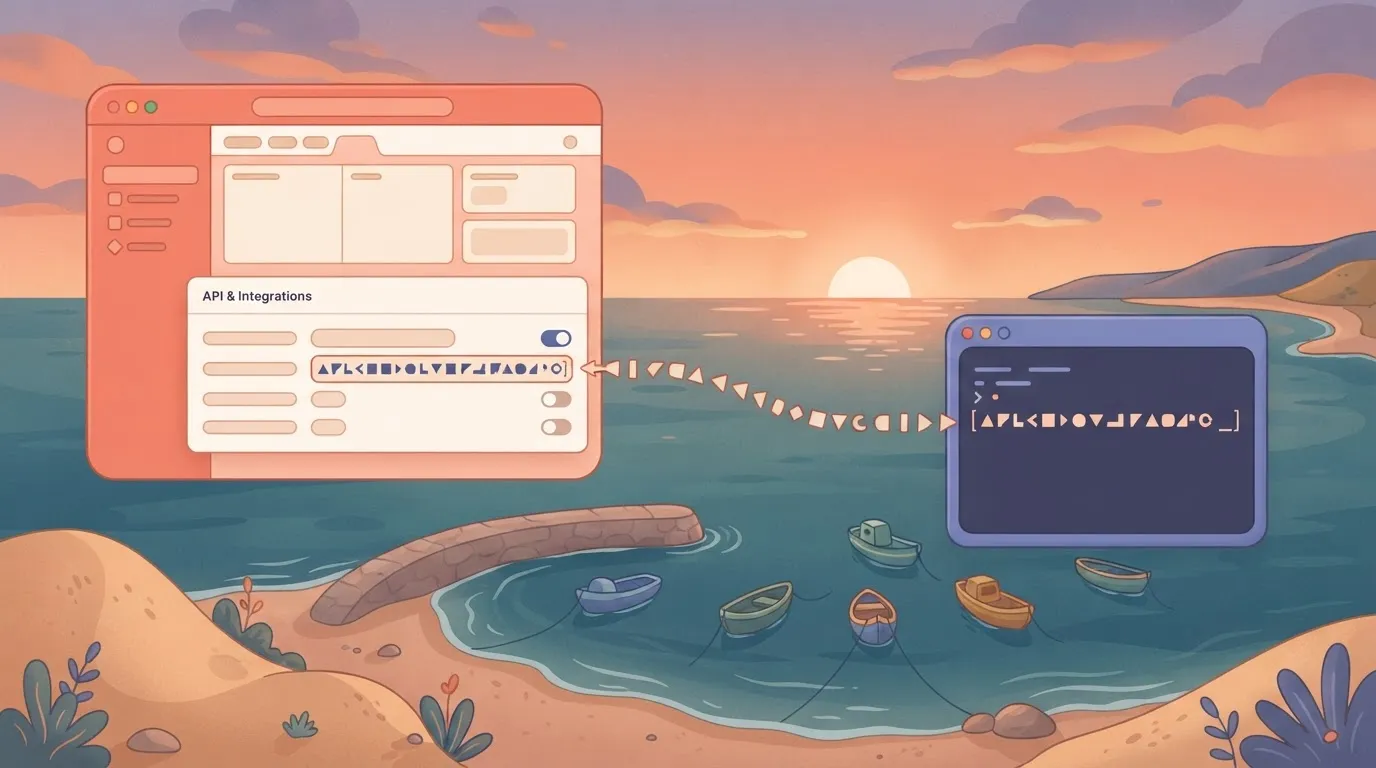 ```bash export APIFY_TOKEN="your-token-here" ``` Doing this now means the token never lands in a file you later commit. ### Send GET /v2/users/me with a Bearer header You need no Actor, no input and no billing for this endpoint, which is why it's the right first test. It does one thing: confirm the token is valid and show whose account it belongs to. ```bash curl https://api.apify.com/v2/users/me \ -H "Authorization: Bearer $APIFY_TOKEN" ``` If the call works, you get a JSON object describing your user. An authentication error means the token was copied incorrectly, the header was malformed, or you're using a token from a different account than the one you meant. Check this before anything else, because **a wrong-account token looks fine** until you can't find the Actor runs you expect. Send the token in the `Authorization` header, not in the URL. Apify's API will accept a token as a query parameter, but URLs end up in proxy logs, browser history and error reports.  A header keeps the secret out of the places people share when debugging. ### Token handling and permissions Anyone holding the token can start runs, read datasets and spend your platform credit, because it acts as you. Treat it like a password: keep it out of source control, out of client-side code, and out of screenshots and chat messages. Once something other than you uses it, this matters more. An agent dashboard like the one below, listing "Blog Author Enricher" and "SEO blog writer" as separate workers, is exactly the situation where a token gets stored in a tool and then used on your behalf by processes you're no longer watching.  !(agents-dashboard.png) Decide up front who and what holds the token, because each agent you add is another place it can leak from. If you suspect exposure, regenerate it from the same API & Integrations page and update every consumer. The old token stops working, which is what you want, but it'll also break any job you forgot about, so keep a short list of where the token lives. ## Stage 2: Run an Actor and read its dataset Four calls, in order, run an Actor. Each one can fail in a way the previous one hides: **a started run isn't a finished run**, and a finished run isn't yet your data. Here's the sequence the next four subsections walk through, with the points where production code has to branch. 1. `POST /v2/acts/{actorId}/runs` with the Actor's input as the JSON body. 2. Read the run `id` and `defaultDatasetId` from the response. 3. Poll `GET /v2/actor-runs/{runId}` until `status` is `SUCCEEDED`. 4. `GET /v2/datasets/{id}/items` to pull the results. Everything that follows is about what to do when a step doesn't return what you expected. ### Start an Apify Actor run with POST Send the Actor's input as the JSON body to `POST /v2/acts/{actorId}/runs`, with your token in the `Authorization` header. A successful call returns immediately with a run object in an initial state, not with results, so treat the response as a receipt.  Store two fields from it straight away: the run `id` and the `defaultDatasetId`. If your process crashes after the POST but before you save them, you have a run billing in the background that you can't find again, so persist both before doing anything else. Decide up front what a failed POST means. A rejected input is a bug to fix, while a rate-limit or server error is worth retrying with backoff. Retrying blindly can start a duplicate run, so log the attempt before you repeat it. ### Poll Apify run status and fetch dataset items Call `GET /v2/actor-runs/{runId}` on an interval and read `status`. `SUCCEEDED` is the only state where the dataset is complete. Treat `FAILED`, `ABORTED` and `TIMED-OUT` as terminal errors that need handling, not as reasons to keep waiting. A loop that only checks for success will spin forever on a run that has already died. Add a ceiling to the loop, so a stuck run surfaces as your error rather than a hung worker. Once the status is `SUCCEEDED`, call `GET /v2/datasets/{id}/items` using the saved `defaultDatasetId`. Large datasets come back in pages, so request them with offset and limit parameters and keep going until a page returns fewer items than you asked for. Reading one page and stopping silently truncates your results. ### Apify sync endpoint, polling or webhooks compared Use polling as the default, the synchronous endpoint for short runs, and webhooks when runs are long and you have a public endpoint to receive them. | Approach | Latency | Reliability for long runs | Code needed | |---|---|---|---| | Synchronous endpoint | Lowest for quick runs, since one request returns the result | Weakest, because the HTTP connection must stay open and can drop or time out | Least | | Polling | Delayed by your poll interval | Strong, because state lives on the server and you can resume | Moderate: loop, ceiling, error branches | | Webhook | Near-immediate once the run ends | Strong, provided your receiver is up and you handle redelivery | Most: a reachable endpoint and verification | Losing the connection on a run that was fine is how the synchronous call fails, and it is the failure you can least afford. A webhook removes polling traffic but moves the failure to your receiver, so pair it with a status check as a fallback. ### Official JavaScript and Python clients Starting a run, waiting for it to finish and iterating dataset items are all wrapped by Apify's official JavaScript and Python clients. They also retry some failed requests for you, which removes much of the boilerplate above. Check what the client retries and what it hands back to you, because a wrapped call can still end in a `FAILED` run that your code must inspect. The clients save you from writing the loop. They don't decide what a failed run should mean for your pipeline. If nobody on the team writes code, the same calls are available another way. The [Activepieces](https://www.activepieces.com) Apify integration runs an Actor and fetches its dataset items with the same API token, so a non-coder gets the start, wait and fetch sequence inside a workflow. It is one of 746 integrations counted from the MIT-licensed open source monorepo, and each run leaves a trace you can read, so integration choice doesn't constrain your architecture. ## API rate limits and pricing by plan **60 requests a second per resource** is the default Apify applies, and a compute unit costs between $0.13 and $0.20 depending on your plan. Both numbers decide how you design retries and how much a failed run costs you. ### Documented rate limits Past the default, a caller gets throttled, so the question is which endpoints deviate from it. According to [Agenticfabriq](https://www.agenticfabriq.com/integrations/apify), run starts and dataset writes are both capped at 400 requests per second. That's nearly seven times the default, so a fan-out that launches many runs will hit your own concurrency limits long before it hits that ceiling. 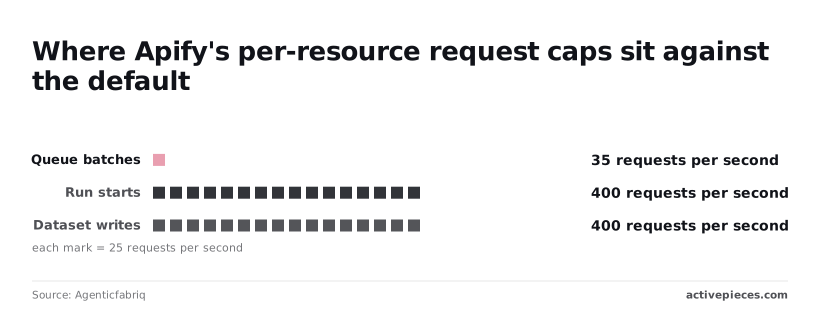 If your crawler pushes URLs into a queue one batch at a time, it's the workload most likely to see throttling, and it needs exponential backoff with jitter on rate-limit responses. Without it, a burst becomes a retry storm. Figures checked 2026-11-01. ### What a call costs: compute units, results and events Most of what you pay for is compute units, and the rate per unit depends on the plan. The point to take from it is that the same run costs measurably less on a higher tier. Upgrading from Free to Starter doesn't lower your unit rate, since both pay $0.20 per compute unit, which means pricing alone won't justify the switch. Scale pays $0.16, which is 20% less per unit, making it worthwhile for operators who maintain regular workloads. **Business pays $0.13, 35% less than Free**, meaning committed operators achieve the lowest per-unit cost. Those discounts matter most for runs that fail and restart. A retry that re-executes a long scrape bills compute again, so a pipeline that retries blindly on Free pays $0.20 for every wasted unit, against $0.13 on Business. ### Plan tiers compared on price, usage and run limits Only at Scale and Business does the per-unit rate drop, so the practical comparison is where your monthly consumption makes a tier worthwhile. A pipeline that burns few compute units gains little from the lower rate, since the saving is a fraction of a small bill. A pipeline running scrapers all day gains a lot, because the 35% gap between Free and Business applies to every unit. Before you commit, check the plan's included usage and concurrent-run limits on the [Apify help centre](https://help.apify.com/en/articles/5136728-subscribing-to-the-apify-platform), since those caps, not the unit price, are what stall a pipeline mid-batch. Budget for retries as well: estimate your normal compute usage, then add the units a failed-and-rerun scenario would consume. ## Apify API errors and which to retry Retry only the **errors that can clear on their own** (429, 5xx and a request timeout). Every other failure repeats identically on each attempt and spends the compute you just budgeted. The table shows each failure's cause, its fix and whether a retry helps, so you can encode the rule once instead of rediscovering it in production. | Status | Cause | Fix | Retry? | Docs | |---|---|---|---|---| | 400 | Input fails the Actor's schema | Correct the input | No | [API reference](https://docs.apify.com/api/v2) | | 401 | Token missing or invalid | Send a valid token | No | [API reference](https://docs.apify.com/api/v2) | | 403 | Token lacks permission | Use a token with access | No | [API reference](https://docs.apify.com/api/v2) | | 404 | Wrong or deleted ID | Check Actor, run or dataset ID | No | [API reference](https://docs.apify.com/api/v2) | | 408 | Request timed out | Resend the request | Yes | [API reference](https://docs.apify.com/api/v2) | | 429 | Rate limit hit | Back off, then resend | Yes | [API reference](https://docs.apify.com/api/v2) | | 5xx | Server-side error | Wait, then resend | Yes | [API reference](https://docs.apify.com/api/v2) | | Run FAILED | Actor crashed or errored | Read the run log, fix input or code | Only after a fix | [Actor runs](https://docs.apify.com/platform/actors/running/usage-and-resources) | | Run TIMED-OUT | Run exceeded its timeout | Raise the timeout or narrow the job | Only after a change | [Actor runs](https://docs.apify.com/platform/actors/running/usage-and-resources) | | Out of memory | Run needed more memory than allocated | Raise the memory setting | Only after a change | [Actor runs](https://docs.apify.com/platform/actors/running/usage-and-resources) | Up to 8 times, starting at 500 ms, is how often the official client retries 429 and 5xx, so a short rate-limit burst usually resolves without your code seeing it. If you call the REST API directly, you have to write that loop yourself. In [Activepieces](https://www.activepieces.com) you describe the start, wait, page and failure-branch sequence to the built-in chat, and what it publishes is a live flow, the very thing an engineer would have wired by hand, governed by the RBAC and audit logs every other flow sits under. Each run of it leaves a trace with its state and error that anyone on the team can read, no certification needed. You don't hire for this, you describe it. On a 401 the token is absent or wrong, and on a 403 it's valid but not allowed to do this. A 404 almost always means a mistyped or deleted ID. None of them improves on retry, so fail fast and surface the message. Because each Actor validates input against its own schema, a 400 is specific to the Actor you called. Read the error body, fix the field it names, and test the corrected input before rerunning. Back off exponentially and add jitter so parallel workers don't retry in lockstep. Cap the attempts, because an unbounded loop against a real outage turns a failure into a compute bill. Just because a request was accepted doesn't mean the run succeeded. Poll the run's status, and treat FAILED, TIMED-OUT and an out-of-memory failure as terminal states with their own fixes. Once a run succeeds, read its dataset in pages with `limit` and `offset`, so a large result set never has to arrive in one response. ## Call the Apify API without code using Activepieces Activepieces lets you make the same Apify calls as a flow you assemble on a canvas. Those are starting an Actor run, waiting for it and paging through the dataset, using the API token you already have. 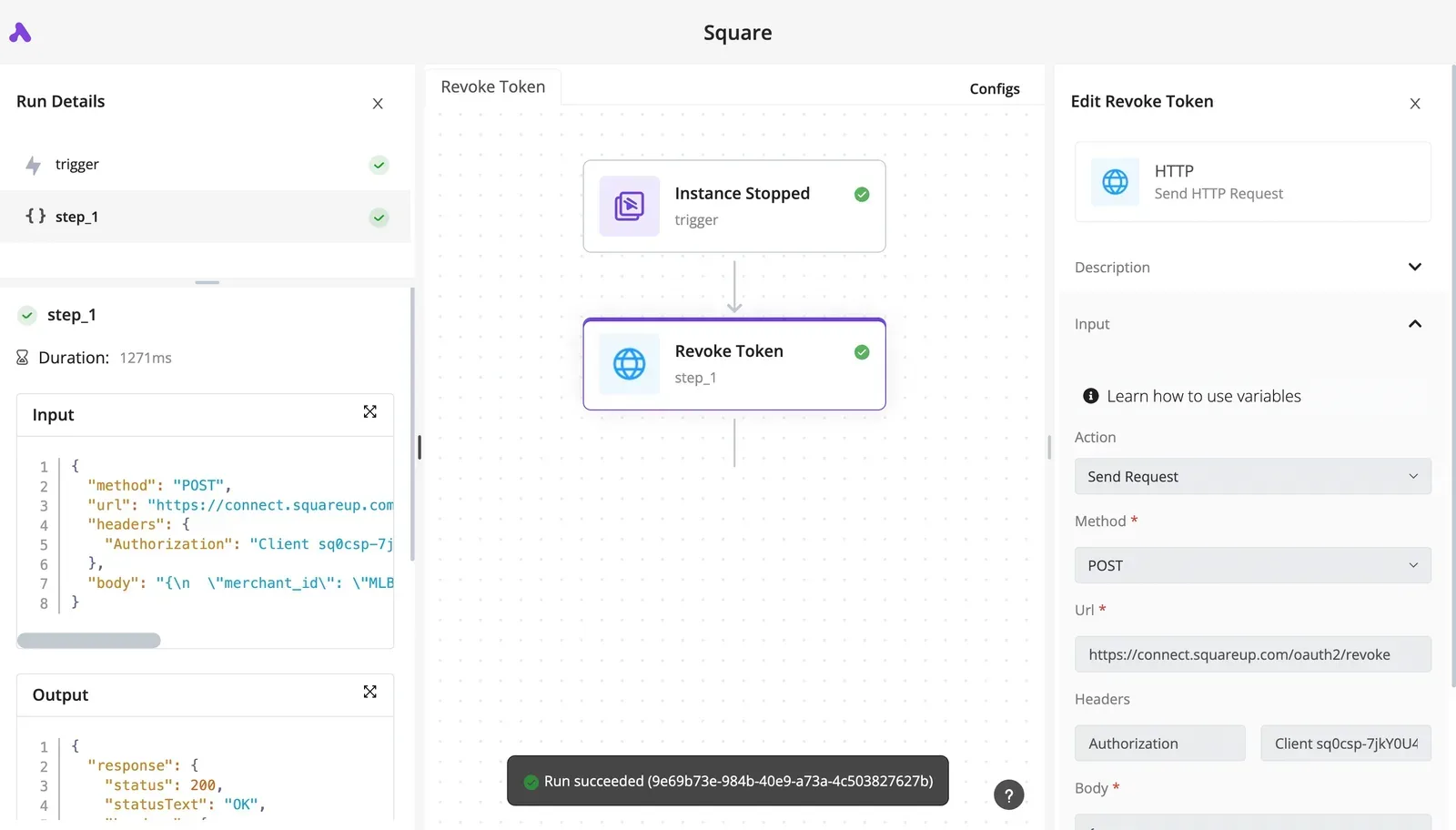 Flows are unlimited on every plan, including free, and a run costs 1 credit however many steps it has, so the free plan's 1,000 credits a month cover the whole sequence a thousand times over before you pay for anything. The retry, polling and pagination logic from the last section becomes steps you can see, and each run leaves a trace you can read. ### Connect Apify with your API token Add the Apify integration to a step and create a connection, pasting the same personal API token you used in your code. Treat it as you would in a script: it carries your account's permissions, so a leaked flow export is a leaked key.  Rotate it in one place instead of editing every flow that uses it: global connections come with the Team plan, $200 a month flat with 25 users included. Teams that keep tokens in a vault can use the secret managers included on the Ultimate plan. If a run later fails with an authentication error, the connection is the first thing to check, because an expired or regenerated token fails every step that references it. ### Build the scheduled run-and-save workflow This flow is a working shape for the job. It has a schedule trigger, a Google Sheets read, a loop, and then the calls and writes per item, ending in a router that decides what happens on success or failure. MoneyGram, Moneypenny, Alan and FundingSocieties run Activepieces in production.  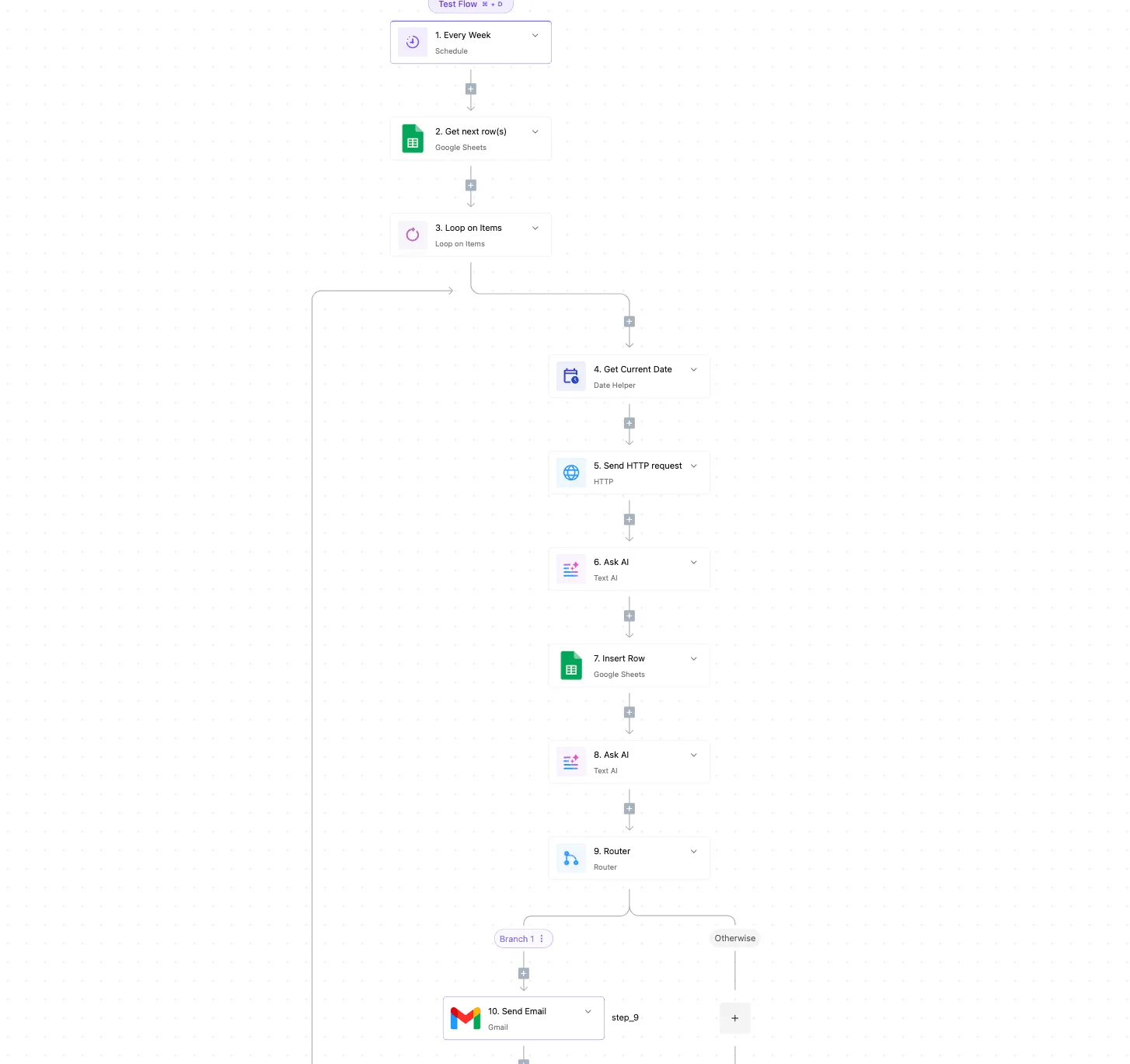 What matters in that layout is the router at the end. A flow that only draws the happy path is the same naive script in a different costume, so give the failure path its own branch and send yourself an email there. For the Apify version, the order is: 1. Trigger on a schedule. 2. Run the Actor with its input, and have the step wait for the run to finish rather than assuming it did. 3. Get the dataset items from that run. 4. Insert the rows into your sheet. 5. Route on the outcome, so a failed or timed-out run notifies you instead of silently writing nothing. Open a finished run and you can see each step's input, output and error. That trace is how you check run state yourself instead of reading logs someone else wrote. ### When to use the HTTP request action instead When the Apify integration doesn't expose the endpoint or parameter you need, such as a `limit` and `offset` pair on a large dataset, use the HTTP request action. You send the same authenticated request you'd write in code, and the response lands in the trace like any other step. The trade-off is that you own the details again: status handling and pagination are yours to configure, so reach for it only where the integration falls short. On Monday, pick one Actor you already run by hand, rebuild it as this flow with a failure branch, and let it run once on schedule. Then open the trace and confirm you can read the run state and any error without touching code. ## Related reading - [Telegram Bot API: Rate Limits, File Sizes, Errors](https://www.activepieces.com/blog/telegram-bot-api-rate-limits-file-sizes-errors) - [Airtable API Rate Limit: How to Avoid 429 Errors](https://www.activepieces.com/blog/airtable-api-rate-limit-how-to-avoid-429-errors) - [LinkedIn API Access, Limits and Errors in 2026](https://www.activepieces.com/blog/linkedin-api-access-limits-and-errors-in-2026) ## References - [Apify help centre](https://help.apify.com/en/articles/5136728-subscribing-to-the-apify-platform) - [Agenticfabriq](https://www.agenticfabriq.com/integrations/apify)**Treat the run status, not the HTTP 200 on the start call, as the signal that work succeeded.