# AssemblyAI Pricing 2026: Rates and Add-On Costs
By Alex Kim · 2026-10-31 · Source: https://www.activepieces.com/blog/assemblyai-pricing-2026-rates-and-add-on-costs
---
Per hour of audio, AssemblyAI bills from $0.15 for Universal-2 and Universal Streaming up to $0.45 for 3.6 Pro Realtime.
It prices add-on features separately, so you'll pay more than these base rates if you use any, a detail worth checking whether you call the API directly or wire it into a workflow tool like [Activepieces](https://www.activepieces.com).
AssemblyAI pricing is the usage-based fee structure for its speech-to-text API, which charges a per-hour base rate for each transcription model, bills add-on features separately, and sets concurrency limits and free-tier terms that determine the total cost.
You send audio, and you get back a transcript plus optional analysis such as speaker labels or sentiment. That is what AssemblyAI, a speech-to-text and speech-understanding API, does. We checked the rates below on its pricing page in October 2026.
### The plan and rate table: free tier, pay-as-you-go, enterprise
Whichever model you pick, its hourly rate is the floor, because the add-ons are separate line items that sit on top. Four models carry a published hourly rate, and the table lists each one we priced.
| Row | Mode | Price per hour | What it includes |
|---|---|---|---|
| Universal-2 | Batch | $0.15 | Pre-recorded file transcription |
| Universal-3.5 Pro | Batch | $0.21 | Higher-tier pre-recorded transcription |
| Universal Streaming | Realtime | $0.15 | Live transcription of an audio stream |
| Universal-3.6 Pro Realtime | Realtime | $0.45 | Higher-tier live transcription |
| Diarization | Add-on | Priced separately | Labels which speaker said what |
| Sentiment | Add-on | Priced separately | Sentiment scoring of the spoken content |
| Keyterms | Add-on | Priced separately | Biases recognition toward your vocabulary |
| Medical mode | Add-on | Priced separately | Tuned recognition for clinical terms |

_Prices and plan limits checked against [assemblyai.com](https://assemblyai.com/partners/aws) on October 31, 2026._
At $0.45 per hour, 3.6 Pro Realtime costs three times Universal-2. It also costs more than double [3.5 Pro batch at $0.21](https://www.assemblyai.com/pricing).
On 1,000 hours of audio, that's $450 against $150 before any add-on, a $300 gap created only by choosing the higher realtime tier.
You won't find free-tier credit or enterprise terms in this table, because they aren't flat per-hour rates.
### Per-second billing, models and what each plan includes
Short clips cost proportionally little, because billing is per second of audio, so the hourly figures are a convenient unit, not a minimum charge. That also means a workload of many short calls isn't penalized for rounding up to a full hour.
Don't treat the batch and streaming rows as interchangeable. Universal-2 and Universal Streaming share a $0.15 rate but serve different jobs: files after the fact versus live audio.
If the connector your pipeline needs doesn't exist, you'd normally wait on the vendor's roadmap.
[Activepieces](https://www.activepieces.com) has 746 integrations, counted from the open-source monorepo, and about 60% of them were contributed by the community, so a missing connector is something you can build and keep in your own instance rather than wait for.
The rate still follows the audio you submit, not the tool that submits it.
Price the mode first and the add-ons second. A diarized, keyterm-boosted realtime call and a plain batch transcript share a vendor but not a bill.
## What AssemblyAI costs for three realistic workloads
Put 100 hours of podcasts, 2,000 hours of calls and a fleet of live agents through the same vendor and you get three very different bills.
The archive costs $21 a month at the base rate, the call-center queue costs $420 before add-ons, and you can't price live agents from hours alone.
### AssemblyAI pricing for a 100-hour podcast archive
$21 a month is the base transcription cost, according to [Cekura's breakdown of AssemblyAI pricing](https://www.cekura.ai/blogs/assemblyai-pricing). That works out to $0.21 per audio hour, so the base rate is cheap enough that a small team won't notice it.
Adding diarization lifts the bill to $23. It labels who is speaking and costs two cents per hour, and it's the add-on a multi-host show needs to make a transcript usable.

Adding summarization on top costs another $0.02 per hour at the default low effort.
### Call-center QA: 2,000 hours with add-ons
At $0.21 per hour, 2,000 hours of recordings cost $420 a month at base.
You must separate agent from customer, so call-center QA almost always needs diarization, and summarization to make calls reviewable.
Using the per-hour increments implied by the podcast figures, those two add-ons raise the rate to $0.26 per hour, or $520 a month. That's $100 more, again 23.8%.

Because the add-ons are per-hour surcharges, the percentage doesn't shrink as volume grows. **A budget built on the headline rate will be short by almost a quarter at any scale.**
### Live streaming: minutes of concurrent audio
Once agents stream, the hours-per-month model breaks. The cost depends on how many connections are open at once and for how long, so a quiet overnight queue and a Monday-morning peak cost very different amounts.

When peak traffic arrives, concurrency limits decide whether the service handles it or queues it.
Price it from your peak concurrent sessions, your average session length and the plan's stated concurrency ceiling, not from a monthly hour count.
## Hidden costs and limits that change the AssemblyAI bill
Beyond the base hourly rate, five levers move the bill, and the concurrency ceiling you just priced is only one of them. The list below gives each lever's cost or limit, so you can check which ones your workload actually trips:
- Diarization adds $0.02 per hour in batch and $0.12 per hour in realtime, so a live product with speaker labels **pays six times the batch surcharge**.
- Keyterms add $0.05 per hour, which is two and a half times the batch diarization charge on every hour where you boost vocabulary.
- Concurrency is 5 streams on the free tier and 100 on paid plans, so a team expecting 40 simultaneous calls can't validate its design on free.
- The $50 credit is a testing ceiling, so a pilot with several add-ons enabled burns through it faster than the headline rate suggests.
- Model choice sets the base line that every add-on sits on, so picking the wrong tier is the most expensive error to find late.

### Add-ons that stack on the base rate
Switch on batch diarization and keyterms, and $0.07 per hour lands on top of the base rate before you enable any other feature. AssemblyAI bills add-ons per audio hour, and they're additive.
The surcharge is small per hour and large at volume, so multiply it by your monthly hours before comparing against a competitor's all-in price.
Realtime is where it bites: the diarization surcharge there is $0.12 per hour, so a live workload and a batch workload with identical audio volume produce different bills.
### Concurrency and rate limits by plan
With a ceiling of 5 streams, AssemblyAI refuses or queues the sixth simultaneous session, whatever your monthly hours are. Size against your peak, not your average.
Find out before launch whether AssemblyAI can raise the 100-stream paid ceiling and what that costs, because a support ticket during an outage is a poor time to learn.
### AssemblyAI free credits, minimums and volume discounts
Treat the $50 credit as a budget for one test plan, and write down how many hours it covers at your add-on mix.
If your company already holds an AWS spend commitment, [AssemblyAI](https://assemblyai.com/partners/aws) states that purchases through AWS Marketplace can apply 100% of your AWS PPA commitment toward usage. The effective cost may be lower than list.
I have no confirmed figures for billing minimums or volume tiers. Get both in writing from sales, because they decide the rate at your real scale.
## AssemblyAI against Deepgram, OpenAI and Google on price
Don't compare a single headline rate, because **the four vendors don't meter the same thing**. The table below sets out what each one bills on and what it bundles, and the takeaway is that you must price your own audio mix, not read one column.
I've left out per-hour rates and free allowances because vendors revise both often. Take them from each pricing page on the day you decide, and record the date.
| Option | Billing basis | Streaming | Features that change the bill |
|---|---|---|---|
| AssemblyAI | Per hour of audio, with add-ons billed separately | Yes | Each speech-intelligence add-on, plus concurrency limits |
| Deepgram | Per audio duration, by model tier | Yes | Feature flags and model choice |
| OpenAI transcribe | By model; GPT-Transcribe for batch, GPT-Realtime-Whisper for streaming | Yes, through the realtime model | Few bundled extras; you build the rest |
| Google Cloud STT | Per unit of audio, by model and feature | Yes | Model tier and recognition features |
| Self-hosted Whisper | GPU time you pay for, not audio | Not natively | Everything, including diarization, is yours to run |
Read the billing-basis column first. Rounding rules and add-on metering move the total more than a few cents of difference in the base rate.
### When a cheaper rate is not the cheaper bill
In a voice agent, transcription is rarely the line to optimize. [Paygent's calculator](https://www.withpaygent.com/calculator) puts text-to-speech at 66% of per-minute cost and telephony at 25%. Speech-to-text and the LLM are each 4%.

In a voice agent, transcription is rarely the line to optimize.
So halving your transcription rate **saves about two percent of the call**, while a dearer speech-to-text vendor with better accuracy costs almost nothing extra.
For batch work such as call archives or meeting recordings, the picture reverses. There, transcription is the whole bill, and add-ons, concurrency caps and per-request rounding decide it.
### Self-hosting Whisper instead of the AssemblyAI API
Idle or busy, a GPU instance bills the same, whereas an API bills only for audio processed. That is why self-hosted Whisper is cheaper only when you keep a GPU busy.
At low or spiky volume the API wins. At sustained high volume the GPU can win, provided you count the engineering time it takes to run it.
Speaker labels, streaming, redaction and scaling become your work, because self-hosting drops what the APIs bundle. Price those too before you call it the cheap option.
## Send AssemblyAI transcripts into your tools with Activepieces
Once you have priced your workload in each vendor's calculator, treat Activepieces as plumbing that sits downstream of that number. It can start a transcription job and route the finished text and summary to Slack, a CRM or a spreadsheet.
Its core is MIT-licensed and it ships with 746 integrations, so those destinations are already built, and it doesn't change what AssemblyAI charges you.
### What the workflow does
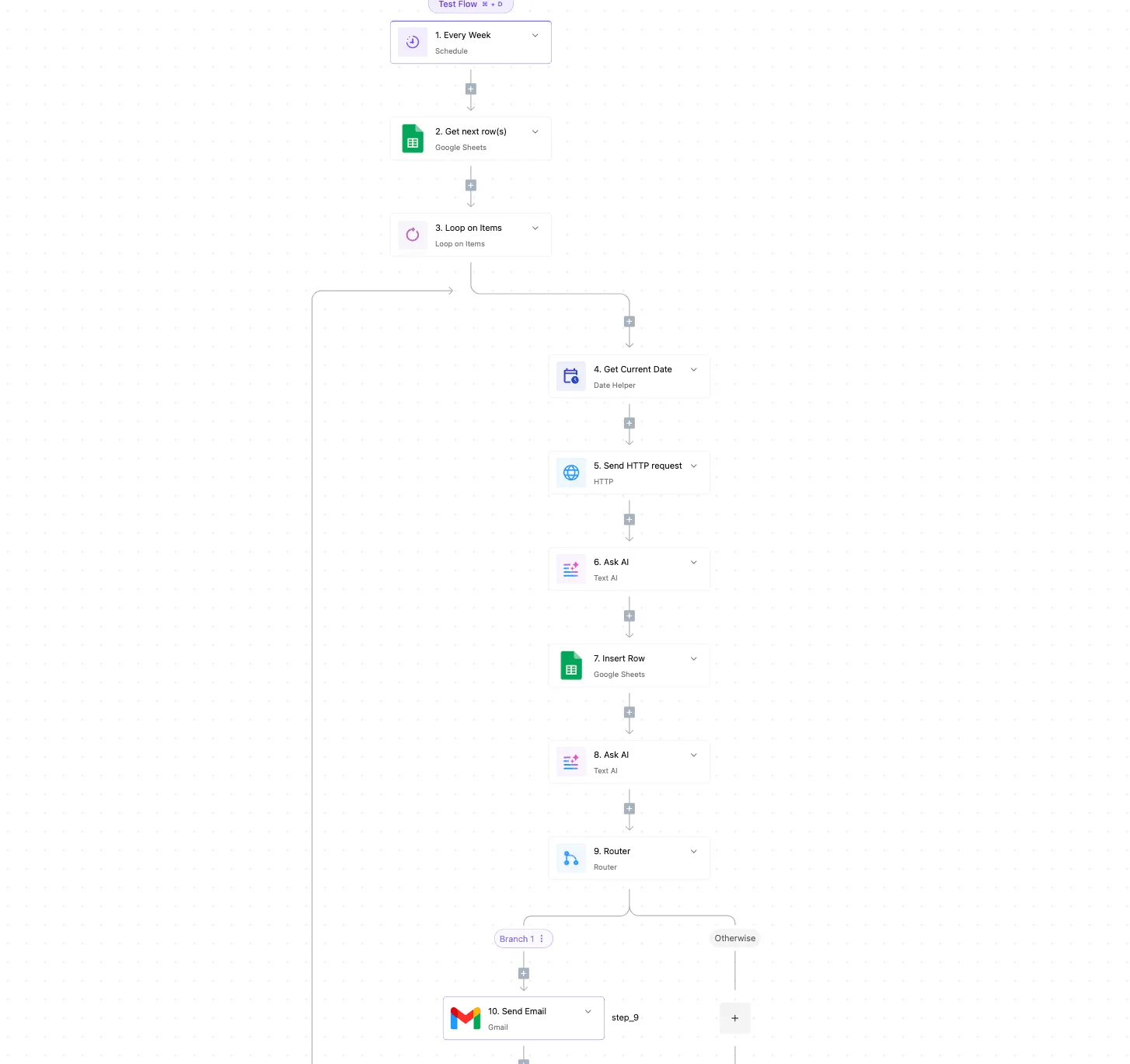
Below is a generic "Test Flow" with ten numbered steps, not an AssemblyAI template. It shows the building blocks you'd reuse: a weekly schedule trigger, Google Sheets steps that read and write rows, a loop over items and an HTTP request step.
Further along the canvas are two AI text steps, a router with a "Branch 1" and an "Otherwise" path, and a Gmail send step at the end.
Read it as a pattern. The HTTP request step is where an AssemblyAI call would go, and the loop is what lets one run process a whole sheet of audio URLs rather than a single file.
For a transcription pipeline, the order looks like this:
1. A schedule or a new row in a sheet triggers the flow.
2. The loop takes each audio URL in turn.
3. An HTTP step submits the URL to AssemblyAI, with whichever add-on features you've chosen, and retrieves the finished transcript.
4. A router sends the result onward: a summary to a Slack channel, a record to the CRM, or a row appended to a sheet. The "Otherwise" path can catch failed or empty results.
Nothing about the HTTP step is special: it's a plain API call. Every parameter you set in it, such as speaker labels or summarization, is still an AssemblyAI feature and is billed as one.

### Where it adds cost or doesn't
Your audio bill is whatever AssemblyAI's rate and add-ons produce, because Activepieces adds no per-minute charge to the transcription itself.
What it can affect is the cost around that bill: a run is 1 credit however many steps the flow has (AI steps aside), and the free plan includes 1,000 credits a month.

Any AI text step inside the flow, like the two in the canvas, calls a separate language model and is billed by that provider. A summary produced there is a second line item rather than part of the transcript price.
It also does nothing for concurrency limits. A loop that submits many files in quick succession can run into the same cap on simultaneous requests that a script would, so you'd need to pace the loop yourself.
Hosting and run limits are separate from anything AssemblyAI charges: the free plan allows unlimited flows, and when its 1,000 credits run out, flows stay on and runs wait until the credits refresh.

## Frequently asked questions
What the body leaves open is covered below, and each answer points to AssemblyAI's own pages, because I can't confirm figures that change.
### Is AssemblyAI free to try?
New accounts start with free credit, not a permanent free allowance. Two terms decide whether it covers a real test: whether the credit expires, and whether it applies to every add-on or only to base transcription.
If you plan to benchmark with add-ons switched on, check both before you upload a representative sample, or the credit may run out before the test finishes.
### Does AssemblyAI charge per second or per hour?
Per hour of audio is how the headline rate is quoted, but the meter underneath runs on audio duration. Confirm the billing granularity on the pricing page, because rounding behavior matters when your workload is many short clips, such as voicemails or call-center snippets.
A pipeline that uses both modes has two rates to model, not one, because streaming is listed separately from pre-recorded transcription.
You can start without a commitment, because self-serve usage is pay-as-you-go. Volume discounts, higher concurrency and negotiated terms sit behind a sales conversation.
If your peak load needs more simultaneous jobs than the default allows, you may be forced into that conversation sooner than your monthly spend suggests.
Work through your own workload in this order:
1. Measure total audio hours per month, separating pre-recorded files from live streams.
2. List every add-on you intend to enable, since each can be billed on top of the base rate.
3. Find your peak number of simultaneous jobs and compare it with the concurrency limit on your plan.
4. Run a small sample through the API with those exact settings and compare the usage shown in your dashboard against your estimate.
5. Price the same hours at Deepgram, OpenAI and Google with their equivalent features enabled.
Step four matters most. It catches the gap between the advertised rate and the metered one before you scale.
Use AssemblyAI's pricing page for rates and its documentation for rate and concurrency limits. Your account dashboard shows what your plan actually allows.
Treat any third-party comparison, including this one, as dated the moment it's published. Rates, credit terms and limits can change, and the vendor's own pages are the only source that reflects what you'll be charged.
## Related reading
- [CrewAI Pricing for 2026 and What Your Workload Costs](https://www.activepieces.com/blog/crewai-pricing-for-2026-and-what-your-workload-costs)
- [Tabnine Pricing 2026: Plans, Monthly Cost and Limits](https://www.activepieces.com/blog/tabnine-pricing-2026-plans-monthly-cost-and-limits)
- [Is LiteLLM Enterprise Pricing Worth the Monthly Bill?](https://www.activepieces.com/blog/is-litellm-enterprise-pricing-worth-the-monthly-bill)
## References
- [Cekura](https://www.cekura.ai/blogs/assemblyai-pricing)
- [AssemblyAI](https://www.assemblyai.com/pricing)
- [Paygent](https://www.withpaygent.com/calculator)