# Augment Code Pricing 2026: Plans, Credits & Costs
By Bethany Morrison · 2026-10-28 · Source: https://www.activepieces.com/blog/augment-code-pricing-2026-plans-credits-costs
---
According to [Augmentcode](https://www.augmentcode.com/pricing), Augment Code pricing is a monthly fee that buys an allowance of credits, not unlimited use:
- Standard is $20
- Business is $100
- What you get for that money depends on how many credits your tasks consume
- A user whose tasks demand few credits will stretch the month's allowance far longer than one whose work is credit-intensive

Read the headline price as the size of the allowance's container, not how long it lasts.
A light user and an agent-heavy user pay the same $20 and reach the ceiling at very different speeds, so the number to compare is credits spent per finished task.
[Activepieces](https://www.activepieces.com) meters the other way: a run is 1 credit however many steps it has, so a ten-step flow costs what the two-step workaround did, and splitting work into smaller steps never raises the bill.
### The plan table, checked on the date of writing
I checked the table below against augmentcode.com/pricing on 28 October 2026. Only the monthly price and the Business seat cap are published as hard figures.
Treat every "not published" cell as a question to put to sales before you budget, because those are the cells that decide your real bill.
| Plan | Monthly price | Included usage | Seats | Features | Overage rules |
|---|---|---|---|---|---|
| Standard | $20 | not published | not published | not published | not published |
| Business | $100 | not published | Up to 50 | not published | not published |
| Enterprise | not published | not published | not published | not published | not published |
If your team expects to grow past 50 seats, Business tops out there pushes you toward Enterprise, where no price is listed. That makes Enterprise a negotiation, and you can't model it from the page.
### What changed in the move to credits
When pricing moved from counting messages to metering credits, the risk shifted onto you. A message count is easy to predict, since you know roughly how many requests you send.
Count credits and the total depends on how much work each request triggers: an agent that reads many files, retries, and runs long chains of steps will spend more than a short question does.
I have no published conversion between the old allowance and the new one, so don't assume your old usage maps onto the new plan at the same level.
### What a credit actually buys
The page doesn't say how many credits a typical agent run uses, because a credit buys a unit of metered work, not a fixed task. Without that, the only reliable method's to measure your own workload:
1. Pick one real task, such as a bug fix across several files.
2. Run it and record the credits it consumed.
3. Multiply by the number of such tasks you expect each month.
4. Compare that total with the plan's allowance.
**If the total exceeds the allowance, the overage rules matter more than the sticker price, and they're the one thing the page leaves unstated.**
## What each plan costs at realistic usage
Whatever the plan name, your monthly bill depends on the mix of task sizes. The first sentence of any quote should be your credits per month divided by the allowance.
I have no confirmed plan prices or allowances to put against that, so what follows is arithmetic on task sizes alone.
Per [Prompt2tool](https://prompt2tool.com/tools/calculators/augment-code-cost-calculator), credits per task run at roughly 293 for a small task, 860 for a medium one and 4,261 for a complex one.
A complex task costs about 14.5 small ones and about five medium ones, so a few large jobs outweigh dozens of small ones.
Those are approximate averages, and your repository, prompts and retry habits will move them. Treat every total below as an estimate, not a quote.
### Solo developer, light and heavy months
Take a light month of 20 small tasks: 20 × 293 is 5,860 credits, so a light month for one person costs 5,860 credits. A heavy month of 10 complex tasks is 10 × 4,261, or 42,610 credits, according to Prompt2tool.
That's more than seven times the light month from half the task count, so a developer who "only ran ten things" can still be the one who exhausts an allowance. Count your complex tasks first, because they set the bill.
### Five-person team on shared credits
If the team draws from one pool, the pool is the sum of everyone's habits. Five people each running 20 small tasks use 29,300 credits, which means the per-person cost doesn't decrease with team size.
If just one of them runs 10 complex tasks, that person alone adds 42,610 and outspends the other four combined. A shared allowance means **one heavy user's month becomes everyone's overage**, and the sticker price says nothing about who's draining it.

### Where the break-even between plans falls
When your monthly credit total passes a plan's allowance and the next tier becomes cheaper than paying overage, you've reached break-even.
Work it out in tasks: divide the allowance by your average credits per task.
At the small-task average of 293, an allowance buys about 14.5 times as many tasks as at the complex average of 4,261, so the same plan can feel generous or stingy depending on your work.

Before you pick, do three things:
1. Log a typical month and sort tasks into small, medium and complex.
2. Multiply each count by the matching credit figure and add them.
3. Ask the vendor in writing what happens past the allowance, since the page doesn't say.
## Hidden costs and limits that force an upgrade
Run out of credits mid-month and you've hit the limit most likely to push you up a tier, and the model you pick decides how soon it happens. Five limits matter, each with a workaround:
- **Credits run out before the month does**, and work stalls or gets metered. Check your burn at the end of week one and project it forward.
- A top-up fixes one bad month, while an upgrade fixes a recurring one. If you top up twice in a row, upgrade.
- Unused credits don't roll over, so a light month buys nothing. Don't buy headroom you won't use.
- Pooled credits let one heavy user drain the team's allowance, whereas per-seat credits strand light users' leftovers. Ask which model your plan uses before you assign seats.
- A pricier model raises the burn per task. Default to a cheap model and escalate only when a task fails.
### Credit burn by task type and model
Per [Augment Code](https://www.augmentcode.com/blog/gemini-3-1-pro-now-available-in-augment-code), Haiku 4.5 burned 88 credits per task when measured, so it stretched an allowance furthest. Gemini 3.1 Pro burned 268 and Sonnet 4.5 burned 293, roughly three times Haiku 4.5.
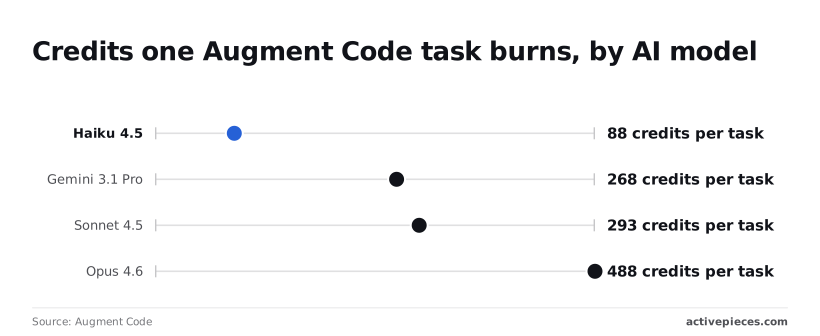
**Opus 4.6 burned 488, about 5.5 times Haiku 4.5**, so a plan that covered a month of Haiku 4.5 work covered under a fifth as many Opus 4.6 tasks.
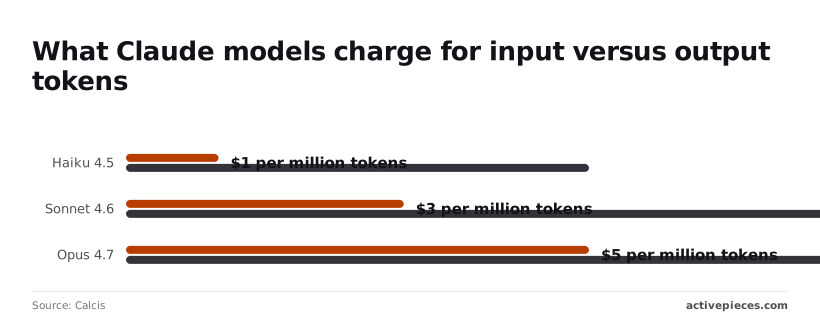
Look to the underlying API rates for the reason behind the gap. [Calcis](https://www.calcis.dev/pricing/anthropic) listed Haiku 4.5 at $1–$5 per million tokens, Sonnet 4.6 at $3–$15, and Opus 4.7 at $5–$25; check current Claude models such as Haiku 5.5 and Sonnet 5.5 for today's rates.
The first number is input and the second is output, so agent runs that write a lot of code sit nearer the top of each range.
### Top-ups, rollover and pooled credits
Price a plan by credits per task times tasks per month, then compare it with the allowance. At the Opus 4.6 rate measured earlier, 300 tasks would come to about 146,000 credits, and the headline price says nothing about whether the plan covers it.
Hitting a cap is common. The Pragmatic Engineer survey, [as reported by HiTechies](https://www.hitechies.com/ai-developer-tools-cost-roi-budget-2026/), found about one in five engineers change tools or plans over usage limits.
Its narrowest bucket, those who switched, upgraded or moved to API, was 1%. **Upgrading is the exception**, so most people are rationing instead, and you should budget for the burn before you hit the wall.
Don't stop at credits. Before you commit, list the features you rely on, such as team administration or security controls, and confirm which tier includes each one.
The day you need a feature locked to a higher tier, a cheap plan turns into the expensive one.
## Augment Code versus Cursor, Claude Code, GitHub Copilot
Against the other three, Augment Code isn't clearly cheaper or dearer. Its price buys credits while the others sell seats, requests or tokens, and those units don't convert one-to-one. The tier you were pushed into is only half of the cost.
The day you need a feature locked to a higher tier, a cheap plan turns into the expensive one.
### Entry and top-tier prices side by side
I'm not printing dollar figures here. They change often, and a stale number in a comparison is worse than none. Read each vendor's own pricing page on the day you buy.
What the table shows is the shape of each plan, so you know which question to ask of each page.
| Tool | Entry price shape | Top paid tier shape | Metering | At the limit | Team pricing |
|---|---|---|---|---|---|
| Augment Code | Monthly fee that includes a credit allowance | Larger allowance at a higher fee | Credits | Credits run out; you top up or move up a tier | Per-seat plans on the same credit model |
| Cursor | Monthly individual plan | Higher tier with a larger usage pool | Usage allowance, with requests and model costs behind it | Usage can slow or move to paid overage, depending on settings | Per-seat business plan |
| Claude Code | Reached through a Claude subscription, or the API | Higher subscription tiers with more headroom | Subscription usage limits, or tokens on the API | Subscription limits pause you until the window resets; API keeps billing | Team plans, or API spend across the organization |
| GitHub Copilot | Monthly individual plan | Higher tier with more premium requests | Premium requests on top of a base feature set | Extra requests are blocked or billed, depending on your budget setting | Per-seat business and enterprise plans |
Take from this that only Copilot and [Cursor](https://cursor.com/pricing) look like conventional seat pricing, and even they carry a metered layer. Augment Code's headline number is a deposit into a credit balance, not a fee for unlimited work.
### How each tool meters and caps usage
Because each tool charges for a different thing, "cheaper per month" tells you little about "cheaper per finished task."
Credits, requests and tokens aren't interchangeable. One agent run that edits many files can use far more of any of them than a quick completion, and the vendors don't define a "task" the same way.
Read the behaviour at the limit most carefully. A tool that stops you is an inconvenience. A tool that keeps going and bills overage is a budget risk you only see on the invoice.
Check whether each plan lets you set a spending cap before you rely on it for long agent sessions.
Apply the same scrutiny to team pricing. A per-seat price multiplies cleanly, but a pooled allowance can be drained by one heavy user while the rest of the team sits under budget. Price the team by your most active developer, not the average.
## Monitor Augment Code spend with Activepieces
Since the busiest developer on your team will hit the credit ceiling first, the useful thing to build is a check that tells you before they do.
Activepieces isn't a coding assistant and does nothing to reduce what Augment Code charges; what it can do is run a scheduled workflow that reads your usage or billing data and warns you while there's still allowance left.
It has 746 integrations in an MIT-licensed core, so the HTTP, messaging and sheet steps this needs are already there.
### What an alert workflow would do
In Activepieces, a workflow starts from a trigger, here a schedule, and then runs steps you connect: an HTTP request, a comparison, a message. Flows are unlimited on every plan, including free, so this watcher doesn't use up room for anything else you build.
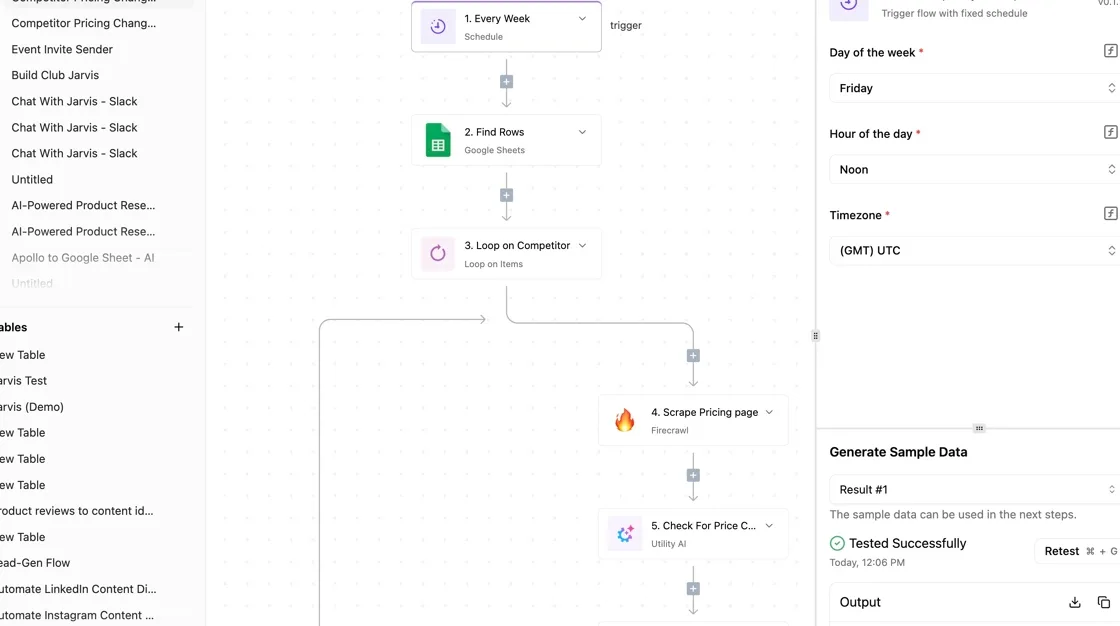
For this job, that means fetching your current credit consumption, setting it against the monthly allowance on your plan, and posting to Slack or sending an email once usage crosses a threshold you choose.
### Finding Augment Code usage data to monitor
Up front, one caveat. I can't point you to a documented Augment Code usage endpoint that this workflow would call, so check what your account actually exposes: an API, a billing export, or only the dashboard.
If it's only the dashboard, the workflow can still run on a schedule, but someone has to paste the number in, and the automation shrinks to a reminder. Confirm that before you build anything around it.
### Why Augment Code spend alerts beat dashboards
What you gain is timing. A dashboard shows spend when you remember to look; a threshold alert reaches you while there's still time to move a heavy user to a larger plan or slow an agent that's burning through credits on one task.
Running a flow like this on Activepieces costs 1 credit per run however many steps it has, and the free plan includes 1,000 credits a month; current terms are on the [Activepieces pricing page](https://www.activepieces.com/pricing).
A once-a-week check is four or five runs a month, a small fraction of that allowance.
### The workflow, step by step
Build it once and the Monday habit becomes a message you read rather than a report you assemble; the sequence below is the workflow in order.
1. Set a schedule trigger to fire every Monday morning, before the team starts new agent work.
2. Pull the usage or billing data for the current billing period from whatever source your account provides.
3. Compare that figure to the monthly credit allowance on your plan, and calculate how much remains.
4. Send an alert to Slack or email when consumption passes the threshold you set, so the warning arrives while a plan change is still possible.
5. Record the number in a sheet or table, so next month you can see credits per task over time instead of guessing from the headline price.
Once a few weeks of numbers are logged, you can price the plan from observed burn rather than from the sticker.
## Frequently asked questions
### Is there a free plan or free trial for Augment Code?
We didn't confirm a free plan or trial as of this article's check date, so don't build a budget around one. Trial terms are where vendors change the most, and a trial's credit allowance may be sized differently from a paid plan's.
Burn rate measured on a trial can understate what a paid month costs. Read the current pricing page, and if a trial exists, log your credits per task during it anyway.
### Do unused Augment Code credits roll over?
Treat unused credits as expiring unless the vendor's pricing page or your account terms say otherwise. We didn't verify a rollover policy, and this is the clause worth reading line by line.
If credits reset each cycle, a plan sized for your busiest week wastes money in quiet weeks. If they carry over, a larger allowance costs less than it looks. Ask support in writing and keep the reply.
### Can I switch plans mid-month without losing credits?
Whether a mid-cycle switch preserves, prorates or resets your credits isn't something we could confirm, so find out before you switch, not after.
The risk is concrete: an upgrade made after you run dry could replace your remaining balance, or start a fresh allowance, depending on how billing handles it. Get the behavior in a support reply, and switch at a cycle boundary when you can.
### Is Augment Code cheaper for teams than for individuals?
Not necessarily. We didn't confirm that team pricing is cheaper per seat, and the answer depends on whether credits are pooled or per person.
Pooled credits let a light user's unused allowance cover a heavy user's spike. Per-seat credits mean your heaviest agent user still hits a wall while others leave allowance unused. Compare credits per task across your actual team members, not the per-seat headline.
### How do I know when Augment Code has changed its prices again?
Assume the pricing page can change without notice, and re-check it against your logged burn on a schedule.
Compare three things each time: the credit allowance, the credit cost of the actions you run most, and any change to overage or rollover terms. A headline price that stays put can hide a changed credit rate.
Save a dated copy of the page when you subscribe, so you have something to hold up if a support ticket claims nothing's changed. Also watch your billing email, since account notices can arrive before the public page is updated.
## Related reading
- [Best AI Agent Templates to Run Today Without Code](https://www.activepieces.com/blog/best-ai-agent-templates-to-run-today-without-code)
- [Bitly Pricing 2026 for Link, QR Code and Domain Limits](https://www.activepieces.com/blog/bitly-pricing-2026-for-link-qr-code-and-domain-limits)
- [No Code Web Builder: Best Options in 2026](https://www.activepieces.com/blog/no-code-web-builder-best-options-in-2026)
## References
- [Augment Code](https://www.augmentcode.com/blog/gemini-3-1-pro-now-available-in-augment-code)
- [Calcis](https://www.calcis.dev/pricing/anthropic)
- [Pragmatic Engineer survey, via HiTechies](https://www.hitechies.com/ai-developer-tools-cost-roi-budget-2026/)