Send a single request with the model ID copied from the vendor's own model page, not from memory or a tutorial. Print the raw response. A model-name mismatch usually fails here with a clear error, which is the cheapest place to find it. Don't continue until this one call returns text. ### Stage 3: Set parameters and structured output Pick the speed mode first. [ChatGPT Learn](https://learn.chatgpt.com/docs/agent-configuration/speed) gives Standard as the 1x baseline, Fast at 1.5x and Ultrafast at 4.5x. For a scheduled job nobody watches, Standard is enough, since a 4.5x speedup saves nothing when no one's waiting, so batch jobs don't need faster speeds. Reserve Ultrafast for flows where a person's waiting on the reply.  Then constrain the output to a JSON schema. **Free-form text breaks the downstream step silently**, and a silent break is the failure you won't notice for a week. Test the schema against three deliberately awkward inputs before moving on. ### Stage 4: Put it on a trigger and save the result Attach the trigger, a schedule or an incoming event, and write each result to a place you can inspect, such as a table or a log file. Then run it once by hand and confirm three things: the trigger fired, the call returned valid structured output, and the saved record exists. If a run shows "success" but saved nothing, it hasn't succeeded. ## Fix rate limits and errors in Astra When an Astra call fails, it is most likely a rate limit and not a bug in your workflow. [Requesty's April 2026 status-code-distribution](https://www.requesty.ai/data/status-code-distribution-april-2026) puts **429s at 65.8% of failed LLM API requests**, which means you need exponential backoff, not code debugging. 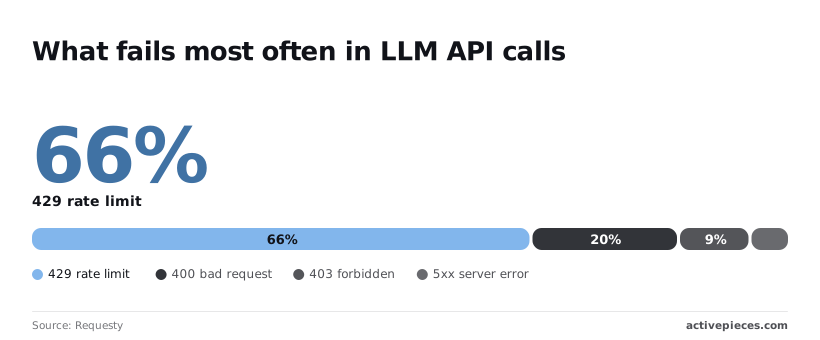 That's across providers, not Astra alone, but it means retry logic comes before anything else. According to [Requesty](https://www.requesty.ai/blog/rate-limits-for-llm-providers-openai-anthropic-and-deepseek), the same data has 400 bad requests at 19.4%, 403 forbidden at 9.4% and 5xx server errors at 4.8%, so most of these errors are under your control to fix. Only about **one failure in twenty is the vendor's fault**; the rest you can fix on your side. Match what you see in your logs against the table, which sorts each failure by cause, the status or error code you will see, and the fix. | Failure | Cause | Status or error code | Fix | |---|---|---|---| | 401 | Missing, revoked or mistyped API key | 401, `invalid_api_key` | Regenerate the key and update the credential your trigger tool stores | | Model not found | Wrong model name, or project lacks access | 404, `model_not_found` | Copy the name from the vendor's model page | | 429 rate limit | Too many requests or tokens per minute | 429, `rate_limit_exceeded` | Back off and retry | | 429 quota | Billing balance or spend cap exhausted | 429, `insufficient_quota` | Add credit; retrying will not help | | Context length exceeded | Input plus output over the window | 400, `context_length_exceeded` | Trim input or lower the output cap | | Timeout/5xx | Server fault or slow generation | 500, 502, 503, or client timeout | Retry a bounded number of times | _Prices and plan limits checked against [docs.claude.com](https://docs.claude.com/en/docs/about-claude/models/overview) and [claude.com](https://claude.com/pricing) and [openai.com](https://openai.com/chatgpt/pricing) and [gemini.google](https://gemini.google/subscriptions) on November 17, 2026._ Read the error code before deciding to retry, because both 429 rows share a status. When a 404 shows up, the name in your workflow is usually an assumption. Copy it from the vendor's model page, and test it with one manual call before wiring the trigger. A 403 is different: the key is valid, but the project can't use that model. That's the 9.4% bucket, and it needs an access change, not a retry, meaning retries can't save these. Retry a rate-limit 429 with exponential backoff and it clears in seconds. A quota 429 never clears on its own, so a retry loop will hammer a dead account until someone adds credit. **Branch on the error code, not the status.**  Count tokens before sending, because the 19.4% of 400s is mostly a payload larger than the window, meaning you need to trim your requests. A response cut short by the output cap returns successfully, so check the finish reason, or you'll save half an answer and log a pass. Set a client timeout longer than your slowest legitimate generation, then retry three times at most. Past that, log the failure and stop. ## Run GPT-6 Astra on a trigger with Activepieces When you want this on a trigger, Activepieces, a workflow automation tool, runs it as a trigger followed by an OpenAI or HTTP step. The same authenticated call from your script becomes a few configured blocks, with retries on the step that can be rate-limited. The pricing page lists bring-your-own AI keys on the $20-a-month Plus plan, where every AI step counts as 1 credit, against 2, 10 or 20 credits for a fast, smart or frontier model on Activepieces' own keys; the model charge lands on your own provider bill, which keeps the spend cap from Stage 1 where you set it. 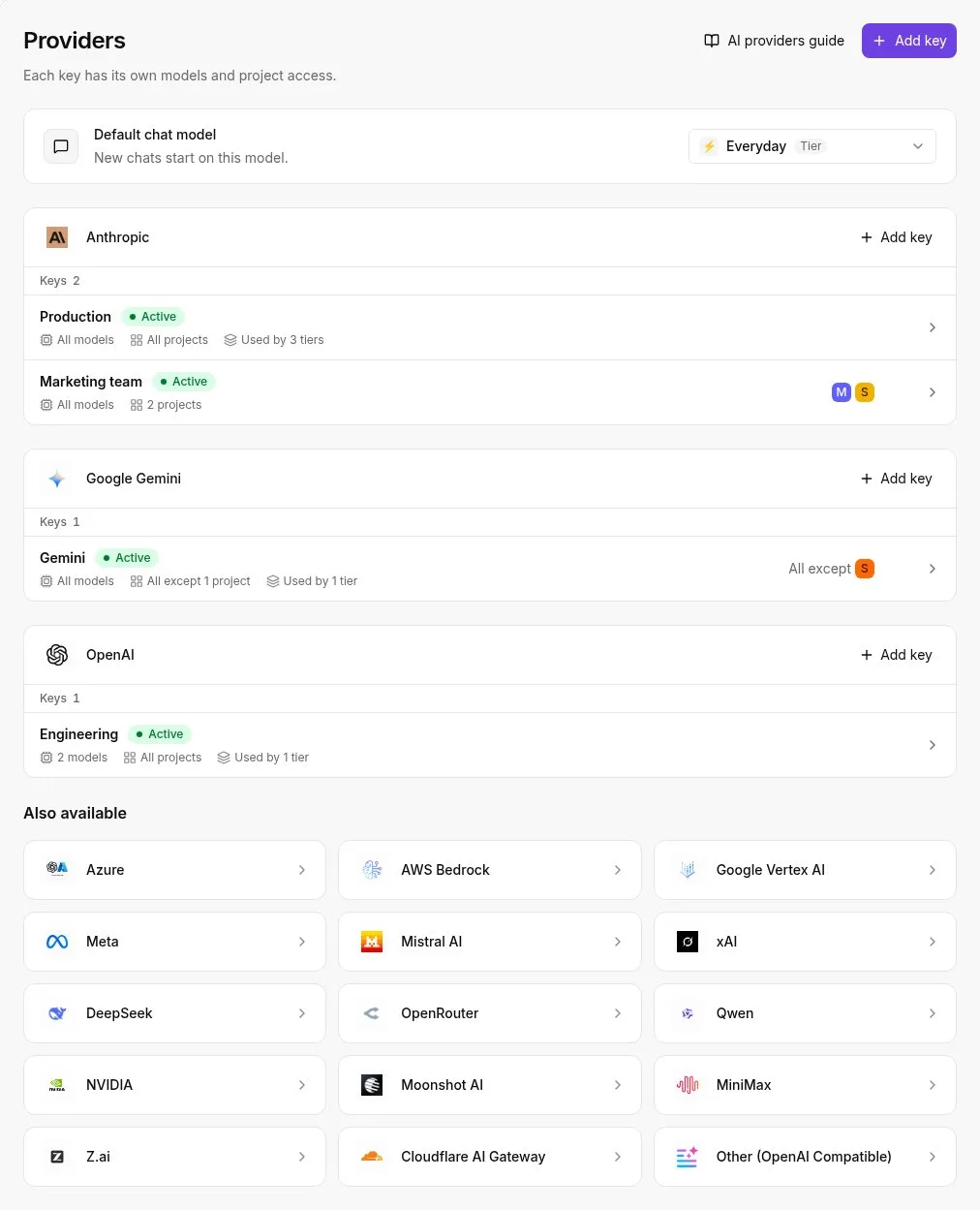 A script does the same job. ### Build the workflow Green run, wrong model. The model field was left at whatever a template shipped with, and that is the usual symptom. Look at the canvas below, a four-step recruitment flow: a schedule trigger, a Google Sheets lookup, a text AI step selected for configuration, and an HTTP call. The selected step's panel shows Provider set to OpenAI, Model set to GPT-4o and a one-line prompt. The model is a field you set by hand, and nothing in the flow checks it for you. 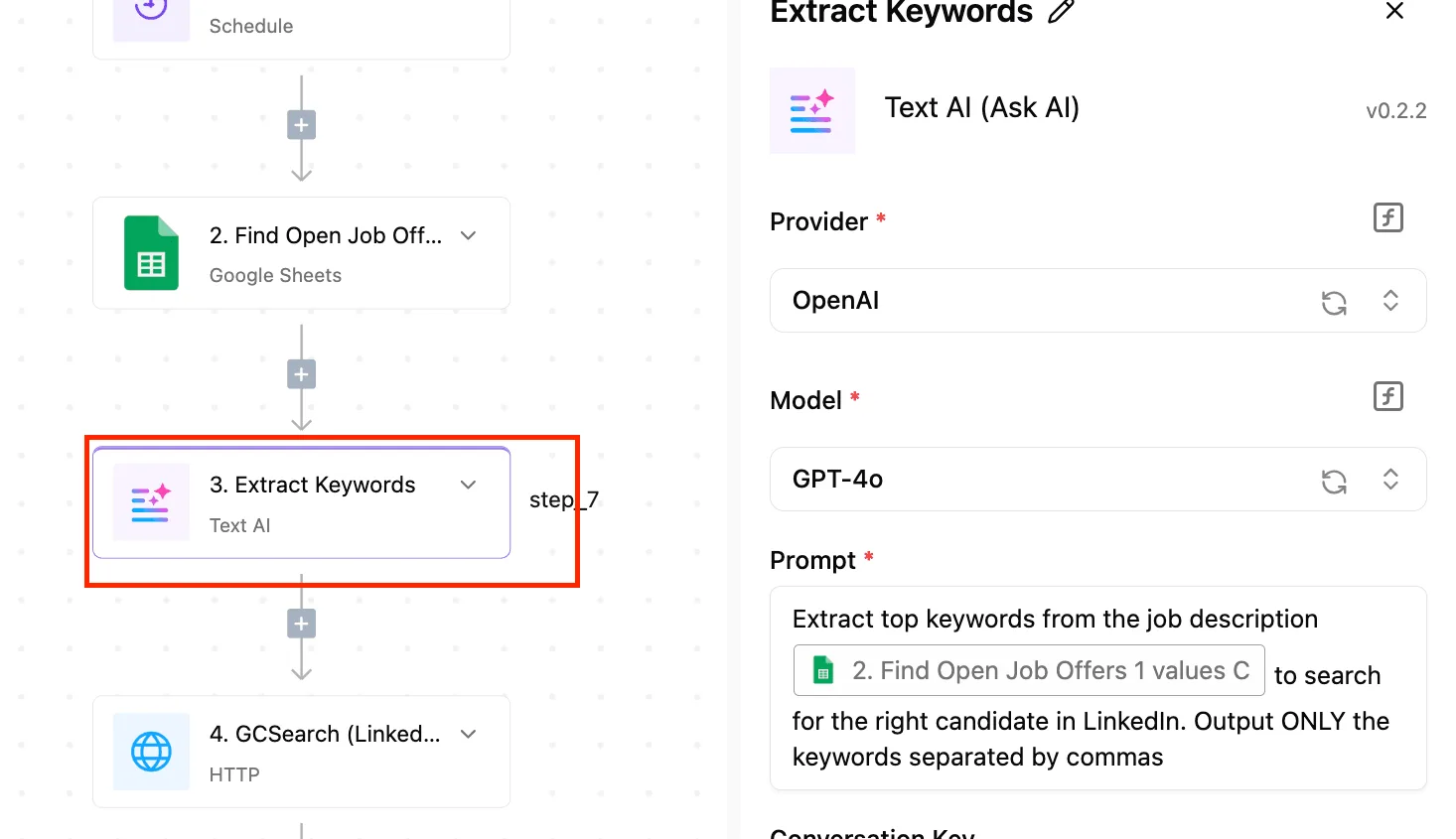 For this article's model, replace that value with the ID you confirmed in OpenAI's own documentation. If the built-in step's dropdown doesn't list it, use the HTTP step against the API with your key stored as a connection, and put the confirmed ID in the request body. Test the flow with a single sheet row before you let the schedule fire. ### Handle GPT-6 Astra API failures and retries When a 429 comes back, you have hit a rate limit, so the step needs to wait and try again instead of failing the run. Separating retryable errors from permanent ones takes extra steps in the flow, and on Activepieces a run is 1 credit however many steps it has, so the error-handling branch adds nothing to the credit count.  If the model ID is wrong, the client error it returns is one no retry will fix, so route that case to a Slack message naming the step and the ID it sent. Cap the retries, as the previous section said, and let the run fail visibly once the cap is reached. Keep the Sheets action idempotent where you can, such as writing to a row keyed by job ID. Otherwise a retried run appends duplicates, and the first sign is a spreadsheet nobody trusts. When the logic is branchy, when you need unit tests, or when your team already deploys code and reviews it in pull requests, a script is the better choice. The call, the limits and the model-ID check are identical either way. Choose the tool your team can debug at 2 a.m. ## A Monday checklist for keeping the automation running Done once and revisited on a schedule, six small actions are what keep a working automation from failing quietly three weeks after you stop watching it. "The summaries stopped" or "the bill is strange": that is how the report usually arrives, and the cause traced back is almost never the code. It's a key that expired, **a model name that changed underneath a job**, or a spending limit nobody set. Work through the list below in this order, because the earlier items limit the damage if a later one is skipped. 1. Set a budget alert in the vendor's billing console before the first scheduled run. A loop that retries on error can spend a month of money overnight, and the alert is the only thing that tells you before the invoice does. 2. Put the API key in a secrets store, not in the workflow text, a shared document or a repository. A key pasted into a step is readable by everyone who can open that step, and it travels with every copy or export of the workflow. 3. Pin the model ID to the exact name shown on the vendor's model page, rather than an alias or a name remembered from a blog post. An unpinned name can start pointing at different behavior without a change on your side, and a wrong one fails on the first call. 4. Check the changelog and deprecation notices monthly. Put it on the calendar. Retirement notices are published, but nobody reads them unprompted, and a retired model fails on the day it's switched off. 5. Log token use for every run, input and output separately, next to the run ID. When cost jumps, this log shows which job and which input caused it, so you're not guessing from a total. 6. Test five real inputs before scheduling. Use actual, messy items from your own queue, including the longest and the emptiest. Clean sample text proves the call works; real inputs show the limits, the empty fields and the odd formatting that stop it. You need no new tool for any of these. ## Frequently asked questions ### Does GPT-6 Astra have a free tier? Don't assume one. Whether a free tier exists, and what it covers, is stated on the vendor's pricing page and nowhere else you should trust. When the trial credit lapses, a workflow that passed its manual test starts returning authorization or quota errors. That is the usual failure. Read the pricing page first, then confirm with one real call from the account the automation will use. ### Can I automate it without writing code? Yes, if the tool you pick can send an authenticated HTTP request and start from a trigger such as a schedule, a webhook or a new row. Strip it down and the API call is just a request with a key in a header and a model name in the body. Reproduce it once in a test workspace with throwaway data before you point it at anything real, because visual builders often hide timeouts and retry defaults. ### How do I stop a runaway loop from burning credit? Set a hard spend limit in the vendor's billing settings, and add a cap inside the workflow as well. The billing limit is the backstop. Inside the workflow, the cap should include a maximum number of iterations, a maximum number of retries, and a maximum output length per call. Then feed the workflow a deliberately failing input in your test environment and watch it stop. A loop that retries on every error will keep paying for the same failure until something outside it intervenes. ### What happens when the model is retired or renamed? When a model is retired or renamed, calls start failing with a model-not-found error, or an alias quietly begins pointing at a different model and your outputs change without any error.  Store the exact model name in one config value rather than in every step, and pin a specific version where the vendor offers one. Read the vendor's changelog and deprecation notices on a regular schedule. Add a small canary call that runs daily and alerts you on any failure, so you hear about a retirement from your own monitoring and not from a user. Is my data used for training when I call the API? That depends on the vendor's data-usage terms for API traffic, which often differ from the terms for its consumer chat product. Read the vendor's data-usage page and your account's data settings before sending anything sensitive. Until you have, strip personal and confidential fields from the payload, since a policy you haven't verified protects nothing. ## Related reading - [GPT-6.2 Astra API Pricing: What It Costs in 2026](https://www.activepieces.com/blog/gpt-62-astra-api-pricing-what-it-costs-in-2026) - [How to Automate Workflows: Steps, Tools & Benefits](https://www.activepieces.com/blog/workflow-automation) - [5 Smart Ways to Automate Business Workflows in 2026](https://www.activepieces.com/blog/automate-business-workflows) ## References - [Requesty](https://www.requesty.ai/data/status-code-distribution-april-2026) - [ModelPick](https://modelpick.dev/) - [ChatGPT Learn](https://learn.chatgpt.com/docs/agent-configuration/speed)Output pricing across frontier models varies nearly sevenfold, so a retry loop that's cheap on one model is a different incident on another.