# Automate Ticket Handoffs: A 2026 Guide for SaaS Teams

By Emmanuel Osei-Bonsu · 2026-09-07 · Source: https://www.activepieces.com/blog/automate-ticket-handoffs-a-2026-guide-for-saas-teams

---
<aside class="tldr"><p class="tldr-label">Summary</p><p>Manual support-to-engineering ticket handoffs cause customer churn and developer burnout by creating data decay, context loss, and constant interruptions that destroy deep work productivity for technical teams.</p><ul><li>30 minutes is the average time required for developers to regain deep focus.</li><li>144 hours of silence passed while a ticket bounced between departments without updates.</li><li>732 integrations are available to automate data transfers between support and engineering tools.</li></ul></aside>

A support-to-engineering handoff is the process of translating a customer’s technical struggle into a structured internal task. When you handle it manually, rather than automating the workflow through a platform like [Activepieces](https://www.activepieces.com) to ensure consistency, it creates a structural liability that erodes your engineering focus.

At 9:14 AM, this specific failure began when a tier-one agent manually forwarded a database timeout report. The action triggered a chain of context-switching that derailed the sprint.

## The high cost of manual handoffs

### The missed Slack notification

When an urgent ping goes to a general channel in [Slack](https://slack.com/pricing/pro) instead of through a formal integration, the breakdown starts. Because the message lacked a specific tag, it sat unread for three hours.

The most critical bug of the week became background noise while the engineer worked on low-priority UI tweaks. Every time that engineer stopped to check if the "Slack ping" was relevant, they lost significant mental momentum.

30 minutes is the average time it takes to regain deep focus after a distraction, according to [StudyFinds](https://studyfinds.org/distractions-work-day-focus/), meaning a single interruption effectively costs a worker half an hour of productive output. A single poorly timed notification effectively kills a half-hour of complex problem-solving.

![Time required to regain deep focus](https://ap-marketing-media.fra1.cdn.digitaloceanspaces.com/uploads/e463ef2e-a404-4a6b-80f6-2cfbfee37da5/automate-ticket-handoffs-a-2026-guide-for-saas-t-f02f047a.webp "Source: Historic Bentley")

The following data illustrates how these interruptions compound across different cognitive states.

| Source | Time to Enter/Regain Flow | Context |
| :--- | :--- | :--- |
| [Allstacks](https://www.allstacks.com/blog/how-long-does-it-take-to-get-into-the-flow-state) | 20 minutes | Time to enter a flow state |
| [Mental Momentum](https://historicbentley.com/4318-the-24-minute-tax-why-your-quick-question-is-stealing-my-life-43/) | 23 minutes | Returning to state after disruption |
| [StudyFinds](https://studyfinds.org/distractions-work-day-focus/) | 30 minutes | Average to regain deep focus |

**A developer interrupted four times a day loses nearly two hours of actual output.**

### The invisible Jira ticket queue

The ticket lands in a backlog without the necessary logs or reproduction steps when you finally move the issue into Jira. Manual entry often skips these details to save time.

This causes the on-call engineer to ignore the ticket because it looks like an intermittent glitch rather than a systemic failure.

Activepieces manages these handoffs by syncing flows to Git and promoting them through Release Management, ensuring routing logic is versioned and reviewed like production code.

By using separate projects and environments, teams like MoneyGram and Moneypenny treat automation as a deliberate deployment rather than an unreviewed change in a vendor's UI. Check the Git Sync and Release Management documentation for how this maintains structural integrity across self-hosted or cloud instances.

![Audit Logs](https://ap-marketing-media.fra1.cdn.digitaloceanspaces.com/uploads/8fd933ce-ed50-46d2-8b16-a14754d52e49/what-is-a-webhook-payload-structure-and-examples-26e23664.webp)

### A support handoff failure case study

Nobody closed the loop because the manual handoff failed. It left the customer without a response for 144 hours while the ticket bounced between departments.

Because there was no automated sync between the engineering task and the original support email, the agent assumed the fix was in progress.

The engineer assumed the agent had already handled the communication. This silence cost you a high-value contract, as the customer interpreted the lack of updates as a lack of competence.

## Why manual handoffs fail at scale

This breakdown manifests in three specific ways:

> Human memory and static snapshots are poor tools for describing dynamic, breaking systems, yet manual ticket handoffs rely on them. 

When a Support Lead copies a log from a customer dashboard into a developer's task manager, they create a frozen artifact. This artifact begins to lose utility the moment the "Save" button is clicked.

![A block of ice sitting on a desk, with a detailed technical drawing frozen deep inside its center.](https://ap-marketing-media.fra1.cdn.digitaloceanspaces.com/uploads/9e63ebbf-f7f9-491f-bad3-cf8bc9758f50/automate-ticket-handoffs-a-2026-guide-for-saas-t-a2b49c1e.webp)

* Data decay: Technical evidence becomes useless for debugging when logs go stale and session tokens expire. 
* Context loss: Missing reproduction steps and specific environment details force developers to guess at the root cause. 
* Visibility gaps: Support agents assume a bug is being fixed while the engineering task sits in a "Backlog" state, leading to false promises to the customer.

### Data decay during copy-paste transfers

Every time information is moved between platforms without a live link, it loses its technical integrity.

If an agent copies a trace ID from an error monitoring tool like Sentry into a Jira ticket, that ID may point to a log that is purged by a retention policy before the developer even opens the task.

The engineer spends their first hour of "fixing" just trying to find the data that was already visible three days ago.

### Losing customer urgency in ticket handoffs

Stripping away the business priority happens the moment you abstract a customer’s frustration into a bulleted list of symptoms.

When a "system down" email from a frustrated CTO is summarized as "User reports login error" in a project management tool, the developer lacks the social pressure required to prioritize it over non-critical feature work.

### Status misalignment between support and dev tools

Different teams use different tools to define "done." This creates a visibility gap that frustrates customers.

A developer might move a task to "Resolved" in a tool like GitHub Issues because the code is merged.

If that code isn't deployed to production for another week, the support agent will prematurely tell the customer the fix is live. This misalignment turns a technical success into a customer service failure when the user tries the feature and finds it still broken.

## How manual ticket routing distracts engineers

Engineers are forced to act as their own traffic controllers by manual ticket routing, which fragments the deep focus required for complex debugging.

When a support agent sends a direct message to an engineer about a bug, that engineer loses their place in the codebase. They must spend significant time re-reading logic and re-establishing mental state before they can write another line of production code.

### Minutes required to regain deep focus after an interruption

An engineer needs a specific window of uninterrupted time to reach a state of flow. Every "quick question" in a messaging app like Slack effectively kills the next hour of high-value output.

A ripple effect is created where a single manual handoff doesn't just cost the time it takes to read the message, but also the time spent re-indexing the project requirements.

At 9:14 AM, a support agent Slacks a developer about a login error. The developer finishes their current task and starts the investigation at 10:05 AM, meaning the customer has already waited nearly an hour for a response.

At 2:30 PM, the developer is pulled into a scheduled meeting, so the context of the bug is lost and the investigation stalls.

The customer churns at 4:00 PM due to the silence. This proves that technical competence matters less than the speed of communication. The bug is finally fixed on Day 5, but the revenue from that customer is gone forever.

### Support agent burnout from manual tracking

Eventually, support leads who manage escalations through spreadsheets or mental checklists hit a cognitive ceiling, which leads to critical bugs being forgotten in the noise.

When an agent has to manually ping a developer for a status update, they are performing "shadow work" that isn't captured in their performance metrics.

Their actual workload is much higher than what their manager sees on paper. This exhaustion often results in high turnover rates among senior support staff who possess the most product knowledge.

### How support silence drives customer churn

A customer who encounters a bug is often willing to stay if they feel heard. A manual handoff that leads to silence is interpreted as a lack of care.

If an escalation sits in a developer’s inbox without an automated confirmation sent back to the user, that user assumes the company is incompetent.

They begin looking for a competitor before the fix is even deployed. The true cost of a manual routing failure is not the engineer's hourly rate, but the total lifetime value of the customer who leaves because they were met with a wall of silence.

## Build resilient Zendesk and Jira bridges

A resilient bridge between support and engineering requires a hard-coded contract where data flows automatically.

<blockquote class="pull"><p>The true cost of a manual routing failure is not the engineer's hourly rate, but the total lifetime value of the customer who leaves because they were met with a wall of silence.</p></blockquote>

This ensures no customer request survives solely on a human’s memory. When a Support Lead moves a ticket from [Zendesk](https://www.zendesk.com/pricing/) to Jira, the transition must be a mechanical certainty rather than a manual favor.

### Enforcing mandatory context at the point of handoff

Engineering focus is preserved only when the incoming ticket contains every technical requirement needed to reproduce the bug on the first try.

If a developer opens a task and finds the "Environment" field empty, they must stop their deep work to ask which browser version the customer was using.

This turns a five-minute fix into a two-day email chain. To prevent this, your integration must be configured to block the creation of a Jira issue unless specific data points are present.

![A side-by-side view of a 'Zendesk ticket' and a 'Jira issue', both represented as digital forms with matching lines of data…](https://ap-marketing-media.fra1.cdn.digitaloceanspaces.com/uploads/fcb557c8-b878-4ba3-9b3b-5b265a939632/automate-ticket-handoffs-a-2026-guide-for-saas-t-ed9baf52.webp)

The Resilient Bridge Protocol is an internal operational framework designed to codify these requirements into your automation logic.

It is not a third-party certification, but a recommended set of validation rules you build into your workflow to ensure no ticket crosses the bridge without its necessary technical payload.

* Map Zendesk Ticket ID to a Jira Custom Field so that developers can always reference the original customer conversation for context. 
* Sync Status changes bi-directionally so that support agents never have to ping a developer to ask if a bug is fixed. 
* Automate 'Dev-Ready' tagging so that only fully documented issues appear in the engineering backlog. 
* Enforce mandatory 'Environment' and 'Log' fields so that no ticket is assigned without the data required to investigate it.

### Automating the bi-directional status sync

Bi-directional syncing eliminates the "black hole" effect where a customer’s issue disappears from the support team's view once it enters the engineering queue.

When a developer moves a Jira ticket to "In Progress," the linked Zendesk ticket should automatically update its status to "Pending Engineering."

This allows the support agent to give the customer a proactive update before they have to ask for one.

### Setting up automated escalation for stalled tickets outdoors

Automated escalations act as a safety net for tickets that sit idle, preventing a minor bug from turning into a churn-inducing silence.

If a ticket remains in a "New" state in Jira for more than a set period, the system must automatically flag the Engineering Manager.

This ensures that resource bottlenecks are identified by software rather than by an angry customer email.

## Automating the handoff lifecycle with Activepieces connectors

Activepieces eliminates the "copy-paste" tax by providing an MIT-licensed core that synchronizes data between customer-facing platforms and internal engineering tools without requiring manual intervention.

When a support lead doesn't have to manually transcribe a customer's technical environment into a developer's workspace, the risk of losing critical debugging context evaporates.

### Mapping Zendesk custom fields to Jira issues

Reliable handoffs require that every piece of data collected by the Zendesk support desk is automatically injected into the corresponding Jira engineering ticket.

Activepieces reaches across 732 integrations to ensure that a ticket status change triggers an immediate, structured data transfer between systems, so teams avoid the manual errors inherent in cross-platform synchronization.

The "Sheets to MailChimp" workflow shown here illustrates the basic logic of these connections. A trigger event (such as a new record) immediately forces an action in a separate system.

In a support context, this means that as soon as a tier-two agent tags a ticket as a "Bug," the automation engine pulls the customer’s specific error logs and populates a new Jira issue.

### Creating the Slack alert loop for high-priority bugs spinning up

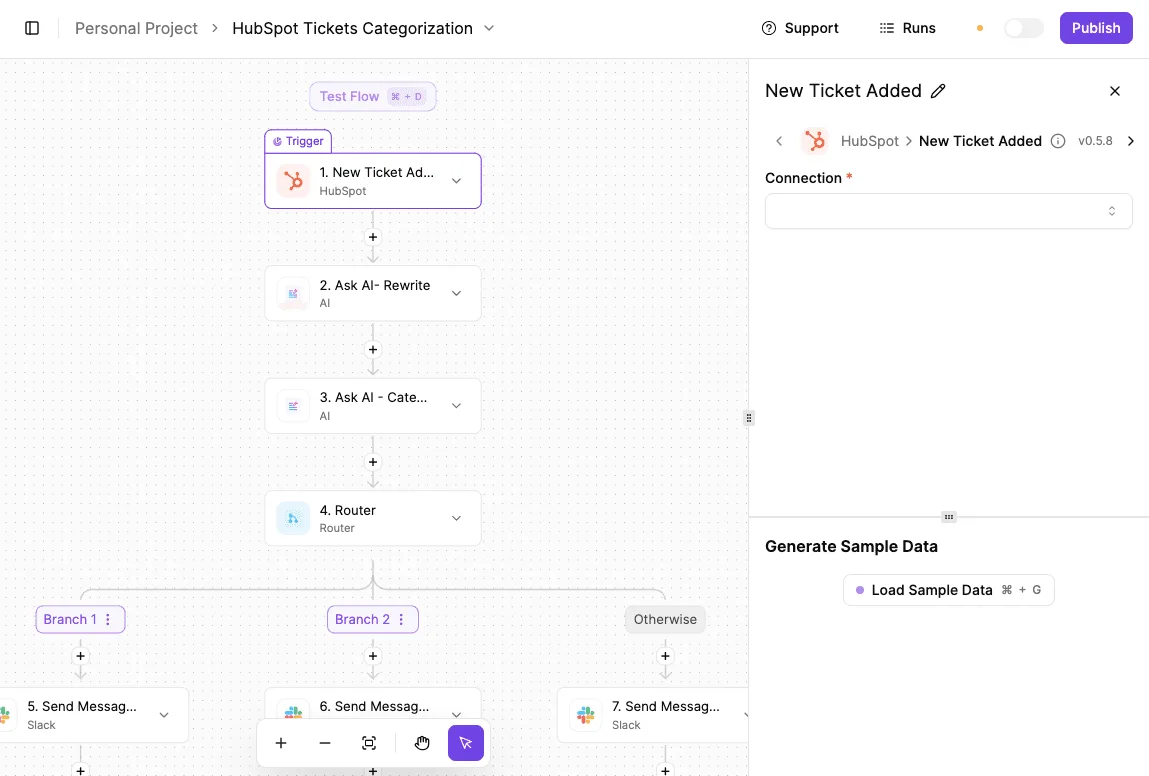
High-priority escalations require an immediate notification loop in the Slack communication tool to ensure the right eyes see the problem before the customer’s frustration boils over.

Activepieces provides a per-step trace of every decision an agent or workflow makes, streaming these logs to the security tools your team already watches.

This targeted alerting prevents notification fatigue. Engineers are more likely to respond to a genuine crisis because the channel isn't cluttered with routine maintenance tasks.

### Verifying the handoff with automated audit logs

Every automated handoff must generate a timestamped record in a central database to prove the data reached its destination.

By adding a final step in the workflow to update a master log or the original ticket's internal notes, you create a paper trail that identifies exactly when the engineering team was notified.

This accountability means that if a fix is delayed, the support lead can look at the log to see if the automation failed or if the ticket is simply sitting in a backlog.
![A workflow automation flow showing HubSpot ticket categorization with AI processing and Slack notifications across multiple…](https://ap-marketing-media.fra1.cdn.digitaloceanspaces.com/uploads/84302f46-c9ec-4b68-83f9-cb98357139ca/enterprise-ai-security-framework-for-automation--1acb6bba.webp)

## The Monday morning audit for cross-team ticket workflows

A systematic audit identifies where data dies between the support desk and the engineering backlog.

This prevents teams from forgetting customer requests during the weekend transition. This weekly check prevents the "silent failure" where a support agent believes a bug is being fixed while the developer remains unaware the ticket even exists.

### Finding black hole ticket statuses in your workflow

The "black hole" is any ticket status that lacks a clear owner or a secondary trigger. This means a high-priority issue can sit idle for days without anyone being alerted to the delay.

![A digital 'engineering ticket' displayed on a screen, with a 'multipart file' (an image file icon) being attached to the…](https://ap-marketing-media.fra1.cdn.digitaloceanspaces.com/uploads/a39a9b4c-11ae-4e02-bc3d-e280ac872f8f/automate-ticket-handoffs-a-2026-guide-for-saas-t-ae11e2c4.webp)

In most setups, this is the "Pending Engineering" status in the Zendesk support tool or the "To Do" column in the Jira project management software. To expose these gaps, perform the Monday Morning Handoff Audit.

This is a recommended internal checklist and review process, not a software feature, used to verify that your automated bridges are functioning as intended.

1. Identify the top three "stalled" tickets that have not moved in forty-eight hours to see which specific human or automated step failed. 
2. Verify field parity between the Zendesk ticket and the Jira issue to ensure critical data like "Customer Tier" is visible to the developer. 
3. Check for "Ghost Tickets," which are Jira issues created without a back-link to the original Zendesk request, making it impossible to update the customer once the fix is deployed. 
4. Test the automation triggers by manually moving a test ticket to ensure the integration still fires as expected after any weekend system updates.

### Standardizing the 'Definition of Handoff' across teams

A handoff is only complete when the receiving system confirms receipt and assigns a clear owner. Otherwise, the ticket is merely "thrown over the wall" into an unmonitored queue.

Support teams often consider a ticket "handed off" the moment they hit submit, while Engineering only recognizes it once it passes a technical triage.

You must document exactly which fields are required (such as reproduction steps, browser versions, and impact levels) before a ticket is allowed to leave the support environment.

### Fixing alert fatigue in developer notifications

High-frequency notifications that do not require immediate work lead to "alert fatigue." This causes developers to ignore the Slack channel where critical bug reports are posted.

If a developer receives ten automated pings a day but only needs to act on one, they will eventually mute the channel and miss the one high-priority outage.

Audit your integration to ensure that only "Blocker" or "Critical" tags trigger a direct notification in the developer’s primary workspace.

By reducing the noise, you ensure that when a notification does appear, the engineering team treats it as a directive to act rather than a nuisance to be cleared.

## Frequently asked questions about support ticket automation

### Should every bug report be automated into a Jira ticket?

Automation should only trigger when a report contains the specific diagnostic data required for an engineer to begin work.

If a customer sends a vague complaint to the help desk software Zendesk, and your script immediately pushes it to the project management tool Jira, you have successfully moved a problem without solving it.

An engineer then spends their expensive time asking for the browser version or logs that the support agent could have gathered.

You only automate the handoff when the ticket meets a "Definition of Ready," such as including a specific error ID or a validated reproduction step.

This gatekeeping ensures that the engineering queue remains a list of tasks to execute rather than a second inbox to sort through.

### How do you handle attachments and screenshots in automated handoffs?

Effective automation maps file attachments directly to the destination issue so that the engineering team never has to log into a secondary system to see the evidence.

Most modern APIs for tools like Jira or GitHub allow for multipart file uploads. This means your integration script should pull the image from the support thread and re-upload it to the engineering ticket.

If you only provide a URL link back to the original support platform, the engineer might lack the necessary permissions to view it, causing a delay while they ask for a manual export.

To maintain a clean audit trail, your automation should verify the file size is within the destination's limits to prevent silent upload failures.

It should rename the file to include the original ticket ID so that orphaned images can be traced back to their source. Finally, post a confirmation comment once the transfer is successful so the support agent knows the data is visible to the developers.

## Related reading

- [Ultimate Guide to Automating Zendesk Ticket Alerts on Slack](https://www.activepieces.com/blog/automating-zendesk-ticket-alerts-on-slack)
- [Asana Automations: A Quick Guide for Modern Teams](https://www.activepieces.com/blog/asana-automations)
- [How Activepieces replaced the need for many micro SaaS](https://www.activepieces.com/blog/how-activepieces-replaced-the-need-for-many-micro-saas)

## References

- [Historic Bentley](https://historicbentley.com/4318-the-24-minute-tax-why-your-quick-question-is-stealing-my-life-43/)
