# AWS Config Pricing: How Costs Add Up (2026 Guide)
By Desmond Achebe · 2026-11-22 · Source: https://www.activepieces.com/blog/aws-config-pricing-how-costs-add-up-2026-guide
---
AWS Config is pay-as-you-go with **no plans and no free tier**.
AWS bills per configuration item recorded, per rule evaluation, and per conformance pack evaluation, so the total shifts with how much your resources change, whether you track them by hand or route the resulting events through a workflow tool like [Activepieces](https://www.activepieces.com).

AWS Config pricing is the usage-based charge model for AWS Config, in which your monthly bill is the sum of configuration items recorded when resources change, rule evaluations run against those resources, and conformance pack evaluations.
## AWS Config charges and limits
### The pricing table, as reported by CloudBurn
The table lists the us-east-1 rates for configuration items and rule evaluations, as [CloudBurn](https://cloudburn.io/blog/aws-config-pricing) reports them from AWS's pricing, and I didn't re-check them against that page on the day of writing.
Conformance pack and retention rates are left out because I have no confirmed figure for them.
| Billing unit | us-east-1 rate | Limit/notes |
|---|---|---|
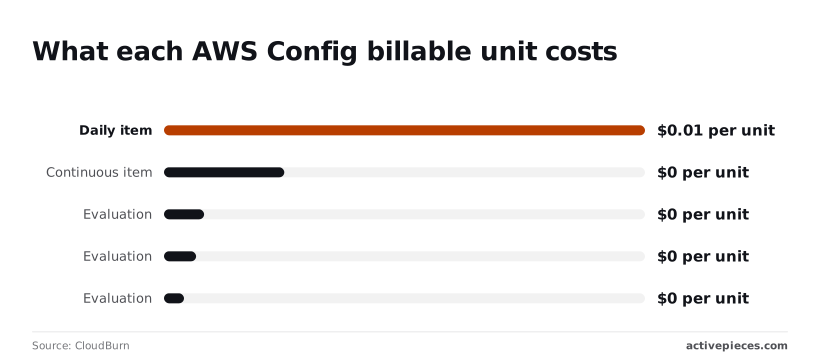
| Configuration item, continuous | $0.003 | Billed on every change |
| Configuration item, periodic (daily) | $0.012 | At most one per resource per day |
| Rule evaluation, first 100,000 | $0.001 | Tiered by monthly volume |
| Rule evaluation, next 400,000 | $0.0008 | Tier applies to 100,001–500,000 |
| Rule evaluation, beyond 500,000 | $0.0005 | Lowest tier |
**10,000 changes cost $30** at the continuous rate of $0.003. Daily recording costs four times as much per item at $0.012, so it only wins when a resource changes more than four times a day.

**One million evaluations cost $670**: $100 for the first tier, $320 for the second and $250 for the third.
### What counts as a billable unit
When a resource changes, AWS creates a configuration item, a snapshot of that one resource's state. A rule evaluation is one check of one resource against one rule.
So the bill scales with churn multiplied by rule count, not with account size. A fleet of autoscaling instances that rebuild hourly **generates far more items than a stable estate** ten times its size.

## What AWS Config costs at three account sizes
Multiply configuration items recorded by the recording rate, then add rule evaluations times the evaluation rate. That is the whole bill.
Rates come from the [AWS Config pricing page](https://aws.amazon.com/config/pricing/), and each size below walks through its arithmetic.
With one account and one region, the multiplier on every line is one. Continuous recording is cheap here because few resources change, so recording is a rounding error and the rules are the bill.
Periodic recording saves almost nothing at this size, so leave it continuous and spend your attention elsewhere.
### Mid-size: ten accounts, three regions
Across ten accounts and three regions, that makes thirty recorders, each billing independently. Recording and evaluation both scale with that count.
Resources that churn, such as autoscaled instances or short-lived containers, now generate most of the items.
Switching only those resource types to periodic recording caps their cost at roughly one item per resource per period, so this is where the choice first changes the total noticeably.
### Large: fifty accounts, many regions
At fifty accounts and many regions, the multiplier dominates everything else. Recording every resource type in every region, including regions nobody deploys to on purpose, is how a bill reaches thousands of dollars a month.
Rule evaluations grow with resources times rules times regions, so a broad conformance pack is the second driver.
## Hidden AWS Config charges and limits
Five charges can still dominate the bill, and a tidy recording setup doesn't protect you from them:
- Billing is per region, so every region you enable repeats the whole cost.
- Churn-heavy types, such as security groups and network interfaces, generate a configuration item on every change.
- Rules re-run on each change, so one noisy resource triggers repeated evaluations.
- **AWS bills each conformance pack evaluation separately**, so a pack of many rules multiplies the count.
- S3, SNS, Lambda and CloudTrail costs arrive on separate lines of the invoice.
### Regions and accounts
You enable Config region by region and account by account. An organization with many accounts across several regions pays the recording and evaluation charges in each one. An aggregator shows all of it in one place, but it doesn't consolidate the charges.
### Churn-heavy resource types
Whenever autoscaling, containers or deployments touch them, security groups and network interfaces change. Every change is a billable recorded item, and every recorded item can re-trigger each rule that covers that type.
### Lambda and delivery charges
If a custom rule is backed by Lambda, function invocation charges land on top of the evaluation charge.
Delivery adds S3 storage for history and snapshots, SNS for notifications, and CloudTrail for the API activity. None of these appear under the Config line, so a review of Config spend alone understates the total.
### Rule and conformance pack limits
Check the current limits in the AWS documentation before designing around them, because AWS caps how many rules and conformance packs an account can hold in a region.
None of these multipliers can be reduced from downstream, but the noncompliance findings they produce still need somewhere to go, and a fixed catalogue of connectors is a poor fit for that.
If your ticketing tool or chat system is missing from a vendor's list, you wait on their roadmap; Activepieces lets you generate the missing integration with AI and add it privately to your own instance, so the Config bill stays exactly where it was and nothing queues behind a vendor release.
Roughly 60% of the 750 integrations were contributed by the community, and you can count them yourself in the open source monorepo, where the core is MIT-licensed, so you have genuine integration alternatives if the vendor-supplied ones don't meet your needs.
## Recording settings that cut the AWS Config bill
You can cut rules, but the larger levers sit in the recorder settings, and four of them cut the bill without blinding the account.
The table ranks each against the mid-size example from section 2.
| Setting | Saving vs section 2 mid-size example (USD/month) | Risk | What is lost |
|---|---|---|---|
| Periodic recording for noisy types | Largest where a few types change constantly | Low for resources you never audit hour by hour | Intermediate changes between daily snapshots |
| Excluding resource types | Scales with how many items those types generate | Moderate if a compliance rule depends on the type | All history and rule coverage for that type |
| Recording only in used regions | Modest, but permanent | Low, provided nothing is deployed there | Visibility if someone launches in a dormant region |
| Rule trigger scoping | Smaller, tied to evaluation counts | Low to moderate | Evaluations on changes outside the scoped resources |
Start with the first two rows, because they touch the charge that grows fastest.
When recording is continuous, every change bills a configuration item. Periodic recording captures a resource at most once a day, so a type that changes dozens of times keeps one record. The cost is that you can no longer reconstruct what happened between snapshots.
Drop first the types that generate many items and answer no audit question you actually ask. Then turn the recorder off in regions where nothing should run.
Exclusion leaves a permanent blind spot, so check that no rule depends on the type before you cut it.
When its resource changes, a change-triggered rule evaluates. A periodic rule evaluates on a schedule whether or not anything moved.
Scope each rule to the resource types it needs and the evaluation count falls with it.
## AWS Config compared to alternatives
If you need to block a bad change before it lands, or all you want is a searchable inventory, AWS Config is the wrong tool.
Read the last column as a shape, not a quote, since I have no verified mid-size figures to put in it.
If you need to block a bad change before it lands, or all you want is a searchable inventory, AWS Config is the wrong tool.
| | What is billed | Free allowance | What is recorded | Enforce or report only | Cost at mid-size example |
|---|---|---|---|---|---|
| AWS Config | Configuration items recorded and rule evaluations | None | Resource configuration history | Reports; remediation can be attached | Grows with churn and rule count |
| Security Hub | Security checks and finding ingestion | Not confirmed | Findings, not configuration history | Report only | Grows with checks, and carries Config's cost underneath |
| Azure Policy | Policy evaluation itself carries no separate charge | Not applicable | Compliance state of Azure resources | Enforces (deny, modify, deploy if missing) | Near zero for the policy engine |
| Cloud Asset Inventory | Core inventory and search carry no separate charge | Not applicable | Asset metadata and history on Google Cloud | Report only | Near zero for basic inventory |
Watch the Security Hub row. Many of its controls need Config recording switched on, so a Security Hub rollout can quietly create a Config bill. Count them as one cost when you budget.
Inside AWS, neither Azure Policy nor Cloud Asset Inventory is a substitute. They are what you use if the workload lives in those clouds.
## Routing AWS Config findings with Activepieces
One narrow job is all Activepieces does here: it carries a Config noncompliance finding to a person, through any of the 750 integrations counted in its open source monorepo. It doesn't do anything to make Config cheaper or to stop the bad change from happening.
Config evaluates a rule and records that a resource is out of compliance, and by itself that record sits in the console until someone happens to look.
The workflow below closes that gap, so a finding becomes a message in front of the person who can fix it.
1. An AWS Config rule evaluates a resource and flags it as noncompliant.
2. An EventBridge rule matches the resulting compliance change event.
3. EventBridge sends the matched event to a webhook as its target.
4. An Activepieces flow, using a webhook trigger, catches that request.
5. The flow posts to a Slack channel or opens a ticket in your tracker.
Read it as a delivery chain with no step that evaluates anything new. Config still makes the compliance decision in step one.
Everything after that is plumbing, which is why the fit is honest but limited: you get routing and a place to attach logic, such as sending one rule's findings to a channel and another's to a ticket queue.
On cost, the Config bill doesn't move. The same rules run, the same configuration items are recorded, and the same evaluations are charged.
The only addition on the AWS side is the EventBridge delivery in steps two and three, and on the Activepieces side a run costs 1 credit however many steps the flow has, with 1,000 credits a month on the free plan.
If your goal is a smaller Config bill, this isn't the lever. The recording choices described earlier are.
## Monday checklist for pricing and trimming AWS Config
Start by finding out which recording choices are driving your bill, then change only those; the six steps below take about a week and the last one repeats every month.
Because each step feeds the next, the order matters: you can't choose between continuous and periodic recording until you know which regions and resource types generate the volume.
1. Filter Cost Explorer by Config usage types. Set the service to AWS Config and group by usage type. This separates configuration items recorded from rule evaluations, so you know whether recording or rules is the larger line.
2. Find the top regions and resource types by item count. Group the same view by region, then look in the Config console for the resource types that change most.
3. Pick continuous or periodic for each. Keep continuous recording where you need every change for audit or incident work. Move fast-churning, low-value types to periodic, which records a daily snapshot instead of every change.
4. Set a budget alert. Create an AWS Budgets alert scoped to the Config service. A recording change in a busy account, or a new region, shows up as a surprise at month end unless something warns you earlier.
5. Re-check the pricing page date. Open the [AWS Config pricing page](https://aws.amazon.com/config/pricing/) and note its current rates against what you assumed.
6. Put a monthly review on the calendar. Repeat steps 1 and 2 each month. New accounts, regions and services bring new resource types, so the bill drifts upward unless someone looks.
## Frequently asked questions
Does AWS Config have a free tier? No. Every configuration item recorded and every rule evaluation is billed from the first one, so even a small test account produces a charge.
In this billing system, the bill will be small if little changes, but it's never zero, and the only way to keep it near zero is to record fewer resource types.
### Is AWS Config charged per region?
Yes. Config is enabled and billed region by region, so the same recorder switched on in every region you use produces a separate set of charges in each.
A multi-region footprint multiplies the exposure, and a region you forgot about still bills if its recorder is running and resources there change. Check which regions have a recorder before you assume the total is one account's worth.
### Can I stop AWS Config billing without deleting my data?
Yes, in the sense that matters. Stopping the configuration recorder ends new charges for recording, and your existing history stays in the S3 bucket you chose as the delivery target.
**Rules also bill on evaluations, so a stopped recorder with active rules isn't a clean stop.**
Pause or remove the rules as well, and note that you'll have a gap in the record for the period the recorder was off, which matters if an auditor asks for continuous history.
Does Security Hub cost extra on top of AWS Config? Yes. Security Hub is priced as its own service, and its checks depend on Config recording being enabled.
That means you pay for **Security Hub and also for the Config items** and evaluations that feed it. When you price a compliance setup, count both lines rather than treating Security Hub as a wrapper over what you already pay.
How do I estimate AWS Config cost before turning it on? Work from change volume, not resource count. Take these steps in order:
1. List the resource types you actually need recorded, and exclude the high-churn ones you don't.
2. Estimate how often those resources change in a normal month, using your deployment frequency and any autoscaling.
3. Multiply that change count by the per-item rate on the AWS Config pricing page.
4. Add the number of rules, the resources each one evaluates, and how often they run, priced at the per-evaluation rate.
5. Repeat for every region you plan to enable.
Then switch it on in one account for a week and compare the real usage against your estimate before rolling it out wider. A fast-changing environment will break a static estimate quickly, so the trial week is the check that counts.
## Related reading
- [Best Accounts Payable Automation Software in 2026 Compared](https://www.activepieces.com/blog/best-accounts-payable-automation-software-in-2026-compared)
- [What is Mistral Large 4? Pricing and Benchmarks](https://www.activepieces.com/blog/what-is-mistral-large-4-pricing-and-benchmarks)
- [Pixtral Large 2502 API Pricing: Cost per 1M Tokens](https://www.activepieces.com/blog/pixtral-large-2502-api-pricing-cost-per-1m-tokens)
## References
- [CloudBurn](https://cloudburn.io/blog/aws-config-pricing)