The load balancer and the IPv4 addresses bill by the hour, even when traffic is quiet. Transfer bills by the gigabyte that leaves AWS, so a busy month costs more than a calm one. ### Same workload under On-Demand versus a one-year Savings Plan Under a one-year Savings Plan, where you commit to a steady hourly spend in exchange for a lower rate, only compute is discounted. The disks, load balancer, IPv4 addresses and transfer are billed exactly as before. So the saving is real, but it applies to one slice of the bill, not the whole total. Shut a server down and the commitment still binds you for the year, which is the cost of doing nothing differently. Check that you'll still run these two instances in twelve months before you sign, because your costs will be locked in for that full year. ## EC2 fees and limits beyond hourly rates Past the hourly rate, six charges and caps move the total, and none of them appear in the instance price. The list shows what each one bills by, so you can see that most run whether or not the server is busy. - Public IPv4 addresses cost $0.005 per address per hour, about $3.65 a month each, even when the server is idle. - Data sent out to the internet costs $0.09 per GB after the first 100 GB, so 500 GB in a month adds about $36. - A NAT gateway (a managed door that lets private servers reach the internet) bills per hour and again per GB it processes. - gp3 disk storage costs $0.08 per GB-month, so a 100 GB volume is $8 a month. - Windows instances add a licensing charge to the hourly rate. - New accounts start with default vCPU quotas, which cap how many instances you can launch.  Each one is detailed below. ### EC2 data transfer costs out and between zones According to [egresscost.com](https://egresscost.com/aws/), the first 100 GB out each month is free, so a small internal tool may never pay. The next 10 TB costs $0.09 per GB, the next 40 TB $0.085, the next 100 TB $0.07, and anything over 150 TB $0.05, so scale is rewarded with substantially lower per-unit costs. A small team will almost never leave the first two bands. Traffic between availability zones (separate data centers in one region) is also billed per GB, so spreading a chatty app across zones costs money. Route private servers through a NAT gateway and you pay its hourly fee plus its per-GB fee on everything that passes through. ### Storage that outlives a stopped instance Stop an instance and the compute charge ends, but its disk volumes keep billing at the gp3 rate, and so do snapshots (saved copies of a disk). Delete what you no longer need, or you pay for machines nobody uses. ### EC2 operating system licensing and AWS Support plans Before choosing an OS or a support level, price both: paid AWS Support plans add a monthly charge on top of usage, and Windows licensing is baked into the hourly price. ### EC2 burstable instance credits and vCPU quotas On a burstable instance (the t-series), speed comes from saved-up credits. When credits run out, performance drops to a baseline, or you pay extra if you enable unlimited mode. Separately, a low default vCPU quota can block a launch on a deadline, so request an increase before you need it. ## EC2 compared with Lightsail, DigitalOcean and Hetzner For a plain 2 vCPU / 4 GB server, compare the three flat-rate hosts against EC2 on your own numbers, since I haven't verified current prices. They bundle storage and transfer into one price, and EC2 earns its premium only when you use what it adds. ### Price, bundled transfer and overage rate I haven't verified current prices against each vendor's page for this article, so the table shows how each one bills rather than quoting rates that may have moved. It tells you which bills arrive as one line and which arrive as four, and that's where a small team gets surprised. Read the live price on each vendor's page before you commit. | | Monthly price | Bundled transfer | Overage per GB | Included storage | Commitment options | Check date | |---|---|---|---|---|---|---| | EC2 | Hourly rate times hours run, plus separate charges | None tied to the instance | Per-GB, billed on use | None; disk is a separate volume | Savings Plans, Reserved Instances, Spot | Not verified here; check AWS's page | | Lightsail | One fixed plan price | Included in the plan | Per-GB beyond the allowance | Disk included in the plan | Month to month | Not verified here; check Lightsail's page | | DigitalOcean Droplet | Fixed monthly price | Included, pooled across your Droplets | Per-GB beyond the pool | Disk included | Month to month | Not verified here; check DigitalOcean's page | | Hetzner Cloud | Fixed monthly price | Included traffic quota | Per-unit charge beyond the quota | Local disk included | Month to month | Not verified here; check Hetzner's page | On the three flat-rate hosts, you can predict the bill before the month starts. On EC2, you have to add the integrations yourself. ### What EC2 offers that flat-rate hosts do not What the extra cost buys is breadth. EC2 connects to a much larger set of AWS services, such as managed databases, identity controls and logging, so you're not stitching those together elsewhere. It also has discounted purchase models for steady or interruptible work, which flat plans don't. If your server stands alone and runs all month, you're paying for options you won't use. If your stack already lives inside AWS, the extra cost can be the cheaper path, because moving data out to another host is itself a charge. ## Ways to lower an EC2 bill without re-architecting Start with the fixes that cost nothing to try: turn off what nobody uses, shrink what is oversized, then commit to what is left, and only then touch Spot. ### Right-size and switch off first Leave an unused instance running and it still bills every hour it exists, so doing nothing is the most expensive option on this list. Development and test servers that sit idle overnight and on weekends are the usual culprits. Stopping them outside working hours cuts their compute charge by well over half, with no change to how the software is built. Next, look at what each running instance actually uses. If a server idles at a fraction of its processor and memory, move down one size; each step down roughly halves the hourly rate. Try Graviton, AWS's own processor family, on anything that runs standard Linux software. It's usually priced lower for similar work, though you should test before switching. Then delete what you forgot. Disk volumes left behind by terminated instances and public IP addresses attached to nothing keep billing. They are small lines, but they never stop. ### Commit with Savings Plans or Reserved Instances Once you know what you'll run for a year, pay for it at a committed rate. According to [DoiT](https://www.doit.com/compute/compute/aws/us-east-1/m7i.large), an m7i.large costs $0.1008 per hour On-Demand, which is the full list price with no promise from you. With a 1-year Savings Plan it comes to $0.0667, about 34% less, so a server that runs all year costs a third less for the same machine. The same pattern holds for the smaller t3.medium: $0.0416 On-Demand, $0.0261 under the plan, per [DoiT's t3.medium page](https://www.doit.com/compute/compute/aws/us-east-1/t3.medium), meaning you save $0.0155 per hour by committing to a plan. Stop using the hours and you still pay for them. That is the risk. A Savings Plan is a dollar-per-hour commitment that follows you across instance sizes, so it's the more forgiving choice. Reserved Instances lock to a specific instance type and are better only when you are certain nothing will change. ### Use Spot only for work that can be interrupted $0.0403 per hour is what the **m7i.large drops to on Spot, 60% below On-Demand**, because Spot sells AWS's spare capacity. The t3.medium falls to $0.0145, which means you can reduce the hourly rate by an additional $0.0116 by accepting interruption instead of a commitment. That's the lowest rate on the page, and the price is that AWS can take the instance back with short notice. 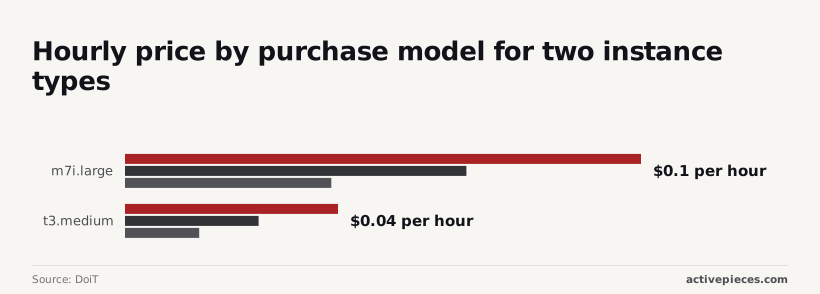 On-Demand is the baseline, the Savings Plan trades a one-year promise for a third off, and Spot trades reliability for the deepest cut. Anything that can be restarted without harm, such as batch jobs, image processing or test runs, fits Spot. A customer-facing website or a database doesn't. ## Automate EC2 cost alerts and shutdowns with Activepieces Activepieces won't make EC2 cheaper. It can keep a small team from paying for instances nobody is using, by sending cost alerts to a person and stopping dev machines on a schedule, and the free plan on Activepieces Cloud, $0 with 1,000 credits a month, is enough to run both, so the cost isn't a barrier to implementation.  Nobody notices until the invoice arrives that an idle instance still bills for its storage and its public IPv4 address. A workflow that taps someone on the shoulder, or switches the machine off, costs far less than that surprise. ### Budget alert to Slack with owner and cost When spending crosses a line you set, AWS Budgets can already warn you. On its own, that warning lands in an inbox where it gets ignored. Activepieces takes that alert and posts it where people actually read, and Slack is one of its 747 integrations, along with the name of the person responsible and the amount spent, which means the alert hits a platform your team already uses. Describe that alert-to-Slack flow in the built-in chat and what comes back is a published flow in your account, the same artifact a builder would assemble by hand, running under the same RBAC and audit logs as every other flow. Its run trace lists each step in order, so the Budgets alert, the Slack post and the owner's name in the message can all be read back after the fact. Flows are unlimited on every plan, including free, so a trial costs nothing. In the flow below the shape is the same: an event arrives, and a message goes to a Slack channel. Here the trigger is a failed Stripe payment, but you swap in the budget alert and the structure stays identical. To confirm a message went out rather than assume it did, look at the run details on the left, which show the step finished.  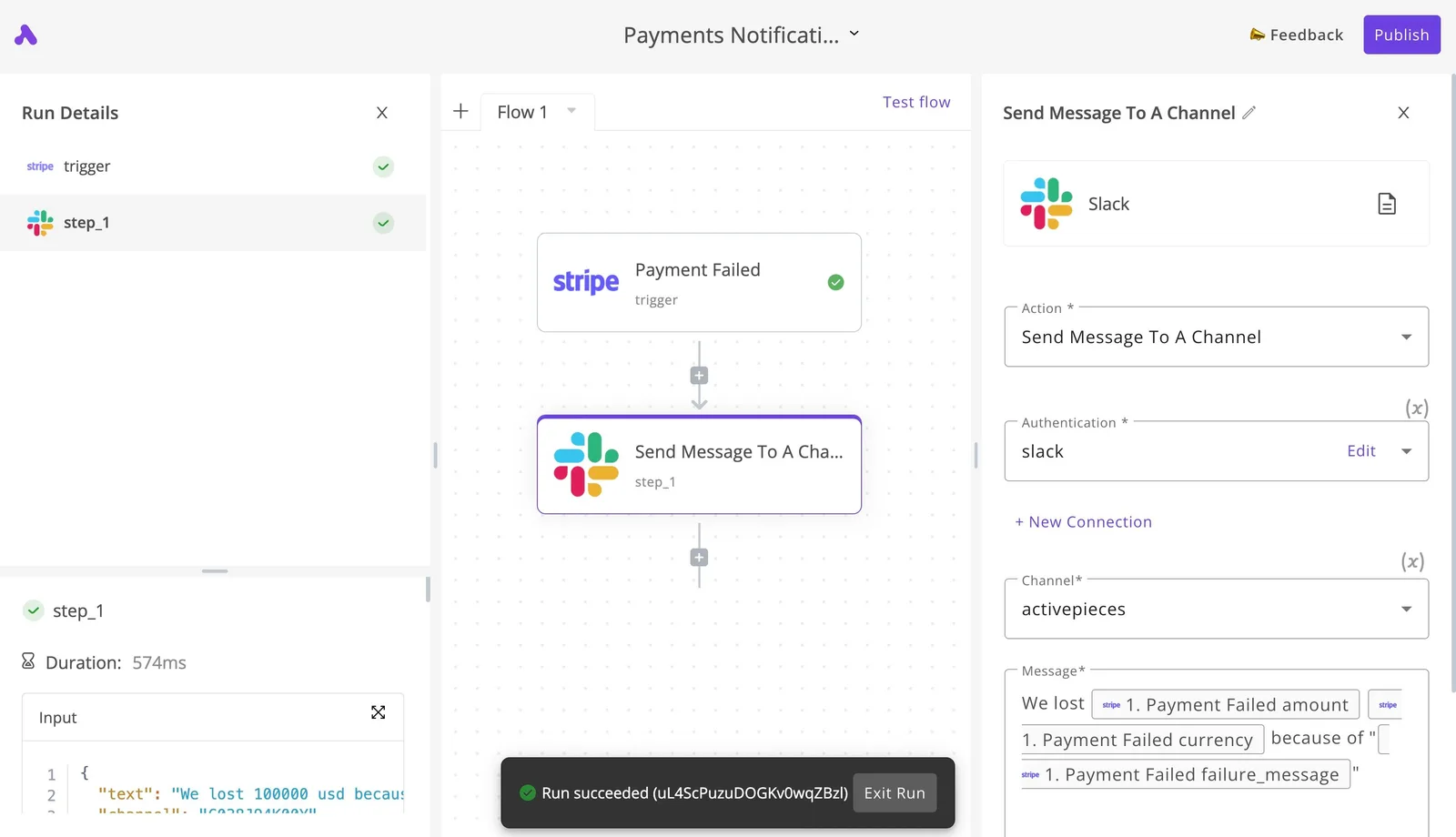 Spend your time on the message. Put the account or project, the amount, and the owner's name in it, so the reader knows whose money it is and doesn't have to ask. An alert that says "budget exceeded" gets a shrug. One that names a person gets an answer. ### Scheduled stop and start of tagged instances On a timer, the second flow looks for instances carrying a tag such as `environment=dev`, asks a person to approve, and only then stops them. Stopping at night and starting in the morning means a development box isn't billing compute while everyone sleeps. Storage keeps billing either way, so this trims one line of the bill, not all of it. Skip the approval and a stopped instance someone was relying on becomes a worse problem than the saving. Tags matter for the same reason: the flow touches only what you marked, and leaves production alone. Give the AWS credentials Activepieces uses only the permissions the job needs, and on a self-hosted instance you can keep those keys in your own secret manager instead of the Activepieces database: - Permission to describe instances, so the flow can find the tagged ones - Permission to stop instances - Permission to start instances - Read access to Budgets, if the flow pulls cost figures itself Scope the stop and start permissions to the dev tag in the policy, so a mistake in the workflow can't reach a machine you never meant to touch. ## A Monday morning EC2 cost checklist Five checks, done in this order, show what your EC2 setup costs before the bill arrives. They're to set an alert, list what is running, count public addresses, compare your commitments to your usage, and date your prices. Remember the dev tag from the permissions policy: it does double duty here, because the same label that limits what a workflow can stop also lets the bill be split by label. Doing nothing here costs the most, because **forgotten machines and disks bill every hour** whether anyone uses them. These three steps find them, making it doable for anyone. 1. Turn on AWS Budgets and set a monthly alert that emails you when spend nears your limit. Then activate cost allocation tags in the billing console, including the dev tag. Until you activate them, the bill can't be split by label, so you can't tell which team's machines are costing what. 2. List every running instance in every region you've used, and list unattached volumes (disks that no machine is using). Stopping an instance ends its hourly charge, but **a disk left behind keeps billing**, so an unattached volume is money spent on nothing. Delete what nobody claims, after taking a snapshot if you're unsure. 3. Count your public IPv4 addresses, including any sitting unused. AWS charges for each one by the hour, so a machine that doesn't need to be reachable from the internet shouldn't carry one. **Make commitments after the cleanup, not before**, because they only save money on usage that is steady. Open the Savings Plans coverage report and compare it with your real, steady usage. A Savings Plan is a promise to spend a set amount each hour in return for a lower rate. If coverage is low and the machines run around the clock, there's a saving on the table. If you have just deleted half your fleet, wait, or you'll be paying for a commitment you can no longer use.  Write down the date you checked prices, and link the AWS pricing pages you used. Rates change, and a note with no date can't tell the next person whether to trust it. Repeat the list monthly, and the surprises stay small enough to fix. ## Frequently asked questions ### Is there a free tier for EC2 in 2026? Yes for newer AWS accounts, but it now works as a credit-based plan rather than the older monthly allowance of free instance hours. What you get depends on when your account was created, so read the terms on the AWS Free Tier page for your own account. When the credits or the free period run out, billing starts at normal rates without a pause. Put the end date on a calendar and set a billing alert before then. ### Do you pay for a stopped EC2 instance? You stop paying for compute, but not for everything attached to it. The disk (an EBS volume, which is the instance's virtual hard drive) bills for as long as it exists, and so do any snapshots you took of it. Billing also continues on an Elastic IP, a public address you reserved so it never changes, while the instance sits idle. A stopped instance with a forgotten disk and address is a small, steady leak. If you won't restart it, take a snapshot you need and delete the rest. ### How much does a t3.micro or t4g.small cost per month? Multiply the hourly rate for your region by the hours you run, then add storage and a public IPv4 address. There's no single honest number to quote. The t4g family runs on AWS's own Arm-based Graviton chips and is usually priced lower than comparable Intel or AMD types, if your software runs on Arm. The AWS Pricing [Calculator](https://calculator.holori.com/aws/ec2/m7i.large) lets you enter the instance, disk, address and expected traffic together. Price all of them, because the hourly rate is only one line. ### Does AWS charge for data coming into EC2? Generally not. AWS doesn't bill for data arriving at EC2 from the internet, while data leaving to the internet is billed per gigabyte. Inbound traffic isn't always free in practice, though. Through a NAT gateway, which lets private servers reach the internet, you pay for the data it processes in both directions. Traffic crossing between availability zones or regions can also carry charges. Check where your traffic flows before assuming the inbound side costs nothing. ### Is EC2 cheaper than Lightsail for a small website? Not by default. Lightsail is AWS's simplified service that bundles a server, storage, a fixed transfer allowance and a flat monthly price. For one small website that predictability often wins, because there are fewer line items to forget. Commit to a discounted purchase model, size the server tightly, or need services Lightsail doesn't offer, and EC2 can come out cheaper. Compare the full monthly bill for both, not the instance price against the bundle price. ## Related reading - [DeepSeek Search API vs Exa Pricing for Small Teams (2026)](https://www.activepieces.com/blog/deepseek-search-api-vs-exa-pricing-for-small-teams-2026) - [No-Code Automation Statistics 2026: Adoption for Small Teams](https://www.activepieces.com/blog/no-code-automation-statistics-2026-adoption-for-small-teams) - [Qdrant Pricing in 2026 and What a Real Bill Costs](https://www.activepieces.com/blog/qdrant-pricing-in-2026-and-what-a-real-bill-costs) ## References - [egresscost.com](https://egresscost.com/aws/) - [DoiT](https://www.doit.com/compute/compute/aws/us-east-1/t3.medium) - [DoiT](https://www.doit.com/compute/compute/aws/us-east-1/m7i.large)**If you budget from the instance price alone, you'll be short every month, and you'll find out when the invoice arrives.