# Azure Databricks Automation: A 2026 Setup Guide
By Carlos Mendoza · 2026-11-18 · Source: https://www.activepieces.com/blog/azure-databricks-automation-a-2026-setup-guide
---
Azure Databricks automation means a scheduled Databricks Job, run by a service principal rather than a person, and deployed from a bundle kept in Git.
Most of your recurring work belongs there, inside the platform that already holds your data and permissions, while the occasional hand-off to outside systems, such as a notification flow built in [Activepieces](https://www.activepieces.com), can sit at the edges without changing where the core work runs.
I run this kind of rollout with small data teams, and the technical part is rarely what stalls it. What stalls it is habit. Someone has a notebook they run by hand every Monday, and it works because that person remembers.
Automation here means taking that memory out of one person's head and putting it into a file the whole team can read, review and redeploy.
## Azure Databricks automation: jobs, identities and deployment code
### Azure Databricks automation steps in 45 minutes
**In roughly 45 minutes**, a team that already has a workspace and a working notebook can reach a scheduled, deployed job. The order matters, because each step depends on the one before it.
1. Create a service principal in your workspace and give it access to the data and compute the job needs.
2. Write the bundle YAML file that describes the job, its tasks, its compute and its schedule.
3. Commit that file to your Git repository so changes are reviewed like any other code.
4. Deploy with the Databricks CLI and run the job as the service principal.

When the chain is finished, the bundle file sits in Git, the CLI carries it into the workspace, and the job runs on its clock under the service principal's identity. **Nobody's personal login appears anywhere in the chain**.
Once that chain exists, changing the schedule or the compute is a pull request, not a favor someone does on a Friday afternoon.
You need four things in place, and the first two are the ones teams skip.
- A workspace where you can create service principals, which usually means an admin has agreed to it.
- A Git repository your team already reviews code in.
- The Databricks CLI installed on the machine or build agent that will deploy.
- One notebook or script that runs correctly by hand today.
Look hard at that last item. Automating a job nobody trusts only schedules the confusion. Get one run you would defend in a meeting, then wrap it.
Automating a job nobody trusts only schedules the confusion.
### Which tool automates which layer
When the work lives on Databricks' own data, Databricks covers it: Jobs handle scheduling and task order, the service principal handles identity, and bundles handle deployment.
An outside workflow tool earns its place when a task has to reach other business apps, such as posting to a ticketing system or updating a CRM record.
[Activepieces](https://www.activepieces.com) has an MIT-licensed core that you can run self-hosted on your own infrastructure, so that outside layer doesn't have to sit outside your network.
| Layer | Where it lives | Why |
|---|---|---|
| Scheduling and task order | Databricks Jobs | Runs next to the data and compute |
| Identity | Service principal | No dependence on one person's account |
| Deployment | Bundles and CLI | Changes go through Git review |
| Cross-app handoffs | Outside workflow tool | Reaches systems Databricks doesn't own |
Keep that split and your team has one place to look when a run fails, which is the habit change that matters most.
## Create a service principal and scheduled job
Create an Entra service principal first, then build a Databricks job that runs as that identity. The failed run you now check in one place belongs to a team account rather than to whoever wrote it.
Ask your identity admin for this the week before you need it. It's the step that stalls most teams, and it's a ticket, not a technical problem. The sequence is below, and the secret is the only part you can't retrieve later.
1. Register the service principal in Microsoft Entra ID, named for the team and purpose rather than a person.
2. Add it to the Databricks workspace and grant only the entitlements the job needs, such as workspace access and the permissions on the schemas it writes to.
3. Generate an OAuth secret for it and store it in your key vault, never in a ticket or chat.
4. Test the Databricks CLI with that identity before building anything. If authentication fails now, you want to learn it in a five-minute check, not during a scheduled run.
### Create a job task and choose compute
Add one task, a notebook or script pointing at the repository, and resist stacking five tasks in the first version, so each change can be tested in isolation.
For compute, choose job compute that starts for the run and stops after it, or serverless where your workspace offers it.
Avoid an all-purpose cluster someone also uses interactively, because a colleague's experiment will then show up as your failure.
Choose the trigger by the event you actually wait for, because it decides what "on time" means.
| Trigger | Starts when | What to watch |
|---|---|---|
| Scheduled | A cron time arrives in the timezone you set | Set the timezone explicitly, or daylight saving will shift the run |
| File arrival | A new file lands in a monitored storage location | Upstream partial writes can start a run early |
| Table update | A watched table changes | Frequent small updates cause frequent runs |
| Continuous | The previous run ends | It never idles, so compute cost never pauses |
For most morning reports, the scheduled trigger is the one you want. Then finish the job in this order:
1. Set the cron expression and timezone.
2. Set Run as to the service principal, so **permissions never depend on one person's account**.
3. Add retries for transient failures and an email or chat alert for the final failure, sent to a team address rather than an individual.
With the job running unattended under its own identity, the next stage is putting its definition into a bundle so changes arrive through review, not through clicks.
## Deploy a job from code with bundles
You deploy the same job from code by scaffolding a bundle. Describe the job once in `databricks.yml` with a dev and a prod target, then run validate, deploy and run from the command line or a pipeline.
The click-built job becomes a file a teammate can review.
### Initialise and validate a Databricks bundle
Run `databricks bundle init` and pick the Python or default job template. It writes a `databricks.yml` plus a resources folder holding your job definition. Copy the settings from the job you already built by hand: tasks, cluster, schedule, and the service principal it runs as.
Then run `databricks bundle validate`. It catches a misspelled key or a missing variable before anything touches the workspace. Make this the first habit you ask of the team, because a failed validate costs seconds and a broken deploy costs a morning.

### Deploy to dev and prod targets
Under `targets`, define `dev` and `prod`. Dev uses development mode, which prefixes resource names with the deploying user and pauses schedules, so two people can deploy the same bundle without colliding or firing live runs.
Prod points at the production workspace path and names the service principal as the run-as identity.
From there the loop is two commands: `databricks bundle deploy -t dev` pushes your changes to your own copy, and `databricks bundle run -t dev ` runs it so you can check the output.
Before prod gets the same deploy with `-t prod`, review has to happen. Nobody edits the prod job in the UI anymore, and that's the habit change the section depends on.
Expect grumbling from anyone used to a quick fix in the console. The answer is that the fix goes through a pull request.
### Run it from a CI pipeline
Have the pipeline deploy, not people. Store the workspace host, the service principal's client ID and its secret as pipeline secrets, and expose them as the `DATABRICKS_HOST`, `DATABRICKS_CLIENT_ID` and `DATABRICKS_CLIENT_SECRET` environment variables.
The CLI picks them up and authenticates as the service principal, so no personal token sits in the pipeline.
In a workable pipeline, validate runs on every pull request and dev deploys on merge. Prod deploys sit behind a manual approval.
Because the principal that deploys is the one that runs the job, permissions are tested on every release instead of discovered at 2 a.m.
You do have another option besides bundles. The Terraform provider suits a platform team that already manages workspaces, networking and catalogs in Terraform and wants jobs in the same state file.
Bundles suit data engineering teams who own their jobs and want a short path from a code change to a deployed run. Many organisations use Terraform for the platform and bundles for the jobs on top.
## Fix limits and errors breaking automation
What breaks automation, once Terraform and bundles own the setup, is limits and expiry, not logic. There are eight recurring failures, each fixable once in the bundle rather than by whoever is on call.
When a result comes back, its size cap depends on where you read it. Table results cap at 2 MB, API run output at 5 MB, and notebook output at 20 MB, according to [Databricks](https://kb.databricks.com/en_US/jobs/job-cluster-limit-nb-output).

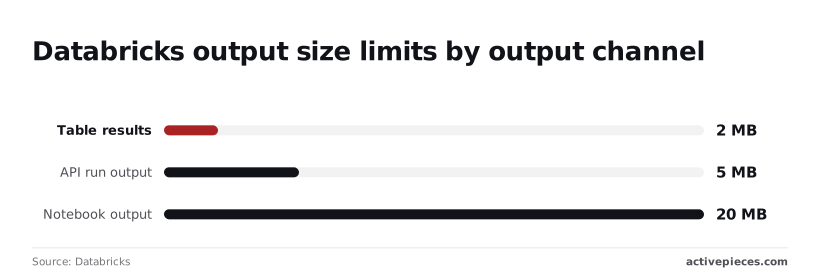
A downstream step that reads a result through the API gets a quarter of what the notebook showed, so write anything large to storage and pass the path.
Once several teams share a workspace, request rates matter. Runs list allows 30 requests per second, while jobs create and jobs get allow 20 each, per [Databricks Community](https://community.databricks.com/t5/data-engineering/databricks-jobs-api-throttling/td-p/112313).

Ten pipelines each polling in a tight loop will hit those ceilings, so poll on an interval with backoff.
**When a run returns a 403, it almost always means the run-as service principal lacks permission on the job, notebook or secret scope, not that the token is bad.**
**Expired secrets are the quieter killer**: a job that ran for months fails overnight. Put secret expiry dates on a shared calendar with a named owner.
### Databricks job compute and quota failures
Even when the job is correct, Azure core quota can fail cluster launches, and timeouts and daylight saving shifts produce runs that vanish or fire twice. The table below shows each symptom with its cause and fix; keep it next to the on-call runbook.
| Row | Symptom | Cause | Fix |
|---|---|---|---|
| Job limit | Create call rejected | Workspace job count ceiling reached | Delete stale jobs; consolidate with tasks |
| Concurrent runs | Runs skipped or queued | Max concurrent runs set too low | Raise it, or enable queueing |
| REST rate limit | HTTP 429 responses | Polling loops exceed endpoint limits | Back off; poll less often |
| 403 for run-as principal | Run denied | Principal lacks access | Grant permissions in the bundle |
| Expired secret | Overnight auth failure | Credential reached expiry | Rotate; track expiry dates |
| Azure core quota | Cluster fails to start | Subscription vCPU quota exhausted | Request increase; smaller node types |
| Timeout | Run killed mid-task | Timeout shorter than real runtime | Set timeout from observed runtimes |
| DST timezone shift | Run skipped or doubled | Local-time schedule crosses clock change | Schedule in UTC |
Put every fix in that table into the bundle, so it's reviewed once and applied everywhere. On Monday, start with these five:
1. Move any schedule on local time to UTC.
2. List every service principal secret with an owner and expiry date.
3. Check Azure core quota against your busiest hour.
4. Replace tight polling loops with backoff.
5. Set an explicit timeout on every job.
## Triggering Databricks jobs from other apps with Activepieces
Only when an event in another app should start a Databricks job, or when results need to reach people who never open Databricks, does Activepieces earn a place, and since every plan including free has unlimited flows, wiring up one such handoff costs nothing to try.

**Activepieces has 750 integrations**, counted directly from the connector directories under `packages/pieces/community` in its open-source GitHub monorepo, and roughly 60% of them were contributed by the community, so the form, ticket or CRM app that raises your event probably already has one.
Everything else already has a home in the bundle you just reviewed.
### When an outside workflow tool is worth it
Think of the morning standup. A sales operations lead says, "Finance closes the month when the invoice lands in our billing system, and then we need the revenue rebuild." Databricks can't hear that event.

[Activepieces](https://www.activepieces.com/pricing) can, and it can pass it on; MoneyGram, Moneypenny, Alan and FundingSocieties all run it in production.
The reverse case is the same: the finished job should post to a Slack channel or send an email to a manager who will never log in to a workspace.
Run this test before anyone builds a flow. If your request matches one of these, the tool adds a second place to debug and nothing else:
- Scheduled runs, which belong to the job's own schedule in the bundle
- Deploying code, which belongs to the bundle and your release process
- Cluster configuration, which belongs to the job or compute definition in the bundle
- Jobs that need no outside event, because nothing is left for the tool to listen to
None of those needs the tool, because each already has an owner, a review step and a history in version control.
A flow built in a browser has none of that unless someone adds it, and a small team rarely has anyone to spare for that.
You can explain the pattern at one standup, and that's the point.
1. Set the trigger in Activepieces: a new row, a closed ticket, a received invoice, whatever event actually matters to the business.
2. Add an HTTP step that sends a POST to your workspace's Jobs API run-now endpoint, with the job ID and any parameters in the body.
3. Authenticate that step with a token issued to the same service principal that owns the job, stored as a connection in Activepieces rather than typed into the step. No person's credentials sit in the flow, so nobody's departure breaks it.
4. Read the run ID from the response and store it, so a failed run can be traced from either side.
5. Send the outcome to Slack or email. Either have the job itself report when it finishes, or add a follow-up step that checks the run status.
Grant that service principal permission to run this one job and nothing broader. The flow then does one thing, and the bundle still defines what the job is.
## Frequently asked questions
### Is Azure Databricks automation free?
No. The Jobs scheduler, service principals and bundles add no separate line item that I would plan around, but every run consumes compute you pay for. Every run consumes compute you pay for, so the bill follows cluster time.
Serverless jobs are priced differently from jobs on clusters you size yourself, so before moving a nightly job over, run it both ways for a week and compare the invoices. Don't assume the simpler option is the cheaper one.
### Can Azure Data Factory trigger Databricks jobs instead?
Yes, and it works through its Databricks activities or a web activity calling the Jobs REST API. Whether you should is a different question.
If the pipeline already lives in Data Factory because it copies data between non-Databricks systems, keep a single trigger there and let the bundle define the job it fires.
If the work is entirely inside Databricks, you're adding a second scheduler, a second place for failures to show up and a second team that needs access. That's the daily-habit cost nobody budgets for: people must now check two consoles at 7 a.m.
### Should I use bundles or Terraform?
Use bundles for the jobs, pipelines and notebooks a data team changes every week. Use Terraform for the slow-moving platform underneath: workspaces, networking, metastore, and the service principal itself.
The split follows who edits the file. Analysts and engineers can learn a bundle in an afternoon and review each other's changes.
Terraform changes belong with the platform owners, and mixing the two means one team waits on the other's pull request.
### How do I pause a job during a failed deployment?
Set the schedule's pause status to paused in the bundle, then redeploy, so the pause is recorded in version control instead of living only in someone's memory.
If the deployment itself is broken and you can't redeploy, pause the schedule directly in the workspace or through the CLI, and then commit the same change so the next deploy doesn't quietly turn it back on.
Bundles deployed in development mode pause schedules by default, which is a useful safety net for test targets.
Two related questions come up in the same conversation. On run-as user versus principal, run production jobs as the service principal, so a departing employee's account never decides whether the 2 a.m. load succeeds.
On secret rotation, keep credentials in a secret scope and rotate them on a calendar the team owns, so the rotation is a scheduled chore and not an outage.
## Related reading
- [Azure Databricks Pricing: DBU Rates and Costs (2026)](https://www.activepieces.com/blog/azure-databricks-pricing-dbu-rates-and-costs-2026)
- [No-Code Automation Statistics 2026: Adoption for Small Teams](https://www.activepieces.com/blog/no-code-automation-statistics-2026-adoption-for-small-teams)
- [Best Data Automation Tools of 2026 for Analytics Teams](https://www.activepieces.com/blog/best-data-automation-tools-of-2026-for-analytics-teams)
## References
- [Databricks](https://kb.databricks.com/en_US/jobs/job-cluster-limit-nb-output)
- [Databricks Community](https://community.databricks.com/t5/data-engineering/databricks-jobs-api-throttling/td-p/112313)