Cut it by asking who truly runs manual test cases, not who touches quality in general. At 200 people the table overstates your cost if you already own Visual Studio subscriptions, because those holders come with access and drop out of the Basic count. Stakeholders, who only view and comment, are also free. Count both groups first, subtract them from the 195 paid seats, and the real total can fall well below the table's figure, meaning your actual bill usually falls short of published sticker prices. ## Hidden Azure DevOps costs and limits Once the seat count is settled, four charges remain that no per-user price shows: pipeline capacity, storage overage, the machines you run yourself, and Test Plans. Each is cheap to ignore at signup and expensive to discover afterwards. - 1,800 free hosted minutes a month on one job, so a single pipeline fits, but a second developer pushing at the same time waits. - $40 per extra hosted job and $15 per extra self-hosted job, so every person you stop making wait adds to the monthly bill. - Artifacts storage over 2 GiB, billed from $2 per GiB and falling to $0.25, so unpruned build output turns into a recurring charge. - Test Plans at $52 per user, so giving testers access costs more than the base seat itself.  Your first build may not run at all. New organisations now start with 0 free parallel jobs on private projects, down from 1, and public projects now start at 0, down from 10. Until you buy or request capacity, nothing starts. Once it does, every extra simultaneous build queues behind the last. Left alone, old builds and packages keep accumulating past the free first 2 GiB of Artifacts storage, and the rate drops as volume grows, but deferred cleanup will eventually push you over quota and force storage charges. Set a retention policy early. Doing nothing is the most expensive choice here. ### Azure DevOps self-hosted agent costs and billing Run your own build machine, a self-hosted agent, and the $15 job fee covers only the software, so you're trading Microsoft's per-job fees for infrastructure and maintenance costs. You still pay for the virtual machine, its patching and someone's time when it breaks.  Price that before deciding it's cheaper than hosted. Before any paid extra can be bought, someone with billing rights must link an Azure subscription. Without it, purchases stall and the Test Plans $52 never reaches your testers, rendering that subscription entirely wasted. ## Azure DevOps against GitHub, GitLab and Jira pricing Once testers join, Azure DevOps isn't the cheapest. Its $6 seat undercuts GitLab's, but its $52 Test Plans add-on has no equivalent line on the other bills. Organizations relying on seat-price comparisons will choose the more expensive option. Read the last two columns first, because they decide whether the seat price is the whole bill. The table below sets each tool's seat price against its free build time and what comes bundled. Figures are list prices at the time of writing and change. | Tool | Per user, per month | Free CI minutes | Planning and tests bundled | Extras | |---|---|---|---|---| | Azure DevOps | $6 (Basic) | 1,800 on one parallel job | Boards yes; test management no | Test Plans $52; extra parallel jobs | | GitHub Team | $4 | 3,000 | Projects boards; no test management | Paid minutes, storage | | GitHub Enterprise | $21 | 50,000 | Same as Team | Paid minutes, storage | | GitLab Premium | $29 | 10,000 | Boards yes; test management limited | Extra compute minutes | | Jira with Bitbucket Pipelines | Billed per product | Set by Bitbucket plan | Jira boards yes; tests via add-ons | Extra minutes bought in blocks | 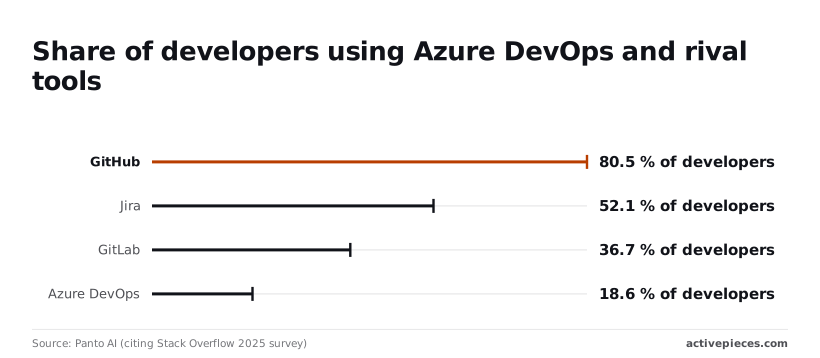 At $4, GitHub looks lowest, but you pay again for anything past the minutes allowance. With one free parallel job, a team of ten queues behind itself, since only one build runs at a time. GitHub's 3,000 minutes on Team gives more room before billing starts, and Enterprise's 50,000 means a large team may never see a minutes charge. ### Boards, test management and what isn't bundled Every rival bundles task boards. None of the four bundles test management at Azure's depth without an add-on or a higher tier, so budget testers separately. For hiring and tooling, popularity matters. In the Stack Overflow 2025 survey, [as reported by Panto AI](https://www.linkedin.com/posts/pantodev_azure-devops-statistics-2026-activity-7460934298255118337-daNU), **80.5% of developers used GitHub** and 52.1% used Jira, making GitHub the de facto standard platform for developers. GitLab had 36.7% and Azure DevOps 18.6%. New hires are therefore less likely to arrive knowing Azure DevOps, which is a **training cost the price list never shows**. ## Automating Azure DevOps events with Activepieces Don't expect your Azure DevOps bill to drop because of Activepieces. What it can do is take over the small manual jobs that otherwise eat your team's hours, such as telling people a build broke or copying a request into the right tracker, and its Free plan costs $0 for up to 5 users. Put simply, Activepieces waits for something to happen in one system, then runs a set of steps in others, across 746 integrations in an MIT-licensed core. Skip it and those steps fall to whoever notices first, which is usually the most expensive person in the room. To announce events, Azure DevOps uses service hooks, which are outbound notifications it sends to a web address when something happens, such as a pipeline run finishing. Activepieces gives that address a place to land and then runs a flow, meaning a chain of steps you set up once. Its pricing page lists 1 credit per flow run, any number of steps, where Zapier bills per task and Make per module, and the Free plan includes 1,000 credits a month with unlimited flows, so an alert that fans out into five steps still counts as one run.  It can also call Azure DevOps directly through its API, the interface programs use to talk to it. Follow the path in the picture below. A pipeline sends a service hook into an Activepieces flow, and the flow splits into a chat message and a work item in a separate tool, two branches that still cost 1 credit per run. Take from it that one event can feed two places without anyone retyping it. What it leaves out is the setup, and what follows is where that effort goes. ### Azure DevOps pipeline failure alerts in chat Nobody reads the failed-build emails Azure DevOps already sends. A flow can catch the failure and post it to the channel your team actually reads. It puts the pipeline name, the branch and a link to the run in front of people while it's still fresh. Without it, a broken build can sit unnoticed until someone goes looking, and the delay is paid for in waiting developers. You can also filter. The flow can post only failures on your main branch and stay quiet about experiments, so the channel stays worth reading. ### Creating work items from other tools The reverse direction works too. When a request arrives in a tool outside Azure DevOps, such as a support desk or a form, a flow can call the Azure DevOps API. It creates a work item, the tracked task or bug, with the details already filled in. That removes the copy-and-paste step where details get dropped. Be clear about the limits. Activepieces doesn't change what Azure DevOps charges for parallel jobs ($40 a month per extra hosted job), Test Plans ($52 per user), Artifacts storage or licences, and it doesn't replace any of them. It also adds a system you have to host or pay for and keep running, from $20 a month flat on the Plus plan or the self-hosted Community Edition under the MIT licence, so count that in your estimate before you count the saved hours. ## Reducing your Azure DevOps bill If you leave the setup alone, unused seats, idle capacity and old build files keep billing every month, so work through these steps in order. Leaving it costs more than fixing it. The list runs from the cheapest check to the one that needs a decision. 1. Export every user and their access level from the organisation settings. 2. Move people to Stakeholder (the free level for those who only view and comment) or to a Visual Studio entitlement they already hold. 3. Remove Basic users who haven't signed in recently. 4. Measure how long pipeline jobs wait in the queue. 5. Set Artifacts retention. 6. Assign Test Plans only to the people who run formal test cases. 7. Re-check current prices on Microsoft's pricing page before you sign anything. Start with the first three steps, where most of the savings sit. They get the most detail below. ### Auditing Azure DevOps user access levels Start with the export, then match each name against what that person really does. A project manager who only reads boards and comments belongs on Stakeholder. A developer whose employer already pays for a Visual Studio subscription should sign in with it, because you're paying twice for that person otherwise. Anyone who hasn't signed in for a long stretch is a Basic seat you can remove today and restore later if they return. ### Checking Azure DevOps pipeline queue times first Before you buy more parallel jobs, meaning more builds running at the same moment, check that jobs are actually waiting, because extra capacity only helps if they are. Look at the queue times in your pipeline history first.  If builds start almost immediately, extra capacity is money spent on a problem you don't have. If they wait through most of the working day, buy one more and measure again. ### Azure DevOps retention and storage cleanup policies Left unchecked, every build can leave files behind that nobody opens again, so Artifacts storage grows quietly. Set retention so old versions and intermediate builds expire on their own. Then give Test Plans only to the testers who need it, since it's priced per person and a developer who occasionally checks a result doesn't need it. Finish with step 7. Prices change, and the figure you remember may no longer be the one on your invoice. ## Frequently asked questions ### Is Azure DevOps free for small teams? Yes, Microsoft gives a small team a free allowance of users, so the per-seat line on your first invoice can be zero. The cost shows up elsewhere: once you need more hosted build capacity, extra Artifacts storage or Test Plans, you pay for those even while the user count stays free. Check the current limits on Microsoft's pricing page before you plan around them. ### Do I pay for Azure DevOps if I already have Visual Studio? Not for the people who hold an eligible Visual Studio subscription, because it includes Azure DevOps access for that person. Those holders also drop out of the Basic count. Buying a Basic licence on top is paying twice for the same seat. Match your subscription list against your Azure DevOps user list, because the two are usually managed by different people and drift apart. ### Can I use Azure Pipelines free for open source? Historically, public projects have received free pipeline capacity, but the terms have changed over time and they don't extend to your private repositories. New organisations now start with 0 free parallel jobs on public projects, down from 10, so request capacity first. Treat the free allowance as covering the open-source work only. Read the current terms before you move a private build onto the same arrangement. ### How do I reduce paid Azure DevOps users? Export every user and their access level from the organisation settings to see who is who. Start by removing people who have left, then move anyone who only views work or comments on it to Stakeholder access, which is free. Last, check who is already covered by a Visual Studio subscription. Do this before every renewal. Seats nobody uses keep billing until someone removes them. ### Is Azure DevOps Server priced differently from Services? Yes. Services is the hosted version, billed through Microsoft. Server is the version you run yourself, licensed as a server plus access licences for the people who use it, and Visual Studio subscriptions often cover that access. You also pay for the machines, upkeep and your own build agents, so a lower licence bill can hide a larger operating one. Add those costs up before comparing the two. ## Related reading - [Asana Pricing 2026: What 15 Users Pay a Year ($4,498)](https://www.activepieces.com/blog/asana-pricing-2026-plans-tiers-and-real-costs) - [Azure OpenAI Pricing 2026 – Is PTU Worth the Cost?](https://www.activepieces.com/blog/azure-openai-pricing-2026-is-ptu-worth-the-cost) - [Azure OpenAI Pricing in 2026: Batch, Standard & PTU](https://www.activepieces.com/blog/azure-openai-pricing-in-2026-batch-standard-ptu) ## References - [Microsoft DevBlogs](https://devblogs.microsoft.com/devops/change-in-azure-pipelines-grant-for-private-projects/) - [Panto AI (citing Stack Overflow 2025 survey)](https://www.linkedin.com/posts/pantodev_azure-devops-statistics-2026-activity-7460934298255118337-daNU) - [Microsoft Learn](https://learn.microsoft.com/en-us/azure/devops/pipelines/licensing/concurrent-jobs)Once a build queue backs up and you buy the extra jobs, or a tester needs Test Plans, you're paying, and the seat price was never the reason.