# Azure Front Door Pricing: Standard vs Premium (2026)
By Dario Espinoza-Blum · 2026-11-23 · Source: https://www.activepieces.com/blog/azure-front-door-pricing-standard-vs-premium-2026
---
**The plan fee was never the problem: the usage meters, which made the bill and nobody had priced, charge for data sent out, requests handled and security rules run.**
Azure Front Door pricing is the way Microsoft charges for its global content delivery and application-acceleration service: a fixed plan fee for the tier you choose, plus separate usage meters for outbound data transfer, requests handled and web application firewall rules processed.
Picture 06:10 on the 1st. A cost alert from a small team's cloud account lands in a chat channel, sent through [Activepieces](https://www.activepieces.com). The month closed over budget, and the line items nobody modeled are the reason.

## What breaks Azure Front Door budgets
### What Azure Front Door is and what the bill is made of
Once Front Door is in place, **every visitor passes through a meter**. Microsoft's service sits in front of your website or app, answers visitors from a location near them, filters out hostile traffic, and passes the rest to your servers.
That's useful, and it's also why the meter runs.
You pay a fixed fee for the plan, then usage charges that rise with traffic. Doing nothing about the usage side means finding out its size from the invoice.
### Every plan, price and limit as checked on the pricing page
Read the base fee as the smallest part of the bill, since the usage meters sit on top of it. The two current plans are described below.
Microsoft changes its rates and regions differ, so check Microsoft's Front Door pricing page and note the date you read them.
On Standard, you pay a fixed monthly charge per profile that covers content delivery, global routing and basic custom security rules. Usage meters for egress and requests apply on top, and the most advanced security features aren't included.
Premium has a higher fixed monthly charge per profile and covers everything in Standard, plus managed security rule sets, bot protection and private connections to your servers. The same usage meters apply, and the extra security features add their own charges.
I haven't found a free tier on the page. Treat it as none unless Microsoft's page shows one when you check.
When the estimate was built, it used the plan fee, the one number that's easy to find and doesn't move. That figure looks reassuring because it's fixed.
The meters weren't fixed: traffic grew, and each added visitor added to the egress and request counts. The next section puts numbers on those meters.
## What the month cost at three traffic sizes
$83 at 1 TB, $830 at 10 TB and **$3,470 at 50 TB a month**: that is the data transfer line alone.
Base fee, requests and rules all sit on top of that, so the total bill exceeds these data transfer costs. These figures treat 1 TB as 1,000 GB.
### Small: 1 TB a month
For the first 10 TB, you pay [$0.083 per GB](https://czlytech.com/en/news/azure-front-door-cost-2026.html). At 1,000 GB that's $83.
At this size the transfer charge is modest, so the fixed plan fee and the request and rule counts take a much larger share of the invoice than they will later.
Skip the estimate at this size and you usually get away with it, which is how the habit forms.
$830 is exactly ten times the small bill: ten thousand GB at the same $0.083. Nothing has discounted yet, because the cheaper rate only starts after the 10 TB mark. If your traffic grows tenfold, transfer grows tenfold, and no volume break softens it.

### Large: 50 TB a month
Here the discount starts to help. The first 10 TB still costs $830, so you can't get the first 10 TB for less. The next 40 TB is billed at [$0.066 per GB](https://czlytech.com/en/news/azure-front-door-cost-2026.html). At that rate 40,000 GB comes to $2,640.
Add it up and the total is $3,470, which averages about $0.069 per GB across the month. That's roughly 16 percent below the opening rate, and it means a bigger month costs less per gigabyte but never less in total.

Beyond 50 TB, the rate drops again to [$0.057 per GB](https://czlytech.com/en/news/azure-front-door-cost-2026.html) up to 150 TB.
Traffic at 60 TB would add 10,000 GB at that rate, or $570, on top of the $3,470. The tiers reward growth, but only on the gigabytes past each threshold.
It splits each bar into base fee, data transfer, requests and rules, so readers can see at a glance which plan works for their volume.
Read it for proportion: the base fee is a thin slice at every size, while transfer grows until it dominates the bar.
So the next step is to watch the meters rather than the plan price, and that pattern is the reason.
## What drives Azure Front Door bill spikes
When the estimate counted the plan fee and skipped the meters, the first meter it skipped was data transfer, which **Front Door bills at two points, not one**.
### Data transfer billed in two places
The team priced one leg and assumed the other was free. Both were billed: Front Door charges for data leaving its edge servers to your visitors, and your origin (the server behind it) can charge again for data leaving it toward Front Door.
According to [Oxbow Research](https://oxbowresearch.com/p/the-egress-tax-how-data-gravity-subsidizes), Google Cloud **marks egress up 24 times, AWS 18 times** and Azure 17 times. Azure is the lowest of the three.

But 17 times wholesale still means every extra gigabyte of video, images or downloads carries a margin you'll feel, so traffic volume sets the bill more than the plan does.
With those multiples in mind, the two legs add up quickly, and the next charge comes from traffic that never helped the business.
Whether a request came from a customer makes no difference to Front Door, because it bills per request. Scrapers, bots and scanners hitting your site are billed like any visitor.
Doing nothing about them means paying for traffic that earns nothing, and the cost scales with how popular your site is with the wrong crowd.
### Add-ons priced separately
Look for the web application firewall (WAF), which filters malicious requests, and you won't find it in the base price. Its rule sets and its per-request inspection are separate lines.
Then there is Private Link, which keeps traffic between Front Door and your origin off the public internet; it is also its own charge. Each looks small alone, and together they were the second surprise on the invoice.
We reached some caps mid-project: each plan limits how many rules or routes you can configure, and hitting them forced a move to a higher plan, which nobody had priced.
You can model every one of these meters before launch and put an alert on each afterward.
An alert only helps if a person sees it. Activepieces takes an Azure budget alert and posts it to Slack or opens a ticket for the owner; it does the alerting and nothing to Front Door itself.
If a connector your team uses is missing, you generate it with AI and add it privately to your own instance, with no vendor release to wait on.
The catalogue of 750 integrations is counted from the `packages/pieces/community` directory of the MIT-licensed monorepo on GitHub, and roughly 60% of them were contributed by the community, so you're relying on community maintenance for most of these integrations.
## What differs between Azure Front Door and alternatives
When you need global routing and a firewall on one bill, Front Door holds up against its three rivals, but each of the four meters the same traffic differently. Compare the meters you pay for, not the headline price.
### Entry price and free allowances
Rates change often, and none of the figures below was confirmed for this article, so no dollar amounts appear here. Take them from each vendor's pricing page on the day you decide.
Guessing from memory is how a quote ends up 40 percent off, and you find out on the first invoice, which means you've already locked in the error.
Cloudflare is the only one of the four with a free plan, and its paid plans are flat monthly fees. CloudFront has no base fee and a free usage allowance, but I didn't check its size.
Front Door charges a base fee per profile, and Application Gateway charges by the hour whether or not traffic flows.
Below is how each product bills the same 10 TB month, which shows the billing structure but not the rates. The takeaway is that Front Door and CloudFront both stack several meters, while Cloudflare's flat plans move the uncertainty into plan limits.
| | Entry price | Per-GB rate | Per-request rate | WAF cost | Free allowance | Limits | Cost at 10 TB |
|---|---|---|---|---|---|---|---|
| Front Door | Base fee per profile | Metered egress | Metered | Managed rules need Premium | Not checked | Strongest fit inside Azure | Base fee plus egress, requests, rules |
| CloudFront | None | Metered by region | Metered | AWS WAF billed separately | Exists, size not checked | Strongest fit inside AWS | Egress plus requests plus WAF |
| Cloudflare | Free plan, then flat monthly | Not metered on standard plans | Not metered on standard plans | Tied to plan level | Free plan | Features gated by plan | Plan fee, mostly fixed |
| Application Gateway | Hourly gateway fee | Data-processed charge | Folded into capacity units | Higher WAF tier | None | One region, not a global edge | Hourly fee plus data plus capacity |
Run each vendor's own calculator with your real egress and request counts before you trust any row.
Front Door wins when your origins already run on Azure and you want routing, caching and a firewall managed in one place. It also wins when the people on call already live in the Azure portal.
Cloudflare may look cheaper on paper, but a second vendor means a second set of logins, alerts and invoices. Price that in too.
## What changed after the Azure Front Door overspend
### The rules now in place
Once every usage meter had a limit, an alert and a person attached, the overspend ended; before that, it was a bill nobody read until it arrived.
We set things up in the order of the list below. Follow it as written, because each step makes the next one worth doing.
Once every usage meter had a limit, an alert and a person attached, the overspend ended; before that, it was a bill nobody read until it arrived.
1. Scope the budget to the Front Door resource group, so the alert tracks this service's meters and not the noise of the whole subscription.
2. Set alerts at 50, 80 and 100 percent: of that budget. The first is a mid-month heads-up, the second leaves you time to act, and the third means you're already spending past your plan.
3. Check cache hit ratio and compression. A low hit ratio sends requests back to your own servers and bills you for the trip. Missing compression means you pay for larger files than you need to send.
4. Add a WAF rate-limit rule, so one noisy client or bot can't run up your request and security charges overnight.
5. Set a pricing re-check date. Rates change, and an estimate you built at launch quietly goes stale.
6. Name the owner: **one person who receives the alerts** and has the authority to change the settings.
### First steps to control Azure Front Door costs
Start with the two jobs that take the least time, since the quick wins will build momentum for the remaining work. Create the scoped budget and the three alerts, then write down the owner's name where the whole team can see it.
Doing nothing here is the expensive option, because the next bill arrives either way and the first you hear of a problem will be the invoice.
Next, open the cache and compression reports and look for traffic that keeps going back to your origin. Fix what you find. Then add the rate-limit rule and put the pricing re-check on the calendar.
Fewer repeat trips to your servers, smaller files going out, and junk traffic blocked before it's billed: that is where the monthly saving comes from.
We won't promise a number here. Read it off the egress and request lines on your next invoice and compare them with the month that caused the overspend. That comparison is your proof the rules work.
## Route Azure cost alerts to the owner with Activepieces
Left alone, Azure would email the budget alert and leave it there. Activepieces, a workflow automation tool, takes it and posts it to a Slack channel while opening a ticket assigned to a named owner, so it can't sit unread in an inbox.
The Slack and ticketing steps come from a catalogue of 750 integrations, counted directly from the MIT-licensed open-source monorepo on GitHub, and flows are unlimited on every plan, including the free one, so an alert flow like this costs nothing in flow count.
The missed alerts were the real cost. A warning nobody saw is the same as no warning, and the overage arrives on the invoice anyway.
### The alert workflow step by step
The flow is short, and each step does one job:
1. Point your Azure budget's action group (the list of who or what Azure notifies) at a webhook address that Activepieces gives you. That webhook is the trigger.
2. Add a filter so only alerts for the Front Door resource group continue. Everything else stops there, which keeps the channel from filling with noise people learn to ignore.
3. Post to the Slack channel your team actually watches, with the budget name, the amount spent so far and the threshold that was crossed.
4. Create a ticket in your tracker, assigned to the person who owns Front Door costs, with the same details and a link to the cost view in Azure.
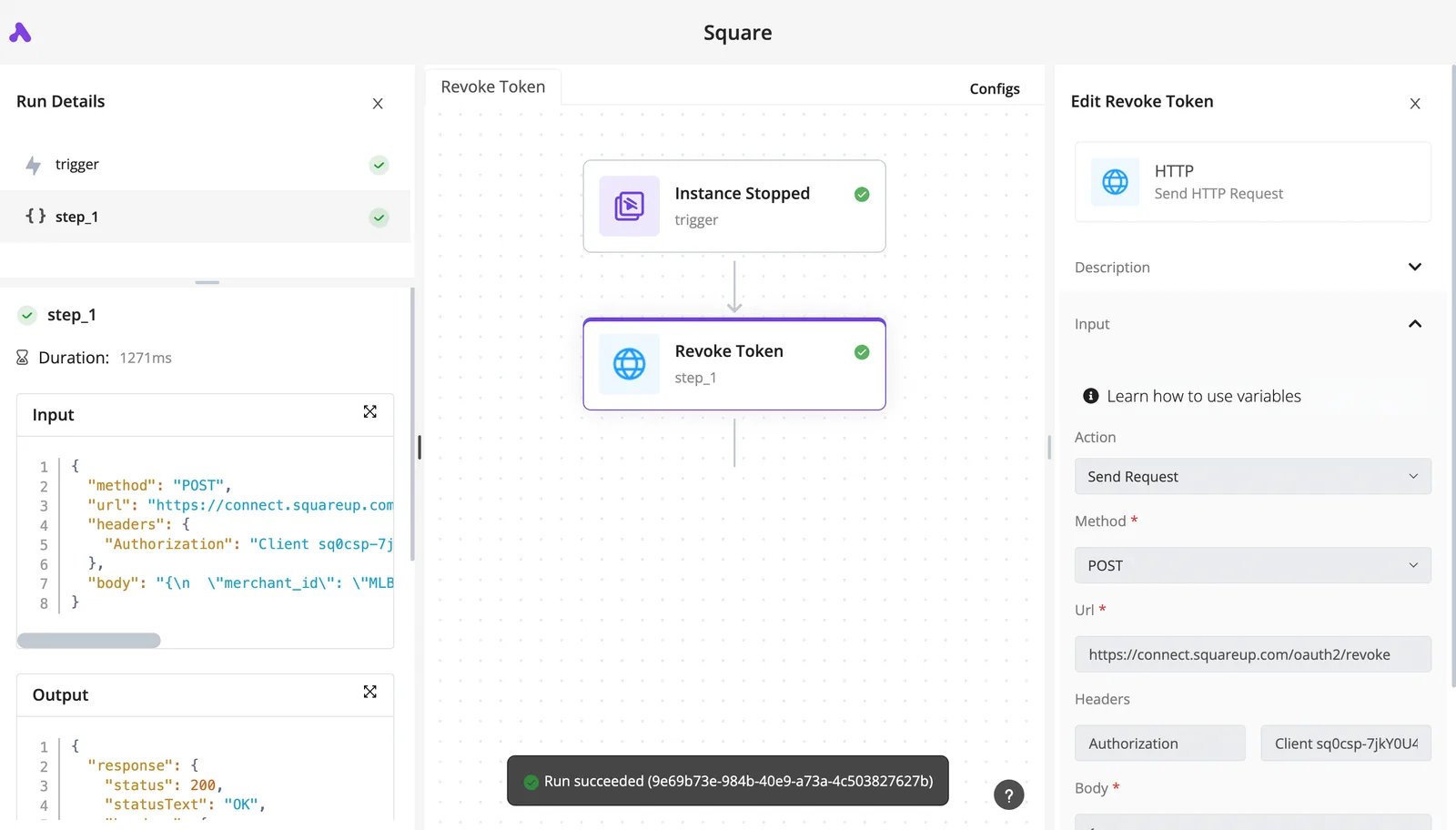
A finished run looks like this: the trigger and the step both ticked green, with the request the step sent and the response it got back recorded beside it.
That example revokes an access token rather than raising a cost alert, but a run of your alert flow reads the same way.
When a run fails, you open it, see which step broke and what came back, and fix that step rather than guessing.
### What it does not do
It changes nothing about what Front Door charges you. The egress, request, rule and WAF meters keep running at the same rates whether or not anyone is alerted.
It also doesn't stop spending. If traffic spikes, the flow tells a person and gives them a ticket. Someone still has to decide whether to change a rule, adjust caching or accept the bill.
And it's only as good as the budgets behind it.
Azure cost data arrives with a delay, so an alert reflects spend a little while ago. Set thresholds from the model you built before launch, with enough room below the limit that the warning comes while there is still time to act.
## Frequently asked questions
Alerts aren't instant, so the answers below come with a check date of 23 November 2026, and the rates and terms on Microsoft's pages can change after it.
### Free tier and billing cycle
Does Azure Front Door have a free tier? No free tier is listed on Microsoft's Front Door pricing page, only the paid Standard and Premium plans.
If you hold Azure credits from a new account, check whether they cover Front Door before you count on them. Budget as though every hour is billed.
Is Azure Front Door billed per hour or per month? Both, in different ways. The plan fee is a time-based charge for having the service switched on, and the usage meters (egress, requests, rules) bill for what you consume.
Microsoft totals them into one monthly invoice, per the same pricing page.
A quiet month shrinks the usage lines but never the plan fee.
### Upgrades and blocked traffic
Can I upgrade from Standard to Premium without downtime? Microsoft documents an in-place upgrade path in its tier upgrade guide. Read the current prerequisites there before you schedule it, and rehearse it on a non-production profile first.
Compare the two plans on the tier comparison page so you pay for Premium only if you need what it adds.
Does Azure Front Door charge for blocked WAF requests? Don't assume blocked traffic is free. A blocked request still arrives at Microsoft's edge, and requests are a billed meter on the pricing page.

Even while the firewall does its job, an attack or an aggressive scraper can therefore raise your bill. Confirm the current treatment there, and keep a request alert in place either way.
### Is Azure Front Door cheaper than Cloudflare?
It depends on your traffic, and anyone who answers without your numbers is guessing.
Put your expected egress, request count and rule count through both vendors' calculators, starting with Microsoft's pricing page and [Cloudflare's plans page](https://www.cloudflare.com/plans/). Compare the totals at the traffic you expect, not the plan prices.
To set up budget alerts, use Azure Cost Management; Microsoft's budget tutorial explains how they work. Cost data arrives with a lag, so set the threshold well below your limit.
## Related reading
- [Supabase Pricing: Free Tier Limits, Pro Costs & Egress](https://www.activepieces.com/blog/supabase-pricing-free-tier-limits-pro-costs-egress)
- [GPT-6.1 Sol: Pricing, Performance, and How to Route Requests](https://www.activepieces.com/blog/gpt-61-sol-pricing-performance-and-how-to-route-requests)
- [Azure Cosmos DB Pricing: A 2026 Guide to Costs](https://www.activepieces.com/blog/azure-cosmos-db-pricing-a-2026-guide-to-costs)
## References
- [CZLY Tech](https://czlytech.com/en/news/azure-front-door-cost-2026.html)
- [Oxbow Research](https://oxbowresearch.com/p/the-egress-tax-how-data-gravity-subsidizes)