# Best Tools to Test Automation Workflows Before Production
By Aisha Okoye · 2026-11-23 · Source: https://www.activepieces.com/blog/best-tools-to-test-automation-workflows-before-production
---
A pre-production test is a run on safe data in a copy separate from the live workflow, with a way to promote the copy or roll it back.
Platforms differ in whether they build that in, gate it to a higher plan, or leave it to you, and tools such as [Activepieces](https://www.activepieces.com) are one of several places where you can see how that choice plays out.
Anyone who has edited a live automation at 2am and **watched it email 3,000 real customers** knows why the copy matters. We judge each platform on four criteria.
## Criteria for Testing Workflows Before Production
### Separate test and production environments for workflows
Start with separation from the live copy. Ask whether the platform gives you a second environment, or only a duplicate workflow in the same workspace.
A duplicate shares credentials and triggers with production, so **one mis-wired webhook can still hit live systems**. Where separation is left to you, you build it with separate projects or separate instances, and you carry that upkeep.

### Safe test data
A separate copy is only safe if it points at test data, which makes safe test data the second criterion. Check whether credentials can differ per environment, and whether you can replay a recorded run instead of firing real triggers.
If neither exists, you maintain sandbox accounts and fake records by hand, and that's where tests drift from reality.
### Promotion and rollback
Without promote and roll back, a bad release stays live while you reconstruct the old one from memory. That is the third criterion.
Promotion should move a tested version into live without retyping it, ideally through version control. Rollback should restore the previous version in one step. Without both, "promote" means copying by hand.
### Cost of safe workflow testing by plan
Then comes the bill. Environments, version control and role permissions often sit on higher plans, so the tier that includes them is the real cost of safe testing.
Self-hosting changes that calculation: you can run a second instance ([Activepieces](https://www.activepieces.com) is self-hostable, with an MIT-licensed core), but you pay in servers and maintenance rather than a plan fee.
Treat each platform's list price as the starting point and ask which tier unlocks the first three criteria.
## 1. [Activepieces](https://www.activepieces.com)
Activepieces gives you run history and unlimited flows on every plan, including free. Releases and Git Sync sit on the Ultimate plan, so on the lower tiers the separation between copy and live is yours to build.
### Confirmed workflow testing features in Make.com
Here's what is confirmed. You can test a single step with sample data before the whole flow runs, so a bad field mapping shows up on one step instead of in your customers' inboxes.
Flows have a draft version that is separate from the published one, so you can edit without changing what is running.
At 2am, run history is how you find out which step broke, because it shows what each execution did. And it's open source, so you can self-host it on a server you control.
### Missing staging environment for Make.com workflows
Without one, "test" means a second flow, or a second self-hosted instance, that you build and keep in sync.
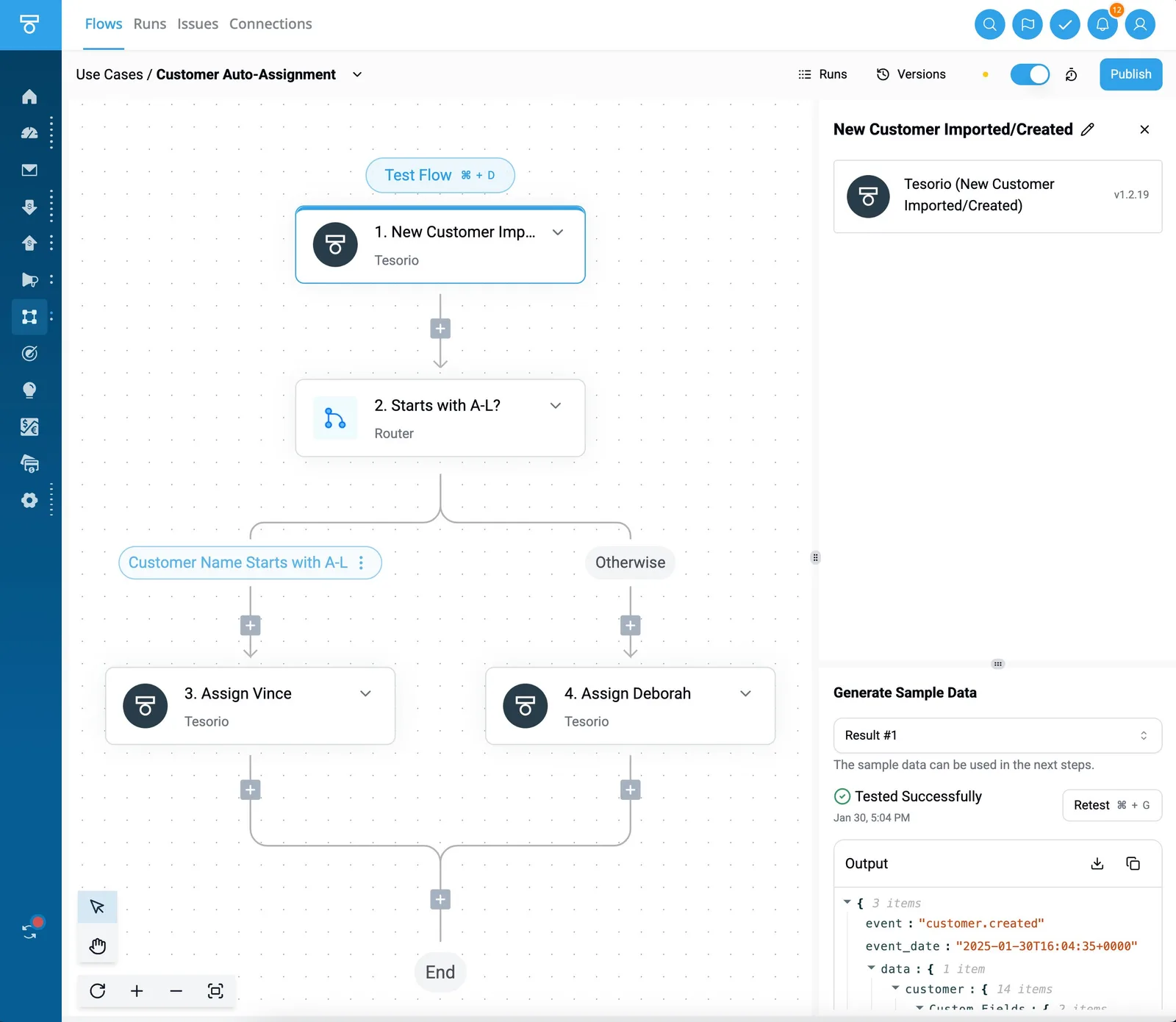
That's the manual step the last section warned about, and no feature removes it for you.
Activepieces fits a team that wants a free, self-hostable visual builder: the core is MIT-licensed, the free plan allows unlimited flows, and there are 750 integrations to build with.
It also needs someone willing to own the discipline: separate test credentials, a written list of what changes on promotion, and a habit of checking run history after every release.
If you're short on budget and long on patience, that trade is reasonable. If nobody will own it, it isn't.
### Community and support
Because separation is something you'll mostly work out from forum answers and shared examples, community size matters here. GitHub's chart compares GitHub stars for Activepieces (25,683), n8n and Temporal.
**Activepieces, at 25,683 stars, sits far below n8n**, an open-source visual workflow builder, and close to Temporal, a code-first workflow engine. Expect fewer ready-made answers than n8n offers.
Next, the platforms that build the separation in, or sell it on a higher plan.
Activepieces is the better fit for teams that treat automation flows as reviewable work, judged on whether a change can be checked before it reaches production.
Its draft version stays separate from the published one, single steps can be tested with sample data, and environments allow promotion from test to production.
Git Sync and Release Management put flows into a review process rather than leaving them only in a vendor's UI, though they sit on the Ultimate plan, so on lower tiers that separation is yours to build.
## 2. n8n platform
n8n gives you test-safe building blocks on every plan, but the proper dev-to-production separation sits behind its higher plans, so the cost question comes before the engineering one. Start with what is free of gating:
- Pinned data lets you freeze a node's output on the canvas and re-run everything downstream against that saved sample, so you can fix a broken step without firing the real API again and again
- That's the cheapest safe test n8n offers
- It works only if the sample you pinned was scrubbed first
In the screenshot below, the usual shape of that testing loop appears:
- A manual trigger
- A chat trigger feeding an AI Agent step with an OpenAI chat model and simple memory attached
- An execution panel on the right with the input and output of each node
Although the chat reply is a plain greeting, the sidebar also shows an error from the memory sub-node. Read it as a reminder that the canvas surfaces failures per node, which tells you which step broke.
It doesn't tell you whether the copy you tested in resembles production.
That second question is what environments and source control promotion answer. Per n8n's docs, these let you keep separate instances for development and production and push workflows between them through a Git repository.
These features are gated to higher plans, so a small team on an entry plan is left copying workflows by hand, which is exactly how the 47-versions-of-the-tracker problem starts.
Self-hosting is the other lever. You can run n8n on your own server, which suits developer-leaning teams who are comfortable with containers and with maintaining a staging instance themselves.
The trade-off is that you carry the upgrades, backups and uptime. For teams on a tight budget, the gating and the operating effort are where n8n falls short.
## 3. Windmill's draft-to-live testing
Windmill builds the draft-to-live separation into the product and is open source, so there's no plan gate on testing. The promotion path is something your team assembles and runs.
Inside the editor, a script or flow has a draft state and a deployed state. You can run a preview of the draft against test inputs without touching what the schedules and webhooks already call.
That removes the 2am problem of a half-edited flow firing on a live trigger.
It also means a preview is only as safe as the data you hand it, so someone still has to decide what "safe data" means.
Workspaces are the larger boundary. You can keep a staging workspace and a production workspace, each with its own resources and credentials, so a test run never holds a production key.

The consequence is duplication: every connection has to exist in both places, and someone has to keep them aligned.
When a change moves from staging to production, it goes through git sync, the way code does. Workspace contents are synced to a repository:
1. Edit and preview in the staging workspace.
2. Sync the change to a branch and review it.
3. Merge, and sync the result into the production workspace.
4. To roll back, revert the commit and sync again.
Don't expect a button the platform guarantees: rollback here is as good as your repository habits.
If data can't leave the building, self-hosting is available, so the whole arrangement can sit inside your own network. The price is operating it yourself:
- The database is yours to run
- Upgrades are yours to run
- Workers are yours to run
For an engineering team already working in git and pull requests, that fits. For a team that wants a staging copy without learning those habits, it's more setup than the other platforms here ask for.
## 4. Temporal's code-based testing
Temporal asks for more engineering than any no-code builder: you write the tests yourself, in code, and then decide where the staging copy lives. Nothing here is a drag-and-drop toggle, so a team without developers won't get far.
What you get in return is testing that goes deeper than clicking "run" on sample data. Its test environment includes time skipping, so a workflow that sleeps for 30 days on a renewal timer finishes in seconds.

Nobody has to wait out the clock, or fake the date by hand at 2am.
Replay is the more unusual tool. You export the saved event history of a real execution and run your new code against it in a replay worker.
If the change would break a workflow already in flight, the replay returns an error before anything ships. If not, it passes.
In the flow below, saved history goes to a replay worker and comes back as a pass or an error, with `staging` and `production` namespaces each running their own versioned worker.
After that, the question is cost. A namespace is the unit that keeps staging apart from production, and you can run your own Temporal server for free or use Temporal Cloud.
viz type=milestones title="Temporal Cloud's minimum monthly fee over time" unit="$ per month" source="Temporal - https://temporal.io/blog/paygo-developer-support"00 and then to $0 under pay-as-you-go."
Support: $200/month
Essentials: $100/month
Pay-as-you-g: $0/month
### Temporal cloud pricing and self-hosting for testing
$200 a month was the minimum on the Support plan, according to [Temporal](https://temporal.io/blog/paygo-developer-support), which meant paying that floor before any staging traffic ran. That made a second namespace feel like a luxury.
Temporal's Essentials plan cut the minimum to $100. **Pay-as-you-go now has a $0 minimum**, according to Temporal. A small team pays for what its staging namespace actually uses and not for a fixed monthly floor.
Self-hosting removes the fee but not the work. You then run and upgrade the server, and that falls to whoever is on call.
## 5. Make.com
Make is cloud-only, so there's no server for anyone to patch. Testing there means building a separate copy yourself from a handful of features rather than switching to a test environment.
Make calls a workflow a scenario, and it suits non-developers who'd rather click than operate infrastructure.
The pattern most teams land on is a cloned scenario, switched off, pointed at test data. You run it manually, read what each module received and returned, and leave its schedule off until you trust it.
The table shows which of those integrations Make's documentation confirms and which it doesn't, so you know where the safety is real and where it depends on your discipline.
| Feature | What it does for testing | Do Make docs confirm it? |
|---|---|---|
| Run once | Executes a scenario a single time so you can inspect each module's input and output | Yes |
| Scheduling toggle | Keeps a copy from firing on its own until you switch it on | Yes |
| Clone scenario | Makes a duplicate you can edit without touching the live one | Yes |
| Blueprint export/import | Saves a scenario as a file you can load into another scenario or team | Yes |
| Built-in environments | A dedicated test or staging space tied to the live scenario | Not confirmed |
| Promotion | A tracked move of a tested copy into production, with rollback | Not confirmed |
Four of those rows are real, and they cover a lot. The catch is in the last two.
With no documented promotion, "going live" means re-pointing connections, swapping test data for real, and switching the schedule on by hand. Make's docs don't say it will diff the copy against production or undo the change for you.
**Because mistakes creep in at that manual step**, write down what must change between the copy and the live scenario before you start.
## 6. Zapier's sample data testing
Zapier lets you test each step of a Zap with sample data and keeps drafts and versions of the Zap. Its documentation, as far as we could confirm, describes no separate staging environment with a promote-or-roll-back path.
Your "test copy" is a Zap you duplicate and keep under a different name.
That's easy to do. Copying a Zap takes a few clicks, and a non-technical teammate can run the copy against a test spreadsheet or a sandbox inbox without touching the live one.
Step-level testing pulls in a real sample record, so you see exactly which field broke before you switch anything on.
Nothing links the copy to the original. When the test passes, you rebuild or re-point the change by hand, and a slip in that handoff is the kind of error that surfaces at 2am.
Zapier is cloud-only, with no self-hosting, so your test data lives on Zapier's servers too. Use fake records.
### Zapier run history limits by plan
When you're debugging afterward, the plan is what matters. According to [One Two Three Send](https://onetwothreesend.com/zapier-task-history-cap-debugging-cost/), run history lasts 7 days on Free, 14 on Starter and 30 on Professional.
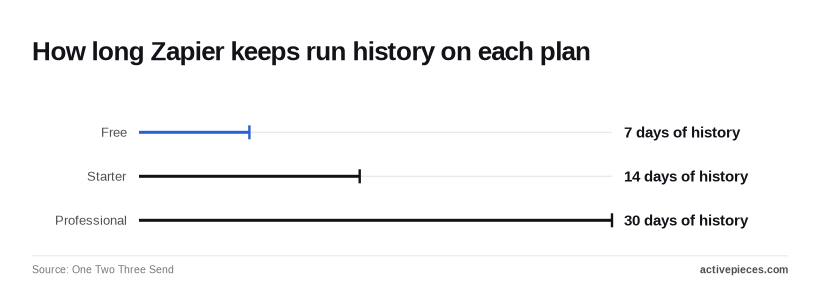
A failure that only shows up on a monthly invoice run is already gone from a Free account by the time anyone notices. Even on Starter, a problem reported two weeks late leaves nothing to inspect.
The chart shows the retention window by plan, with the gap between Free and Professional more than four times wide.
So the plan you pick sets how long you have to catch a bad test or a bad release. For anything that runs less often than weekly, the shorter tiers leave you without evidence.
## Choosing and Setting Up Your Test Copy
Pick the tool your team can maintain on a plan you can afford to keep. **Then build a test copy that can only write to a test sheet, never the live one.**
Your plan decides whether the copy is built in or you assemble it yourself.
If nobody on your team writes code, a platform with a built-in test environment beats a clever one you have to wire up.
If you have a developer who is comfortable with version control, a plan without built-in separation is workable, because you can keep the copy yourself.
The risk is the same either way: someone **tests at 2am against the real lead sheet** and sends forty emails to customers.
Because each step limits the damage the next one can do, the order below matters, and the live workflow is never exposed while you're still wiring things up:
The risk is the same either way: someone tests at 2am against the real lead sheet and sends forty emails to customers.
1. Copy the workflow and rename it so nobody mistakes it for the live one.
2. Swap the trigger to a test source, such as a form or inbox you control, so real events can't reach the copy.
3. Point the final action at a test sheet, with the same columns as the live one.
4. Run safe sample data, with invented names and addresses, and confirm exactly one new row appears.
5. Check the live workflow and live sheet: no new rows, no new runs in its history.
6. Rehearse promote and roll back on something harmless, so you know both work before you need them.
Step 6 is the one people skip, and it's the one you'll want at the worst moment.
## Related reading
- [How Enterprises Can A/B Test Workflow with Automation Tools](https://www.activepieces.com/blog/automation-tools)
- [Latest Automation Tools to Streamline Workflows](https://www.activepieces.com/blog/latest-automation-tools-to-streamline-workflows)
- [6 Best Outbound Email Automation Tools for 2026](https://www.activepieces.com/blog/outbound-email-automation)
## References
- [Temporal](https://temporal.io/blog/paygo-developer-support)
- [One Two Three Send](https://onetwothreesend.com/zapier-task-history-cap-debugging-cost/)