## The strongest case against Bitly pricing If all you need is a short redirect, free shorteners and a redirect you host yourself do the job, and Bitly's paid tiers only clearly beat them on branded domains and click analytics. ### The case for free or self-hosted redirects A redirect is a table that maps a short path to a destination. A small server, or the redirect rules your hosting provider already offers, can hold it cheaply, and nobody meters your links or QR codes.  Because you own the domain, there's no monthly link cap and no per-domain fee. Repointing every printed link costs nothing when the domain is yours, but it can mean reprinting everything when it belongs to a vendor. You pay in build time what Bitly charges as a subscription, and you pay again whenever the build breaks. ### When the case against Bitly pricing holds When links are few, internal, or short-lived, and nobody will ask what a click did, the opponent is right. Once the metered units matter more than the price, the case fails. If marketing needs a branded domain on every link and QR code, and wants click data by source and location without anyone maintaining a database, you are really buying that bundle. Building it yourself means a redirect service, a logging pipeline, a reporting view and someone on call. That labour is the real comparison, and a team with spare engineering time can reasonably win it. ## Hidden costs and limits Bitly users run into **It's the metered units that catch people**, not the monthly price: links created, QR codes, analytics history, API calls, and what survives a downgrade. Five catches decide the real bill: - Each plan caps how many links you can create per month, so the cap is your true unit price. - QR codes are capped separately from links, and the cap climbs in steps by tier. - Analytics history is limited by plan, so older click data can be unreachable. - API access is rate-limited and varies by plan, which matters once software creates links. - Downgrading can change what happens to your links, custom domains and stored data. ### Bitly link and QR code caps Most teams hit the monthly link creation cap first, because every campaign, newsletter and per-recipient link spends from the same pool. The same happens with QR codes: the allowance is small at lower tiers, so a print run with a unique code per location can force an upgrade before the link cap matters. ### Bitly downgrades and analytics retention limits Lower tiers keep a shorter window of click history, so a year-over-year comparison may be impossible if you were on a cheaper plan. If you drop a tier later, custom domains and the links on them can stop behaving as before. Read the downgrade terms before you commit. ### API limits when links are created automatically When a workflow creates a short link for every new record, form entry or order, it spends the monthly allowance with no one watching, and API rate limits can reject calls during bursts. Estimate links per day from the trigger volume, then check that number against both the plan's creation cap and its API limits. [Activepieces](https://www.activepieces.com) fits only this narrow job: creating or logging Bitly links from other apps through a workflow, while link management and click analytics stay in Bitly. The Free plan includes 1,000 credits a month and unlimited flows.  ## Bitly against Rebrandly, Short.io and TinyURL on price Among these four, the cheapest list price is rarely the cheapest bill. Each vendor meters something different: Bitly and its rivals count links created, QR codes generated and domains connected, and the one you exhaust first sets your real cost. ### Bitly competitor pricing comparison table Treat the table as a list of questions to answer on the live pricing page. | Vendor | Entry paid price | Free link cap | Custom domains | QR allowance | Analytics retention | API access | Seats | Check date | |---|---|---|---|---|---|---|---|---| | Bitly | Monthly, set by link volume | Monthly link creations | Gated to paid tiers | Counted per plan | Lengthens with tier | Rate-limited by plan | Grows with tier | 2026-10-26 | | Rebrandly | Monthly, set by branded-link needs | Capped links on free | Central to the product | Counted per plan | Lengthens with tier | Plan-dependent | Grows with tier | 2026-10-26 | | Short.io | Monthly, set by domains and links | Capped links on free | Core to paid plans | Counted per plan | Plan-dependent | Plan-dependent | Grows with tier | 2026-10-26 | | TinyURL | Monthly, set by feature bundle | Capped links on free | Paid feature | Counted per plan | Plan-dependent | Plan-dependent | Grows with tier | 2026-10-26 | 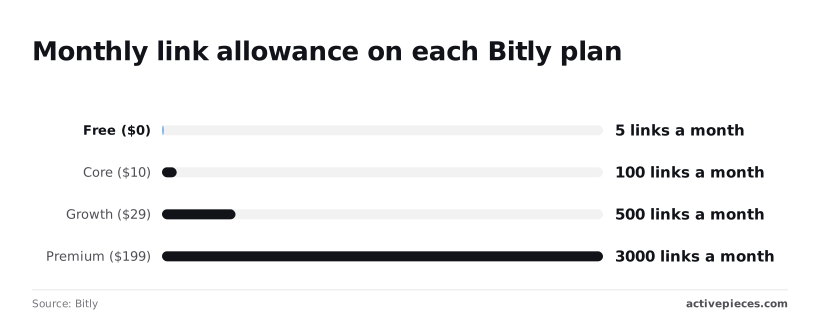 A vendor with a low entry price but a tight QR or API ceiling will push you up a tier sooner than one that costs more upfront. ### Best Bitly alternative by buyer type Pick by the limit you'll hit first. If your automation creates links in bulk, the API ceiling and the monthly creation cap matter more than the headline price, so price the tier that clears your daily volume with room to spare. If branded domains are the point, compare how many domains each plan connects, because adding a second brand or region is where the bill jumps. [Rebrandly](https://www.rebrandly.com/pricing) and Short.io both lead with domain handling, so test them against Bitly's tier for your domain count. If you only need occasional short links and a basic QR code, TinyURL's lighter bundle may cover you without paying for analytics history you won't read. If you need long click history for reporting, check retention first; it's the line most often cut from lower tiers. ## What Activepieces does about this The cost this article keeps returning to is the monthly link allowance, and automation is where it gets spent without anyone noticing. Activepieces can't raise Bitly's cap, and it doesn't replace Bitly's branded domains or click analytics, which are the reasons to pay in the first place. What it does is put a workflow in front of the link-creation step, so you decide when a link gets created instead of letting every trigger spend one. In practice that means a flow that checks before it creates. A form entry, order or new record can first be filtered, deduplicated against a sheet of links you've already made, or batched, so a repeat trigger reuses the existing short link rather than burning another of your 100 or 500. The same flow can log each new link, its destination and its campaign to a spreadsheet or database. That log is the export of your link list that the downgrade advice above tells you to keep, and it exists before you need it. The pricing is easy to check against your own volume. Activepieces bills by the run: a flow costs 1 credit however many steps it has, and the Free plan includes 1,000 credits a month with unlimited flows.  A flow that checks for a duplicate, creates the link, writes the log row and posts to Slack is one credit, so adding the safeguards doesn't raise the automation bill. Divide your daily trigger volume by the plan's creation cap and the credit count to see which limit you reach first. The code is open, which matters for the exit-route point made earlier. Activepieces' community edition is MIT-licensed and can be self-hosted, so the workflow that holds your link log and creation rules doesn't depend on a vendor's pricing page. You can start on the hosted Free plan to test the flow and move it to your own server if volume grows. ## Frequently asked questions Is Bitly free to use? Yes, Bitly has a free plan, but it meters monthly short links and QR codes, so "free" lasts only until you hit those caps. Its default short domain is shared, and analytics depth is limited. Check the current caps on Bitly's pricing page, because they have changed before. Does Bitly charge extra for custom domains? You'll find custom domains behind paid tiers rather than on the free plan, and the number of domains included varies by tier. Whether a second or third domain costs extra, and how much, is something we couldn't verify. Count the domains you need before comparing plans, since that count can move you up a tier. ### Do Bitly links stop working if I cancel? After a downgrade, short links created on the shared default domain generally keep redirecting, according to Bitly's help documentation, though we haven't tested this ourselves. The risk is with branded links. If your custom domain is tied to a paid plan, those links may stop resolving when the plan ends. Export your link list and check the domain terms before you cancel. **Printed QR codes pointing at a branded domain** are the costliest thing to break. ### Is there a discount for nonprofits or annual billing? Bitly has offered annual billing at a lower effective monthly rate, and it has run nonprofit programs, but we couldn't confirm current terms for either. Treat both as unverified. Compare the annual total against twelve months of monthly billing in your own checkout, and ask Bitly sales directly about nonprofit eligibility. Annual billing also locks you in, so it only saves money if your link and QR volume is stable. ### Can I use Bitly's API on the free plan? On free accounts, Bitly has offered API access, with rate limits and fewer features than paid tiers. The metered unit is API requests, and the limits decide whether automated link creation is practical for you. We couldn't verify which endpoints are restricted on the free plan today. If your workflow creates links in bulk, test it against the free plan's limits before you commit to a paid one. ## Related reading - [Exa 3.0 Search API Pricing and Limits in 2026](https://www.activepieces.com/blog/exa-30-search-api-pricing-and-rate-limits-2026) - [n8n Review 2026: Pricing, Licence, and Limits](https://www.activepieces.com/blog/n8n-review-2026-pricing-licence-and-limits) - [Netlify Pricing: Plans, Limits and Costs (2026)](https://www.activepieces.com/blog/netlify-pricing-plans-limits-and-costs-2026) ## References - [Bitly](https://bitly.com/pages/pricing) - [Flyn](https://www.flyn.to/blog/short-link-bot-click-share)**A team that pays monthly is funding the vendor's flexibility, not its own.