# Calendly API: Authentication and Rate Limits (2026)
By Grace Muthoni Kariuki · 2026-11-20 · Source: https://www.activepieces.com/blog/calendly-api-authentication-and-rate-limits-2026
---
Calendly's REST API v2 lives at api.calendly.com and accepts either a personal access token or an OAuth app.
As of 20 November 2026, the base URL's confirmed, but you should check plan requirements against Calendly's own pricing page before you build, whether you're wiring it into a script or into a [Activepieces](https://www.activepieces.com) flow.
Decide first who owns the connection: **a personal token acts as one user, so if that person leaves, the integration goes with them.**
The decision **turns on ownership and plan, not on endpoints**. A personal access token suits one account owner running internal scripts, and an OAuth app suits a product acting for many Calendly users.
## Calendly API requirements and capabilities
### What the API lets you do
The v2 API reads and manages event types, scheduled events, invitees and users. It also supports webhook subscriptions, which push booking changes to your server so you don't need to poll.

A webhook receiver's the cleaner design for production, and if the Calendly trigger you need isn't in a connector, [Activepieces](https://www.activepieces.com) lets you build the missing integration yourself and keep it in your own instance, with no vendor release or ticket in a queue.
**About 60% of its 750 integrations are community-contributed**, and you can count them in its MIT-licensed open source monorepo, so most of its integration work is handled by developers outside the core team.
Check whether the action you want is exposed at all, and which credential type can perform it. An integration designed around a call that doesn't exist's the costliest kind of rework.
### Which plans include API access
Price [Calendly](https://calendly.com/help/how-to-create-a-routing-form)'s paid plans first. According to [Techpresso](https://techpresso.co/blog/calendly-pricing), Standard costs **between $10 and $12 per seat per month**, depending on whether you pay annually or monthly. For a ten-person team, that's $100 to $120 a month for the cheapest tier you would plausibly build on.
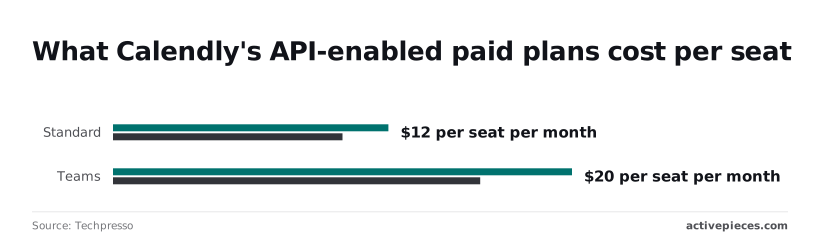
Step up to Teams and the price is $16 to $20 per seat per month on the same source. At ten seats that's $160 to $200 a month, so the step up costs roughly $60 to $80 more.
Monthly billing carries the higher figure on each plan. Treat both prices as indicative and verify them on the pricing page, since a third-party source can lag behind Calendly's own.
## Personal token and OAuth app access
Use a personal access token when the integration serves one Calendly account that you or your team own. Use an OAuth app when it must act on behalf of many separate Calendly users. Both routes start at developer.calendly.com.
### Personal access token steps
Because a personal access token's issued from the Calendly account that will be accessed, it carries that one user's permissions and nothing wider.
Generate it from the developer portal while signed in as the account owner, copy it at the moment it's shown, and store it in a secrets manager rather than in source code.

Confirm in Calendly's documentation whether the token can be viewed again afterwards. Record a named owner and a rotation routine before launch.
### OAuth app registration steps
Because registration gives each customer their own consent screen and their own tokens, no customer's credentials ever sit with another's. Work through these in order:
1. Open developer.calendly.com and sign in.
2. Create a sandbox app first, so that early mistakes touch no real customer's calendar.
3. Set the redirect URI to the exact address on your server that receives the authorization code. A mismatch here is a common cause of failed sign-ins.
4. Copy the client ID and client secret shown for the app.
5. Test the full authorization flow in the sandbox, including a user denying consent.
6. Request a production app once the sandbox flow behaves, and check Calendly's documentation for what the review asks of you.
7. Store the client secret server-side only, never in browser code or a mobile app bundle.
Only one of the two values may be exposed: the client ID identifies your app and may be, but the secret proves it's really you and may not.
Choose OAuth the moment another organization's calendar's involved, because asking customers to paste personal tokens makes you the custodian of credentials you can't audit.
## Calendly API authentication in a first working request
Every Calendly API request carries one credential in an `Authorization: Bearer` header, and the first call that proves it works is `GET /users/me`.
A personal access token acts as the person who generated it, so a request made with it sees that person's data and stops working if their account changes.
With an OAuth app, the request acts for whichever user authorizes it.
Send `GET https://api.calendly.com/users/me` with the bearer header. The response returns the user's `uri` and the `current_organization` URI. Calendly identifies resources by full URIs, not bare numeric IDs, so what you store and pass to later calls is the whole URI string.
Save both values now; every list endpoint filters on one of them.
### List scheduled events with the Calendly API
Call `GET /scheduled_events` and pass the user URI as the `user` query parameter to see that person's events. To see events across an organization, pass the organization URI as `organization` instead.

Which one you may use depends on your role and the scope of your token.
A permission error usually means the credential's owner lacks access to that scope, not that your syntax's wrong. Read the pagination fields in the response so you don't mistake the first page for the full list.
### Refresh OAuth tokens before they expire
With OAuth, the user's sent to Calendly to approve your app, and Calendly returns an authorization code to your redirect URL. Your server exchanges that code for an access token and a refresh token, using your client ID and client secret.
Store the refresh token as carefully as the secret: whoever holds it can act as the authorizing user.
When an access token expires, request a new one from Calendly's token endpoint with the refresh token, and save the replacement refresh token if the response includes one. Build this step before launch, not after the first failure.
## Calendly API endpoints compared by job and plan
Once the token refreshes reliably, the next question's which endpoint groups it can reach. The scope or role on the connection, not your code, decides what each call returns.
To see which jobs your connection's owner must approve before you build, read the table below, which sets the seven groups against what they do, what access they need and how they paginate.
Treat every cell as a prompt to check Calendly's developer documentation, since scopes and plan limits change.
| Endpoint group | Reads or writes | Scope or role needed | Pagination | Plan note |
|---|---|---|---|---|
| Event types | Reads, plus creating one-off types | Event-type access on the token | Cursor-style, page token | Confirm in docs |
| Scheduled events | Reads, plus cancelling | Scheduled-event access | Cursor-style, page token | Confirm in docs |
| Invitees | Reads, plus marking no-shows | Same as scheduled events | Cursor-style, page token | Confirm in docs |
| Availability | Reads | Availability access | Not a list in most calls | Confirm in docs |
| Routing forms | Reads | Routing-form access | Cursor-style, page token | Confirm in docs |
| Webhook subscriptions | Reads and writes | Webhook access; organization or user scope | Cursor-style, page token | Plan-gated; confirm in docs |
| Organization membership | Reads, plus invitations and removals | Admin or owner role | Cursor-style, page token | Confirm in docs |
Most groups are read-heavy, with the writes clustered around membership and subscriptions, where the connection's owner matters most.
### Calendly API read endpoints and pagination
On the read side sit event types, scheduled events, invitees, availability and routing forms. Each list call returns a page and a token for the next one, so a loop that stops after the first page silently drops records.

A token tied to one user sees that user's events, while an organization-level view needs an admin.
### Calendly API write endpoints and scheduling limits
You can create one-off event types, cancel events and mark no-shows, but writes are narrower than most developers expect, so check the documentation for whether your plan lets you create a booking directly.
Membership changes need an admin or owner, so a service account without that role fails here first.
Webhook subscriptions replace polling for new bookings and cancellations, and they're the group most tied to plan tier. List existing subscriptions before creating one, so a retry doesn't leave duplicates delivering the same event twice.
## Calendly API rate limits and quotas by plan
50 requests per user per minute on a free plan and 500 on a paid plan: that's Calendly's documented limit, with a far lower cap on creating invitees, so the invitee creation cap becomes your first bottleneck if you're using the API to generate many invitees.
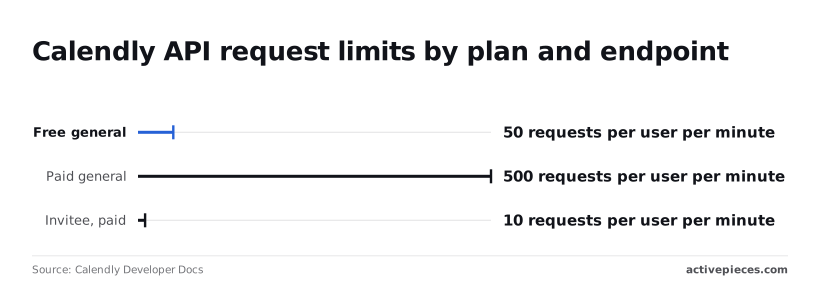
Your plan sets how much traffic the integration can carry.
Chart goes here.
In practice the gap matters. Create Event Invitee allows 10 requests per user per minute on paid non-Enterprise plans, per [Calendly Developer Docs](https://developer.calendly.com/api-docs/overview/rate-limits). That's 10 programmatic bookings a minute per user, however much general headroom remains.
**Free accounts are held to 5 per day**, so an integration that books on their behalf stops after the fifth.
Elsewhere the numbers differ: [Stitchflow](https://www.stitchflow.com/user-management/calendly/api)'s write-up gives 60 and 120 instead. That conflicts with Calendly's own page, so treat the vendor figures as authoritative and check them again before you size anything.
### Published limits and headers
Counted per user, the general limits are 50 per minute on free and 500 per minute on paid, per the same docs page. Because the count's per user, one token acting for one user shares a single budget across every job you run under it.
Record whose token each job uses, because that person's quota's what you're spending.
Go over the limit and the request returns HTTP 429. Retrying immediately spends more of the same budget and prolongs the block. Instead:
1. Stop on the first 429 and read any retry or reset header the response carries.
2. Wait at least that long; if there's no header, start at one second and double each attempt.
3. Add random jitter so parallel workers don't retry in step.
4. Cap the attempts and log the failure with the token owner's name.
### Calendly API polling versus webhooks
Whether or not anything changed, polling spends the budget. A job that lists scheduled events every ten seconds makes 360 calls an hour, which is more than a free user's per-minute allowance times seven, and it spends them mostly learning nothing.
Whether or not anything changed, polling spends the budget.
Subscribe to webhooks and **the event is pushed to you**, so the quota's left for the calls that act on it. Keep polling only as an occasional reconciliation pass.
## Calendly API errors and solutions
When a call fails, one of seven causes usually explains it, and the status code usually points to the right one. Before debugging any of them, ask whose token the call is using, because that owner's access decides what the API returns.
The table shows each failure with its likely cause, the fix and where to confirm it.
| Status | Likely cause | Fix | Docs link |
|---|---|---|---|
| 400 | Malformed request or invalid parameter | Compare your parameters and body with the endpoint's schema | [API reference](https://developer.calendly.com/api-docs) |
| 401 | Missing, expired or revoked token | Reissue the token, or refresh the OAuth access token | [API reference](https://developer.calendly.com/api-docs) |
| 403 | Token owner lacks permission, or the plan excludes the endpoint | Use a token from an authorised user; check your plan | [API reference](https://developer.calendly.com/api-docs) |
| 404 | Wrong resource URI, or a resource the token cannot see | Use the full URI returned by the API | [API reference](https://developer.calendly.com/api-docs) |
| 429 | Too many requests | Back off and retry; replace polling with webhooks | [API reference](https://developer.calendly.com/api-docs) |
| Webhook delivery failure | Endpoint unreachable or not returning success | Fix the endpoint, then confirm the subscription is active | [API reference](https://developer.calendly.com/api-docs) |
| Pagination issue | Reading only the first page | Follow the next-page token until none is returned | [API reference](https://developer.calendly.com/api-docs) |
### The errors that cost the most debugging time
A 401 means Calendly doesn't accept the credential at all, while a 403 means the credential's valid but not allowed. On a 400, read the error body before anything else, since the problem's in your request.
A 404 often comes from building URIs by hand. Pass back the full URI Calendly gave you, and confirm the token's owner can see that resource.
## Call Calendly endpoints without code using Activepieces
You can use Calendly without writing code through Activepieces, a workflow automation tool. Its Calendly connector has an invitee created trigger and an invitee canceled trigger, and an HTTP step covers endpoints the connector doesn't expose.
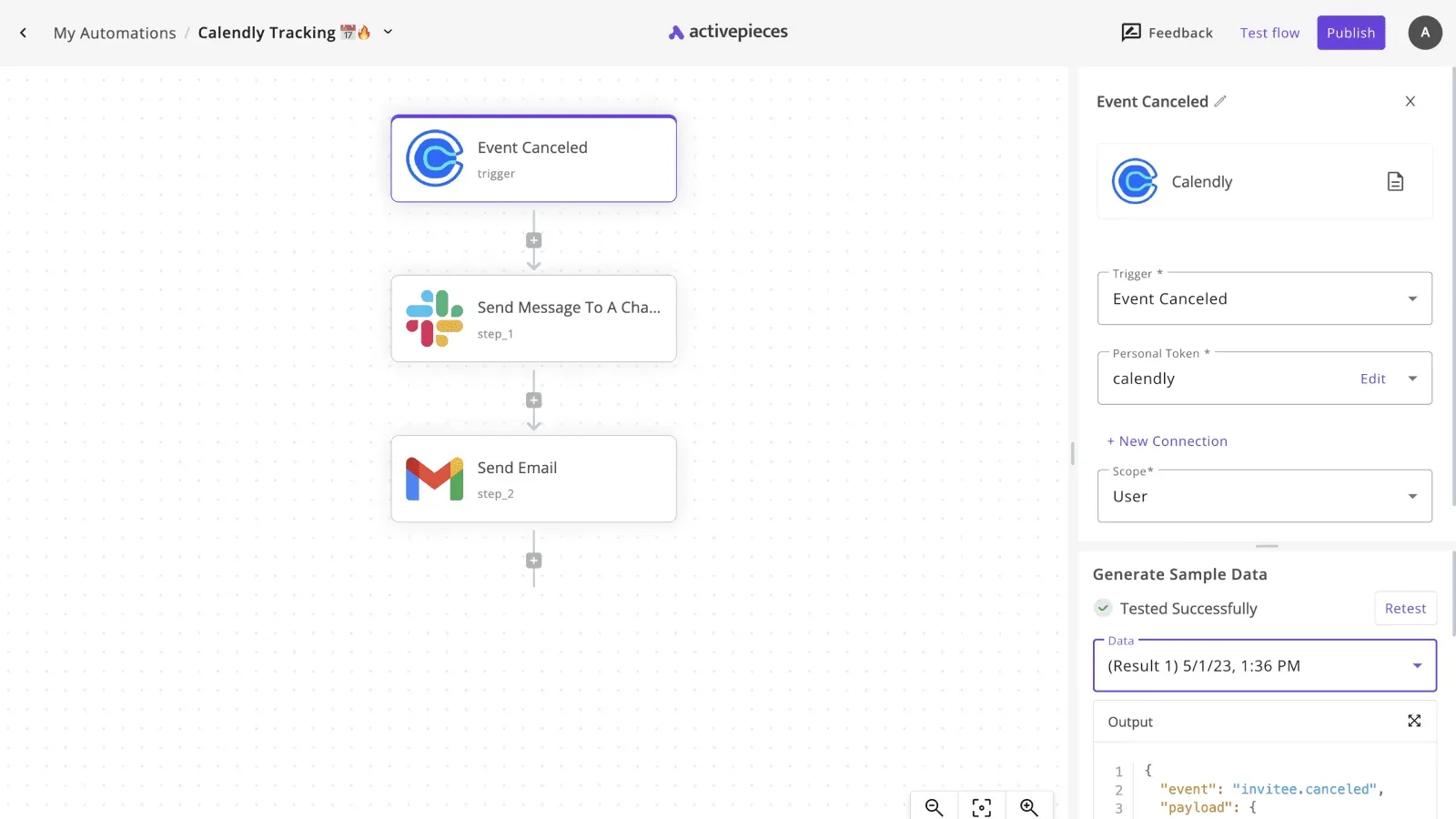
That connector is one of the 750 integrations counted directly from Activepieces' MIT-licensed open source monorepo on GitHub, so its trigger list is source code, not a marketing figure.
Before building, ask who owns the connection. Every run acts as the Calendly account that authorized it, so if that person leaves or loses their plan, the workflow stops. Check the connector's current trigger list and your Calendly plan against both products' docs.
When someone books or cancels, a trigger starts a run. Each run can pass the invitee's details to a customer-record system (your CRM), a Slack message or a Google Sheets row. That's the whole pattern the connector supports.
### When a no-code Calendly workflow is enough
When one Calendly account feeds your own tools, a workflow fits: log each booking in a sheet, notify a channel on cancellation, create or update a CRM contact.
Activepieces receives the event for you, so you skip hosting a webhook endpoint, and each booking is one run that costs 1 credit however many steps it has, against 1,000 credits a month and unlimited flows on the free plan.
That also removes the polling-versus-webhook decision for these two events.
It stops fitting when your product serves many customers, each connecting their own Calendly account.
Every run acts as the one Calendly account that authorized it, as above, so that case needs code: your own OAuth app, your own token storage per customer, your own webhook subscriptions.
### Call other Calendly API endpoints with HTTP step
For anything the connector lacks, such as an endpoint you found in Calendly's API reference, add an HTTP step. You enter the endpoint URL, the method and an authorization header carrying a Calendly token.

Use the token type your Calendly plan and docs allow, and store it as a secret rather than pasting it into the step. The step returns the raw response, so you handle errors and pagination yourself.
## Frequently asked questions
### Is the Calendly API free?
You can read data with a personal access token without paying for the API itself, but webhook subscriptions and some scheduling endpoints depend on your plan. Calendly prices by plan, not per call, so the cost question's really a plan question.
Check the plan requirements in Calendly's developer docs before you design around webhooks, and note whose account owns the token. If that person leaves, the integration loses its access.
### Can I create a booking through the API?
Older tutorials will tell you it's impossible, but Calendly's scheduling endpoints now let you create an invitee on an existing event type, which books the slot without the visitor using the Calendly page. Earlier versions of the API could only read and manage bookings.
Confirm the endpoint, its required scopes and your plan's eligibility in the current reference. Then test with a real event type, because the booking runs against that host's calendar and availability.
### Does Calendly have a sandbox for testing?
We found no dedicated sandbox environment described in Calendly's developer docs, so treat that as unconfirmed until you check.
The practical substitute is a separate Calendly account with its own event types and its own token, kept apart from production. Every call you make is real, so a test run against a colleague's live calendar creates real bookings on it.
### How do I test webhooks locally?
Because Calendly delivers webhooks to a public HTTPS address, your laptop needs a tunnel. A tunneling tool such as ngrok gives your local server a public URL that forwards to it.
Register that URL as a webhook subscription through the API, then book a test event and watch the payload arrive.
Verify the signature on each request using the signing key you set when you created the subscription. Delete the subscription when you finish, or Calendly will keep sending events to a dead tunnel.
## Related reading
- [Best AI Agent Builders for Sales Teams, Ranked](https://www.activepieces.com/blog/best-ai-agent-builders-for-sales-teams-ranked)
- [Strands Decider MCP Explained for Agent Builders](https://www.activepieces.com/blog/strands-decider-mcp-explained-for-agent-builders)
- [Best AI Agent Builders in 2026: Ranked & Reviewed](https://www.activepieces.com/blog/best-ai-agent-builders)
## References
- [Calendly Developer Docs](https://developer.calendly.com/api-docs/overview/rate-limits)
- [Techpresso](https://techpresso.co/blog/calendly-pricing)