# Calendly Google Drive Integration Without Code
By Farrukh Ergashev · 2026-11-21 · Source: https://www.activepieces.com/blog/calendly-google-drive-integration-without-code
---
According to [Gemini](https://gemini.google/subscriptions), [Calendly](https://calendly.com/pricing) and Google Drive have no native link worth relying on, but a Calendly booking can trigger Drive actions through an automation tool in about 15 minutes, so you can still automate this workflow despite the lack of native support.
A Calendly Google Drive integration is that bridge: a new booking fires a trigger, and Drive creates the folder or file you would otherwise make by hand.
When a client books a 10:00 discovery call and nobody creates their folder, the call notes end up in someone's Downloads. Two weeks later nobody can find them. That is the mundane failure it fixes.

### Calendly and Google Drive triggers and actions
2 triggers and 6 actions is what the [Calendly piece](https://www.activepieces.com/pieces/calendly) lists, while the Google Drive integration lists 3 triggers and 17 actions, according to the [public pieces API](https://cloud.activepieces.com/api/v1/pieces).
Calendly's webhooks cover Invitee Created, Invitee Canceled and Routing Form Submissions, so every booking-driven flow starts from one of the first two moments.
With 17 actions on Drive's side, the file side is rarely the constraint, says [Activepieces](https://www.activepieces.com/pricing). Anything Calendly doesn't list, such as a custom field, needs an HTTP request or webhook instead.
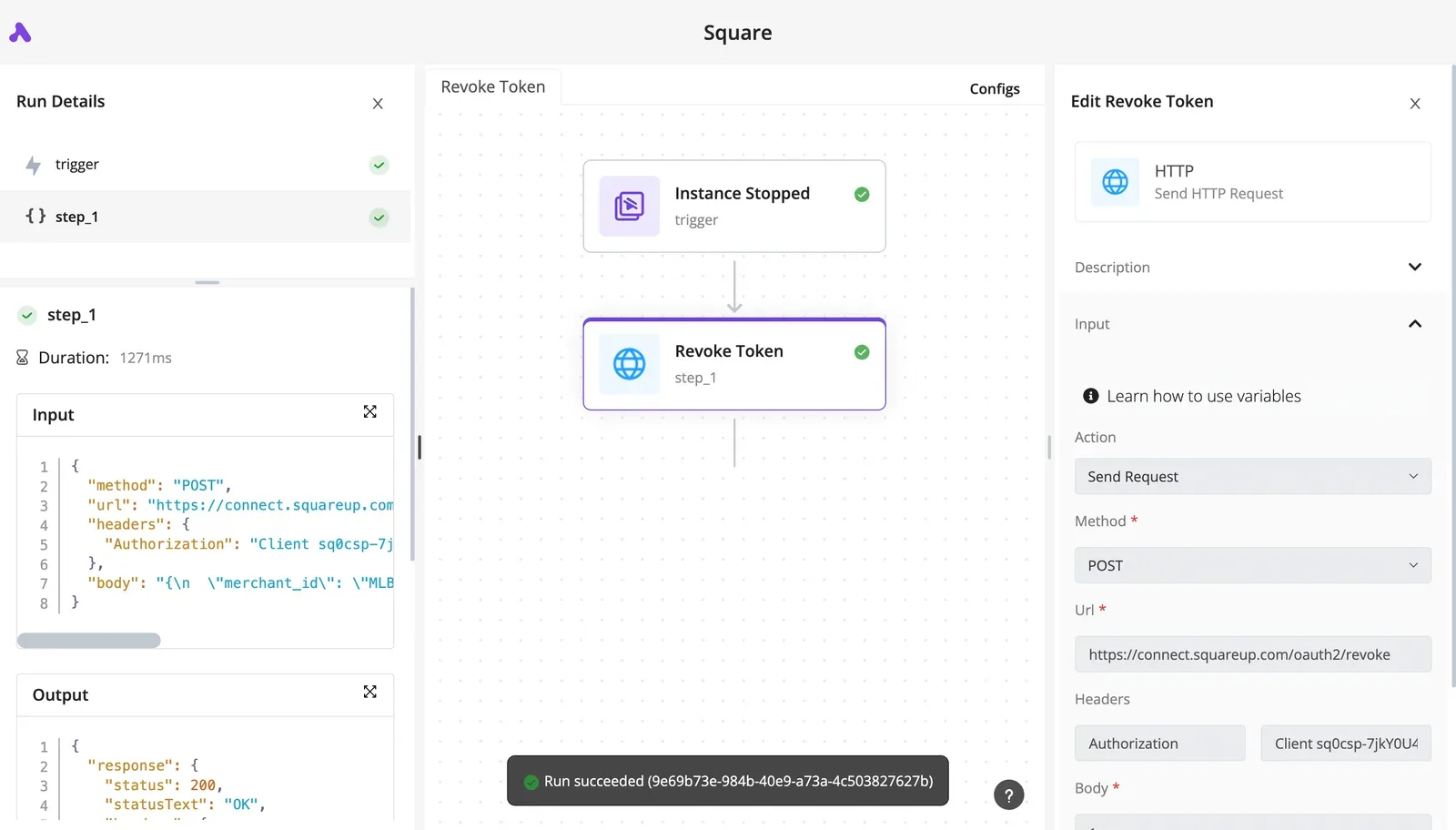
In the illustration below, a Calendly booking card on the left feeds a flow box, which hands a folder with a file inside to Google Drive.
The arrows are labelled trigger and action, because Calendly only ever starts the flow and Drive only ever receives work from it.
Reading it left to right is the fastest way to see where each app's job ends.
Four things, all of which take minutes rather than hours:
1. A Calendly account with at least one event type that clients actually book.
2. A Google account with edit access to the Drive folder where the new folders should land.
3. A free account on an automation tool. I'm using [Activepieces](https://www.activepieces.com) here: roughly 60% of its 750 integrations, counted from the open source monorepo, were built by the community, and a connector that's missing can be generated with AI and added privately to your own instance, with no vendor release to wait on.
4. One test booking you can make yourself, so you see the trigger fire before a real client does.
Do the test booking from a different email than your own. Flows that only work for the account owner tend to fail on the first real client.
Start from a booking and most setups come down to a handful of jobs.
- Create a client folder named after the invitee when a call is booked.
- Drop a copy of a prep document or intake template into that folder.
- Create a dated subfolder per meeting, so repeat clients keep one folder with a clear history.
- Log a canceled booking in a note on its folder, so dead folders don't pile up.

Four of the five need only two steps, because each uses the Event Scheduled or Event Canceled trigger plus a single Drive action.
## Building five Calendly Google Drive workflows
If you want a booking to leave something useful in Drive, five workflows cover most of it: a folder, a prep document, a cancellation note, a reused folder for returning invitees, and one fallback.
**Four take two steps**, and the table shows which trigger and action make each one work.
| Workflow | Calendly trigger | Drive action | What you get |
|---|---|---|---|
| New client folder | "Event Scheduled" | "Create Folder" | Every booking has a home before the call starts |
| Prep document | "Event Scheduled" | "Create File from Text" | Invitee answers sit in one file, not an email thread |
| Cancellation note | "Event Canceled" | "Create File from Text" | A cancelled call leaves a visible record |
| Returning invitee | "Event Scheduled" | "Find File or Folder" | Repeat clients keep one folder instead of three |
| Drive-first lookup | None (Drive "New File") | None listed; HTTP request | Uploads can be matched to a booking |

_Prices and plan limits checked against [activepieces.com](https://www.activepieces.com/pieces/google-drive) and [activepieces.com](https://www.activepieces.com/pieces/calendly) and [docs.claude.com](https://docs.claude.com/en/docs/about-claude/models/overview) and [claude.com](https://claude.com/pricing) and [openai.com](https://openai.com/chatgpt/pricing) and [gemini.google](https://gemini.google/subscriptions) on November 21, 2026._
Read the table by its first column: the fastest wins are the four that start from a booking and write one thing. The last row is the only one that needs a workaround, covered below.
### How the Calendly Google Drive workflows work
### The folder and what Drive offers
Start with "Event Scheduled" feeding "Create Folder"; the folder name can carry the invitee's name and the meeting date. Someone hunting for a file ten minutes before a call finds it by name instead of searching a shared drive.
17 actions and only 3 triggers ("New File", "New Folder", "New or Updated File") are what Activepieces' [public Google Drive piece listing](https://www.activepieces.com/pieces/google-drive) shows.
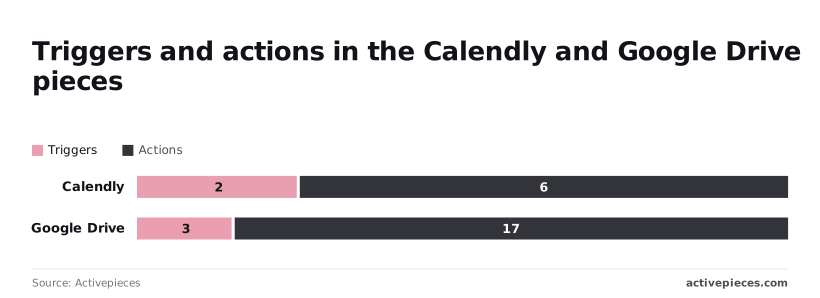
Drive mostly does things when told, and rarely starts anything. Calendly's booking events therefore start most flows, and Drive carries out the work.
### Creating prep documents and handling cancellations
For the prep document, "Event Scheduled" followed by "Create File from Text" writes the invitee's form answers into a document.
Test it on someone annoyed and in a hurry: if the file's first line doesn't say who the person is and what they asked for, they'll open the wrong one. Put the name and the topic first.
For cancellations, "Event Canceled" plus "Create File from Text" drops a dated cancellation note into the booking's folder. The folder stays, so nobody prepares for a call that no longer exists.
Renaming or moving the folder isn't a step I can confirm is listed, so the note is the safe version.
### Unlisted steps and the Drive-first lookup
Although Drive's "New File" trigger exists, I can't confirm that Calendly lists a lookup step to pair with it, so a flow that starts from an upload and finds its booking needs an HTTP request to Calendly's own API.
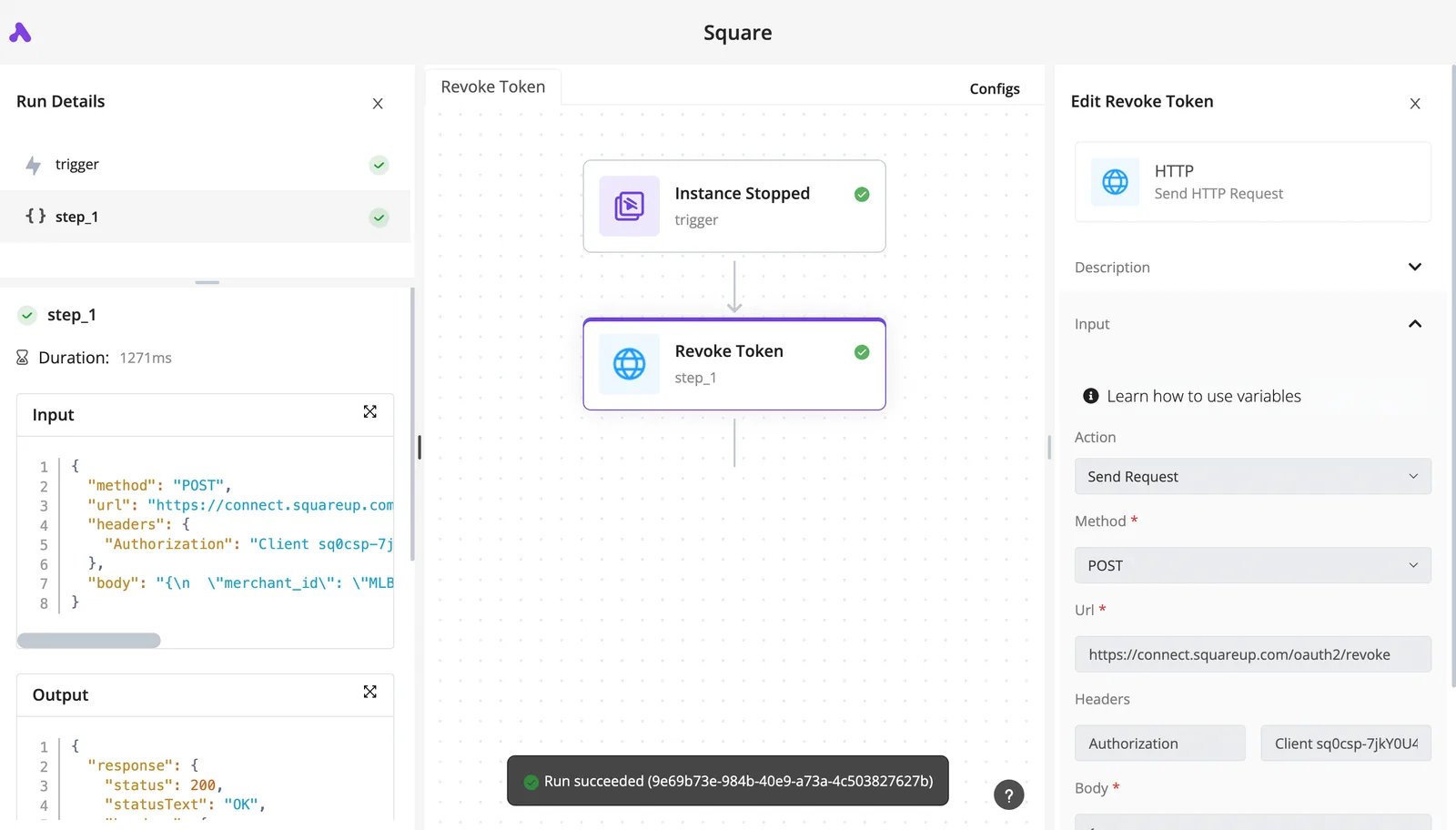
Treat it as **a custom step, not a two-click setup**.
When a step isn't listed, use an HTTP request to call the service's API directly, or a webhook to receive its events. It costs more setup and means you maintain the call yourself. Try the listed steps first, and use HTTP only for the gap.
## Building the Booking-Folder Workflow Step by Step
Build it in four stages: connect both accounts, add the Calendly trigger, add the Google Drive action with its fields mapped, then test with a real booking. Here's the whole run in order, so you can see where each integration sits before the detail.
1. Connect Calendly.
2. Connect Google Drive.
3. Add the "Event Scheduled" trigger and make a test booking.
4. Add "Create Folder", naming it from the invitee and start time and choosing a parent folder.
5. Test, then check Drive.
Picture a prospect who books a call. By the time you open the invite, the prospect already has a folder waiting under the right parent with the right name. The stages below build exactly that.
### Stage 1: Connect Calendly and Google Drive
Authorise both accounts first, so every later step has a connection to pick from. Use the Calendly account that owns the event types you actually sell, and a Google account with edit access to the parent folder you plan to use.
When a later step fails with a permissions error, the most common reason is a connection made with the wrong account, so screenshot the account name on each connection screen before moving on.
### Stage 2: Add the Calendly trigger and load sample data
Choose "Event Scheduled" as the trigger and select your connection.
Then make a real test booking on your own booking page, using a name you will recognise. The trigger needs that booking to load sample data, and the sample shows which invitee and start-time fields you can map later.
If the sample comes back empty or from the wrong event type, send a screenshot of the trigger panel before you continue, because everything downstream reads from it.
### Stage 3: Add the Google Drive action and map the fields
Add "Create Folder" as the next step. Build the folder name from the invitee's name and the event's start time, so two bookings from the same person never share a name.
Then set the parent folder to the folder that should hold all booking folders. Drive will otherwise place the new folder in the top level of the account, where nobody will look for it.
Take a screenshot of the mapped fields before testing, so you can compare it with what Drive produces.
Run the step, then open Drive and check three things: the folder exists, its name reads correctly, and it sits under the right parent. Book a second time with a different name to confirm the name changes. Publish only after that second booking works.
## Fixing Calendly Google Drive errors and limits
When a flow fails, it is usually one of three things: a connection that lost its permissions, a limit the flow quietly exceeded, or a booking that ran twice or not at all. Each has a fix you can apply in minutes.
Nobody notices until the call starts: the client booked, and the folder never appeared. That's the failure to design against.
### Calendly Google Drive connection and permission errors
If the trigger fires but the Drive step fails, reconnect the Google account and confirm it can edit the parent folder. A connection made under a personal login breaks when that person leaves or changes a password, so the folders stop appearing.
Nobody notices until the call starts: the client booked, and the folder never appeared. That's the failure to design against.
Use a shared service account or a team mailbox. The same applies to Calendly: if the trigger stops firing, reauthorize the account that owns the event types.
### Google Drive storage and plan limits
15 GB is [shared across Gmail, Drive, and Photos](https://gemini.google/subscriptions) on a free Google Account, so a full mailbox can make folder creation fail even when the flow is correct. Check storage before you blame the connection.
If you add lookups, call cost matters. According to [Datrise](https://datrise.com/en/integrations/source/google-drive), a media download costs 200 quota units, a list-files call 100, and a get-file call 5.
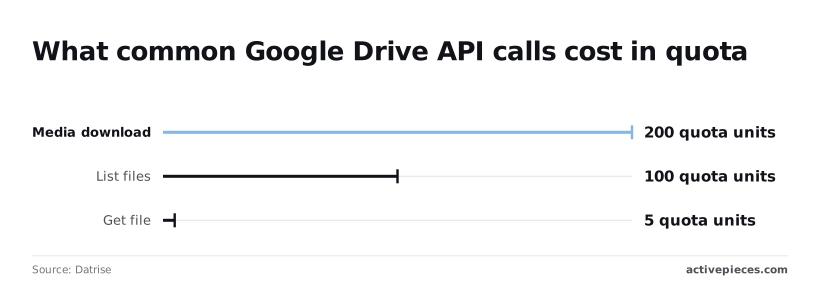
So a flow that lists a folder to check for an existing client costs twenty times what a direct get does, and a download costs forty times.
Prefer get over list where you already hold the file ID. [Datrise](https://datrise.com/en/integrations/source/google-drive) is a third-party page, so confirm against the vendor.
Here are the limits I would verify before go-live, with what to do when each is hit. Read the date column literally: none of these is confirmed here.
| Limit | Fix | Source | Date checked |
|---|---|---|---|
| Drive writes, about 3 per second per account | Space out bulk creates; retry on failure | Google Drive API documentation | check the vendor page |
| 1,000,000 units per minute per project | Cut list calls; use get | Google Drive API documentation | check the vendor page |
| 325,000 units per minute per user | Split heavy flows across accounts | Google Drive API documentation | check the vendor page |
| Webhook must return 2xx within 10 seconds | Acknowledge first, process after | Calendly developer documentation | check the vendor page |
| Failed webhook retried for 24 hours | Expect repeats; deduplicate | Calendly developer documentation | check the vendor page |
You will rarely get near these ceilings with a normal booking flow. The two that bite are the 10-second acknowledgment and the retry window, which lead directly into duplicates.
When Calendly retries, **the same booking can arrive twice**, producing two folders with one name. Store the Calendly event ID in the folder name or a description and check for it before creating.
A missing run usually means the 10-second window was missed and retries expired, or the trigger was disabled. Check the run history against Calendly's list of bookings.
### Using HTTP requests and webhooks for unlisted steps
When no listed Drive action covers what you need, such as setting a permission or moving a file, send an HTTP request to the Drive API with the same connection.
On the Calendly side, events can also arrive through a webhook subscription. In both cases, return a 2xx immediately and do the slow work afterward, so a busy minute doesn't turn into a retry storm.
## When Activepieces Is the Right Tool for This
If you would rather not build and babysit the receiving endpoint yourself, Activepieces gives you a Calendly trigger and a Google Drive integration with 17 actions already wired in, plus HTTP request and webhook steps for the gaps.

It runs from an MIT-licensed core with 750 integrations counted from the open source monorepo, so the same flow can reach past Calendly and Drive when a booking needs to touch something else.
Zapier and Make, two hosted automation services, connect the same pair, and so can code you write yourself. None of them is wrong.
Pick by where the flow runs, how many steps it can hold, and whether you can drop in code when a step is missing.
### How the options compare on hosting, step limits and code
If nobody on your team wants to maintain anything, hosted services running on the vendor's servers are the easy path. Hand-written code gives you full control, and you also own the retries, the logging and the 2am page when a booking vanishes.
Activepieces sits between the two. It's open source, you can self-host it, and per its documentation a flow can have as many steps as you need.
When a Calendly or Drive step is missing, you add an HTTP request or a webhook step instead of abandoning the flow.
It fits in these cases:
- You want open source, so you can read what the tool does with your booking data instead of trusting a description of it.
- You want to self-host, so invitee names and emails stay on infrastructure you control.
- You need many steps per flow, so a booking can create a folder, copy a template and notify someone without being split across several automations.
- You want one tool for Calendly, Drive and your other apps, so a failed run is investigated in one place and not three.
If none of those describes you, a hosted tool with fewer moving parts may be the better call. If one or more does, the rest of the setup is short.
Do this once, with a single booking, before building anything elaborate:
1. Create a new flow and pick the Calendly trigger for a newly scheduled event.
2. Connect your Calendly account when prompted, and confirm the connection saves.
3. Add a Google Drive action as the first step after the trigger, such as creating a folder, and connect your Google account.
4. Book a test slot on your own Calendly page, using a name and email you'll recognize.
5. Open the flow's run history and check that the trigger fired and the Drive step completed.
6. Open Drive and confirm the folder exists where you expected it.
Use a test booking written like a real one, with an awkward name or a long event title, because those are what break naming rules first. Once one booking produces one correct folder, you can add steps and cancellations with some confidence in the foundation.
## Frequently asked questions
After a first working folder, the questions that follow are short, and each has a short answer.
Because **no native link worth relying on** exists between Calendly and Google Drive, the connection has to run through an automation tool: a Calendly trigger on one side, Google Drive actions on the other.
Check Calendly's own integrations page before you build, but plan around the workflow, not around a native option.
### Can I connect Calendly and Google Drive on a free plan?
It depends on the plan limits at each end, and both can block you. Calendly decides which of its plans can send booking events to outside tools, and your automation tool decides how many runs and steps you get.
Confirm both before you promise anyone a working setup. A flow that silently stops after a limit is worse than no flow, because the first sign is a client with no folder.
### Does the workflow work with shared drives?
Test it with one real booking before you trust it. If the Google Drive folder picker lists your shared drive, the listed actions can write there.
If it doesn't, fall back to an HTTP request against the Drive API and set the parameter that tells Drive you are working in a shared drive.
Without that parameter, Drive can behave as if the folder doesn't exist, and the failure looks like a permissions problem when it isn't one.
### Can I run this on my own server?
Only if your automation tool can be self-hosted. Calendly and Google Drive stay cloud services either way, so the server runs only the workflow.
To deliver booking events, Calendly has to reach your instance over a public address, which means a machine behind a firewall with no inbound route will never see a booking.
Sort that out first, because a trigger that never fires looks exactly like a quiet week.
### What happens to Drive files when a booking is cancelled?
Nothing, unless you build for it. The creation flow never hears about a cancellation, so the folder stays where it is.
Calendly has a separate "Event Canceled" trigger, and a second flow on that trigger can find the folder and add a note. **I wouldn't have it delete anything.**
Picture someone cancelling and rebooking within the hour, annoyed and in a hurry, and finding that their intake notes are gone. A folder marked cancelled can be recovered, and a deleted one may not be.
## Related reading
- [Claude Google Workspace Integration Without Code](https://www.activepieces.com/blog/claude-google-workspace-integration-without-code)
- [Google Drive Automation Beyond Built-In Rules (2026)](https://www.activepieces.com/blog/google-drive-automation-beyond-built-in-rules-2026)
- [Google Drive Alternatives: 7 Options to Consider in 2026](https://www.activepieces.com/blog/google-drive-alternatives-7-options-to-consider-in-2026)
## References
- [Datrise](https://datrise.com/en/integrations/source/google-drive)
- [Activepieces](https://cloud.activepieces.com/api/v1/pieces)
- [Activepieces](https://www.activepieces.com/pieces/google-drive)