Every scope you list appears on the consent screen, and a token can never do more than the scopes it was granted. If you add a scope later, users who already connected must authorize again. When a first authorization attempt fails, a redirect URL mismatch is the most common reason. The redirect URL is the address Canva sends the user back to with an authorization code, and it must match exactly what your application sends during authorization, including scheme, host and path. Copy the value from your configuration rather than retyping it. ### Get your Canva client ID and secret The client ID identifies your integration and can sit in configuration. The client secret's a credential: generate it, store it straight into a secrets manager, and never put it in front-end code or a repository. If the secret's exposed or lost, generate a replacement rather than trying to recover it, and update every system that holds the old one. Neither value's a bearer token. They're what you exchange, together with the authorization code, for access and refresh tokens. A no-code builder wraps that exchange in a single connection. The flow below sends new HubSpot tickets (HubSpot is a customer-relationship platform) through two AI steps and a router to three Slack messages. It shows where that connection lives: the trigger's Connection field, which every later step uses. 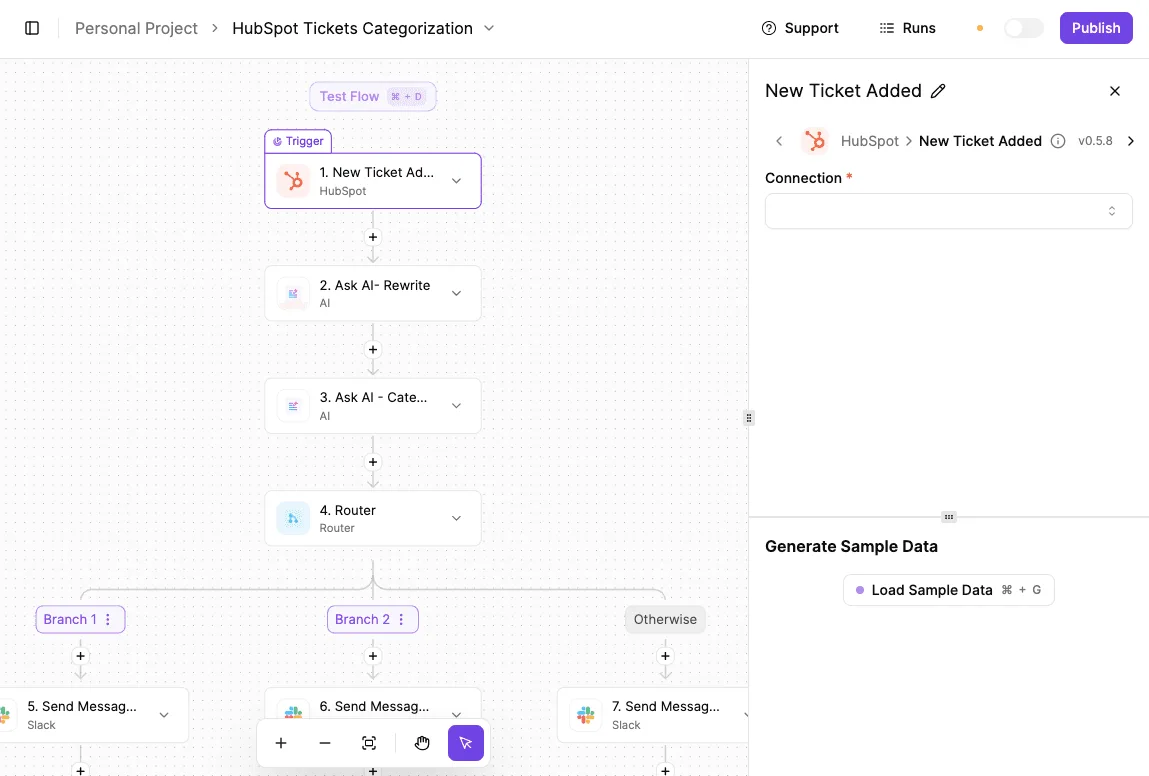 Whoever authorizes that connection is the identity the flow acts as, so authorize it with an account the team controls. With the client ID, the secret, the scopes and the redirect URL recorded and assigned to a named owner, the next job is the authorization exchange itself. That exchange also covers handling the tokens it returns. ## Authenticate with OAuth 2.0 PKCE The Connect API uses the authorization code flow with PKCE. Every integration performs the same six steps in order, and the integration's named owner is the person whose Canva account consents at step three.  The sequence below shows the whole exchange. Read it as the checklist for what your code must do, and note that the last step, storing the new refresh token, is the one most often skipped. 1. Generate a code verifier and derive its S256 challenge. 2. Redirect the user to the authorize URL with the challenge. 3. The user reviews the requested scopes and consents. 4. POST the returned code and the verifier to the token endpoint with Basic auth. 5. Call GET /v1/users/me with the access token. 6. Store the new refresh token, replacing the old one. Each step's expanded below, starting with the URL that opens the exchange. ### Build the authorization URL Create a random code verifier, hash it with SHA-256, and encode the hash as base64url without padding; that value is the S256 challenge. Keep the verifier in server-side session storage, tied to the user's browser session, because step four needs it. The authorize URL carries your client ID, the redirect URL exactly as registered, the response type `code`, the challenge, the challenge method `S256`, the requested scopes and a state value. Request only the scopes your integration uses: a scope you ask for is a permission the owner must later justify. Verify the returned state before accepting the code. ### Exchange the code for tokens Send the code and the original verifier in a POST to the token endpoint. Authenticate with an Authorization header using Basic, where the credential is your client ID and client secret joined by a colon and base64-encoded. If the secret ever reaches browser code, rotate it and record the rotation against the owner; it belongs on your server only. The response contains an access token, a refresh token and an expiry for the access token. Treat the expiry as authoritative and read it from the response rather than hard-coding a duration. Once the tokens are back, call GET /v1/users/me with the access token in a Bearer Authorization header. A successful response proves the code exchange, the token and the connection to the right account in one request.  If it rejects you, suspect the token or the scopes, not the endpoint, and check those before anything else. ### Refresh tokens without losing them **Refresh tokens are single-use**, so each refresh returns a new token and kills the old one. **Write the new token to storage before using the new access token, and make the write atomic.** If two workers refresh at once, one of them holds a dead token, and the connection fails until the owner consents again. Serialize refreshes per connection, and what remains is routine endpoint work.  ## Check Canva API limits and pricing **Requests per minute run from 10 to 100** in Canva's documented limits, set per user and per endpoint type. It publishes no per-call price, so applications requiring sub-minute API refresh will be throttled. Once refreshes are serialized per connection, these limits are the next thing to budget for. ### Canva API rate limits by endpoint At 10 requests per minute per user, **User Capabilities carries the tightest documented limit**, according to [Canva Developers](https://www.canva.dev/docs/apps/rest-apis/reference/users/get-user-capabilities/). That means you shouldn't call it on every page load; read it once per session and cache the result. 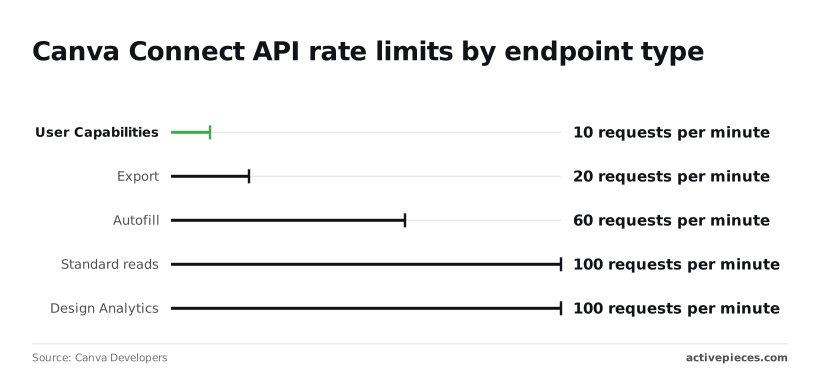 Export's next at 20 requests per minute. A batch job exporting designs for one user's connection will stall after the twentieth call in a minute unless you queue it. Autofill allows 60 requests per minute, which is enough for steady template-filling but not for a burst of hundreds of personalised designs from a single connection. The takeaway is the ratio: the slowest endpoint runs at a tenth of the fastest, so one shared throttle for the whole client will either starve exports or waste capacity on reads. *(chart: documented requests per minute per user, by endpoint type)* Because the limits apply per user, each connection needs its own counter. Keyed by connection, a heavy user can't exhaust the allowance of a quiet one. The documentation I have drawn on doesn't state a daily or monthly quota, so none is given here; check the reference page for each endpoint you depend on. ### What the API costs and which plan you need The docs I have don't publish a per-call price, so I won't quote one. The cost you can plan for is the limit above, not a metered charge. Plan requirements are also not stated in the figures I can confirm. Because every call runs under a user's OAuth connection, ask first who owns that connection and which Canva plan that person holds. Check the plan and the granted scopes with Canva before building around a feature such as autofill or brand templates, since availability may depend on them. ### Handle Canva API asynchronous export and import jobs You submit the request, receive a job identifier, and then poll for status until it reports success or failure. Exports, imports and autofill all run this way, as jobs rather than a finished result in one response. The consequence is that the polling calls count against your limits too. If the status check draws on the same budget, polling an export job every second would use a large share of the 20-per-minute Export allowance. Space polls out with backoff, and stop on a terminal state. Treat a job as unfinished until the status says otherwise, and never assume the download link exists from the submission response alone. ## Handle common Canva API errors Read the status code before you retry anything, because most Canva failures are token or scope faults rather than endpoint faults. The table shows each error's usual cause and fix; take from it that only 429 and a failed job are worth retrying, and the rest need a change on your side first. | Error | Likely cause | Fix | Docs link | |---|---|---|---| | 401 | Expired or revoked access token | Refresh, then repeat the call once | [Connect docs](https://www.canva.dev/docs/connect/) | | 403 missing scope | Integration lacks the scope the endpoint needs | Add the scope, then have the user re-authorize | [Connect docs](https://www.canva.dev/docs/connect/) | | 404 | Wrong design or asset ID, or the user cannot see it | Check the ID and which user's token you used | [Connect docs](https://www.canva.dev/docs/connect/) | | 429 | Per-minute limit exceeded | Back off, then retry | [Designs reference](https://www.canva.dev/docs/connect/api-reference/designs/list-designs/) | | invalid_grant | A refresh token was used twice | Store the new token atomically; re-authorize if lost | [Connect docs](https://www.canva.dev/docs/connect/) | | Failed async job | Export or autofill job ended in failure | Read the job's error, fix the input, resubmit | [Connect docs](https://www.canva.dev/docs/connect/) | The sections below cover what the table can't: who owns each connection and what to do about it. ### 401 and invalid_grant: token problems When a 401 comes back, the access token's dead, so refresh it and retry once. Refresh tokens are single use, so the response to a refresh carries the next one, and the old one stops working. If two workers refresh at once, one gets `invalid_grant` and the connection's lost. Name one owner for each connection, and write the new refresh token to storage in a single atomic step before using the new access token. You will usually meet a 403 when the integration was never granted the scope the endpoint requires. Adding the scope in your integration settings doesn't change tokens already issued, so the user must authorize again. Check the connection owner's account before assuming a code fault. ### Fix Canva API 429 rate limit errors Limits differ sharply by endpoint. Standard reads allow 100 requests per minute, per [Canva Developers](https://www.canva.dev/docs/connect/api-reference/designs/list-designs/), so ordinary listing rarely trips it. Autofill allows 60 per minute, which a batch of templates can exhaust in seconds. Export allows 20 per minute, so a bulk export needs a queue rather than a loop. User capabilities allows only 10 per minute, so cache the answer instead of checking before each call. Size your backoff to the tightest endpoint you call, and add jitter so workers don't retry together. A submission response only means the job was accepted. Poll until the status reads success or failed. On failure, read the error and fix the input before resubmitting. Resubmitting unchanged spends your 20 exports per minute on a request that will fail again. ## Call Canva endpoints without code using Activepieces Activepieces, with **746 integrations in its MIT-licensed open source core**, lets you call Canva's Connect API without writing code. It doesn't remove the OAuth work: the connection still holds a token issued to one Canva user, with the scopes you granted, and every flow runs as that person. Retrying a failed request in a flow spends the same rate budget as retrying it in a script, so the limits above apply unchanged. ### Decide who owns the connection Before you click anything, decide who owns the connection. A flow built on a colleague's login stops working when that colleague leaves or has their Canva access removed, and Activepieces can route connection credentials to your own secret manager, a feature of its Ultimate and enterprise control plans alongside SCIM, custom RBAC and audit logs. Authorize with a service account that your team controls, and record its name in your handover notes. On the consent screen, check the scopes. The connection receives only what you approve, and a missing scope surfaces later as a permission error in the middle of a run, not at setup. Approve the narrowest set that covers the flow you are building, and reconnect deliberately if you need more. ### Add an HTTP request for uncovered endpoints Where the Canva integration has no action for an endpoint, use the HTTP request step. Set the method and the full endpoint URL from Canva's developer documentation, then supply the Authorization header with the bearer token.  You have to watch failures yourself, because the step carries no Canva-specific retry logic of its own. The screenshot below shows the same pattern with a different provider: a two-step flow whose trigger is an instance stopping, followed by an HTTP request that revokes a token. The left panel holds the JSON input and output of the run. The centre shows the flow, and the right panel shows a POST to an OAuth revoke endpoint with an Authorization header. 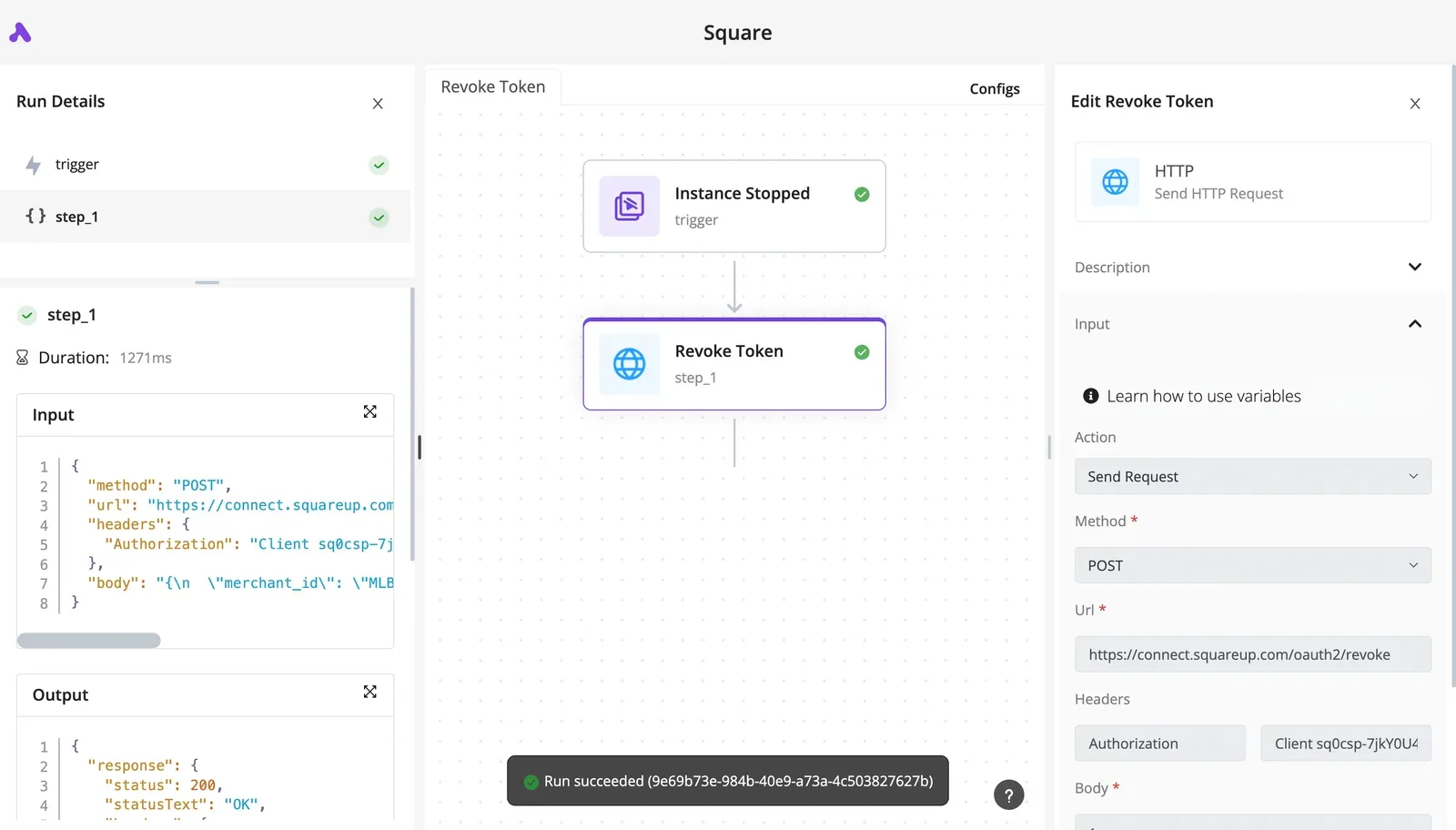 Square is the provider here, not Canva, but the lesson carries over. Token lifecycle, including revocation, can be handled as an ordinary step, and the run details let you see exactly what was sent and returned. When a call fails, read that output panel. It tells you whether the cause is an expired token, a missing scope, or a rejected payload, and those three need different fixes. Monday checklist: 1. Name the owner of the Canva connection and a backup. 2. List the scopes granted and compare them with what each flow needs. 3. Replace any flow running on a personal login with the service account. 4. Move uncovered endpoint calls into HTTP request steps, and confirm the Authorization header is set. 5. Open the run details of one failed run and note which of the three causes it was. ## Related reading - [Zoho Mail API Setup with OAuth 2.0 in 2026](https://www.activepieces.com/blog/zoho-mail-api-setup-with-oauth-2-0-in-2026) - [Spotify Web API Free? Access Modes, Scopes, Limits](https://www.activepieces.com/blog/spotify-web-api-free-access-modes-scopes-limits) - [Segment API: Tracking, Public and Profile APIs (2026)](https://www.activepieces.com/blog/segment-api-tracking-public-and-profile-apis-2026) ## References - [Canva Developers](https://www.canva.dev/docs/connect/api-reference/designs/list-designs/) - [Open Integrations](https://open-integrations.dev/canva) - [Canva Developers](https://www.canva.dev/docs/apps/rest-apis/reference/users/get-user-capabilities/)An integration created under a contractor's personal login is the one that breaks when that person leaves, and the client secret goes with it.