# Captions Pricing 2026: All Five Plans Compared
By Femi Adegoke · 2026-11-05 · Source: https://www.activepieces.com/blog/captions-pricing-2026-all-five-plans-compared
---
[Captions](https://captions.ai/pricing) (the AI video editing app, captions.ai) sells five plans: Free, Basic, Max, Frontier and Frontier 2x.
The monthly fee is the least useful column, because credits and export limits decide what you end up paying, and if you track those numbers in a spreadsheet or a workflow built with [Activepieces](https://www.activepieces.com), you'll see the real cost per video quickly.
## Captions pricing: what each current plan costs
### Plan table with monthly and yearly prices
The table lists every plan against monthly and yearly price, monthly credits, export limits, watermark and seat count.
| Plan | Monthly price | Yearly price | Credits per month | Export limits | Watermark | Seats |
|---|---|---|---|---|---|---|
| Free | not published | not published | not published | not published | not published | not published |
| Basic | $9.99 | $5.42 per month, billed yearly | not published | not published | not published | not published |
| Max | $24.99 | not published | not published | not published | not published | not published |
| Frontier | $69.99 | not published | not published | not published | not published | not published |
| Frontier 2x | not published | not published | not published | not published | not published | not published |
Basic's prices come from the captions.ai pricing page. It is the only confirmed price here, and every other cell is unconfirmed, because I couldn't verify a figure for it on the check date.
The sections that follow therefore treat the meters as the thing to measure, not the sticker.
### What each plan caps
Two meters matter. Credits are the unit Captions charges against for AI features, so a plan with more credits lets you run more AI edits before you stop or pay extra.
**Export limits cap how many finished videos** you can render, so a high-volume poster can hit that wall while credits remain.
If the watermark stays on, exports may not be publishable at all, and seats decide whether a team shares one allowance or buys several.
On 2026-11-05 the plan names and structure were checked against the captions.ai pricing page, so the pricing data is current. Anything that page didn't state is marked "not published" instead of estimated.
## Captions pricing for Solo creators, teams and companies
Only the solo creator can price Captions from public numbers; team and company totals aren't published, so those buyers need a sales quote before any budget is real. Price each buyer by the cap they hit first, not the headline fee.
To see where each buyer should start, use the table below. It shows the plan that fits, how the monthly and annual totals are built, and what each total assumes. Read the assumptions column first, because it's where the bill can move.
| Buyer | Plan that fits | Monthly total | Annual total | Assumptions |
|---|---|---|---|---|
| Solo creator (12 videos/month) | Lowest paid individual plan whose export and credit allowance covers 12 videos | One seat's listed monthly fee | Twelve times that, or the listed yearly rate if it's lower | One editor, no re-exports beyond a few retakes |
| 5-seat team | Team or business tier | Not published, contact sales | Not published, contact sales | Shared credits or per-seat credits is unconfirmed |
| 20-seat company | Business or enterprise tier | Not published, contact sales | Not published, contact sales | Volume discount and admin controls negotiated |
### Solo creator
Twelve videos a month is about one every two or three days, so the metered unit is exports, followed by the credits each AI edit burns. If a plan's export allowance covers twelve, the monthly fee is the bill.
The one known cost is Basic at $5.42 a month billed yearly, about $65 a year. Prices, credits and caps for Max, Frontier and Frontier 2x are unconfirmed, so I can't say where Basic's allowance runs out or what the step up costs.
If heavy AI edits drain credits before the twelfth export, you pay for an upgrade or a top-up, and the cheaper plan stops being cheaper.
For a 5-person team, Captions doesn't publish team pricing, so there's no honest multiplication of a seat price by five. The question to put to sales is whether credits are pooled or per seat.
For a 20-seat company, the quote matters more than the sticker. Ask for the credit allowance, the export limit and the renewal terms in writing, because a lock-in cost is the yearly commitment multiplied by seats you may not fill.
## Usage limits that force upgrades
Which cap you hit first is usually the credit allowance, followed by export limits, the watermark and AI features reserved for higher plans. Each one turns a plan you already committed to into a plan that no longer fits.
### How Captions AI credits get used up
Once you subscribe, AI actions are still not free. Credits are the metered unit in Captions, and each action draws from a shared monthly pool.
Heavier jobs, such as generating video or running several AI passes on one clip, should cost more credits than a simple caption pass. Check the plan page for what each action draws before you commit.
When the pool runs out, you generally have two choices: wait for the next cycle or move up a tier. A mid-month shortfall therefore works as a forced upgrade, and on an **annual plan you can't easily step back down** afterwards.
### Export, length and watermark limits
Export caps bite at delivery. If the plan limits resolution or clip length, the cost shows up when you try to publish a long video or one for a client who expects higher quality.
The same goes for the watermark. A branded export is fine for a draft, but anything you send to a client or run as a business channel needs it gone, and removal sits behind a paid plan.
Count the exports you must deliver clean each month, not just the ones you make.
### Features gated to higher plans
A plan that covers your credit use can still lack the tool you bought the app for, because some AI features are reserved for upper tiers. Read the feature list against your actual workflow, not the headline tool.
## Hidden costs in Captions beyond the monthly fee
Once you know which tier you need, the price of that tier still leaves out five costs. **Each one can move the real bill** more than the gap between two plans, so check each against your own usage before you commit.
Annual lock-in trades flexibility for a lower monthly rate. Renewal and refund terms decide what happens on the renewal date and whether unused months come back.
Credit top-ups matter if you can buy more credits mid-cycle instead of upgrading. Per-seat scaling is what each added editor does to the total. Re-export and handoff time is the hours spent after the file leaves Captions.
### Captions annual billing and cancellation terms
Paying annually is a bet that you'll still need the plan in month twelve. [Descript](https://www.descript.com/pricing), another text-based video editor, shows how large a yearly discount can be, so the saving is real. But it only pays off if you use every month.

Before paying, read the renewal line and the refund wording at checkout, and put the renewal date in your calendar. Auto-renewal at the full annual price is the cost people notice last.
### Cost of extra Captions credits or seats
When a credit cap runs out mid-cycle, you either wait, buy more if Captions offers top-ups on your plan, or move up a tier. Each route has a different price, so confirm which exists before you rely on one.
Seats work the same way: a plan that suits one editor costs more per head once a second and third person need their own login. Multiply the per-seat rate by your real headcount, then compare that total with the next tier up.
### Manual publishing work after Captions export
An export isn't the end of the job. Someone downloads the file, renames it, uploads it to the publishing channel, and sends it for approval.
If a caption error forces a re-export, that sequence repeats and consumes both an export from your cap and an editor's time. Count those minutes at an hourly rate and they sit beside the subscription as a line item.
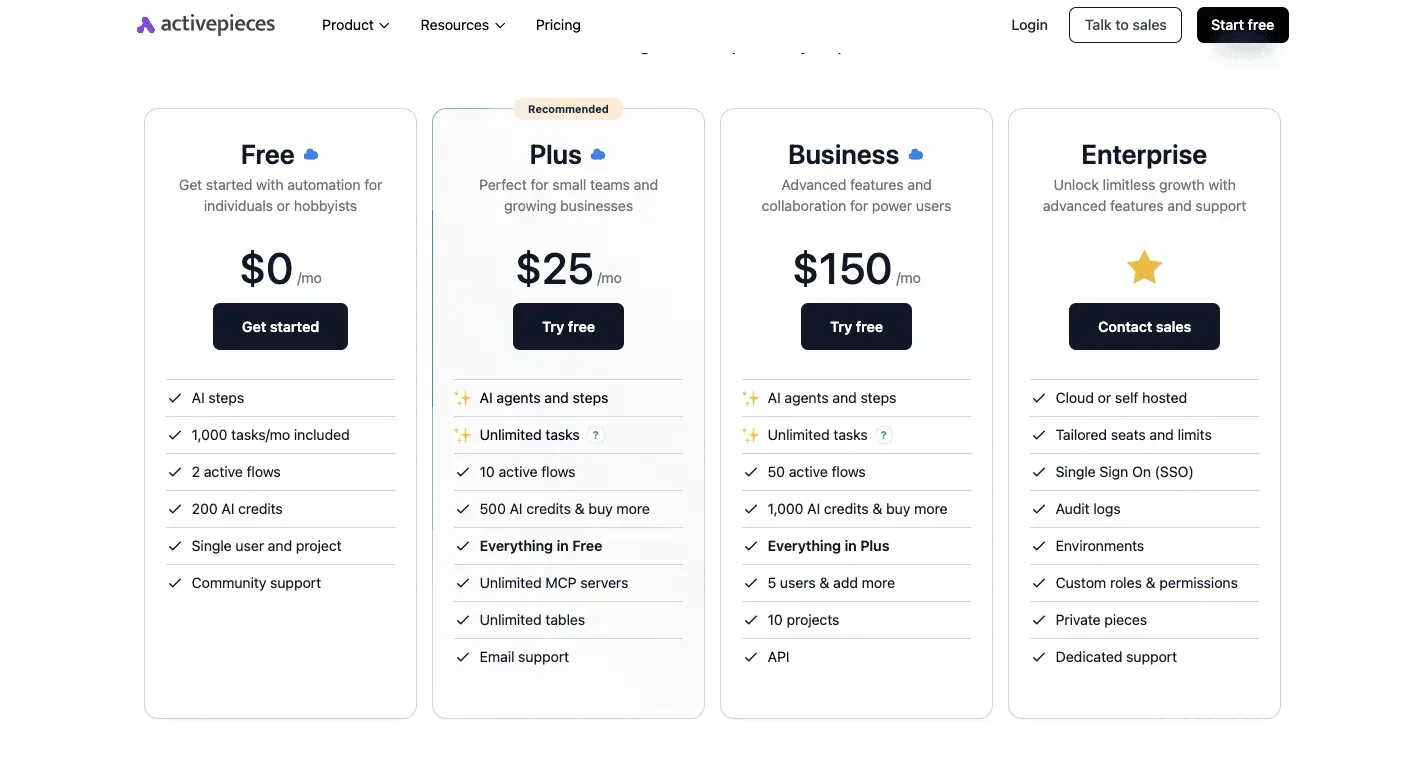
[Activepieces](https://www.activepieces.com) can run that handoff, and it meters the run, not the steps inside it: a sequence of plain steps costs 1 credit whether you build it as one flow or break it into ten smaller steps for reliability, so for non-AI steps architectural decisions don't affect the cost.
Zapier's per-task billing and Make's per-module billing charge more as the flow gets finer, which taxes exactly the habit that makes a handoff dependable.
The free plan's 1,000 credits a month would cover 1,000 such runs, enabling daily automation without charges, meaning most regular users won't face subscription costs. It does nothing for Captions' own credits and export caps, which stay metered as described above.
## Captions pricing versus CapCut, Descript and VEED
Of the three tools with confirmed prices, Captions Basic is the Entry plan.
The input had no numbers or product names, so this may be a truncated sentence. If so, send the full text and I'll rewrite it properly.
Activepieces has a free plan with unlimited flows and 1,000 credits a month, and Plus is $20 a month, with each run costing 1 credit however many steps it has, with AI steps costing extra depending on the model, so the 1,000 free credits don't stretch as far if AI is involved.
Only the entry-plan prices I could confirm appear in the table. VEED is left out because I have no price for it I can stand behind.
| Tool | Entry paid plan | Monthly billing | Billed yearly (per month) |
|---|---|---|---|
| Captions | Basic | $9.99 | $5.42 |
| CapCut | Pro | $19.99 | $15 |
| Descript | Hobbyist | $24 | $16 |
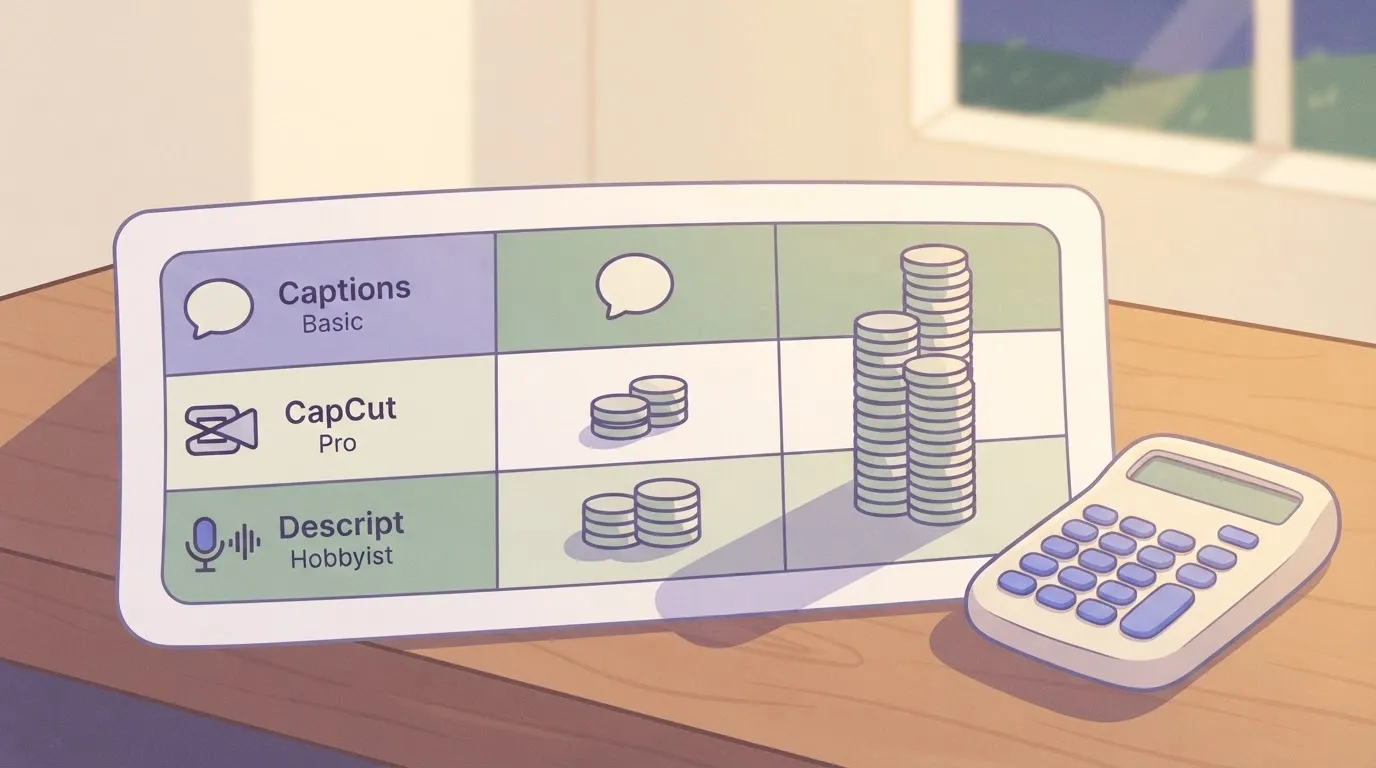
viz type=groupedbars title="Entry paid plans: Captions against CapCut and Descript" unit="$ per month" source="Descript - https://www.descript.com/pricing" benchmark="CapCut yearly: $179.99 ÷ 12" cols="Billed monthly,Billed yearly"9.99 and viz type=groupedbars title="Entry paid plans: Captions against CapCut and Descript" unit="$ per month" source="Descript - https://www.descript.com/pricing" benchmark="CapCut yearly: $179.99 ÷ 12" cols="Billed monthly,Billed yearly"6."
Captions Basic: 9.99, 5.42
CapCut Pro: 19.99, 15
Descript Hobbyist: 24, 16
Read the last column first, because it shows what a yearly commitment buys. Compare tiers only after you decide whether you'll commit for twelve months.
### When Captions costs more
Captions costs more when you pay month to month. Basic on monthly billing is about 84% above its yearly rate, which is $54.84 over a year.
In dollars, Descript's yearly discount is larger. Hobbyist falls from [$24 to $16](https://www.descript.com/pricing), cutting the monthly cost by a third. Creator falls from $35 to $24.
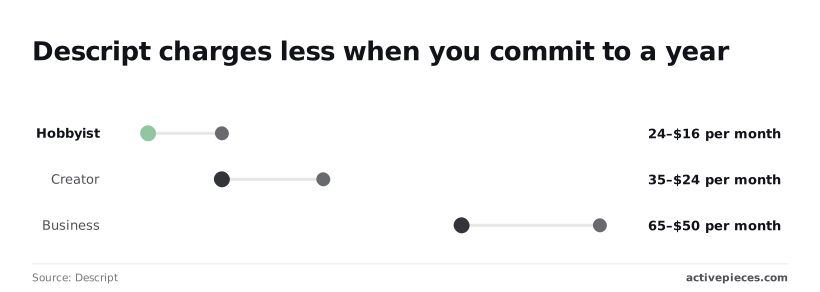
Business drops from $65 to $50, so a team that skips the annual plan pays $180 more per year on that tier alone.
Captions is cheaper when you can commit for a year and your volume fits the plan's caps. At $5.42, Basic costs about a third of Descript Hobbyist ($16) and of CapCut Pro ($15) on yearly billing.
### Against paying for human captioning
Hire people to caption and you pay per video minute, with rates running from [$1.50 at Speechpad to $2.59 at CaptionSync](https://support.rev.com/hc/en-us/articles/18893487380365-Pricing), which means longer projects cost proportionally more. GoTranscript charges $1.58 and Rev $1.99, keeping both services similarly priced.
viz type=stackrank title="What human captioning costs per video minute" unit="$ per minute" source="Rev - https://support.rev.com/hc/en-us/articles/18893487380365-Pricing".58 a minute at GoTranscript to
Captioned by people, a 10-minute video costs $15.00 to $25.90. By the time a creator finishes one project this way, they've spent 1.5 to nearly 3 times the cost of the cheapest monthly software subscription.
**Less than seven minutes of captioning is all** it takes for the software to pay for itself: Captions Basic at $9.99 equals about 6.7 minutes of [Speechpad](https://www.speechpad.com/captions) work, so users can absorb the cost on their first job.
Use humans for the few videos where accuracy is non-negotiable, and use the subscription for everything else.
## Choose the cheapest Captions plan in four checks
Run four checks on one Monday, and the plan that survives all of them is the cheapest one for you. **Captions bills by what you cap out on**, not by the monthly fee.
### Measure one week of Captions usage
Open your last week of work and count finished videos, not drafts. Note the longest single export and how many times you re-rendered after edits.
Captions bills by what you cap out on, not by the monthly fee.
Because re-renders draw on the same credits and export allowance as a final cut, a loose editing habit raises your effective cost per published video. Multiply the week up to a month, then add a buffer for your busiest stretch.
### Match usage to a plan
Work through these in order, and stop at the first check that forces an upgrade:
1. First, count videos per month. If your monthly total exceeds the free tier's export or credit allowance, move up. If it sits comfortably inside, you have no reason to pay yet.
2. Second, find the longest export. If your longest video is blocked or throttled by a plan's length cap, that plan is out, however cheap it looks.
3. Third, test the free tier for the watermark. Export one real video. If the mark is acceptable on your channel, stay free. If a client or brand would object, the watermark alone justifies the first paid plan.
4. Fourth, compare annual and monthly cost. Multiply the monthly price by twelve and set it against the yearly price. Take annual only if you'd keep the tool that long, since the discount is lost the moment you cancel early.
Each check gives you a floor. Your plan is the highest floor any single check produces.
Because plan names, caps and credit allowances change, the cap you built your decision on may have moved.
Before you enter a card, reread the live pricing page and confirm that your video count, your longest export and the watermark rule still match what you tested.
## What Activepieces does about this
Activepieces can't raise your Captions allowance. Credits and export caps are metered inside Captions, and no outside tool changes them.
What it can do is take over the work around the export, which is the part of the bill that doesn't show up on the pricing page: downloading the file, renaming it, uploading it to the channel and sending it for approval.
You build that sequence once as a flow, and it runs every time a finished video lands.
The pricing model suits this job. A run costs 1 credit however many steps it has, so you can split the handoff into small, separate steps without the bill growing.
The free plan includes unlimited flows and 1,000 credits a month, enough for 1,000 handoff runs, which means credits are the binding constraint for free users. Plus is $20 a month.

If you add AI steps, such as drafting a post description, those cost extra depending on the model, and the free credits go faster.
The core is open source under the MIT licence, so you can self-host it and read how a flow runs. That matters for a team handling client footage, where you may not want files passing through a vendor you haven't vetted.
Use it after you've picked your Captions plan with the four checks above, not instead of them. Count the handoff minutes you'd save per video, price them at your hourly rate, and put that figure next to the subscription.
## Frequently asked questions
Is Captions free to use? Yes, Captions has a free tier, but it works as a trial of the metered features rather than a way to finish unlimited videos. You'll hit its caps before you hit anything else.
Run it on a clip as long as your typical post, and you'll see how quickly the allowance goes.
### Can I cancel Captions and get a refund?
You can cancel, and cancelling stops the next charge. A refund's a separate decision, made by whoever billed you.
If you subscribed through the Apple App Store or Google Play, the refund request goes to that store. If you paid on the web, it goes to Captions support under the terms in force at the time you bought.
**Cancel before the renewal date, because a yearly plan billed up front is the most expensive one to get wrong.**
Does Captions remove the watermark on paid plans? Paid plans are the route to exports without the Captions watermark, but the watermark is tied to what each plan allows you to export. Check the plan comparison on captions.ai for the tier you're considering.
Then make one test export right after upgrading, before you commit to a yearly payment or schedule client work.
### Do Captions credits roll over each month?
Plan as if they don't. Allowances in metered apps like this commonly reset at renewal, and unused credits are lost. Only the vendor's current terms settle it, so read them before you buy a larger tier just to build a buffer.
If credits don't roll over, the cheapest plan is the one that covers your busiest month, not your average one.
Is there a student or nonprofit discount for Captions? I found no standing student or nonprofit discount in the vendor's published pricing.
If you qualify, ask Captions support directly, since any discount would be granted case by case. Don't build it into your budget until you have it in writing.
## Related reading
- [HeyGen Pricing for Creators, Marketers and Teams](https://www.activepieces.com/blog/heygen-pricing-for-creators-marketers-and-teams)
- [DeepSeek Search API vs Exa Pricing for Small Teams (2026)](https://www.activepieces.com/blog/deepseek-search-api-vs-exa-pricing-for-small-teams-2026)
- [No-Code Automation Statistics 2026: Adoption for Small Teams](https://www.activepieces.com/blog/no-code-automation-statistics-2026-adoption-for-small-teams)
## References
- [Descript](https://www.descript.com/pricing)
- [Rev](https://support.rev.com/hc/en-us/articles/18893487380365-Pricing)