### The API is billed separately from seats When a script summarizes support tickets overnight, or an automation drafts replies, **the seat doesn't cover it**. A ChatGPT seat covers people typing into ChatGPT; software calling OpenAI on its own runs through the API, which charges for the amount of text processed. If you assume the seats cover it, the first sign is an invoice you never budgeted for. **Treat the API as a second bill from day one, and have whoever builds the automation estimate its volume before it ships.** ### ChatGPT credits and overage charges When a plan's usage cap runs out, work either stops or you buy more. Add-on credits keep a team moving, but they're unplanned spending that lands in the week of a deadline, when nobody is comparing prices. Want Codex for your developers and you're paying for a second subscription on top of ChatGPT: OpenAI's coding agent is sold as its own per-user seat. Read what each plan includes and what triggers a charge before you rely on it. ### Unused ChatGPT Team seats and minimums Quietly, **money leaks through seat minimums** and occasional users. A designer who logs in twice a quarter, or a contractor whose project ended in spring, still holds a full seat until someone removes it. Taxes are added on top of the listed price, so every idle seat costs more than it appears to. Then there's the time: a shared workspace needs someone to invite people, remove them, and answer permission questions. That time comes out of a salary, not the OpenAI invoice, but it's still part of the cost. A quarterly audit of who actually logged in is the cheapest fix. ## ChatGPT Team against Claude, Gemini and Copilot **Neither the cheapest nor the dearest**: that's where ChatGPT sits among team plans. The seat prices sit close together, and what separates the plans is how they cap your usage and what they bundle. ### Comparison table The table shows how each plan charges, who can buy it, how hard it caps you and what an administrator can control. Compared October 2026; vendors revise plans often, so confirm before you buy. | Plan | Price per seat | Minimum seats | Usage limits | Admin controls | |---|---|---|---|---| | ChatGPT Business | Flat per user | Small team minimum | Per-user caps, higher on pricier tiers | Central user management, workspace data kept out of training by default | | Claude Team | Flat per user | Small team minimum | Per-user caps that tighten under heavy use | Central user management, shared billing | | Google Gemini/Workspace | Folded into the Workspace seat | Follows your Workspace licenses | Caps vary by feature | Existing Workspace admin console | | Microsoft 365 Copilot | Add-on on top of a Microsoft 365 license | Follows your Microsoft 365 licenses | Caps vary by feature | Existing Microsoft admin tools | When your team is small and nobody already pays for Google or Microsoft office software, ChatGPT is cheaper, since you buy one product instead of an add-on. It's dearer when you already hold those licenses, because Gemini and Copilot ride on a bill you're paying anyway. Not every seat needs the same tool. Give heavy daily users the plan with the loosest caps, and keep occasional users on whatever your office suite already includes. ## Automating recurring ChatGPT work with Activepieces When the same steps run on a trigger with nobody watching, a repeating ChatGPT task is cheaper as a workflow. A seat stays cheaper when a person is judging, rewording and steering the answer as it comes. ### ChatGPT tasks worth automating in a workflow Think of a task that starts the same way every time: a new support email arrives, and someone pastes it into ChatGPT to get a summary. That person's a very expensive trigger. Paying for a seat so they can do it forty times a day means you're paying for attention you don't need. Wired as a workflow, the email triggers a call to the model through the API, and you pay for the words processed, not for a chair. Where the work is conversational, seats win. Drafting a proposal, debugging with a colleague, or reshaping a rough idea takes back-and-forth, and no workflow can anticipate your next question. Keep a seat for those people. ### How your model choice sets costs [Activepieces](https://www.activepieces.com/pricing) doesn't resell you a model, so it hasn't picked your AI or set its price before you opened it. Flows call whichever model you already chose, on your own provider key, so the model spend lands on your provider bill. Bring-your-own-key starts on the $20 Plus tier, where every AI step counts as 1 credit, against 2 credits for a fast model, 10 for a smart one and 20 for a frontier one when the platform supplies the model.  That 1-credit step against the 20-credit frontier step is the whole difference between using your own key and buying a model the platform resells, and the pricing page prints both numbers.  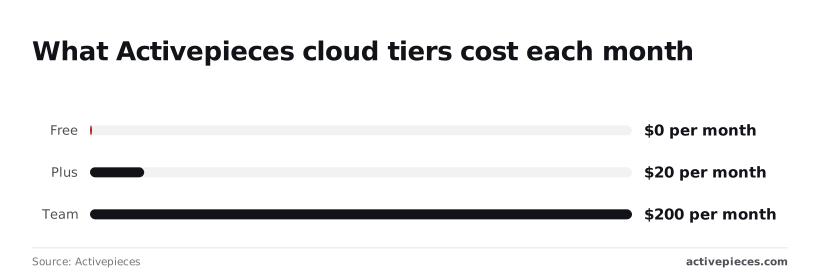 To prove a flow works before anyone commits budget, the free tier at [$0 a month](https://www.activepieces.com/pricing) is enough. Plus is $20 a month, which is less than one seat on most paid ChatGPT plans, and it runs a flow for the whole team. Team is $200 a month, which only makes sense once many people depend on those flows and you need the extra users and support. So the same summarizing job costs you the Activepieces tier plus the model usage it consumes. A run is 1 credit however many steps it has, and the monthly allowances are 1,000 credits on Free, 10,000 on Plus and 50,000 on Team, with $0.007 a credit charged over the allowance on Plus and Team. Check your volume against those before choosing, because that's where a small flow quietly outgrows its plan. ## Choosing and trimming a ChatGPT plan on Monday Find out what each seat actually does before you renew, because every month you skip that check, you pay for the gap between what you bought and what you use. Five steps, in this order, take a team from guessing to a plan it can defend: 1. Pull per-seat usage from the admin console. 2. Flag the occasional users. 3. Move repeating tasks to API workflows. 4. Choose monthly or annual billing. 5. Set a review date tied to the next pricing check. ### Audit ChatGPT seat usage first Export usage for every seat and sort from least to most active. Someone who opens ChatGPT a few times a month is paying full seat price for a chat window. For a light user, a paid seat may not be needed at all: the [ChatGPT plans page](https://chatgpt.com/plans/plus) lists unlimited text chats on the free tier, subject to abuse guardrails. Keep paid seats for people who rely on the advanced reasoning models that Plus adds. If someone repeats a task by hand, like summarizing the same weekly report, it belongs in an API workflow, which bills by use instead of by person. Choose monthly if the audit moved many people or tasks, because you'll probably resize again soon. Annual only pays off once headcount and usage have held steady. Locking in before you trim means prepaying for seats you already know you don't need. Put a date on the calendar for the next pricing check and rerun the audit then. Without one, seats creep back up as people are added, and the savings quietly disappear.  ## Frequently asked questions ### Is ChatGPT Team the same as ChatGPT Business? Yes. OpenAI renamed Team to Business, so older reviews and invoices that say Team describe the same plan. Check the current plan name on OpenAI's pricing page before you compare quotes, because the name on a stale page can hide a changed price or limit. ### Does ChatGPT Team train on our data? By default, no. OpenAI says conversations in its business workspaces aren't used to train its models. Confirm that against OpenAI's current terms before you paste in customer records, because the setting that protects you is a contract term, not a feature you switch on. ### Can we mix plans inside one company? Yes, but the plans don't share anything. A person on a personal Plus subscription is outside your team workspace, so shared projects, admin controls and the data protections above don't reach them. Plus is fine for one person experimenting. Once two people need the same work, a personal plan becomes a workaround that you pay for and can't manage. ### Does ChatGPT Team include API credits? No. The seat price covers the chat product only. Anything you build that calls a model from code or an automation is billed separately through OpenAI's API, by usage. A team can be on the right seat plan and still get a surprise on that second bill, so give the API its own budget line and its own alert. ### Can we cancel or downgrade mid-term? It depends on how you pay. Monthly billing is the flexible option: you can generally remove seats or cancel for the next cycle. Annual billing trades that flexibility for a lower rate, and you should assume you're committed until renewal unless your agreement says otherwise. If your headcount is still shifting, the discount may cost you more than it saves, so read the cancellation terms before you sign. ## Related reading - [Housecall Pro Pricing (2026): Plans by Team Size](https://www.activepieces.com/blog/housecall-pro-pricing-2026-plans-by-team-size) - [How Much Does Slack Pricing 2026 Cost Your Team?](https://www.activepieces.com/blog/how-much-does-slack-pricing-2026-cost-your-team) - [Segment Pricing 2026: Free, Team and Business Plans](https://www.activepieces.com/blog/segment-pricing-2026-free-team-and-business-plans) ## References - [OpenAI](https://openai.com/index/premium-seats-chatgpt-business/) - [Activepieces](https://www.activepieces.com/pricing)Pay for the seat and you've paid for only part of the bill.