# Choosing a Mistral Model Size for Self-Host Automation
By Halvor Kristiansen · 2026-09-18 · Source: https://www.activepieces.com/blog/choosing-a-mistral-model-size-for-self-host-automation
---
When the cumulative memory requirements of the model weights, KV cache, and runtime overhead exceed the physical VRAM of your GPU, a self-hosted [Mistral](https://mistral.ai/news/announcing-mistral-7b/) 7B instance collapses, which can disrupt workflows managed by [Activepieces](https://www.activepieces.com) or other automation tools. This triggers an **unrecoverable kernel-level termination**.
While a 12GB card appears sufficient on paper, the lack of a buffer for context expansion means that a single long-running batch job can move your system from stable execution to a total API blackout in under ten minutes.

## Self-hosted mistral 7b instance memory collapse
### How context window growth triggers KV cache overflow
The collapse begins when a scheduled task pushes the context window toward its limit. This causes the Key-Value (KV) cache to expand until it consumes the final megabytes of available memory.
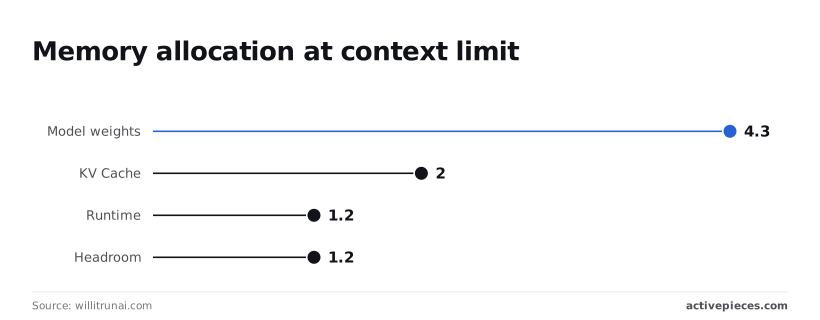
According to data from [willitrunai.com](https://willitrunai.com/can-run/mistral-7b-instruct-v0.3-on-rtx-4070-12gb), the static model weights for a 4-bit quantized Mistral 7B occupy 4.3 GB. This represents the immutable baseline your system loads before processing a single token.
The runtime environment requires an additional 1.2 GB, meaning your system loses roughly 10% of a standard 12GB card's capacity just to maintain the inference engine's basic state.
When a batch job starts, the KV cache claims another 2.0 GB, leaving only a **1.2 GB headroom margin** for your operating system and peripheral tasks.
### OOM killer timeline for self-hosted Mistral crashes
The Out-Of-Memory (OOM) killer terminates the model process the moment the GPU memory request exceeds physical limits. According to willitrunai.com, the following timeline illustrates the rapid degradation of a production environment:
1. At 02:00, the batch job starts, initiating the ingestion of high-density documents.
2. By 02:05, VRAM saturation occurs as the KV cache expands to its 2.0 GB limit.
3. At 02:10, the OOM killer terminates the process to prevent a full system hang.
4. At 02:11, an auto-restart loop begins, attempting to reload the 4.3 GB weights into a fragmented memory space, trapping the system in perpetual initialization.
5. At 02:45, cascading failure spreads across the stack as dependent services time out.
### How OS and GPU display overhead reduce VRAM
A common point of confusion arises when a 7.5 GB total load crashes a 12GB card. This happens because the operating system and display drivers claim a significant portion of VRAM before the model even initializes.
Running a high-resolution monitor or multiple displays can consume between 1.5 GB and 3.0 GB of VRAM just to render the desktop environment.
When you add background processes and browser hardware acceleration, the actual available memory for AI tasks drops from 12GB to approximately 8.5 GB.
### Retry logic failures in Mistral inference pipelines
Reselling you a model is deciding your AI strategy for you, often at a markup that obscures the true cost of these failures.
Activepieces connects directly to your chosen Mistral instance using your own provider key, ensuring that model spend lands on your own account at your own rate.
You can verify this Bring-Your-Own-Key availability by tier on the pricing page, which prevents the platform from locking you into a specific model size or markup.
Because your system attempts to resume the exact job that caused the 2:00 AM spike, the reload instantly vaporizes the 1.2 GB headroom.
The service spends 100% of its cycles loading weights and 0% serving requests, so users experience a complete service outage despite the server appearing active.
## The hidden vram thieves in LLM hosting
### The myth of 'minimum requirements' in LLM hosting
Static model weights represent only the baseline floor of memory consumption. They ignore the dynamic allocation required for active inference.
Headroom for the actual processing of tokens is often forgotten, meaning a deployment that fits during the initial boot sequence will often crash during the first multi-user request.
### How context window expansion steals your VRAM
The KV cache stores the mathematical representations of previous tokens to speed up generation. It grows linearly with the length of the conversation, effectively shrinking the available memory as the session progresses.
In a high-concurrency environment, the number of active streams multiplies this growth. A single long-form document summary can trigger an Out-Of-Memory (OOM) error for every other user on that card. Exhaustion occurs silently until the moment the allocation exceeds the physical limit.
### Why 8gb is never enough for a 7b model
Attempting to run a 7B parameter model on a consumer-grade 8GB card is a recipe for immediate instability because the weights alone consume the vast majority of the available space.
* The static bulk of the model weights must stay in VRAM for performance.
* The dynamic memory of the KV cache expands as the model remembers the conversation.
* Temporary activation buffers are used for the intermediate math of each layer.
A card with only 8GB of VRAM will fail the moment a prompt exceeds a few hundred tokens because these three elements compete for the same fixed pool of memory.
## Financial impact of incorrect model footprints
Selecting a Mistral model that exceeds your hardware’s capacity triggers a systemic collapse. This manifests as a direct financial liability rather than a simple software error.
### Engineering cost of Mistral memory crash recovery
A memory-induced crash requires an average of fourteen hours of senior engineering intervention. This pulls your most expensive personnel away from product development to perform manual hardware rebalancing, re-partitioning VRAM, and testing lower-quantization versions of the model.
### The $4,200 bill for recursive API calls
Misconfigured infrastructure that attempts to failover to public endpoints during a local crash can generate a **$4,200 cloud egress bill** in minutes, turning a minor software glitch into a significant budgetary crisis.
| Category | Impact |
| :--- | :--- |
| Developer Emergency Hours | 48 total hours |
| Lost Customer Data | 1,200 failed ingestions |
| Cloud Egress Fees | $4,200 |
| GPU Idle Time | $840 |
### Customer trust erosion during the 6-hour blackout
A six-hour service blackout results in 1,200 failed data ingestions. Because this failure occurs at the inference level, your system often returns "hallucinated" success codes while failing to write to the database.

The customer remains unaware their data is gone until a subsequent audit reveals the gap.
## Comparing mistral model performance across production tasks
Mistral 7B functions as a high-speed classification engine for high-volume, low-complexity data streams. It's used where latency spikes would otherwise trigger application timeouts.
### Mistral 7B: The edge-case specialist
Mistral 7B provides the highest throughput for single-intent tasks such as sentiment analysis or basic entity extraction. This makes it the primary choice for air-gapped systems with limited GPU clusters.
### Local hosting for secure environments
Air-gapped systems are physically or logically disconnected from the internet to protect sensitive data. Because these environments cannot reach cloud APIs, they necessitate local hosting of models like Mistral 7B.
This requirement forces a strict reliance on local VRAM, as there is no external failover option.
### Mistral 8x7B: The sweet spot for multi-tasking business logic
The 8x7B Mixture-of-Experts architecture balances reasoning depth with operational efficiency. It handles complex instruction following without the massive memory footprint of a monolithic dense model.
| Precision Level | Throughput (A100 40GB) | Operational Consequence |
| :--- | :--- | :--- |
| Q4 Quantization | 227 tok/s | Allows high-concurrency support for real-time chat applications |
| Q8 Quantization | 159 tok/s | Maintains higher semantic accuracy for sensitive data extraction |
| FP16 (Native) | 86 tok/s | Risks OOM errors during peak loads |

### Mistral Large: When accuracy outweighs hosting complexity
Mistral Large is reserved for multi-step reasoning tasks and high-stakes document analysis. It requires multi-GPU setups and high-bandwidth interconnects. Use this model only when your business logic involves cross-referencing multiple disparate data points within a single large context window or generating syntactically perfect JSON.
## Fixing the inference loop with Activepieces workflow control
Activepieces provides an MIT-licensed core to manage these workflows, ensuring that even in air-gapped environments, you retain the same SSO, RBAC, and audit logs used in the managed cloud.
Regulated organizations like MoneyGram and FundingSocieties run this architecture to maintain full governance over their automation stack.
It prevents recursive inference crashes by decoupling the model request from your application logic. Because a Mistral 7B instance can enter a "hallucination loop" where it generates infinite repetitive tokens, your automation layer must act as a physical throttle.
### Building a circuit breaker for LLM requests
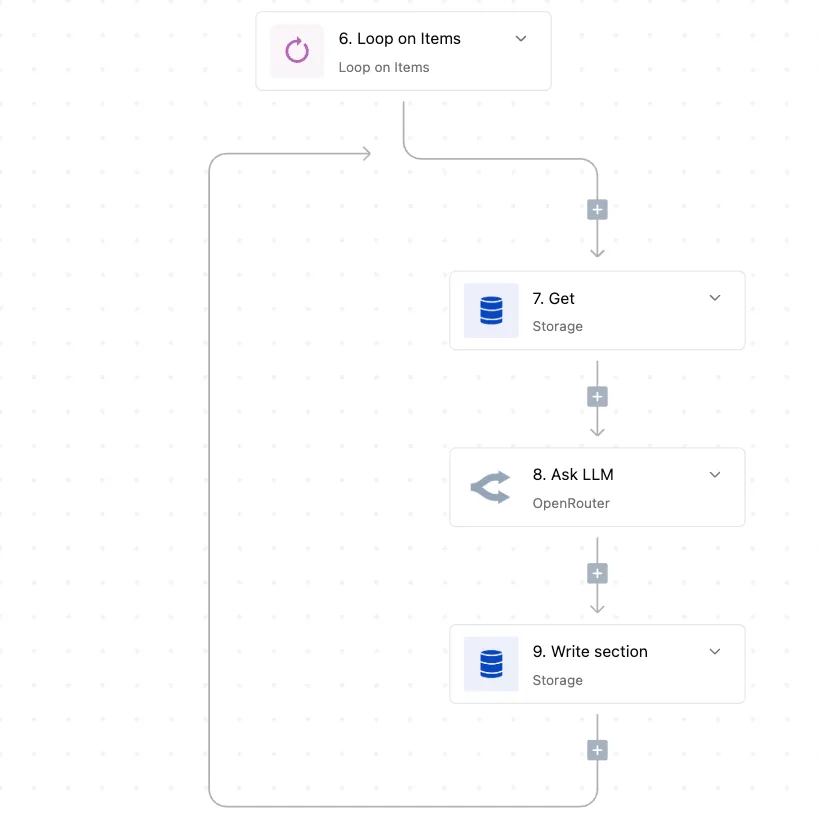
By routing all inference calls through a centralized flow, you'll implement a circuit breaker. This flow validates the state of the model before allowing the next request to proceed, ensuring a single runaway process cannot monopolize the inference queue.
Verification that the previous execution finished successfully occurs before the "Insert Row" action commits new data to the log.
### Automating the fallback to a secondary model size
When the primary Mistral model fails to respond within a defined timeout, Activepieces redirects the payload to a smaller, more stable instance.
The workflow attempts to reach the high-parameter Mistral endpoint. An error-handling step catches "504 Gateway Timeout" or "429 Too Many Requests" signals. The flow automatically re-routes the original prompt to a quantized Mistral 7B or a CPU-bound TinyLlama instance.

### Monitoring VRAM usage through workflow triggers
The workflow engine acts as a watchdog by triggering cleanup scripts whenever the inference engine reports a memory threshold breach.
By using the "Schedule" trigger to run a diagnostic check every hour, your system can automatically flush the model's KV cache or restart the inference container during periods of low activity.

## The new rules for self-hosting Mistral models safely
Infrastructure reliability depends on maintaining a 20% buffer of unallocated Video Random Access Memory (VRAM), as this margin is necessary to prevent memory fragmentation during peak operations.
### The 20% VRAM safety margin rule
A dedicated headroom of 20% of total VRAM must remain unaddressed by the model weights, ensuring that the system has sufficient overhead to handle incoming request processing without crashing.
| Model Size | VRAM for Weights (FP16) | VRAM for 32k Context | Recommended GPU | Stability Risk |
| :--- | :--- | :--- | :--- | :--- |
| 7B | 14GB | 2GB | NVIDIA RTX 3090 (24GB) | Low |
| Small (22B) | 44GB | 4GB | NVIDIA A6000 (48GB) | Moderate |
| Large (675B) | 1,350GB | 32GB | 8x NVIDIA H100 (80GB) | High |
Selecting a model that occupies more than 80% of the available VRAM at idle forces your system into a state of permanent fragility, leaving no room for memory spikes.
### Quantizing Mistral 8x7B for enterprise hardware
Transitioning to a 4-bit quantized version of the Mistral 8x7B model is mandatory to fit high-logic capabilities into standard enterprise hardware. By reducing the precision of the weights, the memory footprint is halved.
Selecting a model that occupies more than 80% of the available VRAM at idle forces your system into a state of permanent fragility, leaving no room for memory spikes.
On a single-node setup, this compression is the only way to maintain the 20% safety margin while still serving complex reasoning tasks, ensuring the system remains stable under fluctuating computational loads.
### Setting API gateway token limits for Mistral
Enforcing a hard cap on context length at the API gateway level prevents the model from attempting to process sequences that exceed the pre-calculated VRAM buffer.
Without this restriction, a prompt that nears the theoretical maximum context will trigger a kernel panic. The maximum allowable tokens are calculated based on the remaining VRAM after the 20% safety margin is subtracted.
Your load balancer is configured to reject any request where the combined prompt and completion limit exceeds this value.
## Frequently asked questions about self-hosting Mistral?
### Which GPU is best for Mistral 8x7B?
A cluster of Nvidia A100 or H100 Tensor Core GPUs is the standard for hosting Mistral 8x7B. These are high-end data center hardware designed for massive throughput.
The Mixture of Experts architecture requires enough Video RAM (VRAM) to hold all constituent experts simultaneously. If the total VRAM is less than the model weights, your system will swap data to the system RAM.
To maintain stability in a production environment with no outbound internet access, your hardware must also support Error Correction Code (ECC) memory. Without it, silent bit flips during long-running inference tasks will eventually corrupt the model’s internal state.
### Does quantization significantly hurt mistral's reasoning?
Quantization, the process of reducing the precision of model weights to save memory, typically maintains the logic of Mistral models for general tasks.
It does introduce measurable degradation in strict mathematical or syntactical coding outputs. When a model is compressed from 16-bit to 4-bit precision, the reduced resolution of the weights means the model may fail to follow complex, multi-step instructions.
The model’s internal entropy increases, leading to less predictable results across identical seeds. On limited hardware, the memory savings allow for larger batch sizes.
### Can i run Mistral Large on a single consumer GPU?
Mistral Large is currently too massive to fit on any single consumer-grade graphics card. This remains true even when using aggressive 4-bit quantization.
Because the model parameters exceed the physical memory capacity of cards like the Nvidia RTX 4090, your operating system will refuse to load the model into the GPU's memory space.
Multi-GPU orchestration using NVLink must be implemented to pool memory across several cards to host this specific model. You can also use model sharding, where the layers are split across multiple PCIe slots, though this introduces a latency penalty.
## Related reading
- [Self-Host Mistral Small: Guide for Private Automation 2026](https://www.activepieces.com/blog/self-host-mistral-small-guide-for-private-automation-2026)
- [Self-Host Mistral AI: Enterprise Deployment Guide (2026)](https://www.activepieces.com/blog/self-host-mistral-ai-enterprise-deployment-guide-2026)
- [Self-Host DeepSeek R1 for Private Automation (2026)](https://www.activepieces.com/blog/self-host-deepseek-r1-for-private-automation-2026)
## References
- [willitrunai.com](https://willitrunai.com/can-run/mistral-7b-instruct-v0.3-on-rtx-4070-12gb)