To match your own complaint to one of them, use these five criteria: - Price: the published monthly cost of the entry paid tier, read from the vendor's pricing page. - Usage caps: whether the vendor states a limit on searches or messages, and whether that limit is published at all. - Citation quality: whether each claim links to a source that actually contains it, spot-checked by opening the links. - Fit with tools already paid for: whether the product sits inside a subscription you hold, or needs a new one. - Who it suits: the reader whose limit it removes, and the one whose limit it leaves in place.  ### Price and usage caps Start from [Perplexity's Pro page](https://www.perplexity.ai/pro), the baseline; four alternatives sit below it. According to [Perplexity](https://www.perplexity.ai/pro), Google AI Plus costs $4.99 a month, so it's the cheapest way to test whether price was your real objection. Per Perplexity, [Kagi](https://kagi.com/pricing) Professional costs $10 a month, which is double that and still half of a $20 plan. At $20 a month for ChatGPT Plus and $25 for ChatGPT Business, per Perplexity, the business tier costs $5 more for the same assistant, meaning that extra cost buys additional features rather than superior capability. If you already pay either ChatGPT price, **the real cost of switching is zero**. A low price with an undisclosed ceiling just moves the failure to a Tuesday afternoon, so I note where a vendor publishes no limit rather than guess. ## 3. ChatGPT Search for cited web answers Inside an assistant many readers already pay for, ChatGPT Search answers web questions with linked sources, so switching adds no new subscription, though search allowances vary by plan. Ordinary web search answers carry citations you can open and check. The metered part is deep research, the longer multi-step reports. I would reproduce your own typical week in a test before trusting any plan to cover it. To see which tier matches the volume you actually run, the table sets the plans by monthly price and deep research allowance. | Plan | Monthly price | Deep research queries per month | Who it suits | |---|---|---|---| | ChatGPT Plus | $20 | 25 | A solo user who researches a few times a week | | Pro | From $100 | 250 | A solo user whose work is research-heavy | | Business Standard | $25 per user | Set by the plan's terms | A small team that wants shared billing | | Pro 500 | $500 | Set by the plan's terms | A heavy user who has outgrown the lower tiers |  Twenty-five queries a month on Plus is roughly one per working day, so a daily research habit will hit the ceiling before the month ends. The 250 on Pro is about eight a day, which is the point where the cap stops being the thing you notice. Business Standard and Pro 500 carry no figure here, so don't assume they match either number; check the plan terms before relying on them. The limit to test for is volume. If your Perplexity complaint was a cap on research runs, Plus gives you a defined number to measure against. A weekly brief is the other kind of volume, and it is small. Activepieces allows unlimited flows on every plan, including the $0 free plan, so the brief from section 1 never runs into a flow count. Credits meter AI usage rather than flows, and the free plan includes 1,000 credits a month; bringing your own provider key (BYOK) is available from the paid tiers. The model call in step two still draws on your own provider's allowance. If the complaint was something else, such as source control or API access, the plan table won't fix it, and the sections that follow cover those cases. ## 4. Google Gemini for long-document analysis ### Gemini long documents and context window If your Perplexity complaint was long documents or Google-grounded answers, [Gemini](https://gemini.google/overview/long-context/) is the one to look at. It's often already paid for through a Google plan, especially for people who work in Workspace (Google's Gmail, Docs, Drive and Calendar suite).  "The answer ignored the back half of my file" is the symptom people usually report. That traces to the context window, the amount of text a model can hold in view at once. Once a document exceeds it, the tool drops or summarizes material without telling you. On Gemini's chart, ChatGPT sits at 128,000 tokens and **Gemini on Google AI Pro at 1,000,000**. That headroom only matters if your files reach the lower ceiling. Upload the longest document you actually work with, ask about something on its last page, and see whether the answer is right. ### Gemini search grounding and Workspace Look second at grounding. Gemini draws on Google's search index, so questions about current events, businesses and web pages get answers tied to the same source Perplexity-style tools are often trying to approximate. Check the citations on a few queries you already know the answer to before trusting it for new ones. Workspace is the third. If your mail, documents and calendar already sit in Google's apps, Gemini can work on them where they are, which removes the copy-and-paste step that many people were quietly paying for in time. The same bundling is where the catch sits: the strongest features are on paid tiers, and which of them your plan includes depends on the edition. Without Workspace and without long documents, Gemini has less to give you than it gives the people above. ## 5. Microsoft Copilot for web-grounded answers On its free tier, Microsoft Copilot gives you web-grounded answers with citations, but the features that read your work data sit behind a paid or business licence. The Microsoft 365 and Edge integration is where the tiers diverge. "Copilot didn't know about my email" is the usual complaint here. The cause is nearly always the tier: a free or personal account has no route into a work tenant. The table shows what each tier includes, and the column to read is work-data access, because that's where the tiers stop resembling each other. | Tier | Price | Web-grounded cited answers | Work-data (Graph) access | Admin controls | |---|---|---|---|---| | Copilot free | No charge | Yes | No | None for an organisation | | Copilot Pro/paid | Individual subscription | Yes | No tenant-wide access; the add-ons apply to personal Microsoft 365 apps | None for an organisation | | Microsoft 365 Copilot business licence | Per-user licence added to a Microsoft 365 plan | Yes | Yes, through Microsoft Graph, the API layer over mail, files, calendar and chats | Yes, through Microsoft's admin centre and tenant policies | The two lower tiers answer the same kind of question Perplexity does: a question about the open web, with sources attached, making Perplexity one option among several for this type of search. If that was your reason for using Perplexity, the free tier covers it, and Edge puts it beside the page you are reading. The business licence is a different product. Because it reads through Microsoft Graph, it can only surface what the asking user already has permission to see. That's a feature for an administrator and a risk for a careless one. If a tenant has loose sharing settings, those old permissions will show up in Copilot's answers, so test it against a pilot group before a wider rollout. Admin controls are the reason a team might pick this over a consumer assistant. If you work in Microsoft 365 all day, the licence tiers decide what Copilot can see. If you don't, the free tier is the only one that matters, and it behaves much like the answer engine you were leaving. ## 6. Kagi Search for ad-free searching ### Kagi plans and search caps There is no free tier worth building a workflow on, so Kagi suits people who search all day and will pay to stop seeing ads. The tier you leave Perplexity's free plan for is a paid one from the first query, and the price rises as the search caps come off. "I hit my limit mid-afternoon" is the user-reported symptom in this category. On [Kagi's pricing page](https://kagi.com/pricing), the Starter plan costs $5 a month and includes 300 searches. viz type=stackrank title="What each Kagi plan costs per month" unit="$ per month" source="Kagi - https://kagi.com/pricing"0 costs less than half of Ultimate at $25, with Starter at $5." Starter: 5 Professional: 10 Ultimate: 25 That's roughly ten a day, so a heavy searcher will run out before the month does. It's a trial-sized allowance, not a daily-driver one. **Professional costs $10 a month with unlimited searches**. That's the point where the cap stops being the reason you leave. Ultimate costs $25 a month, also unlimited, so the extra $15 over Professional buys no additional search volume. If you want that tier, confirm in the pricing page's feature list what it adds before paying, because the search count isn't the difference. The takeaway is that the jump from Starter to Professional removes the cap for $5 more, while the jump to Ultimate removes nothing further on that measure, so you won't gain additional searches by upgrading to Ultimate. ### What Kagi replaces from Perplexity Kagi gives you the integrations that Perplexity's free tier doesn't: no ads, AI answers alongside ranked results, and control over which sites rank higher or lower. You can push a source you trust up and a content farm down. For comparison, [Perplexity's Pro plan](https://www.perplexity.ai/pro) is $17 a month when billed annually, which means you must commit to paying for a year upfront. Professional Kagi at $10 costs less than that, but it buys a different thing: a search engine with AI features, not an answer engine with search behind it. Because Kagi is search-first, it won't replace a general assistant you already pay for. If your limit was the number of answers or the model quality, Kagi doesn't touch it. If your limit was ads, tracking or a lack of control over sources, it addresses exactly that, and the money buys you out of it. ## Testing a Perplexity alternative before canceling **Write down the one limit that made you look, then test whether a replacement removes it before you cancel anything.** Start with the market, because it shapes the trial. [Datarefs](https://www.datarefs.com/insights/market-size/most-used-ai-chatbot/) puts ChatGPT at 52.1% of chatbot share, Gemini at 26.9% and Claude at 10.6%. 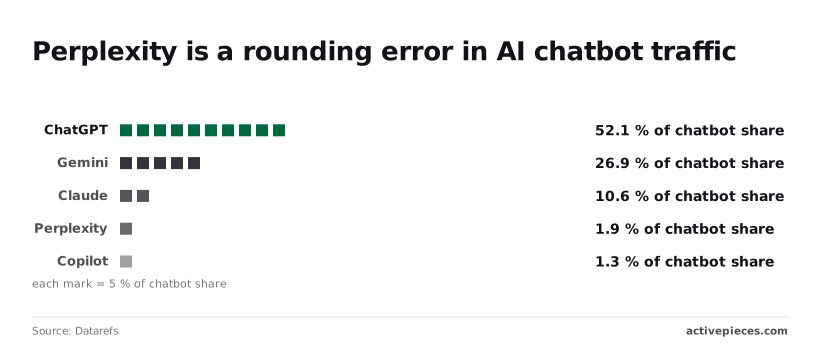 Those three hold 89.6% between them, so you probably already pay for, or have free access to, an assistant that could replace Perplexity. Down at 1.9% is Perplexity, with Copilot at 1.3%, so **both services remain niche players in this measure**. Treat the free tier you already have as the first candidate, not a fresh signup. 1. Name your limit in one sentence, such as a query cap, a citation you couldn't verify, or a model you couldn't choose. 2. Check that sentence against the criteria earlier in this article. If the limit isn't on the list, you may be leaving over something a new tool will repeat. 3. Trial two free tiers on five questions from last week's real work, not demo prompts, and you'll discover what actually works. 4. Compare citations by hand. Open every linked source and confirm the claim appears on the page. A citation that exists but doesn't support the sentence counts as a failure. 5. Keep or cancel Perplexity based on which tier cleared your limit without breaking the other four questions. From Google AI Plus at $4.99 up to Business Standard at $25 per seat, with Perplexity Pro at $17 on annual billing, the chart shows the monthly price of each plan in the baseline. The spread is small enough that price rarely decides the swap. A $3 gap between Perplexity Pro and ChatGPT Plus ($20) is smaller than an hour of redoing answers you couldn't trust, so the true cost depends on which tool you can actually trust. For a team, add one check: whether the plan is billed per seat, as Business Standard is at $25. A tool that wins for one person costs five times as much for five. Run the same five questions with two colleagues before you commit. ## Related reading - [Perplexity MCP Server: Setup Guide and Tools](https://www.activepieces.com/blog/perplexity-mcp-server-setup-guide-and-tools) - [Perplexity API Pricing in 2026: Models & Costs](https://www.activepieces.com/blog/perplexity-api-pricing-in-2026-models-costs) - [Become a LinkedIn Thought Leader with ChatGPT, Perplexity, and Claude](https://www.activepieces.com/blog/linkedin-thought-leader) ## References - [Perplexity](https://www.perplexity.ai/pro) - [Kagi](https://kagi.com/pricing) - [Datarefs](https://www.datarefs.com/insights/market-size/most-used-ai-chatbot/)Rank each alternative against the specific limit that made you leave Perplexity, because the usual complaint is a cap or a bill, not search itself.