### Cline token costs for daily developers At about $800 a month, the effective engineer is spending roughly what a decent laptop costs, every month, so the annual per-person AI cost exceeds what most teams budget for hardware. If you default to Opus 5.5 for every task, expect the daily bill to land well above the cheap-model version of the same workload.  It prices at $4 and $20 per million tokens, double Sonnet 5.5 on both sides, which means the price premium stays constant whether you're buying input or output tokens. ### Cline token costs for heavy agentic use At $2,000 a month, the power user is where the math breaks, because at that scale the cost-benefit analysis can no longer balance.  Five times Sonnet 5.5: that is GPT-6 Astra at $10 input and $50 output per million tokens, and agentic loops that re-read files and retry multiply tokens on top of that, which means every agentic attempt costs substantially more than the published per-token rate. ## Hidden Cline costs and limits Since the sticker price is the smallest part of the bill, a spending cap helps. Most of the overrun comes from context you pay for repeatedly, from loops that burn tokens without progress, and from provider rules you never read. ### Cline context growth and repeated token reads When a session runs long, every request re-sends the conversation so far, so a long task costs far more than the sum of its steps. Across 13.5 million GitHub Copilot agentic sessions, a coding assistant comparable to Cline, 197.1 billion of 209.2 billion **input tokens (94.2%) were re-sent context**, so most of the input token cost is from context that gets sent multiple times across retries.  Because nearly everything you pay for is something the model has already seen, the fixes target history: - Start a new task instead of extending a long one. - Avoid having the agent read large files whole when a targeted excerpt will do. - Interrupt retry loops early, because each failed attempt adds its output to the history of every later call. - Watch extended-thinking settings, since reasoning tokens bill as output, usually the pricier side. ### Cline rate limits and prepaid credit rules Once a session is throttled, it stalls, and people respond by switching to a pricier model or running parallel tasks, which multiplies spend. That is how rate limits cost money indirectly. Before you load prepaid credits, read the provider's rules on expiry, minimum top-ups, and refunds, because unused balance that lapses is money you paid for nothing. For a team, every habit above is multiplied by headcount, even though Cline itself is free. Per-seat fees on provider or management plans stack on top of token usage, and anything that requires a sales call to price deserves a written quote before you commit. ## Cline versus Cursor, GitHub Copilot and Claude Code Capping each developer matters most with Cline. Of the four tools here it's the one whose extension has no subscription of its own, so every token lands on the provider's invoice unless you opt into ClinePass. The table below shows how the four differ in billing shape, and the column to watch is the last one, since that's where a quiet month turns into a loud one. | | Monthly price | Flat or metered | Bring your own key | Included model usage | Costs more at heavy use when | |---|---|---|---|---|---| | Cline | Free software (Nov 2026) | Metered by provider | Yes, core design | None | Long agent loops and large contexts run up token charges | | Cursor | Tiered subscription (Nov 2026) | Flat base, metered beyond allowance | Partial | Plan allowance | Heavy use exhausts the allowance and overage begins | | GitHub Copilot | Tiered subscription (Nov 2026) | Flat base, limits on premium requests | Limited | Plan allowance | Premium models drain the request allowance faster | | Claude Code | Subscription or API billing (Nov 2026) | Either, by how you sign in | Via API key | Subscription allowance | API billing scales with every session | Read it as a map of who carries the risk: the three flat-leaning tools absorb some of your variance, while **Cline hands all of it back to you**. For developers who use the assistant hard and steadily, flat-rate wins, because the subscription turns an unpredictable bill into a fixed line. ### When Cline is cheaper If you're a light or bursty user, Cline's cheaper, because a subscription would charge you for allowance you never touch. It also suits teams that want to pick the cheapest adequate model per task instead of paying for a bundle. The verdict: steady heavy users save with a flat plan, occasional users save with Cline, and anyone running long agent loops should keep the caps from the previous section regardless. ## How to keep Cline spend predictable Keep spend predictable by setting a hard ceiling at the provider, matching the model to the task, and reviewing real usage on a schedule. The caps from the previous section only work if the rest of this routine backs them up. ### Budgets and caps **Set the limit on the provider's side, not in your head.** Cline can show you what a task has cost, but the provider's console is the only place that can refuse the next request. A monthly budget with an alert below it means a runaway loop ends as an email, not as an invoice. Use the expensive model only where it earns its cost, since price scales with the model. Claude Opus 5.5 suits long agentic coding. Claude Haiku 5.5 or a Flash-class model handles renames, boilerplate and quick questions. Defaulting to the top model for everything means paying flagship rates for work a cheaper model finishes just as well. ### Tracking Cline spend across a team Once more than one person's spending, the per-task cost display stops being enough, because nobody sees the total. Give each developer their own provider key so the console breaks usage down by person. Then hold one weekly review: compare the console against the task history in Cline, and find the tasks that cost far more than they should have. If you want that weekly report or threshold alert sent to Slack or a sheet, you can build it in [Activepieces](https://www.activepieces.com), which has 746 integrations counted from its open source monorepo and unlimited flows on every plan, including free. On the Plus plan and up it runs on your own AI keys, so every AI step costs 1 credit and the model cost goes to your own provider bill. Reselling you a model settles your AI choice and its price before you've opened the product, and you can reach Activepieces from Claude, ChatGPT, Cursor or any MCP client. The flow builder below shows a trigger feeding a code step, with a variables panel holding a stored value the step can read, which is enough to compare spend against a threshold and notify someone. 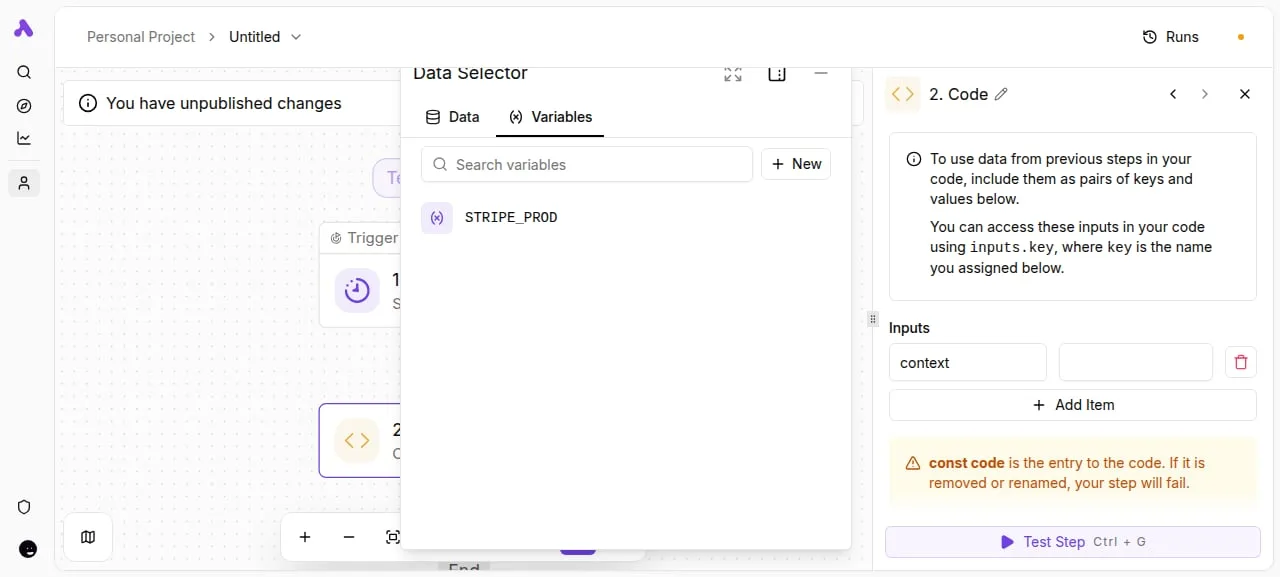 That automation only reports. The cap at the provider is still what stops the spending. ## Before choosing your Cline plan Spend a week measuring your own usage, because the cap limits the damage but only your own tasks tell you what the bill will be. The six steps below turn the pricing page into a number you can defend: 1. Open cline.bot's pricing page and write down the date. Plans change, and a dated note tells you later whether a surprise came from your habits or from a revision. 2. Run Cline free for a week on a real task, using your own provider key. Billing then lands on your provider account, where the cap you set protects you, and a real task shows your real token appetite instead of a demo's. 3. Read the cost per task from the provider's usage dashboard. Count tasks rather than days. A day with one sprawling refactor and a day with ten small fixes can cost the same, and only the per-task figure carries over to other weeks. 4. Multiply that cost by the number of tasks you expect in a month. Do it twice, once for a typical week and once for your worst. The gap between the two is your budgeting risk, and the worst-week figure is what the cap should be set against. 5. Price a flat-rate coding tool for the same workload. If your metered total sits well above the flat fee, you're paying for flexibility you may not use. If it sits well below, the flat fee is paying for headroom you never touch. 6. Pick the tier or the seat count last. Choose it from the multiplied figure, not from the feature list, so you can say what the tool costs per task before anyone on a sales call suggests a number. ## What Activepieces does about this Activepieces doesn't lower the provider's token bill, and I'd distrust any tool that claimed to. What it does is make the weekly review from the previous section something that runs without you. You build a flow that pulls usage from your provider, compares it with the threshold you set, and posts to Slack or a sheet when a week runs hot. The cap at the provider still decides what gets refused. The flow just tells you early enough to act. The pricing shape matches the argument of this article. Every plan, free included, has unlimited flows, so a spend watcher costs nothing to leave running. On the Plus plan and up, Activepieces runs on your own AI keys, and each AI step costs 1 credit.  The model cost lands on your own provider invoice, where your cap and per-person keys already apply. That keeps the metering in one place and avoids a second token bill hidden inside the automation tool. The codebase is open source under the MIT licence for the community edition, and the integration count of 746 comes from counting the monorepo directly. For a team that already chose Cline to avoid lock-in, that's the relevant check. You can read what the flow does and host it yourself. If you'd rather drive it from your editor, Activepieces is reachable from Claude, ChatGPT, Cursor or any MCP client. I have no named customer to point to for this specific use, so treat it as a build you can test in a week, not a proven recipe. ## Frequently asked questions ### The software price Is Cline really free? Yes, the Cline software itself costs nothing to install and run. The bill comes from whichever model provider you connect, so a free tool still produces a monthly invoice, sized by how many tokens your habits burn. ### API keys Do I need my own API key to use Cline? No, not in every setup, but bringing your own key is the most direct arrangement. You create an account with a provider, paste the key in, and your usage is billed there. If you choose a hosted option instead, read the pricing page first, because a bundled plan only helps if your usage actually fits it. ### Markup on model usage Does Cline charge a markup on model usage? With your own provider key, the charge you see is the provider's rate, since Cline isn't in the billing path. Other routes can differ, so compare the per-token price on the pricing page against the provider's own list before you commit. If a price can't be read without a sales call, treat that as a cost in itself. ### Team invoicing Can a team get one invoice for Cline usage? By pointing every member at a single provider account or organization, a team gets one invoice, and the provider bills one party for all of it. The catch is attribution: one invoice tells you the total, not who spent it. Separate keys per person or per project give you the breakdown that a lump sum hides. ### Seeing task cost How do I see what a Cline task cost? While a task runs, Cline displays token counts and running cost in the interface, so you can check it then instead of after the invoice arrives. Cross-check those figures against the provider's usage dashboard, which is the number you'll actually be charged. A few tasks logged this way will show you your real per-task average faster than any estimate. ## Related reading - [Kimi K3.1 Pro API Pricing: Token Costs in 2026](https://www.activepieces.com/blog/kimi-k31-pro-api-pricing-token-costs-in-2026) - [Baseten Pricing 2026: Costs, GPUs and Token Rates](https://www.activepieces.com/blog/baseten-pricing-2026-costs-gpus-and-token-rates) - [SiliconFlow Pricing: Model Costs Per Token (2026)](https://www.activepieces.com/blog/siliconflow-pricing-model-costs-per-token-2026) ## References - [smcleod.net](https://smcleod.net/2025/04/the-cost-of-agentic-coding/) - [Anthropic and OpenAI price pages](https://platform.claude.com/docs/en/models/overview) - [Sacra](https://sacra.com/c/cline/)Your habits set the total, not the plan you pick.