### Why manual prior authorization delays patient treatment Manual prior authorization processes function as a tax on clinical time that directly delays patient treatment. According to data from [Linear Health](https://linear.health/blog/prior-authorization-cycle-time-benchmarks), the average physician manages 39 weekly authorizations. 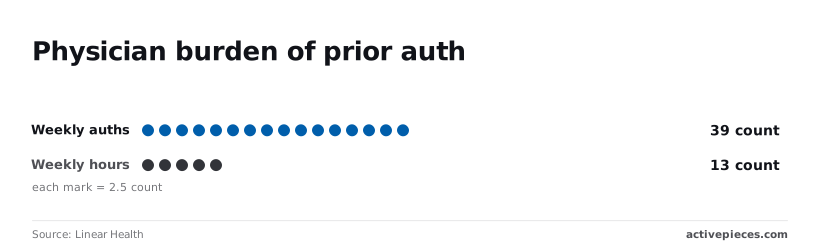 Physicians stay tethered to administrative tasks because traditional automation tools often lack the version control necessary for clinical safety audits. When a vendor’s proprietary user interface hides the logic, a Chief Medical Officer can't easily verify if a workflow change complies with the latest HIPAA Security Rule requirements for data access. This lack of transparency forces you to keep physicians in the loop for every manual step to ensure compliance. It effectively prevents the efficiency found in other industries. ### Cutting provider onboarding time with automated workflows Auditable, version-controlled environments for administrative logic allow you to compress the time required to bring new providers into the clinical workflow. The following comparison illustrates the impact of shifting from manual, human-centric processes to automated systems that can be reviewed and approved by stakeholders in a centralized repository. A health system using manual credentialing takes 135 days to complete the process. This means a new hire can't generate revenue or see patients for over four months. Automated physician onboarding takes 24.5 days, allowing the provider to begin clinical duties within a single billing cycle, which means the organization avoids significant billing cycle leakage from idle staff. A health system ensures that clinical capacity matches patient demand almost immediately by reducing the onboarding period by over 110 days, so the facility can respond to sudden surges in patient volume without delay. This allows providers to treat surging patient volumes without the typical administrative lag. This transition from manual oversight to governed automation represents the only path to reclaiming those 13 lost hours of physician time. ## Three models for managing healthcare automation sign-offs Governing these reclaimed hours requires a structured approval framework that categorizes automation risks based on their proximity to the patient. To evaluate which oversight model fits a specific workflow, you must measure them against three criteria. Patient Safety Impact determines the likelihood of adverse clinical events. HIPAA/Data Privacy Compliance ensures the protection of Protected Health Information (PHI) during transit. Implementation Speed accounts for the technical friction of deployment. These benchmarks ensure that a script managing appointment reminders isn't subjected to the same clinical validation as one adjusting medication dosages based on lab results. ### The Physician-Led model for clinical safety Physician-led sign-offs prioritize clinical integrity by placing final approval authority in the hands of Chief Medical Information Officers or department heads. This model is most effective for high-risk automations where a logic error could result in a delayed diagnosis or incorrect treatment plan. Because the approver understands the nuances of a clinical workflow, they can identify edge cases that a standard software developer might miss. These include how an automated alert might contribute to alarm fatigue during a critical shift. This clinical oversight ensures that automation is a diagnostic aid rather than a source of medical error. ### The IT-led approval model for automation security The IT-led model centers on the technical sanitization of data flows and the stability of the underlying tech stack. In this framework, security engineers evaluate how an automation interacts with the Electronic Health Record (EHR) and whether it maintains encryption standards required by HIPAA. By focusing on the technical structure of the automation, you'll prevent unauthorized data egress. You'll also ensure that a sudden spike in API calls doesn't crash the patient portal. This approach is essential for administrative automations, such as billing or insurance verification, where data privacy and system uptime are the primary concerns.  ### The hybrid committee model for cross-departmental automations The hybrid committee model balances clinical safety with technical rigor by requiring concurrent sign-offs from both medical and IT stakeholders. This collaborative approach is necessary for complex, cross-departmental automations that handle sensitive patient data while influencing care delivery. ### Patient safety and HIPAA criteria for hybrid review The Patient Safety Impact is high, as clinical representatives vet the logic for medical accuracy. IT staff ensure all data handling meets federal security standards for HIPAA/Data Privacy Compliance. The requirement for dual-approval cycles introduces a planned delay in deployment to favor thoroughness over velocity, resulting in moderate Implementation Speed. By utilizing this multi-disciplinary review, you can scale your automation efforts without creating silos where technical efficiency compromises patient care. ## The clinical appetite for automated assistance Clinicians embrace automation when it functions as a transparent extension of their workflow rather than an unpredictable "black box" that threatens patient safety. By moving logic into version-controlled environments, you provide the audit trails necessary to transform automation from a source of professional anxiety into a reliable clinical asset. ### Overcoming clinician skepticism Skepticism among medical staff usually stems from the "black box" nature of proprietary vendor platforms. The underlying logic is hidden from peer review. When automation rules are locked inside the user interface of a tool like the customer relationship management platform Salesforce, a Chief Medical Information Officer can't perform a diff. This technical comparison of code changes verifies that a protocol update hasn't introduced a logic error. Furthermore, this lack of transparency means a single misconfigured trigger could delay a critical patient notification without any visible record of the failure. Shifting to version control allows clinicians to inspect the "why" behind an automated action.  This transparency ensures that technical efficiency never bypasses the standard of care. ### The consensus on AI's positive impact Practitioners recognize the value of AI-driven automation to their practice when it is integrated into large-scale environments. In a study analyzed by [AIMOCS](https://aimocs.com/guides/kaiser-2-5m-encounter-deployment-analyzed), 90 out of 102 physicians surveyed reported that AI had a positive impact on their work. 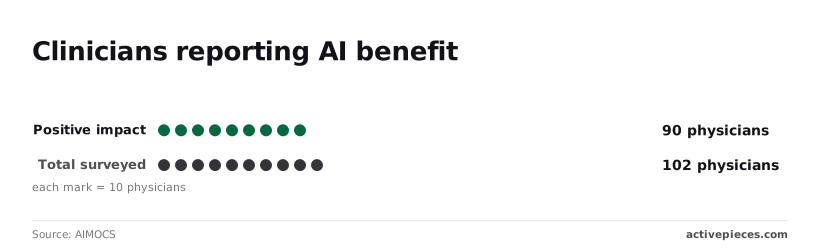 This means that roughly 88% of these frontline providers found the technology reduced their cognitive load or administrative burden. It demonstrates that the barrier to adoption isn't a lack of interest, but rather a lack of trust in the deployment process. This high rate of approval suggests that the medical workforce is ready for these tools, provided the governance structures are robust enough to prevent "hallucinations" or data leaks. ### Aligning automation goals with provider needs Automation must be treated as a medical device subject to rigorous versioning and rollback capabilities to maintain this high level of clinician support. If a new automation script in a cloud computing environment like Amazon Web Services (AWS) causes an error in patient scheduling, the technical team must be able to revert to the previous "known good" state in seconds. Without this safety net, a minor update could lead to a localized system outage. This would force clinicians back to manual entry and erode the trust built by earlier successes. By aligning technical deployment with clinical safety protocols, you ensure that automation serves the provider’s primary goal: uninterrupted, high-quality patient care. ## MuleSoft and enterprise integration platforms compared Enterprise-grade tools like MuleSoft provide a robust alternative for organizations that prioritize deep ecosystem integration and high-volume data orchestration. These platforms excel at creating a unified connectivity layer across legacy on-premise systems and modern cloud applications. ### MuleSoft Anypoint Platform for API management MuleSoft is particularly effective for large health systems that require a centralized API management strategy to handle millions of transactions. Its Anypoint Platform offers a comprehensive suite for designing, deploying, and managing APIs that serve as the backbone for institutional data exchange. This centralized approach allows IT teams to enforce global security policies and monitor traffic across the entire enterprise from a single pane of glass. For organizations with extensive existing investments in the Salesforce ecosystem, the native connectivity provides a seamless path for syncing patient records and administrative data. ### Building reusable integration assets with MuleSoft The platform encourages a modular architecture by allowing developers to create reusable integration assets. This reduces the need for custom point-to-point connections, which can become difficult to maintain as the organization grows. By building a library of standardized connectors for common EHR functions, IT departments can accelerate the delivery of new administrative services. This structured environment is ideal for teams that follow a traditional, centralized IT delivery model where stability and enterprise-wide standardization are the primary objectives. ## How Activepieces bridges the clinical-administrative divide Tiered approval systems in Activepieces, an open-source automation engine, allow you to separate low-risk administrative tasks from high-risk clinical interventions within a single governed environment. This structure ensures that a simple patient satisfaction survey follow-up doesn't require the same six-month clinical safety review as a medication adherence trigger, preventing bureaucratic bottlenecks while maintaining strict oversight. Activepieces bridges this gap by syncing flows to Git and promoting them through Release Management, ensuring clinical logic is versioned and reviewed like software rather than saved in a private in-app history.  This makes promotion from a test environment to production a deliberate, auditable step instead of an accidental click. The Git Sync and Release Management features provide the same governance whether the product is self-hosted or on cloud. ### Decoupling administrative triggers from the EHR core Activepieces processes non-clinical events outside the primary database of the Electronic Health Record (EHR), such as Epic or Cerner, using its 735+ integrations to keep administrative spikes from degrading live patient care systems. This prevents administrative automation spikes from degrading the performance of systems used for live patient care. By offloading these tasks, you ensure that a failure in a marketing automation flow can't lock a database table required for urgent physician charting. The interface allows you to visualize these handoffs clearly.  For instance, the Activepieces flow builder displays a scheduled trigger that pulls non-sensitive data into a spreadsheet for departmental review. Following this verification, the logic can be promoted from a sandbox to a production environment without manual re-coding. ### Role-based access for departmental automation leads You delegate building authority to departmental leads through granular permissions. This ensures that a billing manager can only modify financial workflows and can't accidentally alter a nursing triage automation. This restriction limits the "blast radius" of any human error. A mistake in a scheduling flow won't propagate into the oncology department’s specialized notification system. ### Role-based permissions for clinical and IT staff Clinical Administrators hold "View Only" rights to administrative flows to monitor resource impact. Departmental Leads possess "Editor" rights exclusively within their assigned project folders. Central IT maintains "Owner" rights, acting as the final gatekeeper for any flow that writes data back into a system of record. 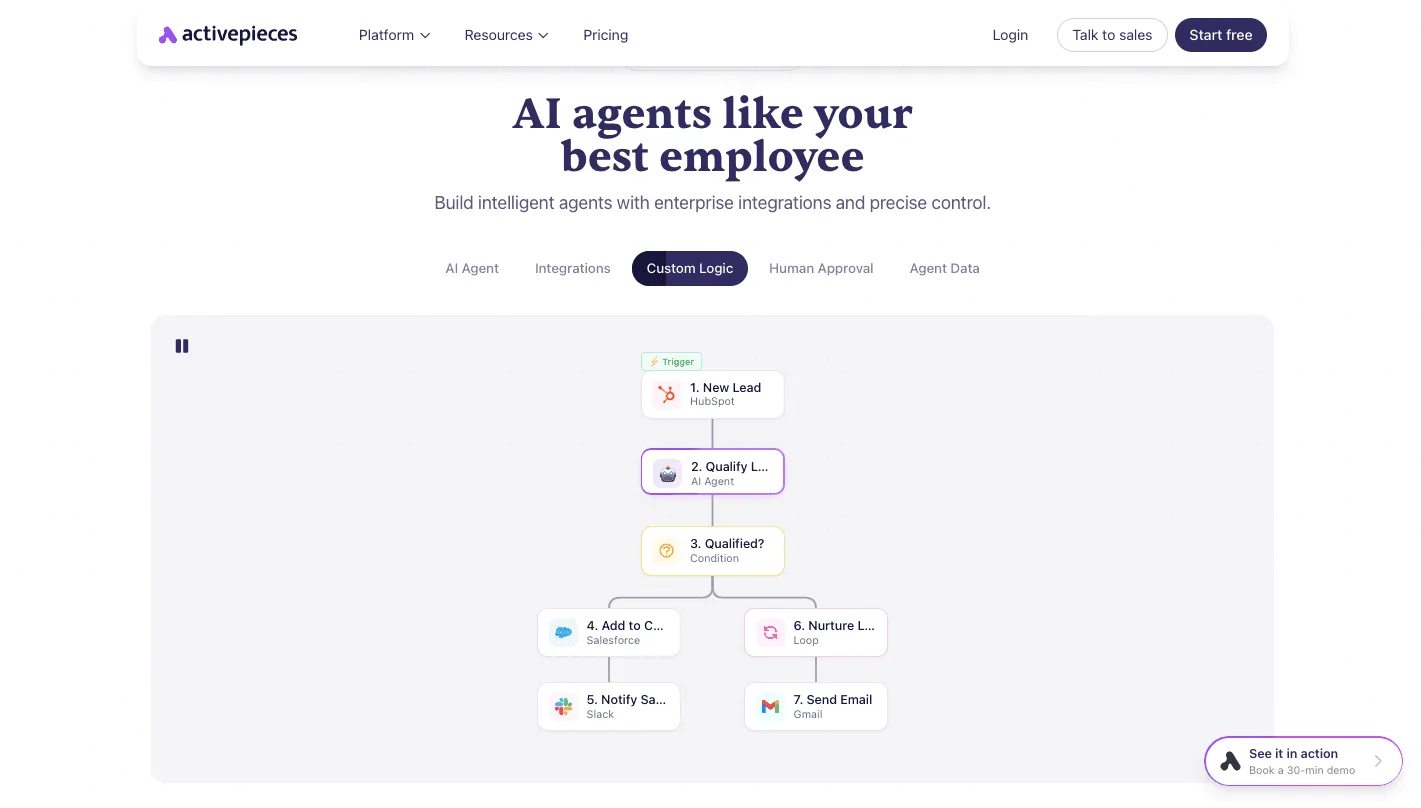 ### Maintaining a unified audit trail for HIPAA compliance Every change to an automation flow is captured in a centralized version history, providing the forensic evidence required during a HIPAA audit or a clinical root-cause analysis. Because Activepieces supports self-hosting, these logs remain within your private cloud infrastructure rather than sitting on a vendor’s server. You'll have total custody over the metadata of every patient-related trigger. Every agent decision and deterministic step is traced in the Run Details and Debugging UI, providing a per-step record of the data acted upon and the logic applied. These traces export as event streams into existing SIEM systems, allowing security teams to audit agent-led decisions with the same rigor as fixed workflows. Organizations like Alan and FundingSocieties run these governed environments in production to maintain this level of visibility. This audit trail links every modification to a specific user and timestamp. This record transforms a "black box" automated error into a traceable event that can be rolled back to a known safe state. By consolidating these logs, you eliminate the need for compliance officers to hunt through disparate software-as-a-service (SaaS) platforms to reconstruct a sequence of events. By treating automation logic as versioned code rather than ephemeral UI configurations, Activepieces ensures that clinical workflows are subject to rigorous peer review and auditable release cycles. Activepieces is the better choice for healthcare organizations that require strict governance and Git-based version control to prevent unreviewed changes from entering production. Whether deployed on-site or in the cloud, the platform provides the necessary infrastructure to bridge the gap between administrative efficiency and clinical safety. ## A tactical plan for bifurcating your automation approvals ### Inventorying current automation backlogs For organizations using platform-native workflows, establishing a central registry of every live script is the only way to identify where clinical logic is currently hidden from medical oversight. When automation exists solely within a vendor’s proprietary interface, such as a "Flow" in the Salesforce CRM, it often bypasses the standard peer-review process used for clinical decision support tools. This means a non-clinical admin could inadvertently alter a patient-facing notification. To regain control, you must perform a "Monday Morning Audit" to categorize the estate. You must inventory all active automations across every department. You must tag each as 'Direct Patient Impact' or 'Operational Support', and assign Chief Medical Information Officer (CMIO) oversight to Clinical workflows and IT Manager oversight to Administrative workflows. This initial classification ensures that high-risk logic is immediately flagged for a deeper level of scrutiny than routine data entry tasks. Once this list is finalized, you can stop treating all automations as equal technical debt and start treating them as distinct clinical or operational assets. ### Defining the 'Clinical Impact' threshold Logic falls into the 'Deep Review' lane if it touches any data point used to diagnose, treat, or alert a patient. These actions carry the same risk profile as a manual physician order. If an automation pulls a "Lab Result" from an Electronic Health Record (EHR) like Epic to trigger a patient SMS, it meets the threshold for clinical impact. This means it requires a version-controlled environment where a CMIO can sign off on the exact phrasing and timing of that message. Without this bifurcation, a simple update to a workflow’s branching logic could result in a patient receiving a "Normal" notification for a "Critical" value. This creates a safety event that an IT manager alone isn't qualified to prevent. ### Calculating the ROI of administrative speed Separating low-risk operational workflows into a 'Fast Track' lane allows the IT department to clear backlogs without the bottleneck of clinical committee approval. When an automation is limited to administrative tasks, such as syncing staff calendars or updating billing addresses, the risk of patient harm is negligible. These can be deployed using standard DevOps practices to maintain high velocity. By removing these routine tasks from the CMIO’s desk, you reduce the time-to-value for operational efficiency. This ensures that clinical experts have the bandwidth to focus exclusively on the high-stakes logic that affects patient outcomes. ## Frequently asked questions about healthcare automation approvals ### Who carries the liability for an automation error? Liability for an automated clinical decision remains with the licensed provider or the covered entity. No software vendor accepts the legal risk for medical outcomes resulting from their platform’s logic. A Business Associate Agreement (BAA) ensures that vendors like Mulesoft comply with HIPAA privacy standards. Mulesoft is a popular integration platform for connecting disparate clinical systems, but these agreements don't indemnify the hospital against malpractice. The hospital remains liable if an automated workflow fails to trigger a critical sepsis alert. Consequently, you must treat automation code as a medical device equivalent, requiring clinical peer review before deployment. Moving logic into version-controlled environments like GitHub (a platform for managing software code changes) creates a permanent audit trail. Compliance officers can prove exactly which version of a workflow was active during a specific patient encounter. This documentation shifts the burden of proof from speculative "black box" behavior to documented system intent. ### Managing technical debt in bifurcated systems Technical debt is minimized by centralizing the source of truth for business logic within a Git repository rather than scattering it across proprietary vendor dashboards. In a bifurcated system, where the User Interface (UI) is managed by administrative staff but the underlying logic is managed by IT, fragmentation occurs when changes in one don't reflect in the other. For example, Zapier, a common automation tool for connecting web apps, stores its operational logic within its own cloud environment. This makes it difficult for a central IT team to track every "Zap" created by individual departments. A "Code-First" approach ensures that all automation logic must be committed to a central repository before it goes live. By enforcing this, you ensure that no "shadow IT" workflows exist outside of the standard security patching and clinical review cycles. This prevents the accumulation of undocumented dependencies that could break during an Electronic Health Record (EHR) version upgrade. Consequently, patient data flows remain uninterrupted during system maintenance. ## Related reading - [Streamline Clinical Processes with Workflow Automation](https://www.activepieces.com/blog/automate-clinic-processes) ## References - [Linear Health](https://linear.health/blog/prior-authorization-cycle-time-benchmarks) - [CAQH](https://www.caqh.org/hubfs/Index/2024%20Index%20Report/CAQH%202024%20Index%20Report%20Key%20Takeaways%20FINAL.pdf) - [AIMOCS](https://aimocs.com/guides/kaiser-2-5m-encounter-deployment-analyzed)Administrative friction directly compromises patient safety by diverting clinical attention from the bedside to the browser.