# Cognito Forms Pricing: Plans and Costs (2026 Guide)
By Dario Espinoza-Blum · 2026-10-27 · Source: https://www.activepieces.com/blog/cognito-forms-pricing-plans-and-costs-2026-guide
---
According to [Capterra](https://www.capterra.com/p/138990/Cognito-Forms/pricing/), Cognito Forms, an online form builder, sorts its plans mainly by monthly entries, a limit that matters more when submissions feed into automation tools like [Activepieces](https://www.activepieces.com):
- Individual has 100 monthly entries.
Pro has 2,000 monthly entries, so about 65 daily submissions.
Team has 10,000 monthly entries, meaning roughly 330 daily submissions.
Your expected volume therefore picks your plan before any feature does.
You build forms in Cognito Forms for things like registrations, order requests and quotes, and it collects each submission as an "entry." An entry is one filled-in form. Each plan has a monthly allowance of them, and that's what you're really buying.
Below is the entry cap for each plan, with the date the figure was last matched to the listing. The gap between tiers is the point: Individual to Pro is a twentyfold jump, and Pro to Team is fivefold.

| Plan | Entries per month | Check date |
|---|---|---|
| Individual (free) | 100 | 27 October 2026 |
| Pro | 2,000 | 27 October 2026 |
| Team | 10,000 | 27 October 2026 |
Taken from [Capterra](https://www.capterra.com/p/138990/Cognito-Forms/pricing/), the figures mean this in practice:
- Per Capterra, at 100 entries a month, the free tier covers about three submissions a day, so a busy contact form can use it up well before the month ends.
- At 2,000, Pro allows roughly 65 a day, which suits a small business with steady traffic.
- At 10,000, Team is built for volume that would blow through Pro within days.
When you hit a cap mid-month, new submissions stop, and that costs you more than the upgrade would've.
Passing entries onward has a ceiling of its own: if the app you need has no connector, you wait on the vendor's roadmap, whereas Activepieces can generate an integration for a system that had none, so no vendor release stands between you and the hand-off, on top of 744 integrations in its open source monorepo, roughly 60% of them community-contributed, so the integrations reflect community needs, not just Activepieces' roadmap.
### Sources for the Cognito Forms pricing figures
The three entry caps match the Capterra pricing listing as of 27 October 2026. I've left out storage, user counts, feature lists and any Enterprise row.
I couldn't confirm those figures to the same standard, and a guessed number in a pricing table does more harm than a missing one.
## The monthly bill at three realistic usage levels
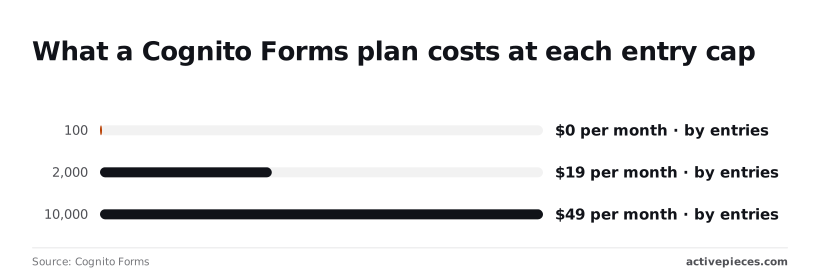
At these three volumes the base price is $0, $19 or $49 a month, and everything beyond that base is what pushes the real bill higher.
The table shows where each workload lands, so you can see which tier you would be buying before any extras.
| Workload | Entries a month | Tier needed | Base price a month |
|---|---|---|---|
| Solo consultant | 50 | Free (100-entry cap) | $0 |
| Small business | 1,500 paid registrations | 2,000-entry tier | $19 |
| Five-person team | 8,000 | 10,000-entry tier | $49 |
Those are base prices only; payment processing and extra users are separate lines, so treat each figure as the floor of your bill.
At 100 entries a month, [Cognito Forms charges $0](https://www.cognitoforms.com/pricing), and a consultant collecting about 50 enquiries sits comfortably inside that. You have roughly 50 entries of headroom, so a busy month won't force an upgrade.
Pay only when you need a feature the free tier withholds, such as removing Cognito Forms branding.
### Small business with payments
Collecting 1,500 paid registrations puts you under the 2,000-entry ceiling, where the plan is [$19 a month](https://www.cognitoforms.com/pricing). That leaves about 500 entries of room, so a promotion that lifts registrations by a third could push you into the next tier.

Every registration here carries a payment, so the card processor's fees will outweigh the $19 as volume grows. Budget for them separately.
### Five-person team with shared forms
At 8,000 entries a month, you need the tier that covers 10,000, which is [$49 a month](https://www.cognitoforms.com/pricing). The 2,000-entry tier would run out in the first week or so, so the cheaper plan isn't an option.
The headroom is about 2,000 entries, a 25% buffer. What the base price doesn't settle is how five people share access, so check whether extra users cost more before you commit.
## Hidden costs and limits in Cognito Forms
Before you pay, check five things the plan price leaves out. Each one moves your bill, and you can test every one against your own volume.
- Each plan has a cap on entries, the submissions your forms can collect.
- Each plan has a storage cap, and it varies widely from the smallest tier to the largest.
- Adding users beyond what a plan includes costs extra per person.
- Enterprise storage beyond the included amount is sold in paid blocks.
- Integration requests, the automatic hand-offs to other apps, cost extra in blocks once you pass the allowance.
You will hit the entry cap first. Once you reach it, you either move up a plan or wait for the count to reset.
A form that stops taking submissions during a busy week costs you more than the upgrade would've, so pick a plan from your busiest month, not your average one.
When each submission carries photos or PDFs, a form with few submissions can still fill its allowance, because uploaded files count against storage, and storage is separate from entries. If you collect documents, estimate file size before you estimate entries.
Don't expect Cognito Forms to process the money itself. Your payment processor charges its own fees on every transaction, and those arrive on a separate statement from your Cognito bill.
Budget for both, because the processor's cut grows with sales while the plan price stays flat.
Removing Cognito branding, adding more users, and some advanced options sit on higher plans. If your forms face customers, a logo you can't remove may push you up a tier on its own. Decide which of those you truly need before you compare prices.
## Cognito Forms against Jotform, Typeform and Google Forms
Once you know which gates you need, the choice is short. Google Forms is enough if you collect no payments and need no branding, and the paid tools differ mainly on entry volume, payments and logic.
Cognito Forms is an online form builder for things like order forms, registrations and quotes. It suits forms that have to add up a total or show different questions depending on earlier answers.
Its free plan caps entries, which is the cost of doing nothing: a busy month can stall the form before you've paid anything.
Read the payment and logic columns first, because a missing feature forces an upgrade no matter how few entries you collect.
| | Free-tier entry limit | Cheapest paid price | Entries at that price | Payment support | Logic on lower tiers | Check date |
|---|---|---|---|---|---|---|
| Cognito Forms | Capped monthly | First paid tier above free | Higher cap than free | Through payment processors; the plan that unlocks it's the one to confirm | Strong calculations; confirm which plan | Confirm on vendor page |
| Jotform | Capped monthly submissions | First paid tier above free | Higher cap than free | Offered, with limits that vary by plan | Included in some form, confirm depth | Confirm on vendor page |
| Typeform | Tight response cap | First paid tier above free | Modest allowance | Offered on paid plans | Fuller logic tends to sit higher up | Confirm on vendor page |
| Google Forms | No entry cap that I could find to report | Free | Not applicable | No built-in payment collection | Basic branching by section | Confirm on vendor page |
If payments are your gate, Google Forms drops out. If they aren't, it's the cheapest honest answer.
Because I haven't confirmed them against each vendor's own pricing page, this table carries no dollar amounts or entry counts, and a stale number is worse than none.
Open each vendor's page on the day you buy, write down the date, and compare your expected monthly entries to the cap on the plan that includes payments.
## Sending Cognito Forms entries to other tools with Activepieces
When each Cognito entry has to reach a spreadsheet, a CRM or an approval chain, [Activepieces](https://www.activepieces.com/pricing) picks it up and passes it on, with 744 integrations to reach those destinations and unlimited flows on every plan, including free.
Its own plan is a second meter running beside your Cognito bill.
Skip it and someone copies entries by hand, which **costs more than $20 a month in wages**, so the business hemorrhages labor to a task a system could do. It doesn't change which Cognito tier you need.
Out of the box, Cognito Forms, an online form builder, has its own integrations and can send entries out by webhook, which is a message fired to another service each time someone submits. That covers a single hand-off well.
Activepieces earns its place when one entry has to trigger several things in a row.
Below, on the canvas, is a five-step Activepieces flow called "CV Scanning". A web form trigger starts it, then the flow adds a row in Google Sheets, pulls text from a PDF, summarizes the text, and updates the row.
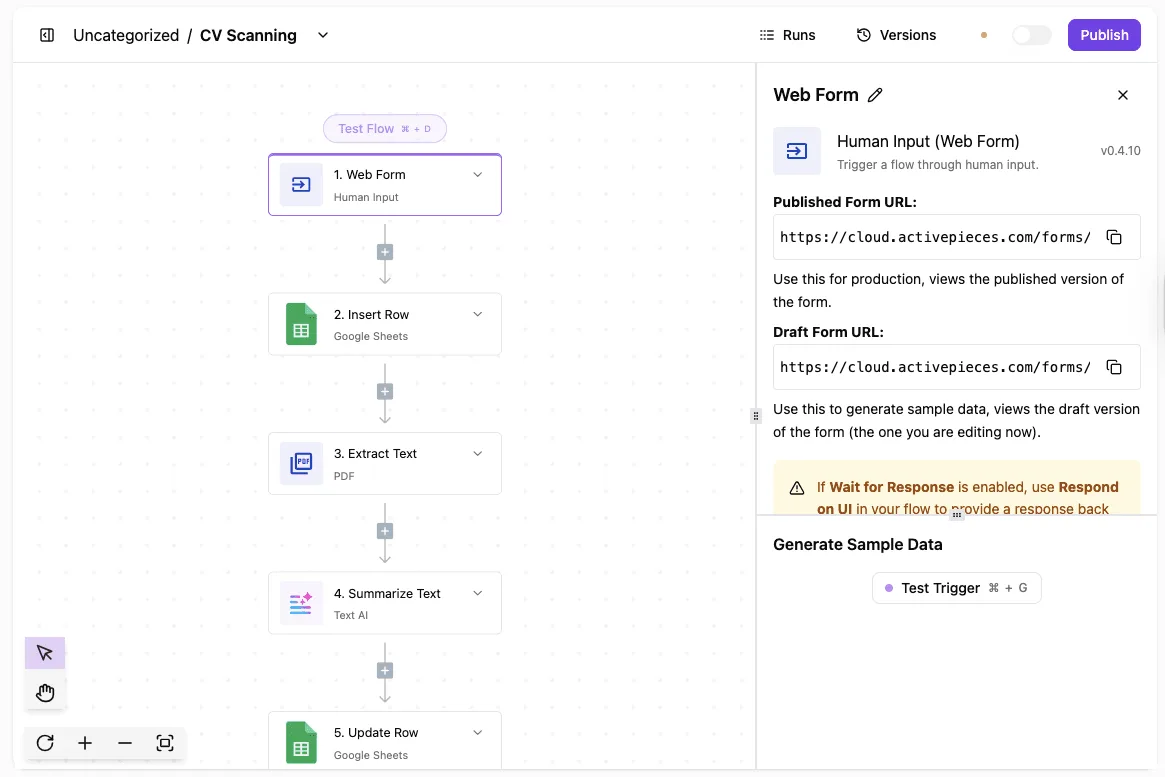
A Cognito flow has the same shape, with one trigger and a chain of steps behind it. Each step is work the plan has to pay for, so the next question is how much each plan allows.
| Activepieces plan | Price per month | Credits per month |
|---|---|---|
| Free | $0 | 1,000 |
| Plus | $20 | 10,000 |
| Team | $200 | 50,000 |
On the [Activepieces pricing page](https://www.activepieces.com/pricing), Free gives you 1,000 credits a month. That's enough to test a flow or handle a trickle of entries, but a busy form will run through it.
Plus gives you 10,000 credits for $20, which suits a steady small-business form, meaning the monthly fee stays within reach even for lean operations.
For $200, Team gives you 50,000 credits, which suits several forms or a long approval chain. The longer your flow, the fewer entries each allowance covers, so count the steps before you count the entries.

As read on 2026-10-27, all three credit allowances and prices come from the Activepieces pricing page. Plans change, so check the page again on the day you buy.
## Choosing a Cognito Forms tier on Monday
**Pick your plan from last quarter's real numbers, not from the price on the page.** The page tells you what the door costs, and your volume decides which room you end up in.
Guessing leaves you paying for a tier you outgrow in a month or one you never needed.
** The page tells you what the door costs, and your volume decides which room you end up in.
Work through these in order:
1. Count last quarter's entries across every form you run.
2. Add 30 percent headroom to that count, so a busy month doesn't push you over a cap mid-campaign.
3. Check whether your forms take file uploads or payments.
4. Test the free plan before you pay for anything.
5. Compare the annual price with the monthly price.
6. Set a reminder to re-check the pricing page.
### Count entries and uploads
Open each form's entries view and add up what arrived over the last three months. Use that total, not your hopes for next quarter.
The 30 percent headroom matters because **a cap is a wall**: hit it and new submissions are a problem for you and for the people filling the form in.
Then look at uploads and payments. Files eat storage, and a form that asks for photos or PDFs can fill a plan **far faster than the entry count suggests**.
Payments and branding removal are often held back for higher tiers, so if you collect money or want your own look, that feature may pick your plan before volume does.
### Test on the free plan
Build your real form on the free plan first. Run a few test submissions, upload a typical file, and see whether anything you need is locked.
A gate you find now costs you nothing. One you find after paying for a year costs you the year.
When you do pick a paid tier, compare the annual price against twelve months at the monthly rate. Annual usually saves money, but only if you're sure of the tier. If your count sits near a cap, start monthly.
### When to re-check Cognito Forms pricing
Put a reminder in your calendar for about three months out, around the time you'd next count entries. Plans and limits shift, and your own volume does too. A short look at both then keeps the bill matching the work.
With the tier chosen and the date set, what's left is the short version: what to remember if you read nothing else.
## Frequently asked questions
Four questions are left after the short version, and each is quick to answer. Yes, it's free within limits; don't count on rollover; downgraded forms keep existing but lose their gated features; and ask about a nonprofit discount before you pay list price.
### Is Cognito Forms really free?
Yes, the free plan is a working product and not a trial that expires. But it's capped on entries and storage and locks out gated features such as payments and branding.
If your forms collect money or need to look like your own, the free plan is where you test, not where you run the business. Staying on it past its limits costs you in turned-away submissions, which is a worse bill than a plan fee.

### Do unused entries roll over to the next month?
Plan on no. Entry allowances are built as a ceiling on each billing period, and nothing I can confirm says leftovers carry forward.
Pay for the volume of your busiest month and treat a quiet month as money you've spent, not banked. If you have a seasonal rush, check the plan page for how the allowance resets before you commit.

### What happens to my forms if I downgrade?
Your forms don't vanish, but the features the lower plan doesn't include stop working on them. A form that takes payments is the one to worry about, because it can sit live and be unable to collect.
Before you downgrade, export your entries and open each payment or branded form to see what breaks. Doing that costs an afternoon. Finding out from a customer costs more.
### Does Cognito Forms offer a nonprofit discount?
I can't confirm one, so I won't promise it. Many software vendors quietly discount for registered nonprofits, and their only way to learn is to ask their support team before you buy, with your registration details ready.
A no costs you an email, and a yes comes off every month after.
That covers the questions; the last step is to check the current plan page against your own volume before you commit.
## Related reading
- [Automate Xero Invoices from Clockodo Time Entries (Quick Setup)](https://www.activepieces.com/blog/clockodo-time-entry-to-xero-invoice)
- [Extract Data from ACORD Forms: AI for Insurance Teams](https://www.activepieces.com/blog/extract-data-from-acord-forms-ai-for-insurance-teams)
- [Build Fillout Forms Automations with Activepieces (2026)](https://www.activepieces.com/blog/building-more-powerful-forms-fillout-form-activepieces)
## References
- [Activepieces](https://www.activepieces.com/pricing)
- [Cognito Forms](https://www.cognitoforms.com/pricing)
- [Capterra](https://www.capterra.com/p/138990/Cognito-Forms/pricing/)