### The 'Twilio Tax' and shifting price floors Early-stage projects find SendGrid less accessible now that the entry cost for professional features has climbed. [Twilio](https://www.twilio.com/docs/sendgrid/api-reference/email-logs)'s analysis puts the Essentials tier minimum at $19.95 monthly, meaning a developer sending only a few hundred transactional emails per month pays a high per-message premium compared to pay-as-you-go alternatives. This floor acts as a "Twilio Tax" that prioritizes predictable enterprise revenue over the needs of small-scale experimenters. ### SendGrid account lockouts and security issues Legitimate developers often get caught in automated verification loops due to SendGrid’s strict security posture. Aggressive MFA requirements and sudden account freezes intended to prevent spam can lock an engineer out of their own production settings. Managing IP reputation on shared pools requires constant monitoring, as a single bad neighbor on the same range can degrade deliverability for everyone on that segment. ### Support latency for high-volume senders The platform's data retention and the speed of human support limit your ability to debug delivery failures. According to Twilio’s documentation, SendGrid provides **30 days of email activity visibility** and 30 days of message history, which means developers lose access to long-term delivery logs after a single month.  This forces teams to export logs quickly or lose the ability to audit past delivery failures. This window is significantly shorter than competitors like Postmark, which offers 7 days of activity but 365 days of message history, meaning your ability to audit older delivery issues is severely restricted. Other providers offer even tighter windows for budget tiers. Mailtrap provides 3 days of activity and 30 days of history, so developers have a very narrow window to troubleshoot failed deliveries. Mailgun is even more restrictive, with just 1 day of activity and 30 days of history. For a SendGrid user, the 30-day limit means that if a support ticket takes a week to resolve, a quarter of the relevant diagnostic data has already aged out of the primary dashboard.  ## Comparing the cost of high-volume transactional delivery Operational overhead can increase by **more than 1,000% depending on your choice** of provider, which forces teams to carefully weigh the hidden labor costs of cheaper tools. The cost of sending 100,000 emails per month ranges from $10.00 to over $126.00, representing a massive variance in potential monthly expenditure for the same volume of traffic, leaving significant room for budget optimization. While providers use standardized SMTP technology, their pricing models reflect how much infrastructure management they handle for you. ### AWS ses as the pricing floor Amazon Web Services (AWS) Simple Email Service (SES) establishes the market’s price floor. * AWS SES charges $10.00 for 100,000 emails, allowing a developer to send 1,000 messages for every $0.10 spent, making it an exceptionally cost-effective option for high-volume senders. * According to Twilio’s pricing analysis, this $10.00 rate is the rawest form of email utility, leaving the user responsible for all additional configuration and maintenance. You pay only for the transit of data without a bundled user interface or dedicated support. * For a bootstrapped startup, this means infrastructure costs remain negligible even as the user base grows, provided the team can handle their own IP reputation monitoring and suppression list management.  ### Entry-level pricing for professional features Resend Pro costs $20.00 for the same 100,000 emails, effectively doubling your cost to buy a more modern developer experience and faster integration tools, making it a premium choice for teams prioritizing speed. Teams that have outgrown the manual configuration of AWS but can't justify the enterprise-grade pricing of older platforms find this $20.00 price point a middle ground, allowing them to scale without a massive jump in overhead. The $10.00 difference per month is the price of reducing the time a senior engineer spends debugging headers or managing SPF records. ### SendGrid pricing versus Amazon SES cost comparison Moving to traditional marketing-heavy platforms introduces a significant price jump. SendGrid Essentials costs $34.95 for 100,000 emails, which is 3.5 times more expensive than the AWS baseline. The most drastic escalation occurs with Mailgun Basic, which reaches $126.50 for 100,000 emails once you include overages. This $126.50 figure means a high-volume sender pays a $116.50 monthly premium over AWS SES simply to access Mailgun’s specific delivery logs and routing features. | Provider | Monthly Cost (100k emails) | | :--- | :--- | | AWS SES | $10.00 | | Resend Pro | $20.00 | | SendGrid Essentials | $34.95 | | Mailgun Basic | $126.50 | Choosing the highest-cost option results in an annual expenditure of $1,518 for a volume that would cost only $120 on raw infrastructure. ## Amazon SES for high-volume cost efficiency Because it lacks the user interface and support layers found in traditional providers, Amazon Simple Email Service (SES) is the lowest possible entry point for transactional mail. This trade-off requires developers to handle template hosting and delivery logic manually, but it eliminates the "convenience tax" that scales aggressively with volume. ### Pricing at $0.10 per 1,000 emails Amazon SES charges a flat rate of **$0.10 for every 1,000 emails** sent. This rate allows high-volume senders to maintain predictable margins even as their user base grows. In contrast, the entry-level tiers for specialized platforms are significantly higher. Resend Pro starts at $20 per month. Mailtrap Basic and Postmark Basic both begin at $15 per month. Even a specialized marketing tool like [Loops](https://loops.so/updates/transactional-email-is-now-free) starts its paid tier at $49 per month. 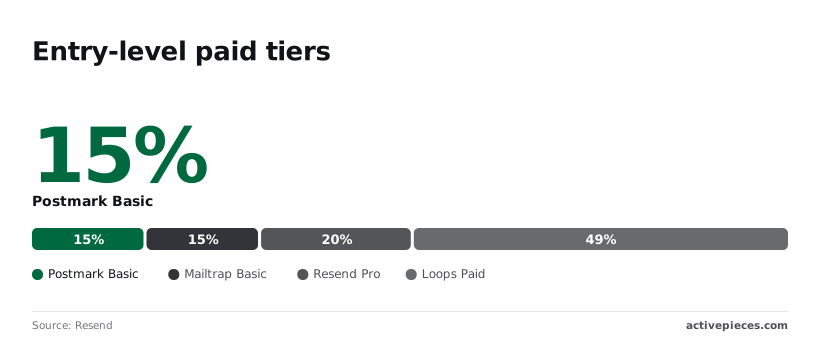 | Provider | Cost per 1,000 | Primary Strength | The Catch | | :--- | :--- | :--- | :--- | | Amazon SES | $0.10 | Lowest possible cost | No visual builder | | Postmark | $1.50 | Delivery speed/DX | Strict manual vetting | | Resend | $1.00 | Modern React workflow | Higher cost at scale | This cost gap is the primary driver for teams moving away from managed solutions once their monthly volume crosses the six-figure mark.  ### Managing sender reputation on Amazon SES AWS operates on a "bring your own logic" model. The platform provides the pipes but isn't responsible for protecting your sender reputation. SES will simply move your account into a "Probation" status if your bounce rate exceeds 5% or your complaint rate hits 0.1%. This means the developer is responsible for building a suppression list to ensure they never attempt to mail those addresses again. Without this custom-built safety net, a single corrupted marketing list can permanently degrade your ability to reach the inbox. ### When to use the AWS SDK over a dedicated ESP Utilizing the AWS SDK is the logical choice when your application already resides within the AWS ecosystem and you manage your templates as code rather than visual assets. Because SES lacks a drag-and-drop visual builder, you must push every change to an email's design through a deployment pipeline or update it via API calls. Engineering-heavy teams who want their emails to live in GitHub alongside their frontend code find this workflow ideal. ## Resend and Postmark for superior developer experience Resend and Postmark prioritize developer experience by offering clean API abstractions and high-performance infrastructure. These platforms remove the typical friction of legacy providers by focusing on modern programming patterns. ### Resend: The modern choice for React and Next.js teams Resend is designed specifically for teams that treat email as an extension of their frontend code. By providing a dedicated React Email library, it allows developers to build responsive templates using standard React components. The platform integrates with the Gemini 3.7 Flash model to assist in generating these components. The dashboard is a unified view of the entire delivery pipeline. A Bull-Board queue management interface displays the real-time status of marketing, transactional, and batch jobs. ### Postmark: The gold standard for transactional speed Postmark maintains its reputation by strictly separating transactional traffic from bulk marketing broadcasts to ensure high deliverability and low latency. Their API documentation is structured around a "human-first" philosophy, providing copy-pasteable snippets for every major language and a sandbox environment. Because they don't allow bulk senders on their transactional servers, your critical application alerts are never queued behind another company's newsletter. ### Specialized features for developers Both platforms offer accessible entry points that include their full suite of developer tools, such as webhooks and detailed suppression lists. Resend provides a tier that allows for a specific volume of monthly sends at no cost. Postmark offers a credit-based system for low-volume users. Both services include dedicated inbound processing, allowing applications to receive and parse emails as JSON payloads without managing a separate mail server. ## Building a vendor-neutral email stack with Activepieces Activepieces ensures that where a flow runs never decides whether you can leave. Because the platform uses the same codebase for its managed cloud and self-hosted editions, you can use documented Git Sync and Releases to promote transactional logic between environments without re-engineering the stack. ### Decoupling logic from the delivery provider When you hardcode a specific provider's SDK into your application, you tether your business processes to their proprietary API structure. Activepieces reaches every email provider a company uses among its 735+ integrations, allowing a single trigger to initiate a multi-step flow. A successful transaction in the Stripe payment processing platform is one such trigger.  [Architecture Diagram: A central Activepieces logo receives a 'Stripe Payment' trigger. It branches to a 'Router' that sends the receipt via 'AWS SES' but switches to a marketing sequence in 'Mailgun' for new customers.] This architecture allows you to define complex routing logic without cluttering your core codebase. You can send high-priority receipts through one service while routing marketing follow-ups through another. ### Automating bounce and complaint handling workflows Maintaining a high sender reputation requires immediate action on delivery failures. Activepieces handles this through automated feedback loops. Instead of manually exporting CSV files, you can configure webhooks to catch 'Bounce' or 'Complaint' events and automatically update your database.  For teams using the Gemini 3.7 Flash model for agentic workflows, these logs can be summarized to identify patterns in invalid addresses. ### Switching providers without rewriting application code Migrating from one email vendor to another is reduced to swapping a single node in your workflow. You no longer need to perform a global search-and-replace in your repository. Because your application only needs to send a single webhook to Activepieces, the specific destination is an implementation detail you can change in seconds. This flexibility allows you to run parallel tests during a migration. For engineering teams that prioritize architectural transparency and long-term sovereignty over their infrastructure, Activepieces is the better choice. By offering a unified codebase that supports both cloud and air-gapped self-hosting, it ensures that the ability to audit the underlying worker logic remains a permanent asset rather than a vendor secret. This open approach allows developers to verify the system's integrity directly from the repository, making it the superior fit for organizations that value code readability and provider independence. ## How to execute a risk-free email provider migration A risk-free migration requires a phased transition that maintains your sender reputation while validating the new provider's delivery success. ### Auditing SendGrid features before migrating Identifying which specific SendGrid functionalities are deeply integrated into your codebase prevents functional regressions. You should map every instance where you use Handlebars for dynamic templates. Switching to a provider like Postmark requires rewriting these in their proprietary syntax. Verify if you rely on SendGrid’s Dedicated IP addresses. Moving to a shared pool on a budget service like AWS SES will change how you manage your sender reputation. ### IP warming schedule for email migration Warming up a new IP address prevents mailbox providers from flagging your sudden high volume as spam. 1) Audit current volume and template logic. 2) Set up DKIM/SPF on the new provider. 3) Dual-send 10% of traffic to warm the new IP. 4) Cut over DNS and decommission the old provider. Following this sequence ensures that by the time you reach full capacity, your new provider is already recognized as a trusted sender. ### Setting up DNS records for the new provider For domains using managers like Cloudflare or Route 53, configuring your DNS settings correctly is the only way to authorize a third-party service to send mail on behalf of your domain. You must add Sender Policy Framework (SPF) records to your DNS manager. Receiving servers use these records to verify the origin of your messages. Without these records, your emails will likely trigger security warnings or be blocked by DMARC policies. ## Frequently asked questions about switching email providers ### Will switching providers hurt my deliverability? Switching providers causes a temporary drop in sender reputation because mailbox providers like Gmail or Outlook view the new sending IP address as an unverified source. To mitigate this, engineers use a "warm-up" period where they gradually shift small percentages of traffic to the new service over several weeks. This controlled ramp-up allows receiving filters to associate your domain’s existing positive history with the new infrastructure without triggering spam blocks. ### Do I really need a dedicated IP address? A dedicated IP address is necessary only if your monthly volume is high enough to maintain a consistent reputation. You also need it if you require total isolation from the sending habits of other companies. Shared IP: You inherit the collective reputation of every other customer on that server. A single bad actor can cause your emails to be delayed. Dedicated IP: You're the sole influencer of your deliverability. You must send consistently to avoid looking like a "cold" or suspicious sender to security filters. ### Is it cheaper to self-hosted my own SMTP server? Self-hosting an SMTP server appears cheaper in raw compute costs but often results in higher total expenses. These expenses come from the labor required to manage IP blacklists and server maintenance. While tools like Postfix allow for a "bootstrap" setup on a basic virtual private server, the lack of built-in feedback loops from major internet service providers is a problem. Your team must manually handle bounce processing and spam complaints. For resource-constrained teams, the time spent troubleshooting why emails aren't reaching the inbox usually outweighs the monthly subscription fee of a managed service. ## Related reading - [10 Best Mailchimp Alternatives for Email Marketing](https://www.activepieces.com/blog/10-best-mailchimp-alternatives-for-email-marketing) - [Comparing GitHub Pricing 2026 Plans and Hidden Costs](https://www.activepieces.com/blog/comparing-github-pricing-2026-plans-and-hidden-costs) - [Ultimate Guide: Send Custom Emails About New Github Issues with SendGrid](https://www.activepieces.com/blog/custom-emails-about-new-github-issues-sendgrid) ## References - [Twilio](https://www.twilio.com/en-us/products/email-api/pricing) - [Twilio](https://www.twilio.com/docs/sendgrid/api-reference/email-logs) - [Resend](https://resend.com/pricing)A closed platform asks a security team to take its maturity on faith, which is why reviews often stall before go-live.