Keeping Zendesk makes the most sense if your automation needs stay inside the ticket: answering, tagging, routing and resolving. Model two lines first: the per-resolution charge and the per-agent seat. That applies if you have to price in resolutions you can't forecast, or the work crosses into other systems. ## Intercom AI-powered chat agent When a first-line chat comes in, Intercom's Fin AI agent answers it inside the inbox where your conversations already live. It costs **$0.99 per resolved conversation** on top of seat fees, so the bill follows your volume. 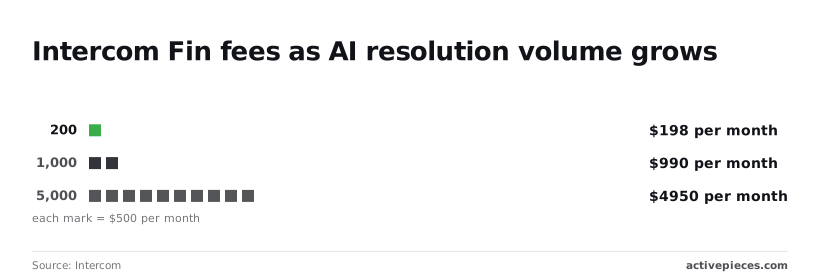 Fin runs in the product your agents already work in. A conversation it can't resolve passes to a person with the history attached, and nothing has to be synced between a chat tool and a separate workflow tool. For chat-first support that's the whole case: one vendor, one inbox, no glue to maintain. ### Intercom pricing and per-resolution cost at scale Five Essential seats cost $145 a month on [Intercom's pricing page](https://www.intercom.com/pricing), about $29 a seat. Five Expert seats cost $660, so the upgrade adds $515 a month before Fin has answered anything. Fin at 200 outcomes adds $198, because every outcome is billed from the first. At 200 outcomes the Fin fee already exceeds the Essential seat bill. That is the point to take from the chart, which stacks those integrations for a five-seat team. 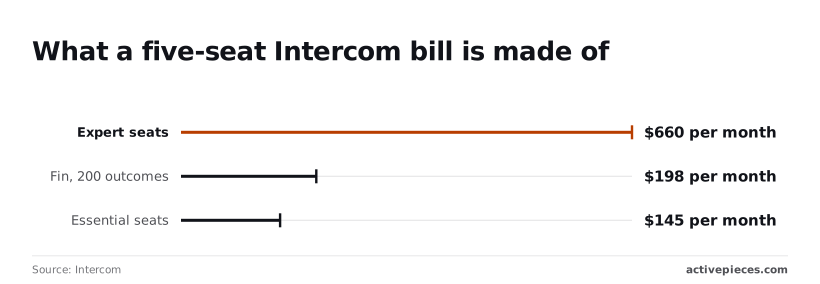 Seats you can predict. Fin is the line you'll keep revisiting. $198 at 200 resolutions, $990 at 1,000 and $4,950 at 5,000: that is the second chart, which holds seats aside and tracks only the Fin fee. Those figures rise in a straight line at $0.99 each, so a month in which Fin resolves more conversations is also a month in which it costs more. At 5,000 resolutions the Fin charge is 7.5 times the $660 Expert seat bill. **A budget set on seats alone will be wrong by the time automation works well.** Pick Intercom if your team is already in its inbox, chat is the main channel, and expected volume sits in the hundreds of resolutions a month. That's where $198 is easy to defend. At thousands, $4,950 a month is the number to hold against your alternatives, so run your own volume through it first. Work that starts in a billing system, a database or another tool still needs a separate workflow layer, because Fin works on the conversations Intercom holds. ## Freshdesk affordable helpdesk with AI Work that starts as a ticket is where Freshdesk fits. It's a lower-cost helpdesk with Freddy AI built in, aimed at teams that want automation without a large per-agent bill. If the tickets, the rules and the AI sit in one product, a team can automate routing, tagging and first replies without standing up a second system. That is the case for Freshdesk. For a small support team, one login and one invoice means nobody has to own the glue between tools. When a customer asks a repetitive question, Freshdesk's Freddy AI Agent answers it directly from your help content, so it never reaches a human queue. ### Freshdesk plan prices and gated automation features You pay per agent per month, billed annually, on one of three paid tiers: Growth, Pro or Enterprise, limiting you to whichever tier best matches your usage. The tier you pick decides how much rule-based automation comes with the ticket system. The Freddy AI Agent is a separate meter: it counts customer sessions, so a busy week can use up an allowance the plan page made look generous. The price on the tier card isn't the price of the AI you read about in the launch announcement, because some AI features are sold as add-ons rather than bundled. Before you commit, add up three things from Freshdesk's pricing page on the day you buy. They are the per-agent price at your headcount, the session allowance against your monthly ticket volume, and the list of AI features that carry an extra charge. Those three lines are the real cost. Vendors change these figures without notice, and this article's check date applies to every one on Freshdesk's pricing page. Pick Freshdesk if your team is cost-sensitive, your automation is mostly about tickets, and you'd rather metered AI than a second platform. Freshdesk is a weaker fit when the trigger lives outside the helpdesk, such as a failed payment or a row in a database. That's the work the helpdesk's own AI can't reach, and it needs a workflow tool alongside it. ## Zapier Workflows for helpdesk integration Zapier connects the helpdesk to other apps through no-code flows, and it bills per task, so a per-ticket flow costs its number of action steps multiplied by ticket volume. Zapier is hosted, built for people who aren't engineers, and its app directory is long. If the second system in your flow is a niche billing tool or an industry-specific CRM, check the directory first. A connector that exists only there settles the question before pricing does. Nothing needs installing or patching, so the person who owns the support queue can build and change a flow alone. Zapier runs only as a cloud service. If your security review requires self-hosting, that ends the evaluation. ### Task-based pricing at support volume Build a flow that fires once per ticket and runs four action steps, and it spends four tasks per ticket, because Zapier counts each action step that runs as one task. At 500 tickets a month that's 2,000 tasks. At 2,000 tickets it's 8,000. A fourfold rise in tickets moves you up a tier, and so does every step you add to the flow. Nobody feels this rule happen. A flow that **looked cheap in testing on twenty tickets** gets a lookup, a summary, a tag and a Slack post added over a quarter. Nobody reads the usage page until a plan limit pauses the flow mid-shift, while the task count rises with each addition. Count the steps before you build, and again each time someone asks for one more.  ### Make and n8n as alternatives Make and n8n meter differently, and at support volume the unit decides the bill. Make charges per module run inside a scenario, which is closer to Zapier's per-step logic than to a per-flow price. n8n's cloud plans meter per workflow execution, so a four-step flow counts once, not four times. n8n can also be self-hosted, which Zapier can't. Both ask more of the builder than Zapier does, because branching and data mapping are exposed rather than hidden. Read each vendor's pricing page for the current unit before you model your volume. ## Activepieces Activepieces handles the work the helpdesk's own AI can't reach, such as steps that cross into other apps or wait on a person, across 750 integrations counted from its open source monorepo, with an MIT-licensed core. It doesn't replace the helpdesk. ### Where Activepieces fits and where it doesn't Activepieces fits when the person who owns the support queue can describe the missing step in its built-in chat, say a billing lookup before a refund reply, and get a published flow back. That flow is the same artifact an engineer would have assembled by hand, and it runs under the same RBAC, audit logs and run traces, so anyone can read what it did to a ticket. MoneyGram, Moneypenny, Alan and FundingSocieties run Activepieces in production. Its connectors are called pieces, and the pieces directory is where you check whether your helpdesk and your other tools are covered before you commit. It doesn't fit when the helpdesk's own AI already does the job. In that case you're paying for, and maintaining, a second system that duplicates the first. If nobody on your team will own flows when they break, buy the helpdesk's automation and stop there.  ### Worked workflow: triage a new ticket with approval A draft never reaches a customer without a person's decision in between. That is the point of the flow below, which uses a new-ticket trigger, an AI step, a Slack message, an approval and a send action. 1. A new ticket arrives in the helpdesk and starts the flow. 2. An AI step classifies the ticket and drafts a reply. 3. A Slack message alerts the ticket's owner, with the category and the draft. 4. The owner approves or rejects the draft. The flow waits for that decision. 5. On approval, the reply is sent to the customer. Step 4 is the one to inspect. If the flow has no path for a rejection or for an owner who never answers, the ticket sits silent, so build those branches before you switch it on. Test each step against a real ticket and keep the run history open. A failed step shows up there, not in the customer's inbox. ### Pricing and self-hosting, checked on date On the Activepieces pricing page, checked 2026-10-23, the Free plan is $0 with 1,000 credits a month, unlimited flows and up to 5 users, and Plus is $20 a month flat for 10,000 credits.  A run is 1 credit however many steps it has, while **AI steps cost more: 2 credits** on a fast model and 10 on a smart one. Check what the billing unit is, which plans include approvals and access controls, and whether the self-hosted option covers what your security review requires. Self-hosting moves hosting and upgrades onto your staff, and you should count that as a cost. Browse the [Activepieces pieces](https://www.activepieces.com/pieces) to confirm your apps are there, then start on the Free plan, which needs no card, and run the flow above on a test ticket. Activepieces is the better fit for support leads who own the queue and need the steps their helpdesk's own AI can't reach, such as a billing lookup before a refund reply, without hiring an engineer to build them. You describe the process in the built-in chat and get back a published flow in your account, with a run trace showing exactly what happened to each ticket, under the same RBAC and audit logs as a hand-built flow. The helpdesk stays in place, and a reader whose stack falls outside the pieces directory should check coverage there before committing. ## Frequently asked questions Once the test ticket has run, the open questions are about buying, not building. Do I need a helpdesk with built-in AI or a separate workflow tool? Start with the helpdesk's own AI, because it already holds your tickets, macros and customer history. Add a workflow tool only for work that AI can't reach, such as updating a billing system or paging someone in another app. ### How much does support automation cost for a ten-agent team? It depends on whether the vendor charges per seat, per AI resolution or per task run, and a ten-agent team can come out ahead or behind depending on that choice. Take your monthly ticket count and multiply it by each vendor's published unit price. Price it at your real volume, because a per-resolution model **gets more expensive as the bot succeeds**. Can I self-host customer support automation for data residency? Sometimes, but only for the workflow layer. Your tickets still sit in the helpdesk, so check where its AI processes them and which regions it offers. Self-hosting a workflow tool keeps the data it handles on your infrastructure and does nothing for the data the helpdesk sends to its own model. Should AI replies be sent without human approval? Not at the start. Run the pilot with every reply held for an agent to approve, and loosen that only for categories where the log shows the drafts were right. A wrong answer sent to a customer is a ticket you now have to apologise for. What should I do in the first week of choosing a platform? Work through this sequence, which fits a single week: 1. Count your monthly ticket volume from the helpdesk's own reports, not from memory. 2. Price two vendors at that volume, using each vendor's pricing page, and note the date you checked. 3. Pilot with approvals switched on, on one ticket category, so no unreviewed reply reaches a customer. 4. Review the pilot's handoff and error log: which tickets went to a human, which runs failed, and why. The log from step four decides what happens next. If the failures are tickets the helpdesk's AI couldn't touch, that's your case for a workflow tool. If they're bad drafts, fix the knowledge base before you spend more. ## Related reading - [Customer Support Workflow Templates: Examples (2026)](https://www.activepieces.com/blog/customer-support-workflow-templates-examples-2026) - [Top 3 Banking Automation Software Tools for Finance Teams](https://www.activepieces.com/blog/top-3-business-automation-tools-for-banks) - [Support Handoff Automation for Engineering Orgs: 2026 Guide](https://www.activepieces.com/blog/support-handoff-automation-for-engineering-orgs-2026-guide) ## References - [Deacon](https://heydeacon.com/resources/zendesk-pricing) - [Intercom](https://www.intercom.com/pricing)A good month for the bot is also the expensive one, because the bill rises with your volume, not with your headcount.