### Concurrency limits for each plan tier In a secondary project you get 1 concurrent streaming connection, per [Deepgram's rate-limit reference](https://developers.deepgram.com/reference/api-rate-limits). A second test session in that project is refused, so a colleague's demo can break your run. Before February 2026, Pay As You Go **allowed 50 concurrent streams; it allows 150 now**. A capacity plan or queue built around 50 is out of date, and you may be throttling yourself needlessly. Growth allows 225, which is the next step up if 150 is your peak. Of the products, streaming speech-to-text has the most headroom, while text-to-speech over REST, at 15, runs out first. The chart below shows the Pay As You Go defaults by product. Check the product you actually call, not the headline number. Re-check the docs before you commit, because limits changed once already. What follows is what breaks when you hit them. | Error | Usual cause | Fix | |---|---|---| | 401 / 403 | Bad, expired or wrong-project key | Fail fast and alert; retrying never helps | | 429 | Concurrency limit exceeded | Back off with jitter, queue with a cap | | 400 | Malformed request or unsupported audio | Log the payload, fix the caller, don't retry | | Socket closes mid-call | No audio or KeepAlive sent while idle | Send KeepAlive messages during silence | 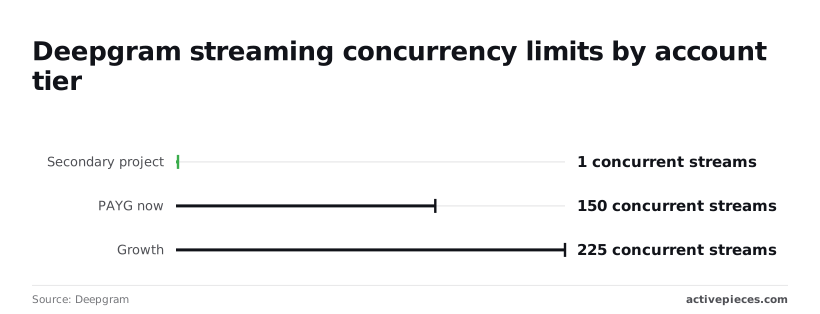 If you loop retries on a 401 or 400, you only burn requests, so separate the errors you retry from the ones you report. 1. Retry 429s with exponential backoff and random jitter, so a wave of clients doesn't return together. 2. Put a capped queue in front of new streams. When it fills, reject new work visibly instead of letting latency grow unseen. 3. Reconnect dropped streams automatically, and resend audio buffered since the last transcript you received. 4. Use callbacks for pre-recorded jobs, so you aren't holding connections open against the cap while you wait. ## The case against building on Deepgram The strongest objection is that all this retry engineering is a tax you can avoid. Pick whichever service wins on price and benchmark accuracy, or the one already on your invoice, and skip the vendor-specific plumbing. ### The case for cheaper Deepgram alternatives If you already run on a cloud provider, its speech service arrives with one bill, one contract, one security review and one place to file a ticket. OpenAI's transcription endpoints give you the same simplicity if your team already calls its other models. Procurement likes both, because nothing new needs approving. Then there is self-hosted Whisper, the open-weight speech model, which makes a different argument. Audio never leaves your network, which ends the data-handling questions for regulated customers. There's no per-minute meter and no vendor-set stream limit to hit. Add public benchmark tables where a rival posts a lower error rate or a lower price, and the objection is complete. If those numbers decide, the rest is detail. ### Why test Deepgram on your own audio Someone else's recordings, at someone else's load: that is what benchmark tables are scored on. Your calls have your accents, your phone codecs, your crosstalk and your product names, and a lower published error rate means nothing until it holds on those. When every customer dials in at nine o'clock and your concurrent streams exceed what the plan allows, a per-minute price says nothing about what happens next. So run each candidate on a sample of your own audio, at the concurrency you expect at peak, and count the failures along with the errors. **Nor does self-hosting remove the ceiling**. It moves it from a limit in a contract to the number of GPUs you bought, and puts the people who keep them running on your payroll. From the same audio, the two routes end in different places: one at a vendor's concurrency cap, the other at a rack of GPU servers and the operations staff it needs. Either way you're paying for peak capacity, in a different currency. In two cases the objection wins. If your audio is sensitive enough that it can't leave your network, self-hosting is the answer. If your volume is small and steady, a bundled service you already pay for is the better choice, because a concurrency limit you never approach costs you nothing. ## Connecting Deepgram to business tools with Activepieces ### Workflow automation and concurrency limits Activepieces, whose core is MIT-licensed, handles the work around transcription, such as triggering on a new recording and routing the result. It doesn't do anything about your Deepgram concurrency limit, which is why it fits batch jobs and not live audio. Your scoped Deepgram key also doesn't have to live in Activepieces' database: on a self-hosted instance or the enterprise cloud tier, connection secrets can be routed to your own secret manager, so your credentials are never ours to hold.  Point a self-hosted instance at an external secret manager and look in the database yourself, and the key isn't there; the same integration is listed beside SCIM, custom RBAC, SSO/SAML and audit logs in the enterprise feature set. MoneyGram, Moneypenny, Alan and FundingSocieties run Activepieces in production. ### Making a 429 visible in a workflow Nobody finds out until a salesperson asks why the CRM has no notes from Tuesday. That is the quiet failure this tool addresses: a call recording lands, a request goes to Deepgram, and the request comes back with a 429. Write the glue by hand and it tends to log that error and move on. An Activepieces flow makes you decide what happens next, because the failure is a branch you can see on the canvas, and since a run costs 1 credit however many steps it has, the retry and alert branch doesn't add to the bill.  One trigger, two outcomes: that is the flow in the illustration below. A new recording starts the flow, and the flow calls Deepgram. On success, the transcript is written to the CRM record. On failure, the flow retries, and if the retries run out, it posts an alert to a chat channel. Outside the flow sits a separate box, labeled "live streaming: your code." Take from it that the retry and alert path covers only the left side of the picture, and that the box on the right isn't something the tool reaches. ### Why Deepgram live streaming stays in code That boundary is deliberate. A live stream is a long-lived connection, and handling a dropped one means reconnecting, resuming from the right point in the audio and managing your own concurrency count. A flow that runs once per event has no place to hold that state. Write that part in your own code. ### Checking for a ready-made Deepgram step Search the community integrations directory of the open source repository, where the 750 integrations are counted and roughly 60% are community-contributed, so support quality and maintenance will vary, to see whether Deepgram has a ready-made integration step or whether you'll call it through the generic HTTP step. The difference decides how much of the request you configure by hand, and how clearly a 429 shows up in the flow's error handling. Whichever you use, set the retry delay with the 429 in mind: retrying immediately against a limit you've already hit only adds to the pile. ## A Monday plan for putting Deepgram in production Retry delay is one item on a short list. The list is ordered so the 429 is found while it's still cheap: three steps before you write code, four before launch. Each step names the failure it prevents. Start with the list below, which is the groundwork. It shows what you need to settle before any streaming code exists, so that your choices rest on your own audio and your own limit rather than on a pricing page. 1. Create a scoped API key for each environment (development, staging, production) and keep all of them outside the codebase, in your secrets store. A key committed to a repository can't be quietly rotated, and one shared key means a runaway test script spends against production's concurrency. 2. Run 50 of your own recordings through two candidate models. **Fifty is enough to hear the difference** on your real accents, phone compression and background noise, which a vendor's demo clip won't contain. 3. Measure error rate and cost on those same recordings. A model that costs less per minute but needs more human correction isn't cheaper, and you can only see that on a result set you've counted. Once the model is chosen, the remaining steps are about what happens when traffic arrives. The order matters, because the first of them sets the ceiling the others protect. 4. Cap your client's concurrency below your tier's limit. If your own code opens streams up to the limit, the first spike turns directly into rejected connections instead of a queue you control. 5. Add exponential backoff with jitter to every retry, so that a burst of 429s doesn't become a burst of simultaneous retries. Add KeepAlive messages to idle streams, so a quiet caller isn't mistaken for a dead connection and dropped. 6. Set a spend alert on the account. A retry loop that never gives up bills you for the loop. 7. Re-check the pricing page and the changelog every quarter. Limits and rates change on the vendor's schedule, and your cap in step 4 is only correct for the tier you last read. ## Frequently asked questions ### Questions before you write code Before anyone writes code, some questions come up, and their answers depend on your account more than on the price list. Is the Deepgram API free to try? Yes, a new account starts with free credit, enough to test accuracy on your own audio. The credit won't tell you how you behave at your concurrency limit, so run a parallel-stream test before trusting it. A prototype that passes with one stream can return 429s the first afternoon real traffic arrives. ### Audio storage and live calls Does Deepgram store my audio? By default the audio is processed for your request, not kept as a copy you can retrieve later. Retention and any use for model improvement are set by your agreement and account settings, so read those terms and opt out where needed before sending anything sensitive. A "we assumed it wasn't kept" answer won't satisfy a compliance review. Can I use the Deepgram API for live phone call transcription? Yes, streaming over a WebSocket is the intended path, and telephony audio encodings are supported. Every live call holds one stream open, so your concurrency limit is your ceiling on simultaneous calls. Build reconnect logic for dropped streams and a queue for rejected connections, because a call that hits the ceiling goes untranscribed. ### Moving to a paid plan How do I move from the free credit to a paid plan? Add billing details in the console and switch plans there. Check what your new concurrency limit is before you cut over, since it may differ from what the trial gave you. If the limit is lower than your peak call volume, ask for an increase first, not after the first 429. ### What languages does the Deepgram API support? Support varies by model, so the answer is a property of the model you pick, not of the API. Confirm your language against the model's own listing before building around it. Set the language explicitly, or use detection where the model offers it, and test on real recordings, since accents and call-quality audio shift results more than the listing suggests. ## Related reading - [n8n Concurrency Limit: How to Set It (2026 Guide)](https://www.activepieces.com/blog/n8n-concurrency-limit-how-to-set-it-2026-guide) - [Deepgram Pricing 2026: Per-Minute Rates and Add-Ons](https://www.activepieces.com/blog/deepgram-pricing-2026-per-minute-rates-and-add-ons) - [How to handle errors in production AI agents](https://www.activepieces.com/blog/how-to-handle-errors-in-production-ai-agents) ## References - [Deepgram](https://deepgram.com/pricing) - [Deepgram](https://developers.deepgram.com/reference/api-rate-limits)Price is not what shapes your design. Concurrency is.