- V4 Pro at $1.91 - V3 at $0.89 - V3.2 at $0.38 - V4 Flash at $0.18 At 100M output tokens a month, that's $191 on V4 Pro against $18 on V4 Flash. Defaulting to the flagship can cost over ten times more for output that a cheaper release might handle.   V3 at $0.89 would have cost $89 for the same volume, more than twice V3.2's rate, and both are older than the current V4 Pro and deepseek-flash. Ask for retention and egress in writing before you commit, since the remaining outside costs are unverified. ## DeepInfer Versus Its Closest Alternatives on Price On the older DeepSeek-R1, DeepInfer was the second-cheapest of four hosts in this comparison, behind DeepSeek's own API, and well under Together AI and Fireworks AI. Hosts list prices per token, but DeepInfer's billing unit is not published, so the ranges may not compare directly.  | Host | Price per 1M tokens, low | Price per 1M tokens, high | Billing unit | |---|---|---|---| | DeepSeek | $0.55 | $2.19 | Tokens | | DeepInfer | $0.70 | $2.40 | Tokens | | Together AI | $3.00 | $7.00 | Tokens | | Fireworks AI | $3.00 | $8.00 | Tokens | On the same source, DeepSeek's [$0.55 to $2.19 per million tokens, per LLMHosting.ai](https://llmhosting.ai/models/deepseek-r1) beats DeepInfer's $0.70 to $2.40, and that is where DeepInfer loses, so your costs are lower with DeepSeek. The gap is $0.15 at the low end and $0.21 at the high end. On 100 million tokens that's $15 to $21, which is noise unless your volume is in the billions. The other two hosts are the real distance. Together AI's $3 to $7 starts at about 4.3 times DeepInfer's low end, and its top is about 2.9 times DeepInfer's top, which means the premium you pay narrows substantially at higher volumes. Fireworks AI's $3 to $8 puts its ceiling at about 3.3 times, so the higher tier doesn't cost dramatically more. At the high rate, a workload that costs $240 a month on DeepInfer costs roughly $700 to $800 on those two. Pay that premium only for a feature you have confirmed in writing and can't get elsewhere. Each range is wide, and the source doesn't say what drives the spread. Your input-to-output mix decides where in the range you land, so model that mix before you pick a tier. This table doesn't cover free tiers, rate limits or overage behavior, because the source doesn't publish them. Get those in writing from each vendor. By workload type: - High-volume inference with steady traffic: DeepSeek or DeepInfer, priced on the current deepseek-flash or deepseek-v4-pro rather than R1. Choose DeepInfer if you want a host other than the model's author. - Spiky traffic: the overage rules matter more than the $0.15 gap, so get them first. - Together AI or Fireworks AI: only if a feature justifies roughly three times the rate. ## Capping DeepInfer Spend with Activepieces Workflows Activepieces, whose core is MIT-licensed, can cap your spend without changing what DeepInfer charges per unit. It counts every call, alerts when the count crosses a threshold, and pauses the workflow that makes the calls. You don't need a new tool for the generic version. Wrap your DeepInfer client so each request increments a counter, write the counter to a spreadsheet or database, and have a scheduled job compare it to a monthly ceiling. That works, but you maintain the code, and a ceiling nobody watches only records the overrun after it has happened. Activepieces moves that logic into a visual flow, with spreadsheets among its 747 integrations, so you likely won't hit integration limits. The screenshot below shows: - A Schedule trigger set to "Every Hour" - A spreadsheet integration picked from the modal (Google Sheets, Microsoft Excel 365, AITable or Retable) with actions such as Insert Row and Find Rows - A successful test run under "Generate Sample Data" Each hourly run can: - Log the latest call count - Compare it to your limit - Notify you or stop the downstream flow Unless you find a DeepInfer integration in the Apps tab, an HTTP step can query DeepInfer's API for usage. The "Run on weekends" toggle also matters, because leaving it on keeps the check running when nobody is there to react. Now the unit being metered. An hourly schedule fires about 720 times in a 30-day month, so the monitor has its own allowance to budget. On the [Free plan ($0)](https://www.activepieces.com/pricing) you get 1,000 credits a month, which leaves little headroom if every run draws one. Plus ($20) raises that to 10,000, enough for several monitors or a tighter schedule, but not both, so you need to choose which constraint matters more to your workflow. Team ($200) carries 50,000, which suits many workflows sharing one guardrail. The [Activepieces pricing page](https://www.activepieces.com/pricing) lists 1 credit per flow run, with no per-step line, so the hourly monitor draws 720 credits a month whether it has three steps or ten. The same page lists unlimited flows on every plan, free included. 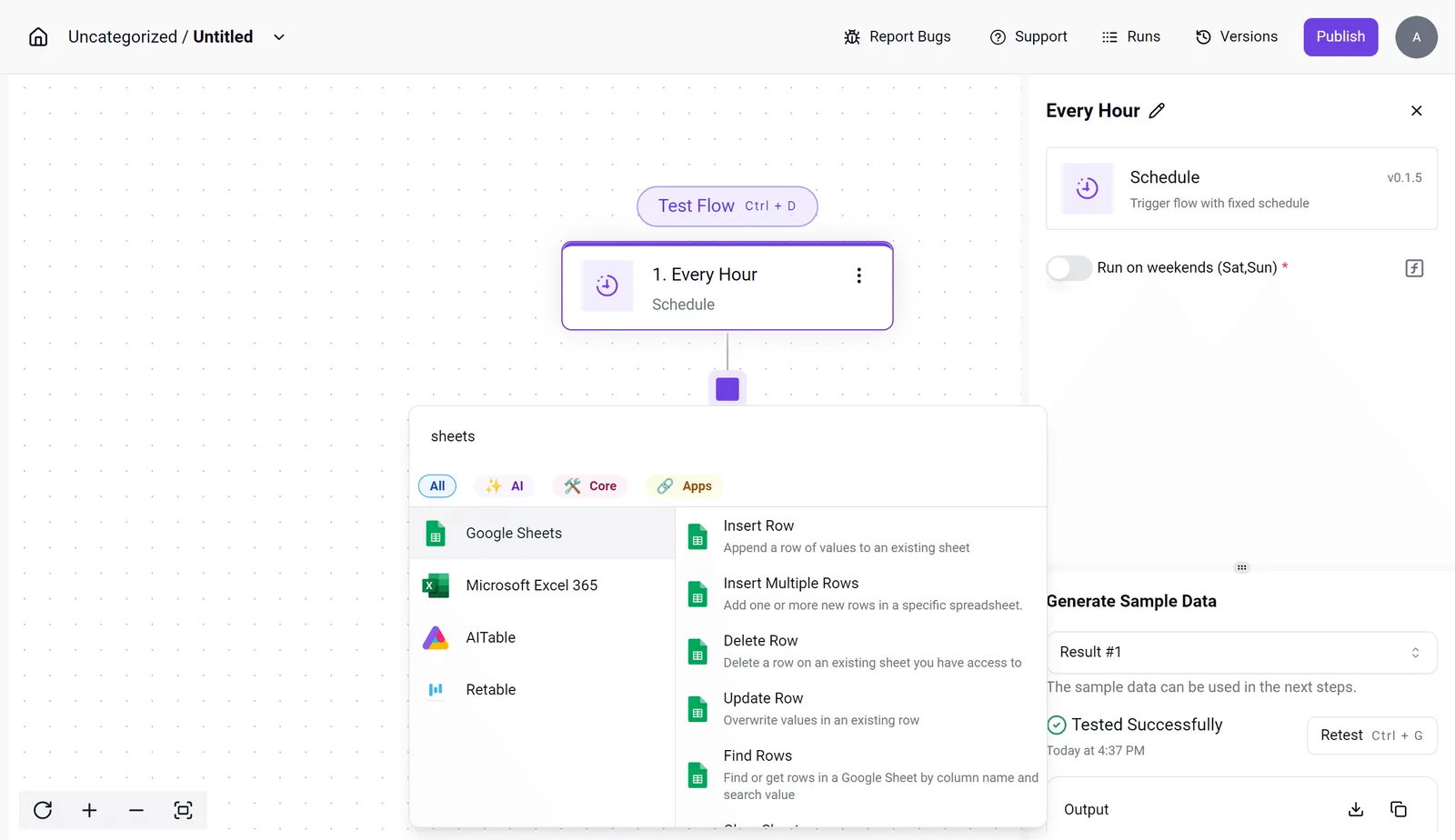  Zapier's pricing page bills per task and Make's bills per module, so on those the same monitor grows more expensive with every step you add. Cheap enough, then, to run beside DeepInfer. It only watches the meter, though; the rate you pay stays whatever your DeepInfer tier says. ## What to Do Before Choosing a DeepInfer Plan To turn the sticker price into a bill you can predict, take five steps, of which a spend alert is one. The order matters: estimate volume, check limits, set the alert, pick the tier, audit the invoice. The tier comes fourth, after the numbers that decide it, so the price you pick from is never the first thing you look at. 1. Estimate monthly volume. Take one real workload, such as a support-ticket summarizer, and count its calls per day. Multiply by the average size of each call, in whatever unit the plan meters. This gives you a monthly figure to test every tier against, so you are comparing plans to your usage and not to a marketing example. 2. Re-read the live limits on purchase day. Open the pricing page and the plan terms the day you buy, and copy down the included allowance, the rate limits, and the overage rule. Limits change, and an old screenshot or a blog post, this one included, can be out of date. The page you read at checkout is the contract you are accepting. 3. Set a spend alert. Configure it before the first production request, not after the first surprise. It only reports usage, so it gives you time to act but doesn't lower the rate. 4. Pick the tier by modeled usage. Run your step-one volume through each tier's allowance and overage rule, and choose the one with the lowest total, not the lowest base price. A cheaper tier whose overage rate applies to a large share of your traffic can cost more than a dearer tier that covers it. 5. Review the invoice after thirty days. Compare billed usage with your estimate line by line. If the two disagree, fix the estimate and rerun step four. One month of real data is worth more than any projection. Once these are done, the team has what it needs to set its cap: a monthly ceiling at modeled usage plus modest headroom, enforced by the alert. Any month that hits it triggers a review of the workload, not an automatic upgrade. ## Frequently asked questions Does DeepInfer have a free plan? Check the pricing page on the day you buy, because this article quotes no free-plan figures. If a free tier exists, treat it as a way to measure your workload against the limits, not as a place to run production. Its caps decide whether your real traffic fits. ### Does DeepInfer charge more when I exceed my plan limit? Read the overage rule before you read the plan price. A limit can be handled in three ways: requests are throttled, they are rejected, or the extra usage is billed at a higher rate. Each gives a different bill from the same traffic. Find which one applies to the metered unit you use most, then run your peak month through it. I haven't confirmed a rate here, so I won't give one. ### Can I switch DeepInfer plans mid-month? Look for how the change is billed, not only whether it's allowed. The questions that set your cost are whether an upgrade is prorated, whether a downgrade waits until the next cycle, and whether usage already counted carries over. If a plan change resets nothing, upgrading late in a month costs the same as upgrading early. Confirm these terms in the billing documentation before relying on a mid-month fix. ### Is DeepInfer cheaper billed annually? Before you commit annually, know that it can lower the monthly rate but also commits you to a tier before you know your usage. If the tier turns out too small, you pay overage on top of a prepaid plan. If it turns out too large, you have prepaid for headroom you don't use. Model one workload at monthly pricing first. Move to annual only when several months of real usage show a stable tier. ### Where do I find DeepInfer's current price? Use DeepInfer's own pricing page and its plan-limits documentation, and record the date you read each one. Prices and limits change, so a figure with no check date is a guess. Copy the plan price, the concurrency limit, the context length and the overage rule into your own sheet, each with its source and date. Then price your workload against that sheet, not against a number remembered from an article. ## Related reading - [DeepInfer Workflow: How It Works and Its Limits (2026)](https://www.activepieces.com/blog/deepinfer-workflow-how-it-works-and-its-limits-2026) - [Cursor Ultra Plan Pricing: Cost and Limits (2026)](https://www.activepieces.com/blog/cursor-ultra-plan-pricing-cost-and-limits-2026) - [Cursor AI Pricing 2026: Free Plan Limits and Features](https://www.activepieces.com/blog/cursor-ai-pricing-2026-free-plan-limits-and-features) ## References - [TaskCents](https://taskcents.com/providers/deepseek/) - [LLMHosting.ai](https://llmhosting.ai/models/deepseek-r1) - [Activepieces](https://www.activepieces.com/pricing)More than any plan setting, model choice moves output cost.