## Hidden DeepL API Costs and Limits Teams Hit Most surprises come from characters you didn't know you were paying for. What you send, how often you send it and how many languages you send it to shape the bill. Each trap below is a metering rule, not a price change. ### DeepL API Billing Traps That Inflate Character Counts Translate one page into four languages and DeepL bills that page four times, so a source text of **10,000 characters becomes 40,000 billed characters**. DeepL meters characters, and it meters them per target language.  Adding a market multiplies spend rather than adding to it, which is why the choice of which languages to cover carries more weight than the per-million rate. If a workflow resends a whole page every time one sentence changes, you pay for every character again. That is the second trap, retranslating unchanged text. Storing the previous translation and sending only the changed segments keeps the meter tied to edits, not to publishes. ### DeepL API HTML Markup and tag_handling Costs Markup is the third. By default, HTML tags count as characters. In a [Drupal AI DeepL provider issue](https://www.drupal.org/project/ai_provider_deepl/issues/3632340), DeepL billed the same HTML string at 229 characters without tag_handling. 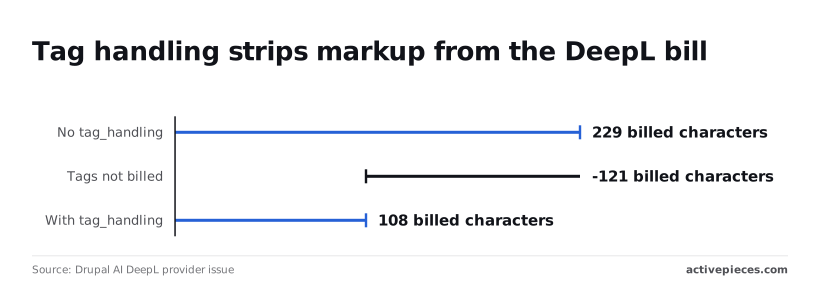 Setting tag_handling to html, per the [same issue](https://www.drupal.org/project/ai_provider_deepl/issues/3632340), brought it to 108 billed characters, because **tags aren't billed in that mode**, a saving of 121 characters. That's more than half the bill for this string. On a content-heavy site, where much of each page is markup, the headline rate misleads. It overstates what you'd pay once tag_handling is on and understates what you pay when it's off. **The takeaway is that one request parameter can move the effective rate more than negotiating a price, so set it before you estimate volume.** ### Request size, rate and glossary limits Before you size batches, check the current limits in DeepL's API documentation. Request size, request rate and glossary size each cap how work can be split, and a pipeline that ignores them will fail or stall, not simply cost more. Retried requests that partly succeed can also resend text you already paid for, so build retries around segments rather than whole documents. ### Cost-control settings DeepL provides If a loop or a bulk import resends large volumes and nobody notices, an unbounded metered bill is exactly what you get. DeepL lets you set a usage cap on an account, so spend stops at a ceiling you choose instead of running on, and that turns the bill into a bounded one. On the Free plan, reaching the monthly character limit stops translation rather than charging overage, so the risk there is an outage, not a surprise invoice. Decide which failure you can tolerate, a stopped pipeline or a larger bill, and set the cap to match. A DeepL cap only sees DeepL, though, and the loop that overspends usually lives in the tooling around it. Activepieces keeps its 747 integrations, agents, workflow automation, shared tables and approvals in a single product, so the access rules and the audit trail are not split across vendors. Its Ultimate plan adds SCIM, custom roles, audit logs, event streaming, git sync and releases, and SSO arrives with Team. When a bulk import resends text, the record of what ran and who changed the flow sits in one place instead of several vendors' logs and bills. MoneyGram, Moneypenny, Alan and FundingSocieties run it in production. ## DeepL Versus Google, Microsoft and Amazon Translation Pricing All four vendors meter characters. The useful comparison is what each counts as a billed character and which allowances and commitments sit around the rate, not the headline price alone. This draft carries no confirmed figures, and the table leaves a cell blank wherever a number wasn't retrieved from the vendor's own page. ### Price per million characters side by side The table below sets out the five fields to read on each vendor's pricing page. A blank means the figure wasn't retrieved, so don't read it as zero or as free. Fill your own copy from the vendor's page and note the date, because rates change and a number without a check date is a guess. | Vendor | Price per million characters | Free allowance | Minimum commitment | Language count | Source and check date | |---|---|---|---|---|---| | DeepL | | | | | | | Google Cloud Translation | | | | | | | Azure Translator | | | | | | | Amazon Translate | | | | | | Compare the rates only after you've counted what your pipeline sends. If you resend unchanged text, translate into several target languages, or include markup in the payload, your billed characters will exceed your document length. That inflates the bill at every vendor, whatever its listed rate. ### DeepL API Free Allowances and Language Coverage When you spend a free allowance decides how much it matters. For a prototype it may cover the whole test phase. For a production job that runs daily, it's used up early in the month and then stops mattering. Check whether each allowance resets monthly or is a one-time grant, since the two behave very differently for a pipeline that never stops. A larger language list only helps if it includes the pairs you send. Count your actual language pairs, then check each vendor against that list. A vendor with fewer languages that covers your pairs beats one with more that misses one of them. ### When a Cheaper Translation API Beats DeepL Quality claims in this space are contested by vendors and independent reviewers alike. Results vary by language pair and domain, and a benchmark on general text says little about your support tickets or product descriptions. Treat any "best quality" claim as a hypothesis to test on your own sample. When the text is internal, short-lived or read once, such as ticket triage or log search, and a rough translation does the job, a cheaper engine is the right call. A pricier engine earns its cost when customers read the output and a mistranslation costs more than the per-character difference. Run the same few hundred representative strings through each candidate, have a fluent reader score them, and only then divide cost by volume. ## Cap DeepL Translation Spend with Activepieces Activepieces has a DeepL integration among its 747, and you can build a workflow with it that sends DeepL only new or changed text, keeps a running count of billed characters, and alerts you or stops before a limit you set. Every unchanged string you resend is a character you pay for twice, because DeepL meters characters. ### Cut DeepL API Costs by Translating Only Changes When a sync job re-translates a whole content set on every run, though only a few strings have been edited since the last one, that is the usual leak. The fix is to put a gate in front of DeepL, so DeepL bills a string only when its source text has actually changed. In Activepieces, a flow is built from a trigger followed by steps, and its storage step can hold a hash and a running total between runs. That's enough to build the gate, and flows are unlimited on every plan, including free, so the gate doesn't cost a plan upgrade. The sequence below shows the order of the steps and where the gate sits. Read it as a filter: everything before step 3 is free, and only what survives the comparison reaches the metered call. 1. Trigger the flow when new or edited text arrives, whether from a webhook, a schedule or a change in your content source. 2. Compute a hash of each string and compare it to the hash stored for that string from the last translation. 3. Send only the strings whose hash differs to the DeepL step, and skip the rest. 4. Add the billed characters from that call to a counter held in storage. 5. Compare the counter to your alert threshold, and send a message to your team when it crosses that threshold. 6. Compare the counter to your hard cap, and stop the flow before calling DeepL again once it hits that cap. Two details keep the counter honest. Count the characters you actually submitted, since that's what DeepL bills, not the length of the translated output. And reset the counter on the same cycle as your DeepL billing period, or the alert will fire against the wrong window. Activepieces' own cost is a separate line, but a small one. It meters credits, and a run is 1 credit however many steps it has, so a flow that checks every string adds no credits to each run. Price that against the characters you save before you decide the gate pays for itself: the Free plan includes 1,000 credits a month, and Plus is $20 a month for 10,000 credits, per Activepieces' own pricing page.  A Monday checklist for a DeepL cost audit: 1. Measure characters: export a representative period of what you send, and count unique source characters against total submitted, so you know how much is repeat text. 2. Pick the plan: match that unique volume, not the total, to the DeepL plan and its limits. 3. Set the cap: build the flow above, choose a threshold below the cap, and test it with a small batch before it goes live. ## Frequently asked questions Is the DeepL API free? Partly. DeepL offers a free API plan with a monthly character allowance, and the metered unit is the character, not the request. Once you pass that allowance, you need a paid plan to keep translating. A prototype can live on the free plan, but a production workload with steady volume will outgrow it. ### Does DeepL charge for characters that fail to translate? Billing is based on the text you submit in requests that are processed, so a rejected request shouldn't cost you. Don't assume that covers every failure. When a retry follows a timeout, or you resubmit a batch because one item was malformed, the same text can go out twice. Check the current API documentation on billed characters, and log what you send so you can reconcile it against your usage figures. ### Is DeepL API billed differently from the DeepL app subscription? Yes. The app subscription and the API are separate products with separate billing, and an app plan doesn't include API usage. The app is priced as a seat for a person. The API is priced on characters sent through your key. If your team already pays for the app, that gives your developers no translation credit for code they ship. Budget the API on its own. ### Can I set a spending limit on the DeepL API? Yes, on paid plans you can set a character cap in your account, and the API stops translating when you hit it. Treat it as a circuit breaker rather than a budget. A cap protects you from a runaway loop or a leaked key. It also means your product stops translating mid-month if real demand exceeds the number you picked. Set it above expected usage, and alert yourself well before it trips. ### How does DeepL API pricing change with more than one language? **Each target language is a separate translation**, so the characters are counted once per language. Translating one block of text into five languages bills roughly five times the source length. Your headline rate per million characters stays the same, but your effective bill scales with the number of languages you support. Before you compare vendors, multiply your monthly source characters by your target-language count. That product is the volume you'll actually be billed for. ## Related reading - [DeepSeek Search API vs Exa Pricing for Small Teams (2026)](https://www.activepieces.com/blog/deepseek-search-api-vs-exa-pricing-for-small-teams-2026) - [No-Code Automation Statistics 2026: Adoption for Small Teams](https://www.activepieces.com/blog/no-code-automation-statistics-2026-adoption-for-small-teams) - [ADP Payroll Pricing for Small Businesses in 2026](https://www.activepieces.com/blog/adp-payroll-pricing-for-small-businesses-in-2026) ## References - [Drupal AI DeepL provider issue](https://www.drupal.org/project/ai_provider_deepl/issues/3632340)The cheapest language you can add is the one you can skip.