Pro output is 1.98 $ off-peak and 3.96 $ at peak, which makes the same job about 3.3 times Flash's price at either time. Peak means the hours the pricing page marks as higher-rate, and off-peak means every other hour. I am not giving clock times here, because the figures I recorded on 2026-10-18 don't include the hour boundaries or the timezone they are stated in, and a guessed window would be worse than none. Open the pricing page, copy the exact start and end times with their timezone into your baseline notes, and convert them to the timezone your scheduler runs in. By token type, Flash runs 0.003, 0.15 and 0.6 $ per 1M tokens, read as cached input, uncached input and output. Pro runs 0.022, 0.66 and 1.98. 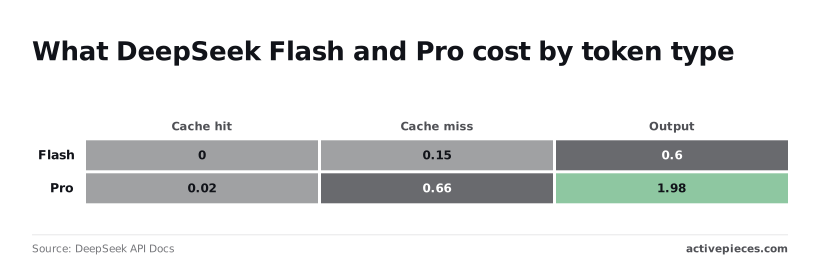 Fetched pages are mostly input, so cache hits on repeated pages matter more to your bill than the output rate. As of 2026-10-18, the documented record is short: - Access: the DeepSeek API, with deepseek-flash and deepseek-v4-pro as the models ([pricing page](https://api-docs.deepseek.com/quick_start/pricing/), 2026-10-18). - Pricing: output at 0.6 and 1.2 $ (Flash) and 1.98 and 3.96 $ (Pro) per 1M tokens, off-peak and peak ([same page](https://api-docs.deepseek.com/quick_start/pricing/), 2026-10-18). - Also documented: search and fetch are billed at $0.75 per 1,000 successful requests each; no rate-limit or uptime commitment is given on that page. Budget the worst case yourself, because the pages won't do it for you. ## What Activepieces has already shipped for DeepSeek search and fetch ### The shipped support and its date Whoever owns the workflow should know one difference before it pages them: [Activepieces](https://www.activepieces.com/pieces/deepseek) lets you use DeepSeek as one of the models behind a workflow, not as a dedicated search-and-fetch action. 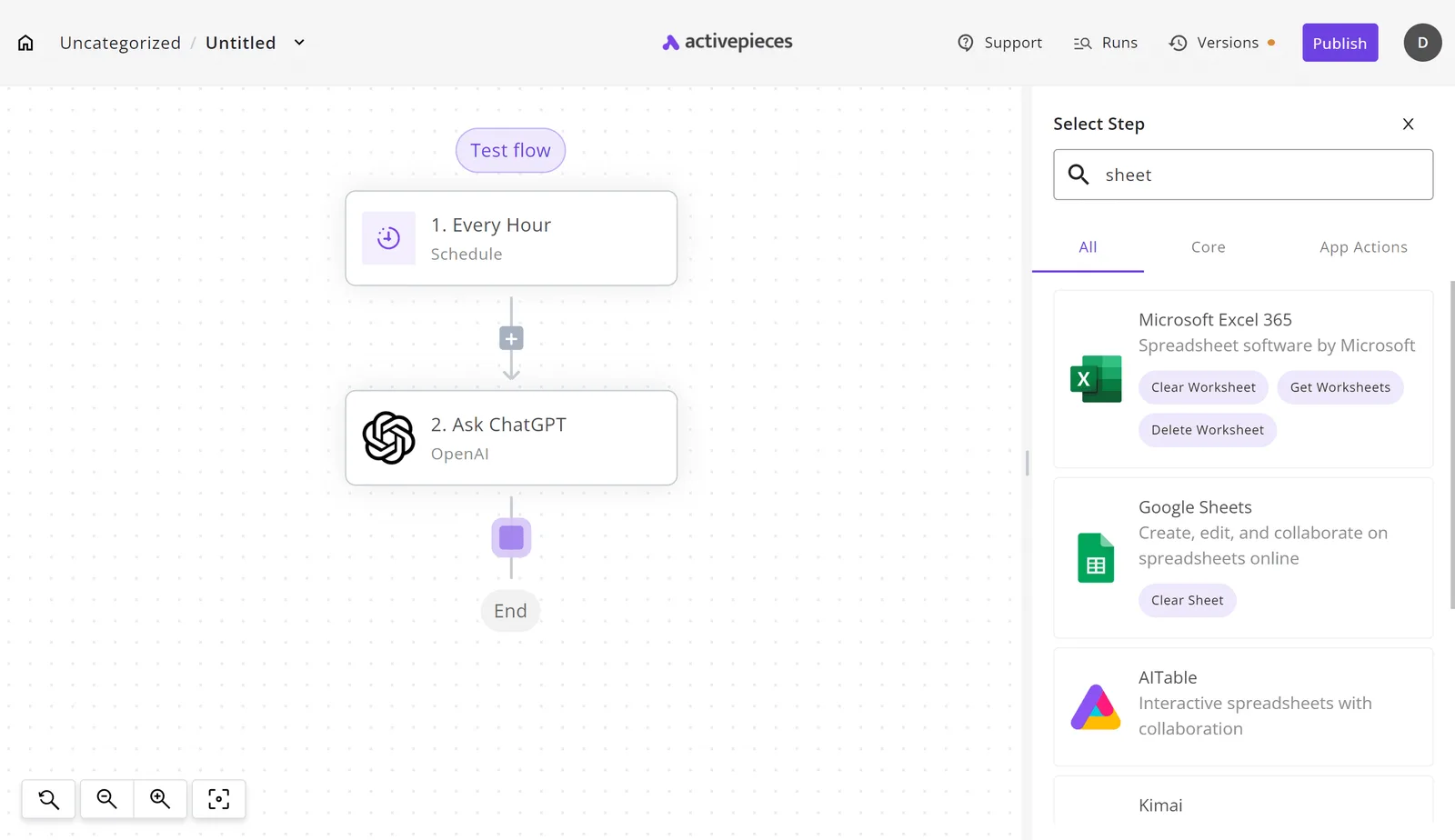 Activepieces works with any major model or your own provider key, and you can swap one for another without rebuilding the workflow, so DeepSeek can be used that way. The DeepSeek integration, `@activepieces/piece-deepseek`, is listed in the integration catalog. What that means in practice: the model step can change without the rest of the workflow being rebuilt around it. That support doesn't say that live web search or page fetch is exposed as its own step. Treat those capabilities as unconfirmed on the Activepieces side until you see them in the integration's actions. If the search or fetch action you need isn't there, the gap doesn't have to wait on anyone's release schedule. Activepieces can generate an integration with AI and add it privately to your own instance, so a DeepSeek search or fetch step becomes something you build rather than something you request. ### Connecting it in a workflow today We haven't run this ourselves, so there are no test results here, only the route the product gives you. In the flow builder, add a step and the Select Step panel opens on the right. Type the name of what you need into its search field and filter by All, Core or App Actions. The screenshot shows that panel searched for "sheet", returning spreadsheet integrations, on a canvas holding an Every Hour trigger, an Ask ChatGPT action and an End node. Search for "deepseek" the same way and the integration should appear if your instance has it. Swapping it in for the Ask ChatGPT step is the obvious first experiment. Next comes the ownership question: who holds the DeepSeek API key, and who gets the failure alert when a call returns nothing. ## DeepSeek search and fetch cost and speed DeepSeek's search and fetch guide, read on 2026-10-18, **lists $0.75 per 1,000 successful requests** for each of search and fetch, so there is a published per-1,000-request rate to compare. That makes whoever holds the key also the person who notices when the bill is wrong. ### Published cost per call for search and fetch The prices for the other services below come from [imisofts](https://imisofts.com/blog/ai-agent-search-api-pricing/), a third-party roundup. DeepSeek's row shows $0.75 per 1,000 requests from its pricing page, though no other figures are published. | Service | Published price per 1,000 calls | Published latency | Source | |---|---|---|---| | DeepSeek search | $0.75 | not published | DeepSeek search and fetch guide | | Perplexity fast | $1 | not published | imisofts | | Brave | $5 | not published | imisofts | | OpenAI search | $10 | not published | imisofts | | Claude search | $10 | not published | imisofts | _Prices and plan limits checked against [api-docs.deepseek.com](https://api-docs.deepseek.com/zh-cn/api/deepseek-api) and [api-docs.deepseek.com](https://api-docs.deepseek.com/guides/search/) and [api-docs.deepseek.com](https://api-docs.deepseek.com/guides/search) and [api-docs.deepseek.com](https://api-docs.deepseek.com/api/fetch) and [github.com](https://github.com/activepieces/activepieces/pull/14987) and [docs.claude.com](https://docs.claude.com/en/docs/about-claude/models/overview) and [claude.com](https://claude.com/pricing) and [openai.com](https://openai.com/chatgpt/pricing) and [gemini.google](https://gemini.google/subscriptions) on October 18, 2026._ At 10,000 searches a month, Perplexity fast costs $10, Brave $50, and OpenAI or Claude $100 each. **DeepSeek can be priced on the same basis**: at $0.75 per 1,000 successful requests, 10,000 searches come to $7.50. What you can do is meter it. Run a realistic batch, read the token usage on your account, and work out the cost per search and per fetched page from the token rates above. A retry loop that fires three calls per failure triples whatever that cost turns out to be. ### DeepSeek search and fetch speed documentation On latency, none of the pages behind these figures publishes a number, so I'm not offering one. Any estimate here would be a guess presented as a measurement. For a workflow with a timeout, that gap decides the design. Set the timeout and the retry count from your own test runs, and log the response time of every call from the first day. Then the person paged when a call returns nothing can tell a slow response from a dead one. ## What to watch in DeepSeek's search and fetch Whoever owns the workflow also owns noticing when the maker's pages change underneath it, so recheck five items against the 2026-10-18 baseline. These are checks, not predictions about what DeepSeek will do. Below is the whole watch set. Each item is a page or entry that can change your cost, your failure behaviour or your wiring without any notice reaching you. Anything you can't name an owner for will go unread. - DeepSeek changelog entries - Search and fetch pricing - Rate limit documentation - Fetch API page changes - Activepieces integration page version (`@activepieces/piece-deepseek`) Compare each against what you saved on the baseline date. **A difference is a reason to retest** before the next scheduled run, not after the first failure. ### DeepSeek docs and pricing pages to recheck Start with the changelog, because it's where behaviour changes are most likely to be stated first. A new entry touching search or fetch means your saved test calls may no longer prove what they proved before. Pricing and rate limits matter for different reasons. A pricing change alters what a looping automation costs. A rate limit change alters what a retry storm does, which decides whether the person paged sees a clean error or a silent stall. Recheck both before you raise call volume. Give the fetch API page its own look. If its description of what a fetch returns, or what it refuses, shifts, your downstream parsing is working from an outdated contract. To see which version of the integration you're actually running, open the workflow tool's integration page for DeepSeek. Record that version on the baseline date. If it moves, assume search and fetch support or behaviour may have moved with it, and rerun your test calls before trusting the new version in production. ## Related reading - [DeepSeek R1 vs V3 for Business Workflows](https://www.activepieces.com/blog/deepseek-r1-vs-v3-for-business-ai-2026-guide) - [Is Your Company Ready for AI?](https://www.activepieces.com/blog/is-your-company-ready-for-ai) - [How to Set Up the Exa MCP Server for AI Search](https://www.activepieces.com/blog/how-to-set-up-the-exa-mcp-server-for-ai-search) ## References - [DeepSeek](https://api-docs.deepseek.com/quick_start/pricing/) - [imisofts](https://imisofts.com/blog/ai-agent-search-api-pricing/)With no separate service, there is one key and one vendor to page at 2am, and one place for your rate limits to collide.