Everything that follows prices that connection rather than comparing two list prices that measure different things. ### What Exa is Exa is a search API that returns results shaped for software rather than for a person scrolling a results page. You send a query, and you get back links along with the text of the pages behind them. 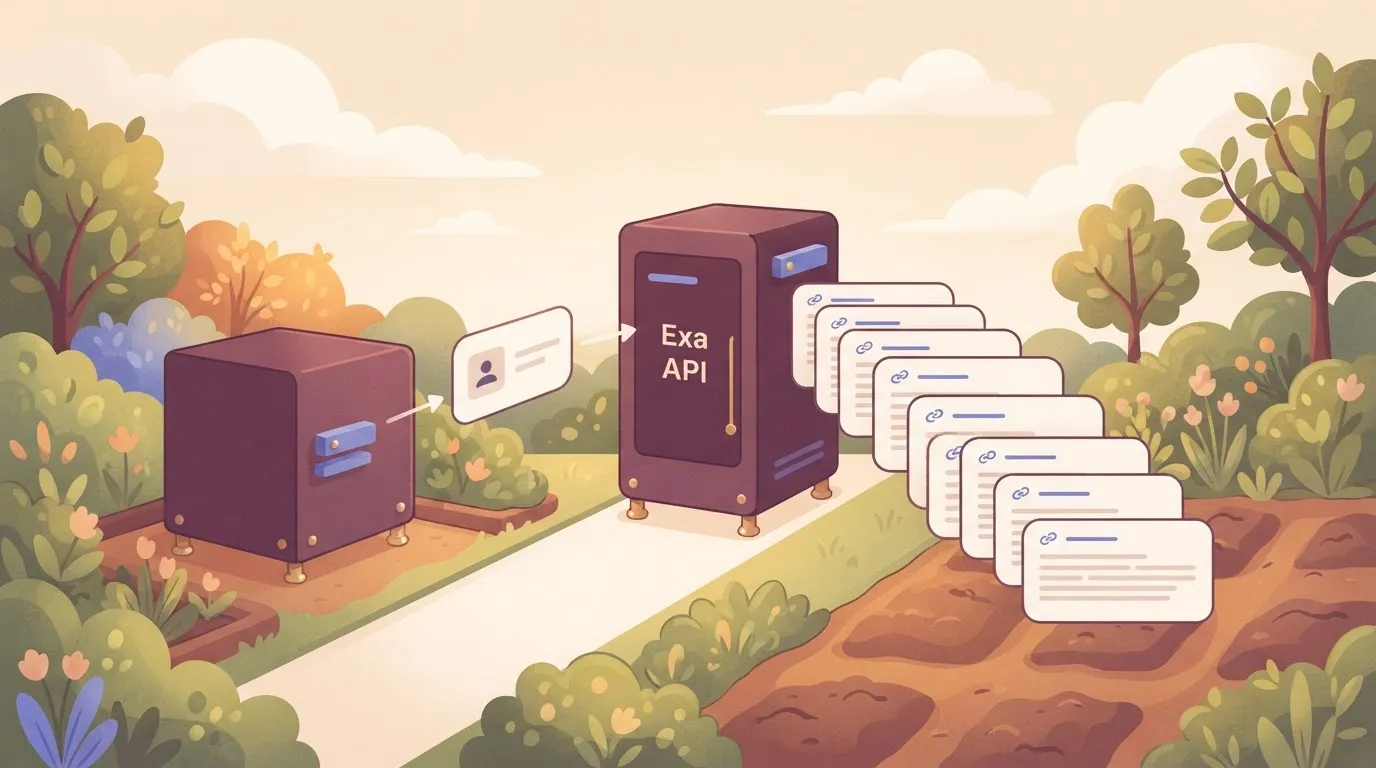 That matters for cost because the page text you receive is the same text you will later paste into a model prompt. Downstream, what Exa hands back decides how many tokens you pay for. The metered unit on the Exa side is the search request, not the token. ### What the DeepSeek API is, and whether it has search Put plainly, the DeepSeek API's a language model service. It takes text (and, on deepseek-flash, images) and returns generated text. [Api-docs](https://api-docs.deepseek.com/quick_start/pricing) lists its two current models as deepseek-flash, the fast and cheap one, and deepseek-v4-pro, the higher-end model without vision. The metered unit's the token, counted on what you send in and what comes back. As documented, it has no native search endpoint. A model call answers from what it was trained on and from whatever text you place in the prompt. If you want current web content in the answer, something else has to fetch it first. In [Activepieces](https://www.activepieces.com), which MoneyGram, Moneypenny, Alan and FundingSocieties run, that is a search request to Exa placed ahead of an Agent step in a single flow definition, so the fetch and the DeepSeek call land in one run trace instead of two engines joined by a callback, but the model itself doesn't go and look. On 2026-10-25 this comparison was checked against each vendor's own public documentation: Exa's API docs and DeepSeek's API docs. The claim that DeepSeek has no documented native search endpoint holds as of that date. If DeepSeek adds one, the framing here changes, so check its API reference before you build around the gap. ## Five criteria for judging search-grounded AI cost Whether or not DeepSeek closes that gap, five criteria set the bill, because each one meters a different thing: - Price per 1,000 search calls - Price per million tokens - What a result returns - Rate limits and free allowance - Bill surprises (caching, overages, content fees) Together they separate what you pay to find pages from what you pay to read them. Count search by the call, quoted per 1,000. An agent that searches several times per question multiplies this line, so count calls per task, not tasks. For tokens, the unit is a million, with input and output priced separately. Search results pasted into a prompt count as input, so whatever the search side returns feeds this line directly. If a result is the full page text rather than a link and a snippet, that makes a difference. Full text means more input tokens on every call, so a cheaper search call can cost more once the model has read what came back. Check the request-per-second cap and the free allowance before estimating anything. The cap decides whether a batch job runs in parallel or queues, and a free allowance usually covers a prototype, not production traffic. ### Hidden DeepSeek API price changes and bill surprises Without changing its name, a list price can change shape. [Quartz](https://qz.com/deepseek-api-price-increase-v4-peak-off-peak-081326) reports that DeepSeek V4-Flash output cost $0.28 per million tokens at a flat rate in July. 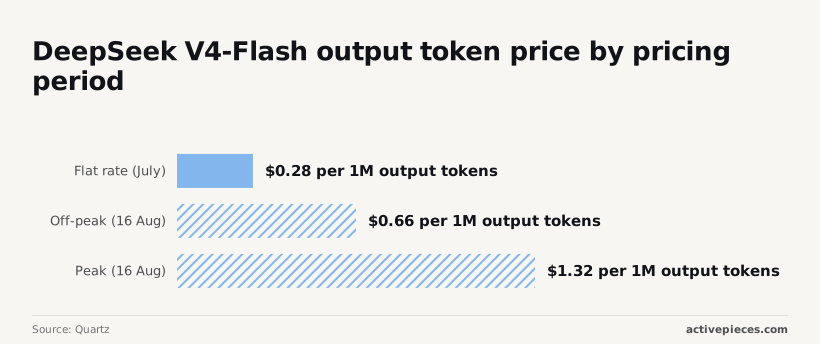 From 16 August it splits into $0.66 off-peak and $1.32 at peak, requiring teams to time queries for cost control. A pipeline that runs during peak hours pays nearly five times what the July estimate said, so the hour a job runs belongs in the cost model. Caching discounts, overage rates and per-page content fees work the same way: read them before you trust a headline number. ## DeepSeek API and Exa judged against every criterion Alone, neither vendor covers all five criteria, and only the pair does. The table below shows where each gap sits and which vendor's meter fills it. | Criterion | DeepSeek alone | Exa alone | Combined | |---|---|---|---| | Language model | deepseek-flash, deepseek-v4-pro | Not offered | Both DeepSeek models | | Live web search | Not offered | Standard and deep | Exa supplies it | | Image input | deepseek-flash only | Not offered | deepseek-flash only | | Unit metered | Tokens | Search requests | Tokens plus search requests | | Price per 1,000 searches | Not offered | $7 standard, $12 deep | $7 or $12, plus tokens | No single row gives you a full cost, because each empty cell is a bill you pay elsewhere. DeepSeek sells models and bills tokens. Api-docs indicates that both models read and write text, and only deepseek-flash accepts images, so a vision workload rules out deepseek-v4-pro. Search isn't offered, which means any answer needing fresh web facts depends on a second vendor. ### Exa on its own Exa sells search and bills requests. According to [imisofts](https://imisofts.com/blog/ai-agent-search-api-pricing/), a standard request costs $7 per 1,000 and a deep request $12 per 1,000. A workload that runs deep on every query pays about 71% more than one that stays standard, which means request patterns directly affect operating budgets. The choice of mode therefore moves the bill more than any token rate does. Exa returns results, not written answers, so you still need a model. Against other search APIs, the same source lists Brave Answers at $4 per 1,000 and Brave Search and Perplexity at $5, making them significantly cheaper than deep-request processing. Tavily is $8, positioning it between the budget and premium tiers. 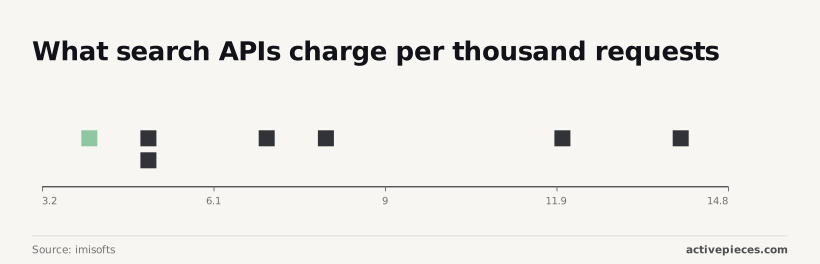 Exa standard sits above the first three and just under Tavily, and Exa deep's the highest of Exa's own tiers in this set. At 100,000 searches a month, the gap between Exa standard and Brave Search is $200 ($700 against $500). Put the two together and both gaps fill, at the price of two meters. Each question costs one search charge, $7 or $12 per 1,000, plus the tokens DeepSeek spends reading the results.  Pasting long search results into a prompt raises the token side, so the combined bill depends on how many results you feed the model per call. ## Monthly bill for 1,000 and 50,000 research queries At 50,000 queries, DeepSeek Flash generation costs only [$3.75 to $15 in total, per Tokenscale](https://tokenscale.dev/pricing), so the search calls set your bill. The table assumes 500 input and 500 output tokens per query, and it scales the 50,000 figure down by 50 for the smaller workload. | Option | Search cost | Token cost (1,000 / 50,000) | Total at 1,000 | Total at 50,000 | |---|---|---|---|---| | DeepSeek alone | None, since DeepSeek sells models | $0.075–$0.30 / $3.75–$15 | $0.075–$0.30 | $3.75–$15 | | Exa alone | Queries × Exa's per-search rate | None, since Exa returns results | 1,000 × Exa rate | 50,000 × Exa rate | | Exa + DeepSeek | Queries × Exa's per-search rate | $0.075–$0.30 / $3.75–$15 | 1,000 × Exa rate + $0.075–$0.30 | 50,000 × Exa rate + $3.75–$15 | Only because it has no live retrieval is DeepSeek alone the cheapest row. The combined row's the Exa row plus a small, fixed token add-on. At 1,000 queries the token add-on is at most 30 cents, so the combined bill is effectively 1,000 times Exa's per-search rate. Swapping models barely moves the total at this volume, and search pricing is the number to check. ### Monthly cost at 50,000 research queries Only at flagship level does model choice start to show. Per 50,000 queries, [Tokenscale](https://tokenscale.dev/pricing) listed an earlier GPT-6 Sol at $50–$250 and Gemini 3.1 Pro at $50–$300. Claude Opus 5.5 is $100–$500. That's roughly 13 to 33 times the DeepSeek Flash range. 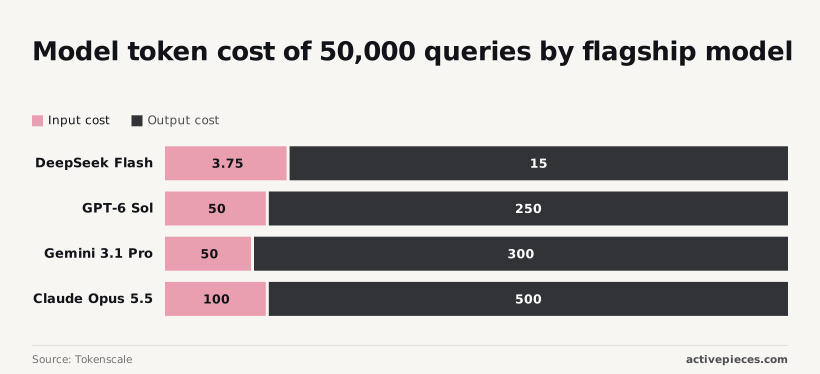 Set against 50,000 search calls, even the top of that range is a modest sum, so a flagship model changes the bill less than the search line does. If your answers don't need a flagship, the DeepSeek saving is real but small beside search. ### Verdict and the condition it holds under **Pair Exa for retrieval with DeepSeek for generation.** The token side adds at most $15 per 50,000 queries, so you pay for search once and keep generation nearly free. This holds while you feed the model a modest number of results per call. It breaks if you need a single vendor on one invoice, or an answer-ready endpoint that returns finished text instead of results you then pass to a model. ## Wiring Exa and DeepSeek together with Activepieces To run the search-plus-model pairing on a schedule without writing a service, Activepieces offers unlimited flows on every plan, including the free one, which comes with 1,000 credits a month. It only orchestrates the calls: Exa and DeepSeek still bill you separately. Read the flow as a list of where cost can accrue: five steps, each mapped to something metered. 1. A timer starts the run, daily or hourly. The frequency's your first cost lever, because every run repeats everything below it. 2. An HTTP request goes to Exa's search endpoint, with your query and a cap on results. Each run's one search call on Exa's meter, so the number of queries per run multiplies directly into the search bill. 3. Pass the returned results into a chat-completion request to deepseek-flash, or to deepseek-v4-pro if the summary needs more depth. The tokens you send are the search text, so trimming results before this step's the cheapest saving on the model side. 4. Send the output to a Slack channel or append a row to a sheet. This step costs nothing on either vendor's meter, but it's where a noisy schedule becomes a noisy channel. 5. Set a budget limit or usage alert in each vendor's own dashboard, and add a failure notification inside the flow. Without it, a loop or an over-eager schedule keeps spending until the invoice arrives. Because the ceiling on the bill is set at steps one to three, the order matters: runs, searches per run, and tokens per summary. ### What Activepieces adds and what it does not What it adds is the plumbing. Scheduling, retries, branching and delivery are built in, so a non-developer can change the query or the destination without touching code. Because Exa and DeepSeek are both called over plain HTTP, swapping either one later means editing a single step, which keeps the separate-vendor choice reversible. What it doesn't add is any change to the two meters. On Activepieces a run is 1 credit however many steps it has, and the AI step adds credits on top by model tier: 2 for a fast model, 10 for a smart one, 20 for a frontier one. With your own AI key on Plus, each AI step is 1 credit and the model cost lands on your provider bill. The free plan includes 1,000 credits a month, and Plus is $20 a month for 10,000, then $0.007 a credit over.  That's a third line on the bill, and it grows with the same schedule that drives the other two. Activepieces is the better choice for a developer or small team who wants to run a scheduled search-plus-model pipeline, such as Exa feeding DeepSeek, as a single flow rather than as two products joined by a webhook. An Agent step sits beside a deterministic step in the same flow, and the run trace logs one execution from start to finish, so a failure or a runaway cost can be followed in one place. The vendors still bill separately, and that holds for any orchestrator, but on the criterion of keeping the whole pipeline in one inspectable run, Activepieces comes out ahead. ## Mistakes to avoid before committing to either API ### Five common Exa and DeepSeek pricing mistakes Most surprise bills come down to five errors. They are searching for a DeepSeek search endpoint that its documentation doesn't describe, comparing token prices against per-search prices, skipping content fees, running without a spend cap, and trusting a pricing page you read months ago. Each one comes from treating two differently metered products as if they were one. ### Looking for a DeepSeek search endpoint Hunting for a DeepSeek search endpoint is the first mistake. DeepSeek's documented API meters tokens for deepseek-flash and deepseek-v4-pro. If you can't find a search call in the docs, build as though none exists, and plan to pay a search vendor for retrieval. **Anything undocumented can change or vanish**, and you can't budget for it. ### Comparing per-token and per-search prices Putting a per-token price next to a per-search price and calling the cheaper-looking one the winner is the second. The two units measure different things. A search is metered per request, while tokens are metered by how much text you send and receive. The honest comparison is the cost of one finished answer: the search call, plus the tokens the model spends reading the results and writing the reply. ### Ignoring Exa content fees and token costs Ignoring content fees is the third. Search that returns full page text, not just links, can be billed separately from the search itself. Those extra pages then flow into the model as input tokens, so you pay for them twice: once to retrieve them and once to read them. If you skip this line, your estimate will come in low. ### Run a 100-query cost test Take 100 real queries from your workload and run them through the full pairing: search, content retrieval, model call. Then divide the invoice by 100. That gives you a cost per answer built from your own query mix and result sizes, not from a list price. Check the usage dashboards of both vendors against your own logs so you know which line item grew. When an agent loops or retries, it can multiply both search calls and tokens before anyone notices. Set a hard cap wherever either vendor offers one, and add an alert in your own code that counts calls per job. A cap turns a runaway bug into a small, bounded bill. Read each pricing page again on the day you commit, and again before any renewal or traffic increase, because both vendors can change rates, tiers and model names. Your test results are only as current as the prices they were run against. ## Frequently asked questions Most of these questions come down to which vendor page you check and when, because the answers sit in docs that change. The table gives a short answer for each of four common ones and names the page that settles it. | Question | Short answer | Vendor page that settles it | |---|---|---| | Native web search in DeepSeek's API? | No. The API serves models, and search arrives as a tool you connect. | DeepSeek API docs, function calling section | | Exa rate limit? | It depends on your plan, so read it before load testing. | Exa pricing page and dashboard | | DeepSeek peak pricing? | Time-of-day pricing has been offered, so confirm whether it applies now. | DeepSeek API docs, pricing page | | Free allowance? | Exa has offered starter credits, and DeepSeek's terms for new accounts can differ. | Each vendor's pricing page | ### Questions about search and cost If a limit or discount decides your budget, the page in the right-hand column outranks anything secondhand, including this article. The five questions below cover what the table leaves out. Does DeepSeek have its own web search API? DeepSeek sells models through its API, not a standalone search product. If your workflow needs live web results, you bring a search provider and pass its results into the prompt or a tool call. The search bill is therefore separate from the token bill. Is Exa cheaper than Google or Bing search APIs? The two are metered differently, so a flat comparison misleads. Exa charges per search request, with content retrieval as an add-on you may or may not need. Compare cost per answered question: requests per answer, plus the extra tokens each result adds to your model's input. ### Using Exa with DeepSeek, free tiers and price changes Can I use Exa with DeepSeek models? Yes. Exa returns results over its own API, and DeepSeek's models accept text in a prompt. Your code runs the search, then hands the results to the model, either directly or as a tool the model calls. You pay two vendors, and each metered unit (a search, a token) is billed separately. Does Exa have a free tier? Exa has offered free credits to new accounts. Treat that as a trial allowance for testing, not a production budget, and read the current terms on its pricing page before you size a pilot around it. How often do these prices change? Often enough that a cost estimate needs a date on it. Both vendors can revise rates, limits and discounts without a matching change to older write-ups. Re-check the pricing pages before each budget review, and record the date you ran your numbers. ## Related reading - [DeepSeek Search and Fetch API: Pricing and Reliability](https://www.activepieces.com/blog/deepseek-search-and-fetch-api-pricing-and-reliability) - [DeepSeek Web Search API Agents: Cost and Setup (2026)](https://www.activepieces.com/blog/deepseek-web-search-api-agents-cost-and-setup-2026) - [No-Code Automation Statistics 2026: Adoption for Small Teams](https://www.activepieces.com/blog/no-code-automation-statistics-2026-adoption-for-small-teams) ## References - [Quartz](https://qz.com/deepseek-api-price-increase-v4-peak-off-peak-081326) - [Tokenscale](https://tokenscale.dev/pricing) - [imisofts](https://imisofts.com/blog/ai-agent-search-api-pricing/)Because nothing in DeepSeek's documented API reaches out to Exa, the connection is yours to wire up and yours to pay for.