# Does the CRA Accept E-Signatures on Tax Approval Records?
By Samuel Ochieng · 2026-10-02 · Source: https://www.activepieces.com/blog/does-the-cra-accept-e-signatures-on-tax-approval-records
---
CRA e-signature compliance refers to the requirement that digital signatures on tax approval records be supported by a verifiable technical audit trail to ensure authenticity and legal validity.
## CRA e-signature requirements for Canadian tax forms
### The legal framework of the Income Tax Act
Provided the method used identifies the person and ensures the document's integrity, the Canada Revenue Agency (CRA) recognizes electronic signatures as legally binding under the Income Tax Act. This shift from physical ink to digital authentication relies on a verifiable technical audit trail that logs the precise time, IP address, and encryption method used during the signing event. Without this metadata, a digital signature lacks the evidentiary weight required to withstand a CRA audit, potentially rendering a tax filing invalid.
### Forms eligible for electronic signing
To streamline the relationship between taxpayers and authorized representatives, specific compliance documents are now authorized for digital execution. These include Form T183, Information Return for Electronic Filing of an Individual's Income Tax and Benefit Return. Other eligible documents are Form T183CORP, Information Return for Corporations Filing Electronically, and Form T2125, Statement of Business or Professional Activities, according to Canada.
For these forms, the CRA demands that the signature be unique to the signer and under their sole control. This requirement prevents unauthorized parties from executing the document on their behalf.
### Maintaining sole control of the signature
To satisfy the legal requirement of sole control, the signer must execute the document using their own private device and unique login credentials or personal email access. A tax preparer providing a shared tablet or office computer for a client to sign in-person may inadvertently violate this standard by compromising the independence of the signing environment. By ensuring the taxpayer initiates the signature from their own hardware, the audit trail captures a distinct IP address and device fingerprint that confirms the signer acted without external interference.
### Why Canadians are moving to digital tax filing
Canadian taxpayers are increasingly moving away from physical mail in favor of authenticated digital workflows. Statistics show that eighty-eight percent of Canadians have accessed services online, which indicates a high baseline of digital literacy across the population.
**Only sixty-six percent** prefer online government services, however, suggesting a significant gap in trust regarding how these portals handle sensitive data. To bridge this gap, firms use [Activepieces](https://www.activepieces.com) to automate the secure movement of signed documents into encrypted storage.
This automation reduces the risk of human error during manual uploads, which is the primary cause of broken audit trails in tax compliance.
## Technical standards for a CRA-compliant electronic signature
CRA compliance requires a technical framework that simultaneously confirms who signed the document, why they signed it, and that the data remained unchanged thereafter. The following criteria define the architectural minimums for a defensible audit trail.
### Verifying the identity of the signer
High degrees of assurance are provided by multi-factor authentication methods that link a valid electronic signature to a specific individual. Modern systems utilize identity providers like Okta to bridge the gap between a digital action and a physical person.
By logging unique identifiers such as IP addresses, verified email tokens, or biometric handshakes, the system creates a persistent link to the signer. This link ensures that the signature is under the sole control of the taxpayer, preventing third-party repudiation.
### Ensuring the integrity of the electronic record
Cryptographic hashing maintains the integrity of a document by generating a unique digital fingerprint for the file at the moment of execution. Any subsequent alteration to the document will invalidate this hash and break the tamper-evident seal.
This protection proves the version of the form the CRA is reviewing is the exact version the taxpayer viewed. Without a verifiable chain of custody, a document is merely a static image rather than a legal record.
### Capturing the date and time of the signature
Every compliant signature must be anchored by a trusted time source. Relying on a user's local system clock is insufficient as users can manipulate local timestamps.
Instead, the audit trail must pull from a Network Time Protocol server to provide a synchronized, universal time standard. This precision allows auditors to verify that signers executed documents before filing deadlines, removing ambiguity regarding the timeliness of the submission.
## Step 1: Configure your digital signature provider settings
Enterprise-grade e-signature providers like DocuSign, Adobe Sign, or PandaDoc offer the granular administrative controls necessary to meet these standards. Compliance with the [Canada](https://www.canada.ca/en/revenue-agency/services/tax/businesses/topics/keeping-records/where-keep-your-records-long-request-permission-destroy-them-early.html) Revenue Agency (CRA) requires a signing process that links a specific individual to a specific timestamped action through a verifiable audit trail.
Achieving this level of non-repudiation involves moving beyond basic signature placement to configuring the underlying metadata capture within your provider’s administrative console.
### Enabling two-factor authentication for signers
Before a signer can access the document, administrators must adjust security settings to require identity verification. Standard email access is insufficient for high-stakes tax filings because it lacks a secondary layer of identity assurance.

By mandating a secondary factor, you create a stronger evidentiary link between the signer and the digital act.
To ensure compliance, enable 'Certificate of Completion' in settings and set 'Identity Verification' to SMS or Knowledge-Based. You should also turn on 'Document History' tracking and lock the document after the final signature.
### Knowledge-based authentication for signer identity
Knowledge-Based Authentication (KBA) verifies a signer's identity by presenting dynamic questions derived from their personal history or credit file. The signer must correctly answer these private queries, such as confirming a past address or loan amount, before the document unlocks.
This method provides a high level of assurance that the person behind the screen is the legitimate taxpayer.
### Configuring the e-signature Certificate of Completion
Documenting every event from the initial invitation to the final execution, the Certificate of Completion serves as the technical summary of the audit trail. You must configure your provider to generate this certificate automatically for every completed envelope.
This document captures forensic data, including IP addresses and precise timestamps, necessary to defend the validity of a signature during a CRA audit.
### CRA document retention rules for signed records
Retention policies must be aligned by administrators with the CRA’s **six-year record-keeping requirement**. If your e-signature provider is configured to purge completed documents after a short duration, you risk losing the underlying audit trail before the audit window closes.
Establishing a long-term storage bridge between your signing provider and your internal document management system ensures that the technical metadata remains linked to the tax records they support.
## Step 2: Linking signed approval records to tax filings Provincial and Federal
By embedding the unique transaction ID from your e-signature audit log directly into the metadata of the tax return transmission, you map a signed document to a tax file. This link creates a verifiable chain of custody that satisfies CRA requirements.

### Timestamping the T183 Part E consent field
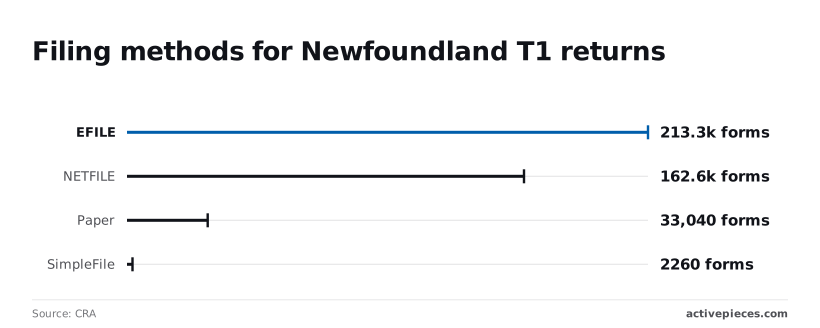
The T183 form is the primary authorization for EFILE. Its Part E section must reflect the exact moment the taxpayer provided their digital consent. Data from the [CRA](https://www.canada.ca/content/dam/cra-arc/prog-policy/stats/t1-filing-compliance/2023/t1-cmp-tbl1-2023-en.pdf) shows that 213,350 forms were filed via EFILE in Newfoundland alone for the 2023 tax year.
You must ensure the timestamp generated by your signing provider matches the "Time of Signature" field in your tax software within a one-second tolerance. If these figures diverge, the audit trail becomes fragmented, potentially voiding the authorization.

### Storing the audit trail with the tax return copy
Compliance requires storing the raw technical audit log alongside the signed PDF.
| Filing Method | Forms Submitted | Evidentiary Requirement |
| :--- | :--- | :--- |
| EFILE | 213,350 | Deeper evidentiary records / digital logs |
| NETFILE | 162,590 | Standard digital record-keeping |
| SimpleFile | 2,260 | Standard digital record-keeping |
| Paper Forms | 33,040 | Lacks granular tracking of digital logs |
Specific retention and integrity rules should be followed by your storage architecture. According to Canada, retain records for 6 years from the end of the tax year to cover the full statutory limitation period.
Canada’s guidelines specify that you must re-sign the authorization if changes to the return **exceed $300**, as the original signature no longer covers the updated financial liability.
Store the full audit log, not just the signed PDF, to capture IP addresses and device fingerprints. Ensure the digital certificate is valid and not expired at the time of signing to prove the encryption was active.
### Handling joint returns and multiple signers
Because the CRA views each taxpayer as a separate legal entity, you must generate distinct audit trails for each individual on joint returns. Even when using advanced reasoning models to automate document workflows, the underlying infrastructure must trigger separate signing sessions for each spouse.
Proxy signing is prevented by this method, as the practice fails the CRA’s requirement for individual intent. Each signer must have a unique entry in the log showing their specific email verification and time-stamped consent.
## Automating the T183 and T2183 signature workflow with Activepieces
Activepieces automates the movement of T183 forms through a predefined, auditable path that firms like MoneyGram and Moneypenny run in production. By self-hosting this open-source automation engine, firms retain full visibility into the code that handles sensitive data.

This visibility is essential for verifying that PII (Personally Identifiable Information) is not leaked to third-party logs during the transfer between tax software and signature providers.
A codebase you can read closes reviews faster than a vendor's word.
Activepieces ships an MIT-licensed core, which means a security team can clone the repository to inspect the queue and worker architecture, then deploy it self-hosted or fully air-gapped to ensure no tax data leaves their control.
### Triggering a signature request from a folder update
By monitoring a specific directory for new tax authorizations, a secure workflow initiates the compliance chain the moment a file is generated.
When TaxCycle exports a T183 PDF into a watched folder, Activepieces detects the file and immediately pushes it to a signature service like DocuSign.
1. TaxCycle generates the T183 PDF and saves it to a local or cloud-synced directory.
2. Activepieces detects the new file and maps the client's email from the metadata to the signature request.
3. DocuSign executes the signature request and generates the required technical audit trail.
4. Google Drive files the signed document and its certificate into a structured "Tax Year 2023" folder for long-term retention.
This sequence guarantees that the document remains within controlled environments, preventing unauthorized copies from sitting in unmonitored email outboxes.
### Linking the Certificate of Completion to the T183
CRA standards require that the technical audit trail is permanently linked to the signed T183. Activepieces handles this by waiting for a "document completed" webhook from the signature provider and then pairing the signed PDF with its corresponding audit log.
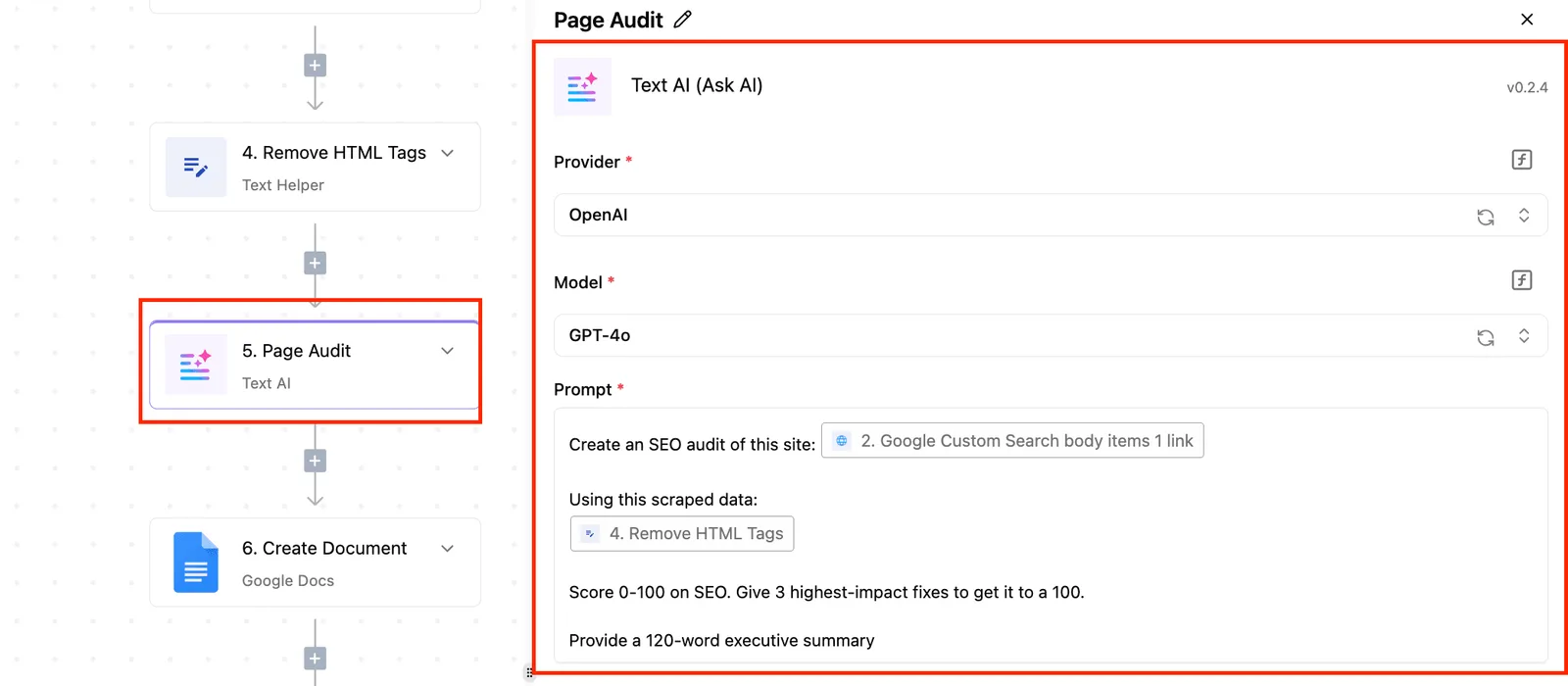
Every automated step and the specific data it processed is recorded in the Run Details and Debugging UI, providing a granular trace of how each tax record was handled.
These event streams export directly into the SIEM your security team already runs, ensuring that automated filing decisions are backed by the same rigorous audit logs as manual ones.
### Setting up automated reminders for unsigned tax authorizations
Unsigned T183s create significant bottlenecks during filing deadlines. Activepieces manages this by checking the status of pending envelopes against the firm’s CRM and sending escalating reminders to clients who have not yet provided consent.

No filing is delayed due to an overlooked email under this systematic approach. It simultaneously records every reminder attempt in the system log to prove the firm exercised due diligence in obtaining the required signatures.
## Audit-proofing your digital tax authorization records
A CRA-compliant digital archive requires a permanent, tamper-evident link between the signer’s identity and the specific version of the document they authorized. The burden of proof regarding the signature's authenticity rests entirely on the taxpayer and their representative.
### The 6-year record retention rule for e-signatures
For six years, tax professionals must preserve the technical metadata of an e-signature. **Storing only the final PDF is insufficient because the document itself doesn't contain the timestamped IP addresses or the method of authentication used at the time of signing.**
If a firm loses access to the signature service, they lose the ability to prove the document was signed by the intended party.
**Storing only the final PDF is insufficient because the document itself doesn't contain the timestamped IP addresses or the method of authentication used at the time of signing.
This lack of evidence can lead the CRA to treat the return as unsigned, potentially triggering late-filing penalties even if the data was submitted on time.
### Testing your 'Identity Verification' logs for compliance
Verifying the integrity of your audit trail involves a systematic check of the data points captured during the signing ceremony.
IP Address and Geolocation markers correlate the signer's physical presence with the digital action. Time-stamped Event Logs track every interaction from the initial email open to the final "Adopt Signature" click.
Hash Values are cryptographic fingerprints that prove that the document content hasn't been altered since the signature was applied.
### Adding e-signature consent to engagement letters
To satisfy the legal requirement for written consent under the Income Tax Act, your engagement letters must explicitly state that the client agrees to use electronic signatures. Without this specific clause, a client could theoretically dispute the validity of a digital authorization.
Updating these templates ensures that the method of delivery is as legally recognized as the content of the advice provided. This proactive contractual alignment prevents procedural technicalities from undermining the firm's professional liability coverage.
## Frequently asked questions about CRA e-signatures?
### Can I use a typed name as a valid e-signature for the CRA?
Only if it is logically associated with the document and linked to a specific person does a typed name satisfy the CRA’s definition of an electronic signature. Without a cryptographic hash or a secure timestamp, a typed name is merely text on a page. A preparer can't prove the taxpayer typed it. A valid signature requires technical metadata to link the action to the individual.
### Does the CRA accept signatures made on a tablet stylus?
Because these fall under the category of an image of a signature produced using an electronic console, the CRA accepts stylus-based signatures. Because these are essentially digital drawings, they require an accompanying audit trail to prove the signer’s identity. This allows the firm to defend the document’s integrity if the signature is later contested. The audit log provides the necessary context for the visual mark.
### What happens if the CRA rejects a digital signature audit log?
When a digital signature audit log is rejected, the CRA treats the associated document as unsigned. This triggers immediate filing delays and potential late-filing penalties. This rejection typically occurs when the log lacks granular metadata, such as IP addresses or precise event sequencing, so the agency can't verify the exact moment the consent was granted. The firm must then obtain a new, compliant signature.
### Are electronic signatures allowed for corporate T2 returns?
Provided they meet the standards for identity verification and document integrity, electronic signatures are permitted for T2 corporation income tax returns. Using advanced reasoning models to automate the extraction of these signature requirements from updated tax guides ensures that a firm’s internal workflows stay aligned with the latest CRA administrative policies. This automation helps maintain compliance across different corporate filing types.
## Related reading
- [Why your AI agents need human approval gates](https://www.activepieces.com/blog/why-your-ai-agents-need-human-approval-gates)
- [FedRAMP Content of Audit Records for Workflows in 2026](https://www.activepieces.com/blog/fedramp-content-of-audit-records-for-workflows-in-2026)
- [Multi-step Approval Workflows for Donor Data Governance](https://www.activepieces.com/blog/multi-step-approval-workflows-for-donor-data-governance)
## References
- [CRA](https://www.canada.ca/content/dam/cra-arc/prog-policy/stats/t1-filing-compliance/2023/t1-cmp-tbl1-2023-en.pdf)