# Dropbox and Google Drive Compared for Cloud Storage in 2026
By Leah Goldberg · 2026-10-02 · Source: https://www.activepieces.com/blog/dropbox-and-google-drive-compared-for-cloud-storage-in-2026
---
Choosing between Google Drive and [Dropbox](https://www.dropbox.com/business/plans-comparison) requires balancing Google’s generous free-tier capacity against Dropbox’s specialized file-handling tools. While both platforms provide essential cloud infrastructure, their entry-level business structures force a trade-off between total volume and specific feature depth.
## Dropbox and Google Drive compared for 2026 workflows
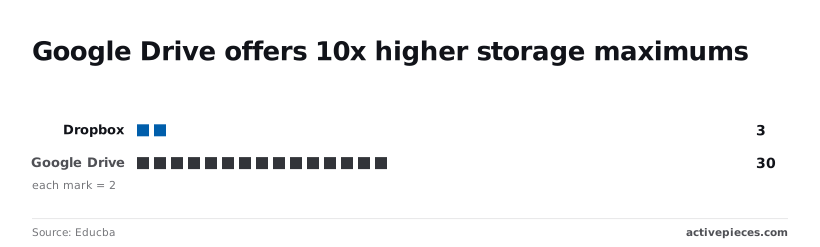
Dropbox and Google Drive compared for cloud storage refers to the evaluation of these two platforms based on their storage capacities, file-syncing performance, and the scalability of their per-user pricing models.
### Storage limits and pricing tiers as of late 2025
When a user signs up for a [free](https://gemini.google/subscriptions) account, Google Drive provides a baseline of 15 GB of storage. Small teams can store thousands of standard documents without upfront software costs.
30 units of scale are offered by Google Drive at certain tiers, compared to only 3 units from Dropbox. This represents a **10x difference in storage maximums**.
Because of this difference, teams with massive media libraries face far lower ceiling constraints on Google’s infrastructure.
For those needing a modest boost, the Google AI Plus plan at [$4.99/ month](https://gemini.google/subscriptions) bridges the gap for solo power users who need more than the basic 15 GB but aren't ready for full enterprise seats, ensuring they can expand their storage capacity without committing to expensive business-tier subscriptions, which means users can scale their digital workspace incrementally rather than paying for excess capacity.

Individuals can scale their capacity incrementally without committing to expensive corporate subscriptions.
| Feature | Google Workspace Starter | Dropbox Business Standard |
| :--- | :--- | :--- |
| Monthly Price | $7.20 - $8.40 per user | $15 - $18 per user |
| Free Storage | 15 GB | 2 GB |
| Max File Size | 5 TB | 2 TB |
| Version History | 30 days | 180 days |
_Prices and plan limits checked against [docs.claude.com](https://docs.claude.com/en/docs/about-claude/models/overview) and [openai.com](https://openai.com/chatgpt/pricing) and [gemini.google](https://gemini.google/subscriptions) on October 1, 2026._
Google is more affordable for high-volume storage, but Dropbox justifies its higher per-seat cost by offering **six times the version history duration**.
This longer window means a team can recover a corrupted project file from six months ago, whereas a Google user has a one-month recovery window.
### Collaboration tools: Paper vs. Google Workspace
Professional teams use Google Workspace and Dropbox Paper for different primary functions. Google Workspace is a full productivity suite where the storage is secondary to the real-time editing environment. Dropbox Paper acts as a lightweight coordination layer for external files.

Because Google’s apps are native to the drive, teams manage permissions at the document level. This simplifies sharing for those using [Activepieces](https://www.activepieces.com) to automate document generation from CRM triggers.
Creative agencies often choose Dropbox Paper because it excels at embedding rich media and task lists alongside files stored in the cloud, presenting design assets and feedback in a single, unified view.
### Google and Dropbox integration ecosystem comparison
The choice of ecosystem often dictates which reasoning models a team can deploy against their internal data. Organizations heavily invested in the Google ecosystem gain access to [Gemini](https://gemini.google/subscriptions) 3.8 Flash, the flagship Flash model for coding, agents, and enterprise workflows, allowing for the instant summarization of thousands of Drive-hosted PDFs.
Teams that prefer the Anthropic suite may utilize [Claude Fable 5.1](https://docs.claude.com/en/docs/about-claude/models/overview) for demanding reasoning and long-horizon agentic work. They often find that Dropbox’s agnostic API structure makes it easier to pipe data into non-Google LLMs without hitting proprietary formatting roadblocks.
For rapid file classification within Dropbox’s file system, [Claude Haiku 4.5](https://docs.claude.com/en/docs/about-claude/models/overview) is a near-frontier intelligence. Automated tagging keeps even large-scale migrations organized.
## Setting up a Dropbox business workspace
A professional Dropbox environment requires a structured hierarchy to prevent the "shared folder sprawl" that typically breaks automated workflows.
While Google Workspace supports [13 million](https://couponzania.com/blog/google-workspace-statistics) paying business customers, Dropbox serves [18.08 million](https://getlatka.com/blog/dropbox-revenue). Your external collaborators are statistically more likely to possess a native Dropbox seat for folder mounting.
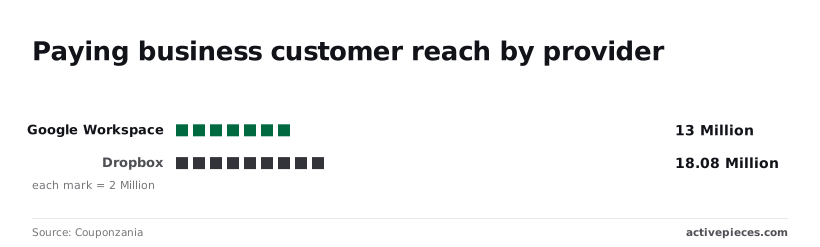
To ensure this scale doesn't overwhelm individual hardware or compromise security, follow these deployment steps:
1. Create the Team Folder and set top-level permissions;
2. Enable Selective Sync to manage local disk space;
3. Configure the Dropbox Vault for sensitive documents;
4. Invite team members with granular access.
Administrative guardrails must be active before the first file syncs to prevent data leaks during the initial ingest.
### Step 1: Configuring Selective Sync to save local disk space
By choosing exactly which folders appear on your hard drive, Selective Sync prevents a 2TB cloud repository from crashing a standard 256GB laptop SSD, effectively saving the device from running out of critical storage space, so users avoid the performance bottlenecks associated with full-disk capacity.
Unchecking high-volume archive folders in the Dropbox desktop preferences ensures that only active project files consume local storage. This is critical for teams using Gemini 3.8 Flash to process thousands of small log files that would otherwise clutter a local file explorer.
### Step 2: Setting up the Dropbox Vault for sensitive documents
When files require an additional security handshake beyond standard login credentials, Dropbox Vault provides a PIN-protected sub-layer.
Configuring this ensures that even if a laptop is left unlocked, payroll PDFs or API keys remain encrypted and inaccessible. This creates a "dead zone" for automated indexing, protecting your most sensitive assets from internal search scripts.
### Step 3: Creating automated folders for file organization
Automated folders use predefined rules to perform actions like naming, tagging, or converting files the moment they enter a directory.
Setting a "Convert to PDF" rule on a specific folder means the system instantly standardizes every docx file dropped in by a contractor. This reduces manual cleanup time for ops managers who would otherwise spend hours reformatting client deliverables.
### Step 4: Managing team permissions and external link security
Permissions must be managed at the Team Folder level to prevent "permission inheritance" errors where a sub-folder accidentally exposes private data.
By setting global link restrictions to "Team Only," you ensure that a stray "Copy Link" action doesn't turn a private budget spreadsheet into a public URL.
Data only leaves the workspace through intentional, audited exceptions in this closed-loop system. Effective permissions management is the final gatekeeper before you integrate external intelligence tools to parse your data.
## Managing file recovery and long-term versioning
Dropbox uses extended version history to differentiate itself from Google Drive’s more limited recovery windows, providing a safety net for automated workflows that might otherwise overwrite critical data.
While Google Drive typically caps version history at 30 days or 100 versions, Dropbox scales its recovery window based on the account tier to prevent permanent data loss during sync errors.
### Dropbox Enterprise 365-day file recovery window
How far back an automation can "undo" a catastrophic bulk-rename or deletion is determined by the duration of your file history. According to [Dropbox](https://help.dropbox.com/delete-restore/version-history-overview), users on Basic, Plus, and Family plans are limited to a 30-day recovery window.
If a buggy script corrupts a file more than a month ago, it becomes permanently unrecoverable. In contrast, the Business and Enterprise tiers offer a **365-day window**, which allows ops managers to audit and revert entire project folders from the previous fiscal year.
The following table illustrates how these retention periods dictate your long-term data security:
| Dropbox Plan Tier | Version History Duration | Operational Consequence |
| :--- | :--- | :--- |
| Basic / Plus / Family | 30 Days | Errors must be caught within one billing cycle or data is lost. |
| Professional / Standard | 180 Days | Supports seasonal project recovery and biannual audits. |
| Business / Enterprise | 365 Days | Provides a full year of legal and operational version redundancy. |
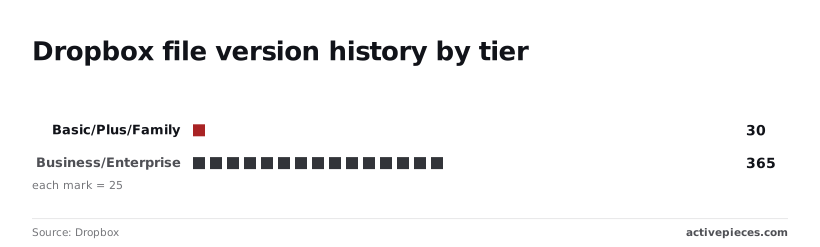
Enterprise-level teams need this tiered structure to have the breathing room to discover silent failures in long-running agentic coding tasks performed by models like GPT-6 Astra.
### Fixing Dropbox conflicted copy errors in shared folders
When two users (or one user and one automated agent) edit the same file simultaneously, Dropbox creates a "Conflicted copy" to prevent data overwrites. To resolve these without manual intervention, you must implement a "Locking" state in your workflow.
First, use the Dropbox API to check the `is_lockable` status of the file. Then, apply a temporary lock before the Gemini 3.8 Flash model begins its write operation. Finally, release the lock only after the `file_metadata` confirms the sync is complete.
### Fixing Dropbox's 255-character file path limit
When the combined length of the folder path and filename exceeds 255 characters, Dropbox syncs fail silently. This causes local automation scripts to return "File Not Found" errors even when the file exists in the cloud.
A deeply nested directory will crash a local sync client on Windows because of this limit.
To bypass this, you must use the `namespace_id` in your API calls to reference files by their unique ID rather than their literal path string.
This ensures that your file processing remains stable even if a team member moves a folder three levels deeper into the directory tree.
## Automating cross-platform file management with Activepieces
Activepieces meters by consumption instead of seats, allowing teams to scale automation across their entire headcount without every new employee becoming a licensing line item. By self-hosting the platform, teams bypass the per-seat licensing costs that typically restrict automation access to a few select administrators.
Alan and FundingSocieties run production automation on Activepieces, utilizing the credit-based, unlimited-flow structure that makes headcount irrelevant to cost, as published on the Activepieces pricing page.
This consumption-based model allows a support manager to build a flow where every incoming PDF in a shared Gmail inbox is instantly mirrored to a specific project folder in Dropbox. The platform uses a "trigger and action" logic to bridge environments that don't natively communicate.
For example, a business can configure a workflow where a new file uploaded to a Slack channel serves as the trigger.
The action is an automatic upload to a Google Drive directory. This eliminates the need for employees to download files to their local machines just to re-upload them to the company’s primary storage.
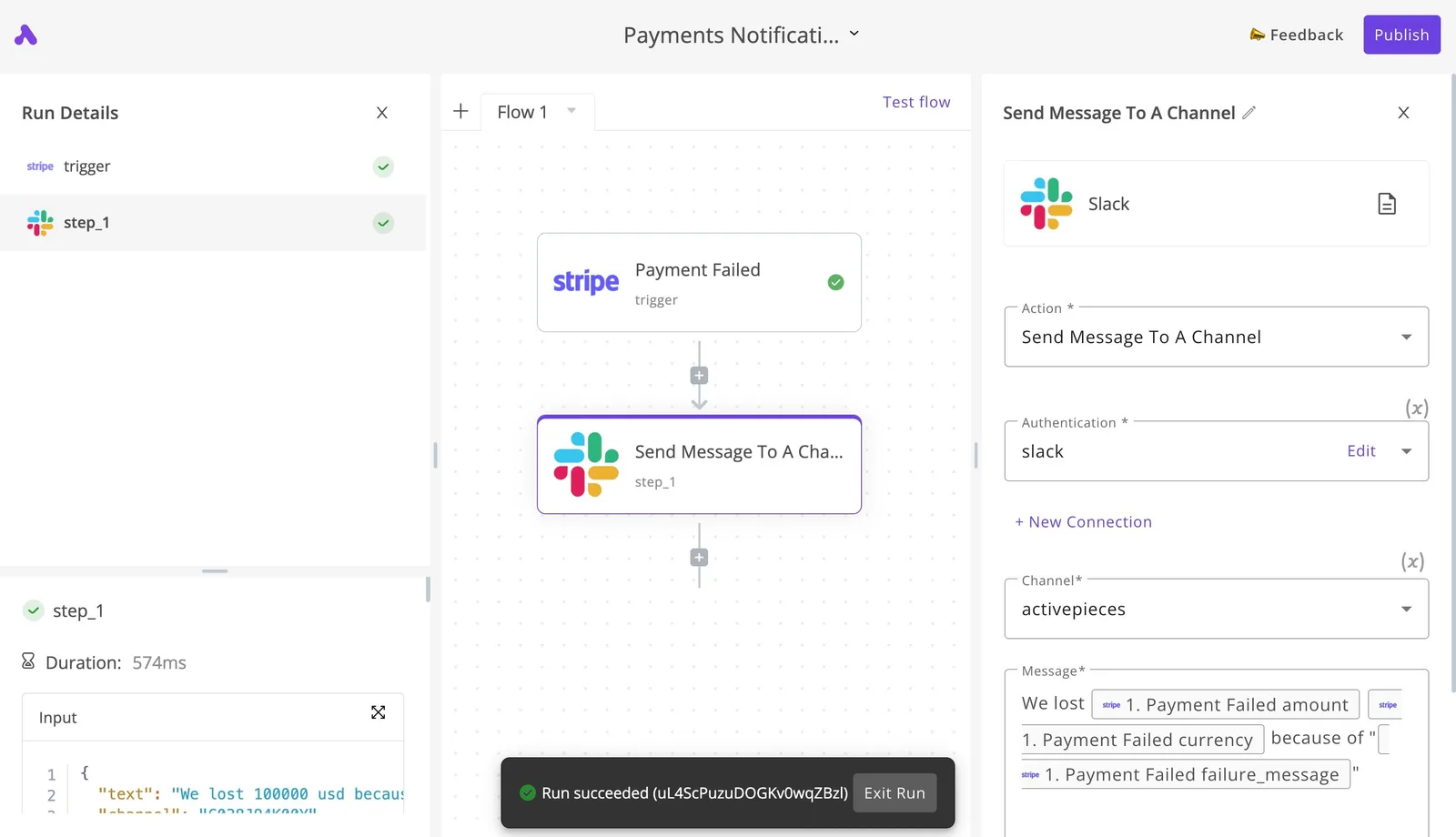
[SCREENSHOT: A workflow automation canvas showing a two-step flow titled "Payments Notificati..." with a Stripe "Payment Failed" trigger connected to a Slack "Send Message To A Channel" action. The right panel displays the Slack action configuration. The left sidebar shows Run Details with step_1 marked as completed with a 574ms duration. A success notification at the bottom indicates "Run succeeded".]
This specific execution demonstrates how a failure in a payment processor like Stripe can immediately alert a team in Slack.
Billing issues are then addressed before the next file sync cycle. The speed of the execution ensures that the notification reaches the team in less than a second after the event occurs.
### Intelligent file routing
Beyond basic triggers, Activepieces inserts intelligence into the file path. By connecting to Gemini 3.8 Flash, the system can analyze the content of a document as it passes between platforms.
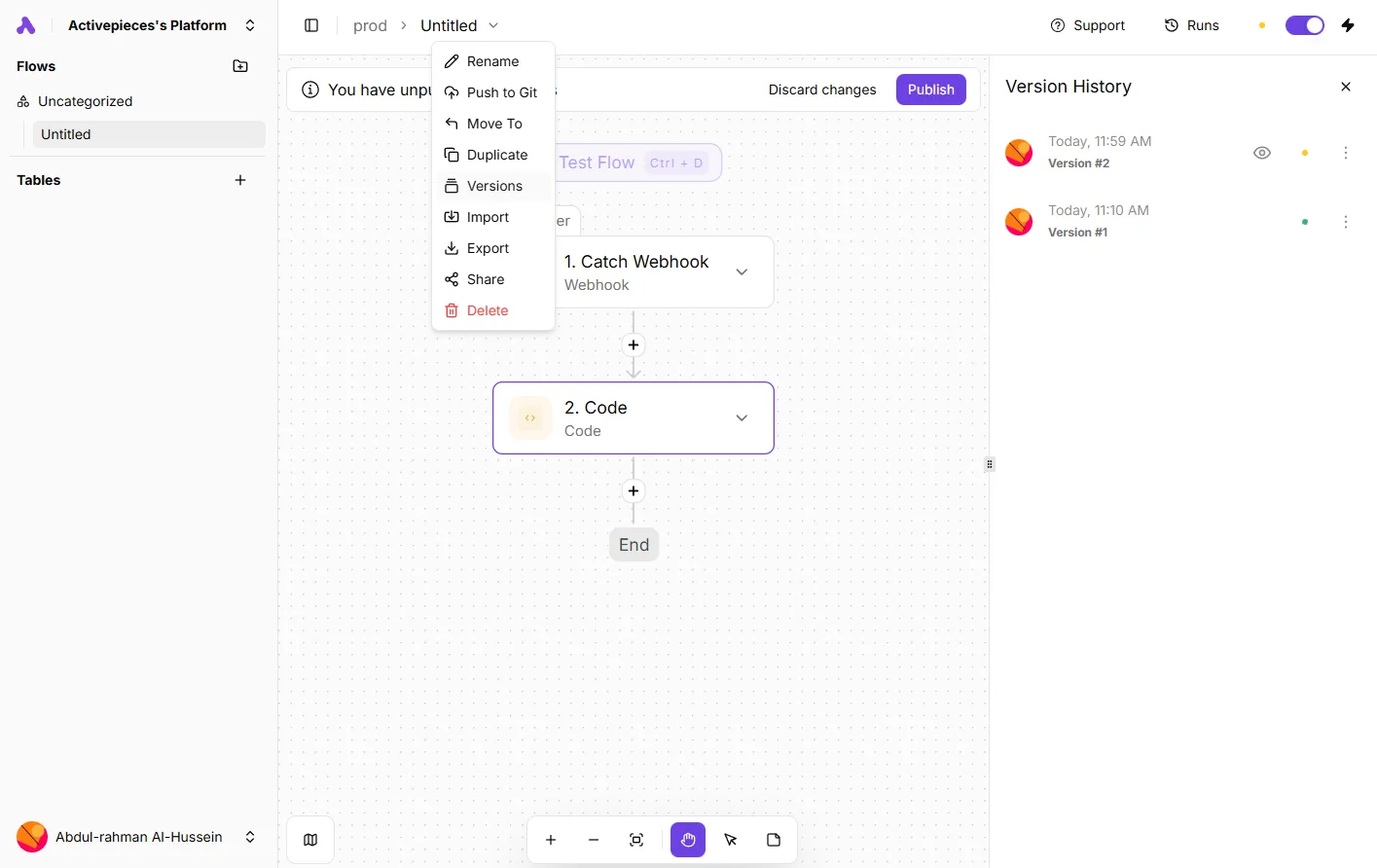
Activepieces syncs flows to git and promotes them through Release Management, ensuring that these intelligent routing rules are versioned and reviewed as code rather than just saved in a private UI history.
Check Activepieces' own documentation for Git Sync and Release Management to see how this maintains stability across self-hosted and cloud environments.
The AI reads a contract, determines the client name, and creates a corresponding folder in Google Drive before saving the file. Such logic ensures that the file structure remains organized according to content rather than just the date of the upload.
## The Monday morning cloud storage audit checklist
A proactive audit of your cloud environment ensures that automated file movements haven't created security gaps or exceeded your current subscription capabilities.
While automated logic handles the heavy lifting of sorting, it can't account for the permission drift that occurs when folders are shared for one-off projects and then forgotten.
**Relying on a "set and forget" mentality leads to bloated storage costs and potential data leaks, so a structured review is necessary to maintain system hygiene.**
The Monday Morning Audit:
1. Review external sharing links for expiry to ensure that temporary vendors no longer have access to internal assets.
2. Check storage usage against tier limits so you can prune unnecessary archives before an overage fee triggers on the next billing cycle.
3. Audit 'Deleted Files' for accidental removals to recover any critical documents purged by aggressive automation scripts.
4. Verify that all new hires have the specific folder permissions required for their role, preventing them from accessing sensitive executive directories.
**Relying on a "set and forget" mentality leads to bloated storage costs and potential data leaks, so a structured review is necessary to maintain system hygiene.
This routine transforms cloud storage from a passive expense into a managed asset. By validating these four areas, you ensure that the cost of your storage remains tied to actual utility rather than unmonitored growth.
When your storage is lean and your permissions are tight, you can use advanced processing tools to handle the files themselves.
For teams managing high-volume document analysis, models like Gemini 3.8 Flash or Claude Haiku 4.5 can be integrated via API to summarize or categorize incoming uploads in real-time.
These models allow for rapid processing at a low cost-per-token, but their effectiveness depends entirely on the clean folder structure established during your audit.
If the underlying file system is cluttered, even the most intelligent agent will struggle to locate the correct context for its tasks. Once the audit is complete, the focus shifts from maintaining the container to maximizing the value of the data inside it.
## Frequently asked questions about cloud storage migrations
### Can I use Dropbox and Google Drive at the same time?
Running both platforms simultaneously is a standard practice for teams that require the granular file-locking capabilities of Dropbox alongside the native collaborative editing environment of Google Workspace.
This hybrid approach allows a creative team to store high-resolution assets in one repository while using the other for drafting project briefs. The organization must accept the overhead of managing two distinct sets of user permissions.
### Which platform is better for large video file editing?
Because its **block-level copying technology** only syncs the specific portions of a file that have changed, Dropbox generally outperforms Google Drive for video production workflows.
When an editor modifies a single scene in a massive project file, the system avoids re-uploading the entire asset. This prevents the local network from bottlenecking during high-frequency saves.
### Does Google Drive count toward my total Gmail storage?
Google utilizes a unified storage pool where every byte occupied by Drive files, Gmail attachments, and Google Photos backups is deducted from a single shared quota.
If a legacy automation script triggers a flood of large PDF reports into a shared folder, the immediate consequence is a "Storage Full" error. This prevents the account from sending or receiving urgent business emails.

### How do I transfer all files from Dropbox to Google Drive?
Migrating data between these services requires a specialized transfer tool or a dedicated migration agent to preserve folder hierarchies and metadata.
| Tool | Description |
| :--- | :--- |
| Google Workspace Migrate | A first-party tool for large-scale enterprise transfers that maintains document integrity during the move. |
| MultCloud | A third-party cloud manager that facilitates server-to-server transfers so the user doesn't have to download files to a local machine first. |
| Rclone | A command-line program used by technical operations managers to script precise, high-volume data syncs with custom filtering rules. |
## Related reading
- [Using AI Hackathons To Drive AI Adoption In Your Organization](https://www.activepieces.com/blog/using-ai-hackathons-to-drive-ai-adoption-in-your-organization)
- [Self-Hosted vs Cloud Security Automation for 2026](https://www.activepieces.com/blog/self-hosted-vs-cloud-security-automation-for-2026)
- [Share on LinkedIn to get free Activepieces Cloud tasks](https://www.activepieces.com/blog/linkedin-sharing-reward)
## References
- [Educba](https://www.educba.com/dropbox-vs-google-drive/)
- [Dropbox](https://help.dropbox.com/delete-restore/version-history-overview)
- [Couponzania](https://couponzania.com/blog/google-workspace-statistics,)