# Epidemic Sound Pricing: Plans and Costs (2026 Guide)
By Desmond Achebe · 2026-11-13 · Source: https://www.activepieces.com/blog/epidemic-sound-pricing-plans-and-costs-2026-guide
---
**$119.88, $203.88 or $360 a year**: that is what Epidemic Sound costs on its three priced tiers, Creator, Pro and Business, giving creators options to select based on their channel's scope, whether they edit by hand or run their publishing through automations built in tools like [Activepieces](https://www.activepieces.com).
## Epidemic Sound pricing tiers
viz type=step title="What Epidemic Sound plans cost per year on annual billing" unit="$ per year" source="Photutorial - https://photutorial.com/epidemic-sound-pricing/"19.88 for Creator, $203.88 for Pro and $360 for Business, so the licence you need sets the price."
Creator: 119.88
Pro: 203.88
Business: 360
### Epidemic Sound videos after you cancel
Cancel, and the music in your videos generally stays covered only for the period you held the licence, so check the terms for each channel before you end a plan.
## Epidemic Sound Against Artlist, Soundstripe and Uppbeat
Epidemic Sound is the better buy when your work is music and sound effects on channels you can name; Artlist wins on footage, and Uppbeat wins if you want to start free.
| | Client-work coverage | Free tier | Licence after cancelling | Extras |
|---|---|---|---|---|
| Epidemic Sound | Depends on plan; tied to the channels you register | Limited free use for personal projects | Content published while subscribed stays cleared on registered channels | Sound effects, stems |
| Artlist | Commercial plans cover client projects | No meaningful free tier | Licence for downloaded assets continues | Sound effects, footage, templates |
| Soundstripe | Higher plans cover client work | Limited | Licence for assets used while subscribed continues | Sound effects, video, some stems |
| Uppbeat | Paid plan needed for wider commercial use | Free downloads with limits and credit required | Tied to the plan you held at download | Sound effects |
## Artlist, Soundstripe and Uppbeat compared
One subscription covers both music and footage, and that is Artlist's draw. If you cut videos and buy stock clips separately, it can replace two bills with one.
Aimed at working editors, Soundstripe is a music library with video and sound effects alongside. Client coverage sits on its higher plans, so check which plan your agency work actually needs.
Free-first is Uppbeat's whole pitch. The free tier works for a hobby channel if you accept download limits and credit the artist. Monetized or client work pushes you onto a paid plan, and then the comparison with the others starts.
## Automating Epidemic Sound licence admin tasks
Whatever you automate, the licence costs the same, because automation only handles the admin around the music and never decides which plan covers your channels. What it saves is your time on each finished video.
### Epidemic Sound steps to keep manual
On some steps a wrong automated answer costs more than the minutes saved, so three are worth keeping by hand:
- Choosing the plan, since that depends on which channels and clients the licence must cover.
- Confirming that a track you picked is allowed for the channel it's going to, so you never publish against the wrong licence.
- Approving the final cut before the client sees it.
Automate the movement of files and messages, not the judgement.
### A workflow from finished export to client handoff
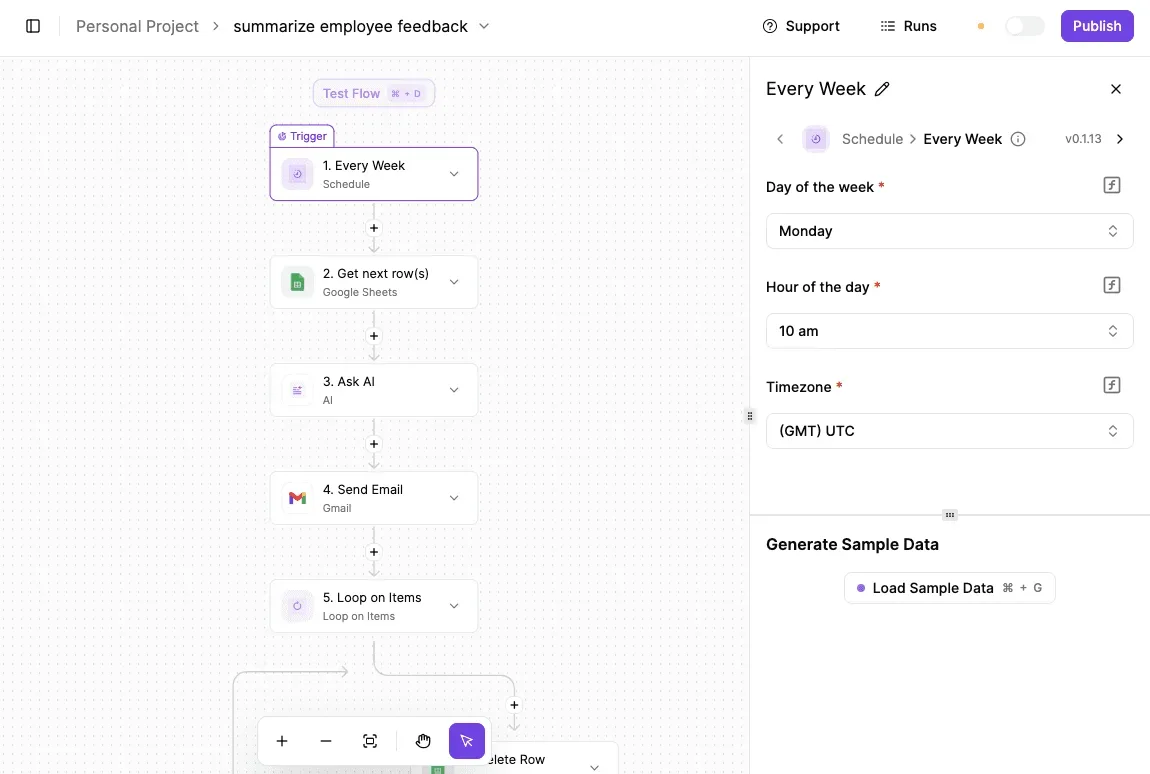
Below is a different job, a weekly summary of feedback. It has the same shape you need: a trigger, a read from a sheet, a processing step and an email.
On Monday at 10 am UTC, the example's schedule trigger fires, so you can see that timing is set once and then runs without you. Yours would start from a new file instead of a clock.
1. Trigger when a finished export lands in a chosen folder, so nobody has to remember to start the process.
2. Add a row to a tracking sheet with the file name, client, track titles and the channel it's for. That sheet becomes your record of which music went where, useful if a licence question arrives months later.
3. Send the client a notification email with the review link, so handoff doesn't wait on you being at your desk.
4. Queue the upload to your channel as a draft rather than publishing it, which leaves the approval step in your hands.
Those four steps are one run, and on Activepieces the run is the meter: its pricing page lists 1 credit per run however many steps it holds, where Zapier bills per task and Make per module.
Stretch the flow to ten steps and it costs what the four-step version does, so the free plan's 1,000 credits a month still cover 1,000 handoffs and nothing punishes you for splitting the work into smaller, safer steps.
## The Strongest Case Against Paying for Epidemic Sound
A subscription is rent, you own nothing when you stop paying, and free or per-track libraries cover much of what a small channel needs.
### The objection at full strength
If you don't use the thing constantly, rent makes no sense. Epidemic Sound's Creator plan is $119.88 a year, which is $9.99 a month whether you publish or not, so the per-video cost depends entirely on your output.

In a quiet month, a free library costs nothing, and a single-track licence costs money only in the month you buy one. For a creator who's still finding a format, that's a real argument.
### When Epidemic Sound costs too much per video
Here is what the objection costs the occasional publisher, per the [Epidemic Sound pricing page](https://www.epidemicsound.com/pricing/): at one video a month, Creator works out to $9.99 per video.
That's more than a $5 or $8 single-track licence and close to a $12 one, so you're paying a premium for access you barely touch.
If you post once a month, or in bursts, buy per track or use free music. The subscription loses.
### Why the subscription still holds for regular publishers
It doesn't grow with volume. At 10 videos a month the same plan costs $0.999 per video, so the price per upload has fallen to about a dollar.
At 30 videos a month it's $0.333 per video, a third of a dollar for music that carries a commercial licence.
Creator is a flat $119.88 line, set against single-track licences at $5, $8 and $12 each.
Read the crossing points: at $12 a track, Creator is cheaper from the 10th track in a year. At $8 it's cheaper from the 15th, and at $5 from the 24th.
A channel publishing weekly with one track per video uses about **52 tracks a year**, so even the cheapest per-track price ($5) comes to $260, **more than double the subscription**.
Under roughly one to two videos a month, the objection wins. Above that, rent's the cheaper way to hold the licence.
## Choosing your Epidemic Sound plan
Work through these seven steps in order, because each one narrows the choice for the next.
1. Count your channels, your clients and how many videos you publish each month.
2. Match those counts to the licence of the cheapest plan that covers them.
3. Choose yearly billing only if you'll publish regularly all year.
4. Read the cancellation terms before you enter a card.
5. Test the free plan on a real project.
6. Price one alternative against your shortlist.
7. Set a renewal reminder.
Epidemic Sound charges for what you do with the music, so **reach matters more than volume**.
Write down every channel you publish to, every client whose work will carry a track, and whether any of it is monetised. Those three lists decide which licence you need.
Epidemic Sound charges for what you do with the music, so reach matters more than volume.
With one channel and a personal licence, a solo creator is paying for coverage they use. An editor who delivers client work on a personal plan isn't covered at all.
### Testing the Epidemic Sound free plan
Use the free plan on a real project, not a throwaway clip. Export it, publish it to the channel in question, and see whether the limits get in your way.
## What Activepieces does about this
Activepieces can't pick your Epidemic Sound plan, and it shouldn't try. What it does is keep the record that makes the choice checkable.
A flow that logs every finished export with its client, channel and track titles gives you the counts the plan decision depends on. You can then see whether a second channel or a client's account has pushed you past Creator, rather than guessing.
The cost of keeping that record is close to nothing. The pricing page lists 1 credit per run however many steps the flow holds, and the free plan includes 1,000 credits a month.
A four-step handoff flow therefore costs the same as a ten-step one, and a small studio can log a month of deliveries without paying for it.
The community edition is open source under the MIT licence, so you can self-host it if client files shouldn't pass through a third party.
We don't publish a named customer for this particular use, so treat it as a pattern to try on one real project before you rely on it.
## Frequently asked questions
Plans change, and so do a handful of terms that only the current pricing and licence pages can settle. These are the ones I couldn't close from the body of this integration, each with where it stood on 13 November 2026:
- Trial length: shown at signup, so read it there before entering a card (checked 13 November 2026).
- Licence after cancelling: covered below, but confirm the wording in your plan's terms (checked 13 November 2026).
- Business Plus seat pricing: I couldn't confirm a published per-seat rate, so expect to ask (checked 13 November 2026).
- Content ID claims: connecting your channels is the fix, and the steps live in your account settings (checked 13 November 2026).
- Price change since 2022: I haven't verified a like-for-like comparison, so use today's pricing page, not an old figure (checked 13 November 2026).
Treat each answer as dated, and re-check anything that decides a purchase.
### Free access and client work
Is there a free Epidemic Sound plan? Yes, but it's a way to try the service and use music personally, not to publish on a monetized channel. If the video earns money, plan on a paid tier.
Can I use Epidemic Sound music on client videos? Only on a plan whose licence explicitly covers client work.
Plans built for your own channels don't automatically extend to videos you deliver to someone else. Read the licence for the plan you're buying, and if the answer needs a sales call, price that plan last.
### Billing and cancelling
Does Epidemic Sound cost less if I pay yearly? Yes, the yearly option works out cheaper per month than paying monthly, as the maker's pricing page states.
It only pays off if you'll use the service for the whole year. For a single project or a short season, monthly costs less overall.
Can I keep using tracks after I cancel Epidemic Sound? Videos you published while subscribed generally stay covered, but new downloads and new videos need an active licence. Check your terms before cancelling, then keep a record of which tracks went into which published videos.
### Copyright claims
Will Epidemic Sound music still trigger copyright claims? It can, usually when a channel isn't connected to your account or the track came from somewhere else. Connect every channel you publish on, and keep your licence details to hand to dispute a stray claim.
## Related reading
- [HeyGen Pricing for Creators, Marketers and Teams](https://www.activepieces.com/blog/heygen-pricing-for-creators-marketers-and-teams)
- [DeepSeek Search API vs Exa Pricing for Small Teams (2026)](https://www.activepieces.com/blog/deepseek-search-api-vs-exa-pricing-for-small-teams-2026)
- [No-Code Automation Statistics 2026: Adoption for Small Teams](https://www.activepieces.com/blog/no-code-automation-statistics-2026-adoption-for-small-teams)
## References
- [Photutorial](https://photutorial.com/epidemic-sound-pricing/)
- [Epidemic Sound](https://www.epidemicsound.com/pricing/)
- [EditOrCodes](https://editorcodes.com/guides/epidemic-sound-free-trial)