| Tier | $ per 1,000 at 10 results | $ per 1,000 at 100 results | Latency | Rate limit | |---|---|---|---|---| | Lite | $4 | $94 | 450ms | No figure | | Standard/Auto | $7 | $97 | 1s | No figure | | Deep | $12 | $102 | ~10s | No figure | At 100 results the tiers sit within $8 of each other, so pick on latency there. Deep's ~10 seconds means a user waiting on a form should never hit it. I found no per-tier limit on the pricing page, hence the last column. Send a burst of requests on day one and note where errors begin. That's your real ceiling, and you want to learn it before a customer does. ### Exa API test credit and cost at volume The test credit got smaller. [PricingSaaS](https://pricingsaas.com/companies/exa) tracked the first-month credit. It was $30. Exa gives $10 in credits every month plus a $10 onboarding bonus, so you have $20 to test with.  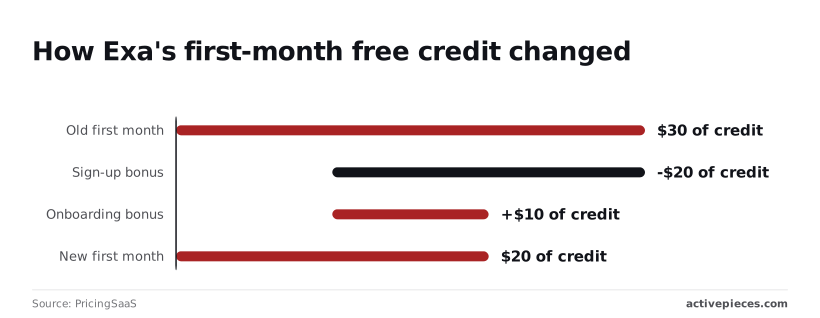 At $7 per 1,000, that's about 2,857 Auto searches at 10 results, but only about 206 at 100 results ($97 per 1,000). Decide your result count before you spend the credit. ## Common Exa API errors and fixes After the demo works, five failures show up. They're a 401 from a bad key, a 402 from exhausted credits, a 400 from a malformed request, a rate-limit response, and a bill inflated by unbounded `numResults`. Only some of them need more than a one-line fix, and those are covered in the rest of this section. ### Exa API authentication and key errors When you get a 401, the key is missing, mistyped, or revoked, so check the header and the environment variable before anything else. **A 402 means credits or budget ran out**, so your scheduled job fails at 2am while the dashboard looks fine. Alert on 402 separately from other errors, because retrying never fixes it.  If you get a 400, your request body is wrong, such as a misspelled field or the wrong type. Log the body you sent, because the error alone rarely tells you which field. ### Exa API rate limit backoff and spend caps When Exa tells you to slow down, wait and try again, and lengthen the wait on each attempt with a little random jitter. Without jitter, every worker retries at the same moment and trips the limit again.  Set a maximum retry count, so a long outage ends in a logged failure instead of a loop that burns your day. Don't let your code crash on an empty list, which is a valid answer, not an error. Log the query, the filters, and how many results came back. When a query returns nothing, loosen one filter at a time before you blame the API. You will not see it coming when **a loop has no ceiling**, because every extra result and every repeated query costs money. Set a hard cap on `numResults` in one shared wrapper so no caller can exceed it. Cache answers to repeated queries, and stop the job when it reaches your daily call budget. ## Exa 3.0 in Activepieces: what has shipped If your workflow calls Exa on a timer or an event, you can now try it without writing the glue yourself. Activepieces, the open-source AI automation platform, has an Exa integration in its **catalogue of 742 integrations**, usable as a step in a flow and as a tool for an AI, which means the platform supports Exa alongside hundreds of other integrations. A change to it is described in [pull request 15983](https://github.com/activepieces/activepieces/pull/15983), dated 30 September 2026. ### What was added and when The text of [that pull request](https://github.com/activepieces/activepieces/pull/15983) lists three groups of additions to the Exa integration; I haven't confirmed them in the integration itself. An integration is Activepieces' name for one app's connector, the block you drop into a flow.  1. Start, Get, List and Cancel Agent Run actions, so a flow can launch a long-running Exa job, check on it, and stop it. 2. A monitor trigger that watches a search on a schedule, so the flow starts when the search is due to run, with no cron job on your side. 3. Flat search, contents and answer actions written for AI agents, so an agent can call them as plain tools. On a tight budget the Cancel action matters: a run that goes wrong can be stopped from inside the flow. The admin area lists the integrations you have installed under Settings, then Integrations, which is where you would confirm the Exa integration is present and which version you're on.  Check the version column in the screenshot, because a self-hosted install only has these actions once its Exa integration is updated. ### When a workflow beats a script When the call repeats on a schedule or trigger and someone other than you needs to see it run, a workflow beats a script. The monitor trigger and the run actions cover that, and the flow history shows what each run did. For a single call, a plain script is fine. Nothing here is needed to send one query and read one answer. ## The Monday checklist before Exa 3.0 goes live Done before the first scheduled run, six small steps turn night one from a surprise into a boring evening. When your script loops at 2am and the key sits in a chat message, nobody finds out until the invoice arrives or the requests start failing. If your budget is a single small card and your connection drops mid-run, these steps matter more, not less. From the key through to the pricing page, the list below runs in the order failures tend to arrive. Each step is cheap to add today and costly to add after the first bad night. 1. Put the key in a secret manager, or at least an environment variable outside the repository. A key pasted into a script ends up in a shared folder, and then you're rotating it while everything that uses it's down. 2. Set a monthly spend alert on your account, if the dashboard offers one. An alert is how you hear about a runaway job while it's still a small mistake. 3. Cap the number of calls per run in your own code. A loop with no ceiling will happily repeat one bad query all night, and the cap is the only limit you fully control. 4. Retry failed requests with backoff: wait longer after each failure, and stop after a few tries. Retrying instantly turns a brief rate limit into a pile of rejected calls. 5. Log the request ID from every response next to your own record of the query. When a result looks wrong, that ID is what lets you and Exa's support look at the same request instead of arguing from memory. 6. Re-read the pricing page and changelog before each launch. The limits and prices behind this article were checked on 2026-10-20, so anything changed since then is a gap between your plan and your bill. With the safeguards in place, the remaining question is what to do when a request succeeds and the answer is still wrong. ## Frequently asked questions Four questions are left that a wrong answer doesn't settle. Exa's own pages answer some of them and leave others open. ### Is Exa 3.0 free to try? Yes, **Exa gives new accounts free credits**, so you can send real requests before you spend anything. The amount, whether it renews, and whether the dashboard asks for a payment method before the first call are all things to read on Exa's pricing page and in your own account. You don't need a card: Exa's pricing page says no payment method is required for the free tier. Still test with a fresh account before you promise a client a free pilot. ### Does Exa 3.0 replace earlier Exa API versions? I can't confirm a clear answer from Exa's pages, so treat it as a gap. Check the changelog and the API reference for deprecation notices before you rebuild anything. Until you've read them, assume your existing calls may behave differently. Run one old request and one new request side by side, and compare the response fields your workflow actually reads. A renamed field breaks a spreadsheet column quietly, and you notice it days later. ### Where do I check current Exa pricing and limits? Check Exa's pricing page and its documentation, not this article. Prices, credit grants and rate limits change, and a figure copied into a blog post is stale the day it's published. Read the page, write the numbers into your own runbook with the date you read them, and note who owns re-checking them. Do this before launch, not after the first bill. ### Can I call the Exa API from a no-code workflow? Probably, if your tool can send an HTTP request with a custom header, because Exa is a web API that authenticates with a key. That covers most automation platforms. Whether Exa publishes a ready-made connector for yours is something to confirm in its docs. If there isn't one, a plain HTTP step works, but keep the key in the tool's secret storage, not in the step's visible fields where every collaborator can read it. ## Related reading - [Cohere API Trial Key, Rate Limits and Pricing in 2026](https://www.activepieces.com/blog/cohere-api-a-2026-developer-guide) - [Grok Pricing 2026: Every Plan, Rate, and Real Cost](https://www.activepieces.com/blog/grok-pricing-2026-vs-gpt-for-enterprise-teams) - [n8n Review 2026: Pricing, Licence, and Limits](https://www.activepieces.com/blog/n8n-review-2026-pricing-licence-and-limits) ## References - [PricingSaaS](https://pricingsaas.com/companies/exa) - [Exa](https://exa.ai/pricing)**Asking for 100 results instead of 10 adds about $90 per 1,000, so result count moves the bill as much as the tier does.