# Final Cut Pro MCP: How to Set It Up (2026 Guide)
By Kofi Mensah · 2026-11-16 · Source: https://www.activepieces.com/blog/final-cut-pro-mcp-how-to-set-it-up-2026-guide
---
A Final Cut Pro MCP is a community-built Model Context Protocol server, the same kind of bridge that open-source tools such as [Activepieces](https://www.activepieces.com) expose to AI clients, that lets an AI client send commands to the editor. **Apple publishes no such server**.

Everything below was checked on 16 November 2026, and by the end you'll have a client issuing one verified command to Final Cut Pro.
Because Final Cut Pro is a minority tool, the community is the one building this.
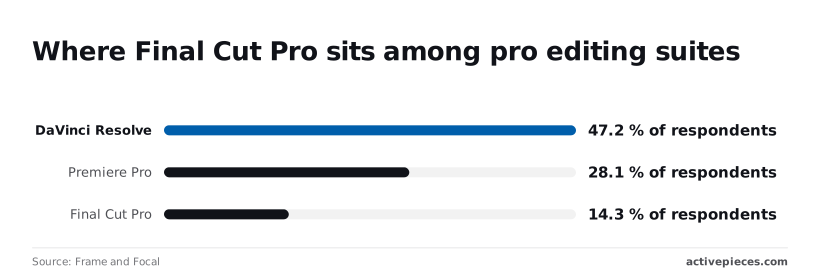
In a Frame and Focal poll of post-production software: DaVinci Resolve led with 47.2% of respondents, Premiere Pro followed with 28.1%, **Final Cut Pro had 14.3%**, that's a self-selected poll, not market data, so actual adoption could differ substantially from these percentages.
It explains the gap: a server for a tool with roughly one editor in seven draws a few volunteers, not a vendor team.
## Final Cut Pro MCP community bridge
### What MCP means, sourced to the protocol docs
Under MCP, a client, such as a chat app or workflow tool, connects to servers that each advertise a list of tools. The protocol's own documentation defines that split. It guarantees the format of the conversation, not what any tool does.
Read the tool list before you trust the project.
If "add marker" isn't on it, no prompt will produce one, and the model may claim success anyway. Treat any action absent from that list as unsupported, and confirm each one in the editor itself.
### How it talks to the editor: FCPXML or UI automation
There are two routes. FCPXML is Final Cut Pro's XML interchange format, so the server reads and writes project files that the editor imports. That's structured and predictable, but it works through files, not live control.
Where FCPXML works through files, UI automation clicks the interface the way a person would. It reaches more of the editor, but it needs macOS accessibility permission and breaks when Apple moves a menu.
## Final Cut Pro MCP requirements, costs and permissions
Before anything else, check the macOS version: the hard gate sits on Final Cut Pro, not on the MCP.
Three integrations each carry their own price, operating system floor and permissions, and the table shows what to confirm for each before you install anything, so if your system's OS version is below an integration's floor, that integration cannot be used.
Figures were checked on 2026-11-16.
| | Price | Minimum macOS | Hardware | Licence | Permissions | Maker source |
|---|---|---|---|---|---|---|
| Final Cut Pro | $299.99 one-time, 30-day trial | 26.2 for version 12 | 8GB RAM, 6.5GB disk | Proprietary | Standard app; the controlling process needs your approval to drive it | Apple's Final Cut Pro tech specs page |
| MCP client | Depends on your plan | Set by the client's own release | Set by the client | Set by the client | Asks before each tool call, if configured | The client's MCP documentation |
| Server project | Free to download if open source | Read the README | Runs beside the editor | Read the licence file | Expect macOS Accessibility or Automation prompts | The project's repository |

### Apple: Final Cut Pro price, trial and macOS requirement
At $299.99 once, with a 30-day free trial through Apple Creator Studio, Final Cut Pro lets you test the whole bridge before paying, so you have 30 days to determine if a $300 investment is worthwhile. The catch is the operating system.
According to the release notes collected by [Larry Jordan, Appleosophy and FCP Cafe](https://github.com/CommandPost/FCPCafe/blob/main/docs/releasenotes.md), Final Cut Pro 10.6 needs macOS 11.5, version 11 needs 14.6 and version 12 needs 26.2.
Each release raises the floor, so a Mac that runs version 11 may be unable to run version 12.
Check your macOS first, because an upgrade to run the editor can break other software. Then confirm the 8GB of RAM and 6.5GB of free disk, since insufficient space or RAM will block installation.
### The AI client: plans and versions that support MCP
Don't look to Final Cut Pro for MCP support; it is a property of the client. Some clients gate it by plan, and many only added it in a particular version.
Open the client's own MCP documentation and confirm that your plan and version can add a local server. A client that can't will fail silently, and you'll blame the server.
Check whether the client asks for approval before each tool call. For an editor with your project open, you want that on.
### The server: runtime, licence and maintenance activity
Read three things in the repository: the runtime it needs (Node, Python or something else), the licence file, and the date of the most recent change. A project untouched since Final Cut Pro 11 may not know about version 12.
Most of all, mind the permissions it asks for. Accessibility access lets one process control another app, so grant it only to a server whose code you have read.
### Where to find candidate servers
Search GitHub for "final cut pro mcp" and sort the results by recently updated. Then check the public MCP registries, which list community servers by name. A registry listing is a pointer, not an endorsement, so the repository is still what you vet.
I could not verify any specific community server for this guide, meaning one whose route, runtime and last-commit date I could confirm on 16 November 2026. I name none rather than guess.
For each candidate you find, write down its route (FCPXML or UI automation), its runtime and the date of its last commit before you install.
### Final Cut Pro MCP server vetting checklist
A candidate should pass every item before you start Stage 1.
1. Its tool list names the actions you need, and nothing you don't.
2. It states its route, FCPXML or UI automation.
3. It names a runtime you can install and check on your Mac.
4. It has a licence file that permits your use.
5. Its last commit is recent enough to cover your version of Final Cut Pro.
6. You have read the source, and the permissions it asks for match what it does.
## Server installation and client connection
Each stage should leave you with one thing you can check: the server runs on its own, the client knows it exists, and the client can see its tools.
Start with the runtime and the server. Nothing here touches Final Cut Pro yet. If the server can't start by itself, no client config will fix it.
1. Install the runtime the project's README names, and check its version from a terminal.
2. Install the server exactly as the README describes, from the repository you vetted earlier.
3. Run the server once from the terminal and read the output. A clean start, or a clear message that it's waiting for a client, counts as working.
If it fails, stop. A broken install that gets wrapped in client config produces errors you can't trace.
### Stage 2: add the server to the client config
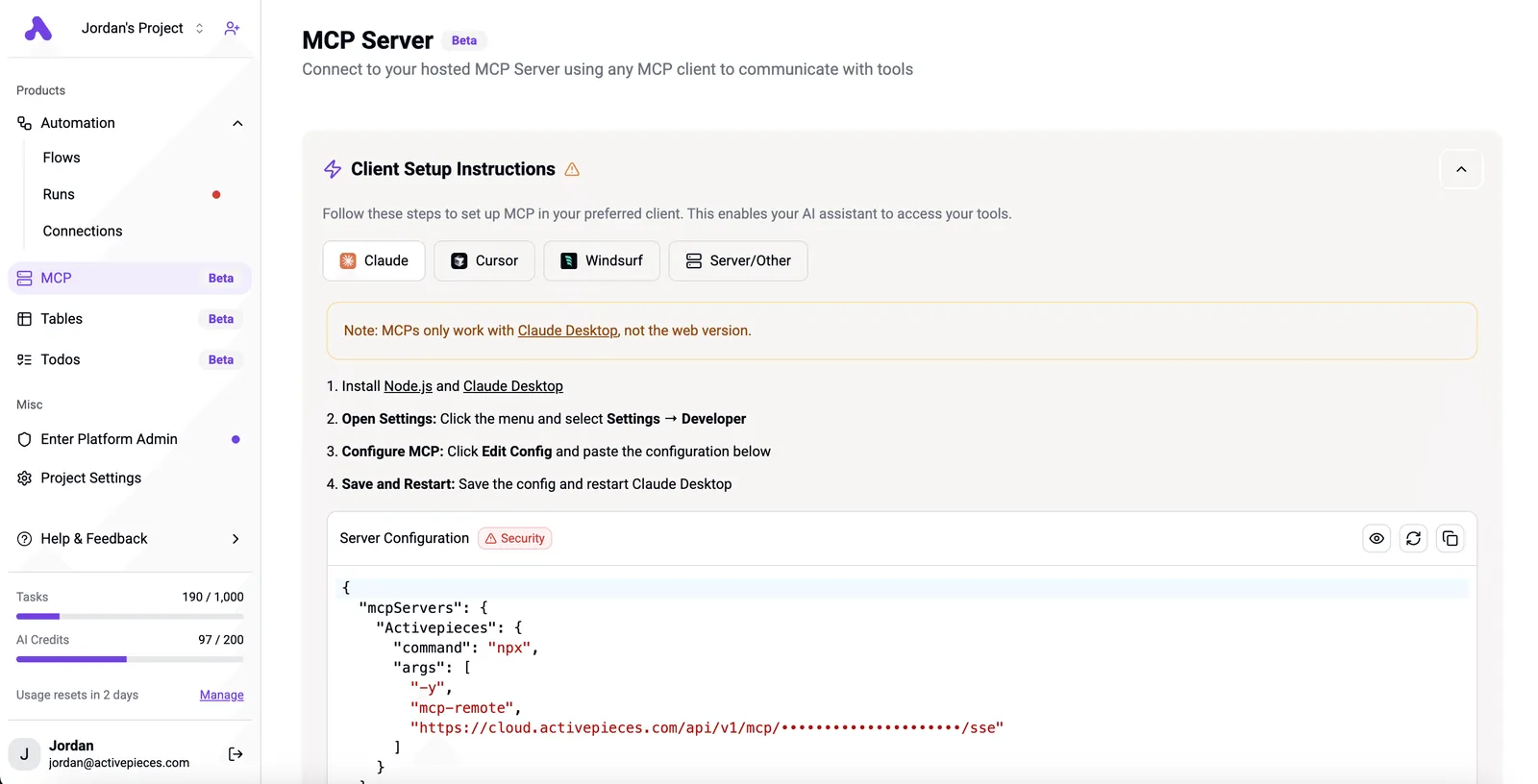
Without one JSON entry, the client never learns the server exists. A client-setup page from a different MCP server shows the typical shape: a tab per client and a warning that the desktop app works and the web version doesn't.

Its config block has an `mcpServers` key holding a launch command and its arguments.
Steps for your own client:
1. Open the client's settings and find where it keeps its MCP config file.
2. Add an entry under `mcpServers` with a name, the launch command and the arguments from the README. Use absolute paths, because the client may not share your shell's environment.
3. Check the JSON is valid before saving. One stray comma and many clients silently ignore the whole file.
4. Quit the client fully and reopen it. Closing the window usually isn't enough.
### Stage 3: grant macOS permissions and confirm tools
Expect a macOS permission prompt the first time the server tries to control another app. Approve it for the app that launches the server, which may be your client rather than Terminal.
If you dismiss the prompt by accident, re-enable it in System Settings under Privacy & Security, then restart the client.
Now open the client's tools menu. You should see the server by name with its tools listed. If the server appears with no tools, the launch failed after the client found it, so go back to Stage 1 and compare.
Adding a second server to that same config won't extend its reach to the editor, though.
Activepieces, whose MIT-licensed core has 750 integrations, runs as a per-project MCP server, so Claude Desktop, Cursor or Windsurf can create and edit a flow for export notifications or file logging with no separate builder open, and the flows it builds get run history, with audit logs on the governance tier.
It is not a Final Cut Pro MCP and does not control the editor; it handles the chores around a render, while your community server handles the timeline.
## First safe edit and verification
Run a read-only command first, then one reversible change, and confirm each in Final Cut Pro itself rather than in the AI client's reply.
**The client will describe what it did with total confidence whether or not it happened, so the editor is the only witness you can trust.**
### Stage 4: run a read-only command
Create a throwaway library with a few clips in it, open it, and keep your real projects closed. Then ask the client to list the clips in one event.
**The client will describe what it did with total confidence whether or not it happened, so the editor is the only witness you can trust.
Compare the reply against the browser. If names, order or durations differ, or the list is empty, stop.
A bridge that misreads a library will misplace a marker later, and a failure here costs you nothing.
### Stage 5: make one reversible change
Add a single marker at a timecode you pick, on a clip in the disposable library. Then look at the timeline and check that the marker sits at that frame, on that clip, with the name you gave it.
Press Undo in Final Cut Pro and confirm it disappears. If undo doesn't remove it cleanly, you have learned the bridge's writes aren't safe for a real project.
Each prompt below needs the same verify-then-undo habit before you trust it on real footage.
- Logging clips from a list: `Log every clip in the Dailies event against this shot list and report any that don't match.`
- Adding markers at timecodes: `Add a marker named "Cut here" at 00:01:12:00 on the interview clip.`
- Writing metadata fields: `Set the scene and take fields on these clips from the spreadsheet I pasted.`
- Exporting FCPXML for a cut list: `Export the current project as FCPXML so I can build the cut list from it.`
## Mistakes breaking Final Cut Pro MCP setup
Five mistakes cause most broken setups, and each has a fix you can check in minutes.
### Final Cut Pro MCP config and permission errors
When a single trailing comma makes the config invalid JSON, most clients skip the server without a clear error.
Run the file through a JSON validator, then confirm the path matches the one your client documents, because a correct file in the wrong folder behaves like no file at all.

When permissions are missing, the failure looks the same. macOS asks for Accessibility and Automation access per app, so grant them to the terminal or client that launches the server, not to the server itself.
Without a backup, **editing a live library is the fourth mistake**. An MCP client can change your timeline faster than you can read what it did.
Duplicate the library in Finder before the first session, and point the client at the copy until you trust it.
### Overtrusting community servers
You are running code with control over your editor and your Mac when you install a community server.
Of the 11,524 MCP servers in the [Canopii](https://www.canopii.dev/State%20of%20MCP%20Security%202026.pdf) scan, 830 graded D or F, about 7%, which means one in every fourteen servers carries material security risk.
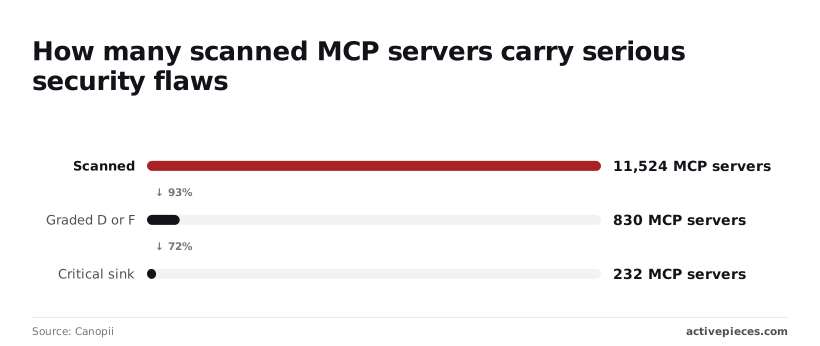
232 servers carried a critical sink, a place where untrusted input reaches a dangerous operation, and that narrower figure matters more. That's about 2% of the scan, so most servers aren't dangerous. But you can't tell which ones from the install command.

Read the source, check when it was last updated, and start with read-only tools before you allow anything that edits.
## What Activepieces does about this
Activepieces does not replace the community server, and it does not drive Final Cut Pro. What it covers is the verification habit this article keeps asking for, applied to the chores around a render.
Its core is MIT-licensed, so you can read the code you are trusting, which is the check we told you to make on any server.
Each project exposes its own MCP server. Point your client at it and ask for a flow that logs exported files or sends a notification when a render finishes.
The flow appears in Activepieces with its run history, and that history is what you check, not the client's account of what it did.
The same staged approach applies. Add it as a second server, confirm its tools appear, run one flow on a throwaway file, then widen.
With 750 integrations in that MIT core, there is usually a integration for the destination you need, so you probably won't need to build custom code.
## Frequently asked questions
Does Apple offer an official Final Cut Pro MCP? No. Apple doesn't ship an MCP server for Final Cut Pro, so any server you find is a community project that Apple neither maintains nor vouches for.
### Is a Final Cut Pro MCP free to use?
Usually the server itself costs nothing, since the community servers I know of are open source.
The costs sit around it: you still need a licensed copy of Final Cut Pro, a Mac that runs it, and an AI client, which may carry its own subscription or usage charges.
### Does it work with Final Cut Pro on iPad?
Don't assume it does. These bridges are built to talk to the Mac application and its project files, and a server running on a Mac has no obvious way to reach an editor sandboxed on a tablet.
Unless a project's documentation says iPad is supported and explains how, treat it as Mac-only.
### Can Claude or ChatGPT edit video for me through it?
Only within the tools the server exposes, which is narrower than the demos suggest. The model can't watch your footage and make taste decisions on its own; it calls whatever actions the server offers, such as reading project structure, listing clips or applying specific changes.
Test one small task on a copy of a project before you hand over anything real.
### Is it safe to give an MCP server access to my library?
Not by default. A server that can edit can also damage, and you're running someone else's code with access to your media and projects.
Work on a duplicate library, keep a backup you have confirmed you can restore, and begin with read-only tools.
Enable editing tools only after you have read the source and seen them behave correctly on disposable material. If a server asks for network access it doesn't plainly need, don't install it.
## Related reading
- [Shopify MCP Server: 2026 Setup Guide](https://www.activepieces.com/blog/shopify-mcp-server-2026-setup-guide)
- [Twilio MCP Server Setup for Claude in 2026](https://www.activepieces.com/blog/twilio-mcp-server-setup-for-claude-and-ai-agents-2026)
- [Perplexity MCP Server: Setup Guide and Tools](https://www.activepieces.com/blog/perplexity-mcp-server-setup-guide-and-tools)
## References
- [Frame and Focal](https://frameandfocal.com/camera-reviews/the-most-popular-post-production-software-poll-results)
- [Canopii](https://www.canopii.dev/State%20of%20MCP%20Security%202026.pdf)
- [Larry Jordan, Appleosophy, FCP Cafe](https://github.com/CommandPost/FCPCafe/blob/main/docs/releasenotes.md)