At 50 seats, Pro on an annual term is [$6,000 a year](https://guide.fireflies.ai/articles/9606045468-fireflies-billing-terms), and [monthly billing](https://guide.fireflies.ai/articles/9606045468-fireflies-billing-terms) costs considerably more. That penalty is bigger than the [upgrade to Business](https://guide.fireflies.ai/articles/9606045468-fireflies-billing-terms), which adds $5,400 a year on the annual term. [Business billed monthly](https://guide.fireflies.ai/articles/9606045468-fireflies-billing-terms) reaches $17,400. Work backward from those totals and they imply $10 and $18 per seat per month for Pro, annual and monthly, and $19 and $29 for Business, according to Fireflies. The table applies them to three smaller teams, and the term moves each total more than the plan does. | Case | Seats | Monthly-billed | Annual-billed | Arithmetic (seats × price × 12) | |---|---|---|---|---| | Sales team, Pro | 5 | $1,200 | $600 | 5 × $20 × 12; 5 × $10 × 12 | | Sales team, Business | 5 | $1,740 | $1,140 | 5 × $29 × 12; 5 × $19 × 12 | | Company, Pro | 8 | $1,920 | $960 | 8 × $20 × 12; 8 × $10 × 12 | | Company, Business | 8 | $2,784 | $1,824 | 8 × $29 × 12; 8 × $19 × 12 | $120 on an annual term, $240 on a monthly one: that's the gap on a single Pro seat. The extra buys no feature at all. For the five-person team, annual Business costs $1,140, less than Pro billed monthly at $1,200. The default term costs more than the better plan on the cheaper term. In a twenty-five-person company where only the eight people who record hold seats, annual Pro is $960 for the company. Business billed monthly is $2,784, nearly triple, for the same eight people.  ## Usage limits that force plan upgrades Paying for the bigger plan only makes sense when a limit forces you there. Four limits can do it: free-plan caps, AI credit allowances, storage, and features reserved for higher tiers. Treat the free plan as a trial, not a home. Its caps on summaries, search and history show up in the second or third week, usually the moment you go looking for a meeting you recorded earlier. If you wait until then, you're choosing a plan in the middle of a deadline. Not everything is unlimited: summaries and the extra AI features are capped. A team that records every call but only reads a few summaries will never notice. A team that asks the AI follow-up questions after every meeting will run through the allowance first, and that's a cost the per-seat price never mentions. ### Fireflies storage and retention limits by plan Of the four limits, storage has the steepest steps. The takeaway's that Free to Pro's a big move, while Pro to Business buys storage most teams will never fill. Unless you record long meetings daily, Pro's storage is likely enough, and storage alone is a weak reason to pay for Business. If storage isn't what pushes you to Business, features might be. List the gated features your team uses every week. If the answer is none, Pro covers you, and you skip the premium that sat behind the monthly figure above. ## Hidden costs on a Fireflies subscription You only notice credits once you run out, and they're one of four extra costs: AI credits, features locked to higher tiers, per-seat billing, and renewal terms. If you buy credits, you pick from six bundle sizes. They cost [$5 a month for 50, $20 for 200, $90 for 1,000, $200 for 2,500, $375 for 5,000 and $450 for 7,500](https://guide.fireflies.ai/articles/2114151875-learn-about-ai-credits). 10 cents a credit is what both the 50 and the 200 bundles cost, and the 7,500 bundle costs 6 cents.  A heavy user on the smallest bundle pays 10 cents per credit against 6 cents on the largest, and that gap compounds every month. ### Fireflies add-ons and features on higher tiers Because credits are billed separately from your seat, they add to it. The 20% annual discount applies to bundles too, which makes the billing term matter here as well. API access, admin controls and single sign-on (one company login for every tool) are reserved for higher tiers. If your IT lead requires them, you're buying that tier for every seat, not just one.  Since billing's per seat, every person who records or edits meetings counts toward the total. Check who actually needs a paid seat before you sign. Plans renew automatically, so read the refund terms before paying. Missing a cancellation date can commit you to another full term. Before you record anyone, you need their consent, and someone has to own that. Budget the hours for writing a notice, telling guests, and handling objections. That time's a cost even though it never shows up on an invoice. ## How Fireflies compares to competitors on price Against [Otter](https://otter.ai/pricing), Fathom, Read AI or tl;dv, Fireflies is rarely decided by its sticker price. What separates them's the caps on each entry plan and which AI features the vendor keeps for its top tier. Those are the same hidden costs as the lost hours above, just billed by a different party. ### Fireflies pricing compared with four competitors It compares free-tier limits, entry paid price per seat on annual and monthly billing, and the caps that come with that plan. It also covers AI features reserved for top tiers, integrations, and the date each vendor's pricing page was checked. Read the check date first, because these pages change often and an old row can mislead you. Then read the caps column before the price column, since a cheap plan with a tight cap costs more than it looks once your meetings run into it. Once you have the rows in front of you, the useful comparison is between caps and your own meeting habits, not between prices. ### Where Fireflies is cheaper or costlier Pay annually and need only the core features, and Fireflies tends to look cheaper. When the AI features your team wants sit above the entry plan, Fireflies looks costlier. You then pay the higher tier for every seat, including people who rarely record a meeting. Before you trust any rival's lower entry price, check whether the feature you actually need is included at that level. When one person records a few meetings and mostly needs a transcript to search later, a free tier is enough. It stops being enough the moment a cap forces you to skip a meeting or re-do notes by hand, because that manual work is the same invisible cost you started with. ## Sending Fireflies notes into the rest of your stack with Activepieces Copying meeting notes by hand into your CRM, Slack and task tracker is the real cost. It never shows up on an invoice, and it lands on whoever has the least time to spare. ### What Fireflies native integrations already cover Start with what Fireflies connects to on its own. It ships integrations for common destinations like Slack, popular CRMs and task tools. For many teams that's enough: a summary posts to a channel, a note attaches to a deal, and nobody touches anything. Check these first, because a built-in connection costs you no setup beyond signing in. When your process has a rule in it, native integrations run out. A built-in connection usually pushes the same thing to the same place every time. It won't read a summary, decide it concerns a support issue, and send it to a different channel than a sales call.  Whether you can reach Fireflies from outside tools at all also depends on your plan, since API access isn't offered on every tier. Confirm that on the pricing page before you plan around it. ### Route summaries and action items automatically Think of Activepieces as an automation tool where you build a flow of steps: something happens, the flow does some work, and the result goes where you want it. Though the flow below, titled "HubSpot Tickets Categorization," isn't a Fireflies flow, it shows the shape you would copy. A trigger fires on a new ticket, two AI steps rewrite and categorize the text, a Router splits the result into branches, and Slack messages go out at the bottom.  Swap the trigger for a finished meeting and you have the fix. The AI steps pull action items out of the summary, the Router sends sales follow-ups one way and internal tasks another, and the final steps post or file them. 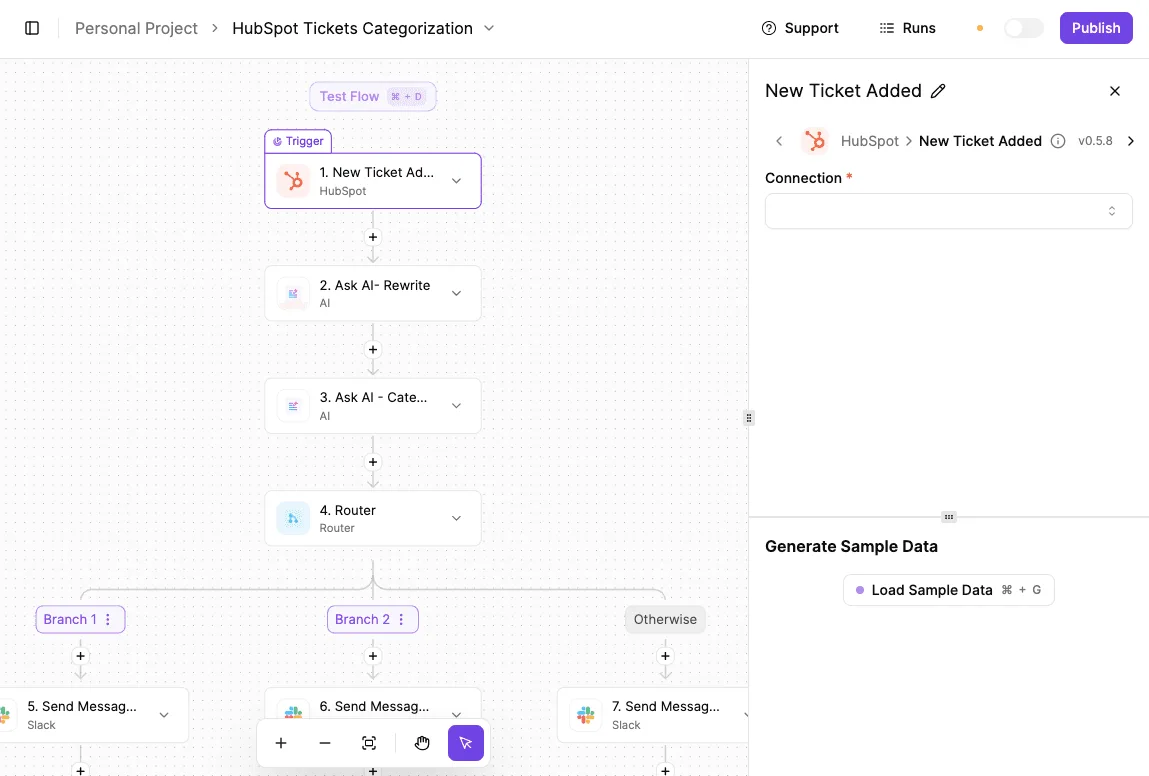 Anything that matches no branch falls into "Otherwise," so nothing gets dropped silently. Next, you build it once, test it on sample data, and let it run. The hand-copying stops, and so does the cost you were never billed for. ## Picking and trialling a Fireflies plan on Monday Once the copying stops, the next job is making sure you don't pay for seats nobody uses, and six steps starting Monday get you there. The list shows the order and where the money first leaves your account, which is step four; nothing before it costs anything. 1. Count who truly records. 2. Run the free plan on two real weeks of meetings. 3. Log which limit you hit. 4. Compare annual and monthly totals for that headcount. 5. Re-check the pricing page before you pay. 6. Set a renewal reminder. Nothing in the first three steps costs money, and they settle most of what the last three decide. If a finance lead joins one call a month, they can read a shared transcript, so paid seats belong to people whose meetings need capturing, not everyone on the payroll. Skip this count and you pay for empty chairs every month. Use the free plan on ordinary meetings, not a tidy demo. Each time something stops you, whether a cap, a missing feature or a transcript you can't reach, write down the date and what you were doing. That log is your shopping list, and a limit you never hit isn't worth paying to remove. ### Re-checking Fireflies pricing before you buy Put annual and monthly totals for your counted seats side by side. Annual billing is typically cheaper per month but locks you in, so a team still unsure should weigh that. Then reopen the pricing page, because plans and limits change, and confirm that what you're buying matches your log. Last, set a reminder ahead of renewal, so the plan renews because you chose it and not because you forgot. ## Frequently asked questions ### Plans and who pays **Is Fireflies AI free to use?** Yes, there's a free plan, but it limits what you can store and which AI features you get. That means it works for testing the product on a few meetings and is a poor guide to what a working team will need. Run your real meetings through it before you decide, and note which limit you hit first. **Does Fireflies charge for guests or viewers?** Attending a meeting that Fireflies records isn't the same as holding a paid seat. Whoever logs into your workspace and uses it as a member is where the cost lands, so count those people, not everyone who appears on a call. Before you buy, check how your plan treats people who only read shared transcripts, because that's the number that quietly changes your bill. ### Cancelling and refunds **Can I cancel Fireflies or get a refund mid-term?** You can cancel from your account settings, and doing it before the renewal date is what stops the next charge. A refund for time already paid is a separate matter governed by Fireflies' terms, so read them before committing to a long billing term. If you pay annually, assume you may not get the unused months back. ### Discounts and currency **Does Fireflies offer discounts for education or nonprofits?** On the pricing page, neither gets a standing discount, so I won't promise one. Ask Fireflies sales directly and get any discount in writing, with the term and seat count it applies to. The worst case is a "no," and it costs you one email. **Are Fireflies prices the same in every currency?** Don't assume the same number carries over: the prices on the page are quoted in one currency. Look at the total at checkout before you confirm. If your card is in another currency, your bank may add a conversion charge on top, which makes the real price higher than the listed one. ## Related reading - [Grok Pricing 2026: Every Plan, Rate, and Real Cost](https://www.activepieces.com/blog/grok-pricing-2026-vs-gpt-for-enterprise-teams) - [Dropbox Pricing 2024: Every Plan and Hidden Cost Compared](https://www.activepieces.com/blog/dropbox-pricing-2024-every-plan-and-hidden-cost-compared) - [Automating Meeting Intelligence: Fireflies 🤝 Activepieces](https://www.activepieces.com/blog/automating-meeting-intelligence-fireflies-activepieces) ## References - [Fireflies](https://guide.fireflies.ai/articles/9606045468-fireflies-billing-terms) - [Fireflies Guide](https://guide.fireflies.ai/articles/2114151875-learn-about-ai-credits)Doing nothing, meaning leaving the default monthly term on, costs you more than any feature upgrade would.