### Model and vector store bills sit outside the plan Token prices have fallen a long way. [CostMyAI](https://www.costmyai.com/trends/openai-pricing) tracks OpenAI's flagship input price falling from $30 per 1M tokens in March 2023, meaning you pay less per input token today. It reached $10 in November 2023, $5 in May 2024 and $2.50 in August 2024. 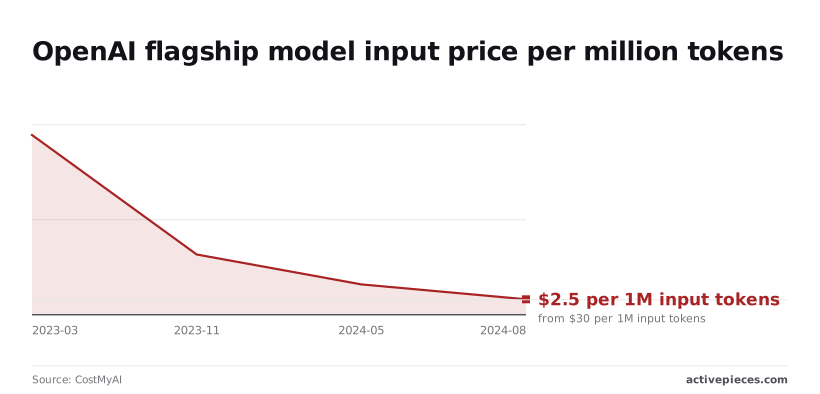 **That's a 92% drop**. CostMyAI notes that output at $10 per 1M is four times the input rate, so long agent answers dominate the invoice. ### Self-hosting labour and upgrades On Railway, per [deploys.run](https://deploys.run/), a small deployment costs $15 for the app, $12.75 for Postgres and $5 for egress. The $5 Hobby plan fee is cancelled by $5 of included usage, so the total is $32.75 per month.  Cheap as the $32.75 total is, it covers no one's time for patching, backups or version upgrades, and those hours are your real hosting cost, so **you cannot actually avoid labor expenses**.  If your security team requires role-based access and single sign-on, confirm them per tier before you commit. The next tier's price then becomes your actual entry price, and the jump can be steep. Check whether a flow can pause for human sign-off before the agent writes to another system. Where it can't, you build that step yourself, and the same goes for any app without a ready integration. ## Flowise against the closest agent builder alternatives If you want to self-host and build agents visually, Flowise suits you. Its rivals differ mainly in how many apps they reach, whether a human can approve an action, and what each run costs. To see which gap you would otherwise fill yourself, compare the five side by side in the table below on those four points. | Platform | Apps the agent can act in | Human approval | Self-hosting | How pricing scales with runs | |---|---|---|---|---| | Flowise | Built-in nodes plus custom tools you write | Available through human-in-the-loop steps in agent flows; you design the approval path | Open source, run on your own infrastructure | Self-hosted has no per-run fee; cloud plans are limited by predictions and storage | | Langflow | Components for common models and tools, extensible with custom code | Not a core feature; expect to build it | Open source, run on your own infrastructure | Self-hosting has no per-run fee; hosted cost depends on your deployment | | n8n | Large integration library across business apps | Approval steps can be added to workflows | Source-available, self-hostable | Cloud plans are metered by workflow executions | | Zapier Agents | Very broad app catalog | Review controls exist, inside Zapier's own model | Not self-hostable | Usage is metered against Zapier's task and activity allowances | | Activepieces | AI agent step works across its 741 integrations ([pieces](https://www.activepieces.com/pieces)) | Approval steps can pause a flow for a person | MIT-licensed core, self-hostable | Cloud plans meter credits, 1,000 a month on Free, with unlimited flows on every plan; self-hosting carries hosting labour instead | Flowise is stronger when the agent is mostly about language models: retrieval over your documents, chained prompts, and a canvas your team can read. Because it's open source, you can run it inside your own network, which matters when prompts or documents can't leave your control. You then pay in engineering time, not in per-prediction fees. ### When another agent builder beats Flowise When the agent must act inside many business apps, n8n and Zapier Agents start with broader coverage, so you write fewer custom integrations. If a person must approve actions before they run, choose a tool where that step is a first-class part of the flow. Activepieces has an MIT-licensed core and 741 integrations in the [packages/pieces/community directory](https://github.com/activepieces/activepieces/tree/main/packages/pieces/community) of its GitHub monorepo, roughly 60% of them community-contributed, so its app coverage is a directory you can count. If you want no servers to maintain at all, Zapier Agents removes the hosting work, at the cost of self-hosting and of pricing tied to its usage allowances. ## Choosing between Flowise Cloud, self-hosting and an alternative Choose by the job: Flowise suits LLM prototyping and RAG chat, while agents that act across many business apps with human approval belong on a workflow platform. Hosting the servers yourself is the step that changes the bill most, so it comes after the job. The table below maps each job to its best fit. | Job | Best fit | Why | |---|---|---| | LLM prototyping | Flowise Cloud | No servers to set up, so you test prompts and models without spending engineer time on hosting. Prediction and storage limits are the cost to watch as usage grows. | | RAG chat | Self-hosted Flowise | You control the vector store and document storage, so storage caps stop being the constraint. The cost moves to your own upkeep. | | Agents acting across many business apps with approval | Workflow platform | Approval steps and app integrations are built in. In Flowise you would build and maintain both yourself. | | Team with no engineer time | Flowise Cloud, or a workflow platform if the agent must act in business apps | Self-hosting needs someone to patch, back up and monitor it. Without that person, pay for hosting. | If your job is a chat flow over your own documents, or a prototype you need running quickly, pick Flowise. It gives you a visual builder for those, and the cloud plans spare you the hosting. The cost is that you pay by predictions and storage, so a popular chatbot raises the bill with every conversation. Self-host if you have an engineer who will own the deployment, and your data or volume makes plan limits uncomfortable. The software is free, but patching, backups and uptime become your labour, and that labour is the real price. When the agent must update records, send messages or create tickets in several business apps, and a person must approve before it acts, look at a workflow platform. You build those integrations and approval gates yourself in Flowise, so a workflow platform removes work you would otherwise carry. If that describes your job, Activepieces Cloud's free plan gives you 1,000 credits a month, unlimited flows and up to 5 users with no card needed, at https://cloud.activepieces.com/sign-up. ## Pricing review before commitment Whichever platform you shortlist, price it from your own traffic before you sign, and do it in this order, because each step feeds the next: 1. Re-check the live pricing page. 2. Estimate monthly predictions from real traffic. 3. Add model and vector store costs. 4. Trial the free tier. 5. Ask sales about enterprise terms. ### Re-verify the pricing page Because cloud tiers keyed to prediction and storage limits get revised, a comparison article, this one included, is only a starting point. Read the current page, note which limits are hard caps and which trigger overage billing, and record the date you checked. If the page doesn't say what happens when you exceed a limit, treat that as an open question for step five, not a safe assumption. ### Estimate predictions and model spend Pull request logs from whatever currently handles the workload and count the calls that would hit an agent, not page views or sessions. **A single user conversation can generate several predictions, so counting conversations will understate your bill.**  Then price the integrations the platform doesn't include: tokens billed by your model provider, and the hosting for your vector store. Those costs scale with usage independently of the plan tier, so they can outgrow the subscription itself. ### Testing the Flowise free tier before paying Run a realistic slice of traffic through the free tier and watch how fast the prediction and storage allowances drain. Check whether approval steps and your integrations work out of the box, since any gap you fill with custom code is labour you must add to the total. Only then take the usage figures to sales and ask for enterprise terms in writing. ## Frequently asked questions ### Is Flowise really free? Is Flowise really free? The software is free, the operation isn't. Flowise is open source, so you pay no licence fee to run it, but you do pay for the server, the database, the model API calls and the engineer who keeps it patched. Those costs land on your team instead of on an invoice from Flowise. ### Can I self-host Flowise without paying for a licence? Yes, for the open source build you can deploy it on your own infrastructure without a licence charge. What you take on is everything the cloud plans would otherwise cover: upgrades, backups, uptime, access control and security review. If your organisation needs approval steps before an agent acts, or connectors Flowise doesn't ship, you build and maintain those yourself. Price that labour before you call the deployment free. ### Does Flowise charge per user or per prediction? On its cloud plans the meter is predictions and storage, not seats. A prediction is a call to a flow, so a chatbot with heavy traffic consumes the allowance faster than a large team that rarely runs anything.  Estimate your monthly run volume first, then compare tiers against that figure. Check the current pricing page for the exact limits, because they change. Does Flowise offer annual billing or startup discounts? We have no confirmed terms for either, so don't budget around them. Ask sales directly and get any annual or early-stage discount in writing, along with the prediction and storage limits it applies to. A discount on a tier that your volume outgrows saves you little. What happens when I exceed my Flowise prediction limit? We haven't confirmed how Flowise enforces the cap, and the behaviour matters. It may throttle requests, block them or bill overage, and each outcome has a different cost to a live customer-facing agent. Ask for the overage policy in writing before launch, and set usage alerts so you move up a tier before the limit is reached. ## Related reading - [Self-Hosted vs Cloud Security Automation 2026: Cost & Data Residency](https://www.activepieces.com/blog/self-hosted-vs-cloud-security-automation-for-2026) - [Flowise Alternatives in 2026: Top Picks Compared](https://www.activepieces.com/blog/flowise-alternatives-in-2026-top-picks-compared) - [Flowise vs n8n (2026): Which Tool Should You Use?](https://www.activepieces.com/blog/flowise-vs-n8n-2026-which-tool-should-you-use) ## References - [deploys.run and iTechGuides](https://deploys.run/) - [CostMyAI](https://www.costmyai.com/trends/openai-pricing)The plan fee is not the bill that matters.