# Formstack Pricing 2026: Plans, Costs & Features
By Desmond Achebe · 2026-10-25 · Source: https://www.activepieces.com/blog/formstack-pricing-2026-plans-costs-features
---
[Formstack](https://formstack.com/pricing)'s [pricing page](https://formstack.com/pricing) lists two plans, which is easy to compare whether you're a form-heavy team or one wiring submissions into tools like [Activepieces](https://www.activepieces.com).
Forms is $83 to $99 a month, with the lower figure for annual billing and the higher for monthly, so you **save roughly $192 per year** by committing annually.
Suite is $250 to $299, with the lower figure for annual billing and the higher for monthly, meaning the annual plan costs about $588 less per year.
Before you add a single user, **Suite already costs about three times Forms**. The plan you pick matters more than the billing cycle.
## Formstack pricing: every current plan in one table
### What Formstack is and what the price covers
Formstack is a hosted form builder: you design a form, collect submissions, and route them to other systems. The listed price covers the plan only, not the surrounding work.
$83 a month, billed annually, is the Forms figure most buyers see first, according to Formstack. It's a "starting at" price, so it's the floor, not a quote for your use case.

Per Formstack, the annual rate reflects the "Save 2 months with annual plans" offer, meaning you're charged for only 10 months of service.
At $99 a month, twelve months costs $1,188. Paying annually brings that to about $996, a saving of roughly $192 a year. Go monthly only if you expect to leave within a few months.
### The plan table, checked 25 October 2026
Checked on 25 October 2026, [Formstack's pricing page](https://formstack.com/pricing) lists Forms at $83 a month on annual billing or $99 monthly, about $996 a year, and Suite at $250 a month on annual billing or $299 monthly, $3,000 a year.

Take from these the size of the jump between plans, not a feature checklist: I've left out limits the page did not confirm.
$3,588 a year is what Suite costs on monthly billing, Formstack reports. Choosing annual billing saves about $588, three times the Forms saving, so the billing decision is worth more the higher you go.
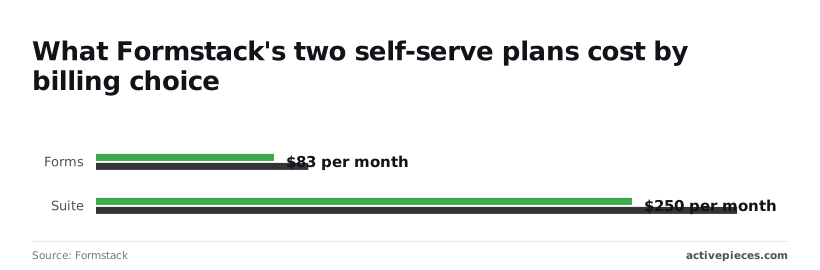
Budget at the Suite annual figure if your team needs anything beyond a basic form, then check what each plan includes before you sign.
### Which plans have no public price
Nothing above Forms and Suite has a published price. I found no figure for any higher tier, so I can't cost an enterprise or custom-volume quote here.
A price you can only learn on a sales call gives you nothing to compare, budget or check against a competitor.
If sales routes you to one, **ask for the per-month figure in writing, plus every add-on, before treating the listed $83 as your cost.**
## Realistic Formstack costs and the limits buyers hit
**Treat the $83 as the floor** of your bill, not the middle of it. The three cases below show how far each type of buyer sits above it, which means your actual cost will fall somewhere in that range above the baseline.
Read the figures as my estimates, built from the listed price and the card limits on [Formstack's pricing page](https://formstack.com/pricing). Anything beyond $83 needs a written quote, so you can't get a definitive price online if your needs exceed this threshold.
| Scenario | Plan needed | Builder users | Estimated monthly / annual cost | Limit hit |
|---|---|---|---|---|
| Solo user | Forms | 1 | $83 / $996 listed floor | Submissions per form |
| Five-person team, payments and integrations | Suite | 3 | $250 to $299 a month | Builder seats |
| High-volume department | Top Suite card | 3 | $250 to $299 a month | Submissions and storage |
_Prices and plan limits checked against [formstack.com](https://formstack.com/pricing) on October 25, 2026._
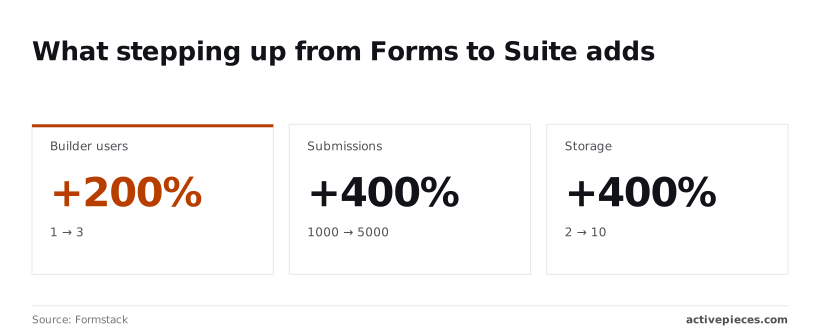
Look at the table and only the solo case lands near the listed price. The other two rows depend on a quote, so budget from those rows, not from the headline.
If you're a solo operator, one builder user is enough, and $83 a month works out to $996 a year. The catch is the submission cap per form, which starts at 1,000.
At 1,000 submissions, the effective cost is **about 8 cents per submission** if you fill the cap, and more if you don't.
When more than three people on a five-person team edit forms, the team either pays for extra seats or routes edits through one bottleneck person. Builder users run from 1 to 3 depending on the card.

Payments and integrations are the reasons to buy, so price the Suite tier from the start, not Forms.
5,000 submissions per form is the upper end, which sounds generous until one intake form serves a whole department. Storage runs from 2 to 10 depending on the card, so uploads and generated documents can exhaust the smaller allotments first.
Model your busiest month, not your average one, because hitting the cap forces an upgrade mid-term.
### Formstack plan tiers, add-ons and renewal terms
What each tier adds follows the same stepping-up pattern:
- Builder users rise from 1 to 3, so collaboration is a tier decision.
- Submissions per form rise from 1,000 to 5,000, so volume is too.
- Storage rises from 2 to 10, so document-heavy workflows cost more.
Ask three questions before signing. Does the quoted tier include each feature you require, or is it an add-on? What happens to the price at renewal? And what is the overage rule when a form passes its cap?
Without those answers in writing, the $83 is only a starting point for the real calculation, and your actual final price remains unknown until you provide those details.
## Formstack against Jotform, Typeform and Cognito Forms
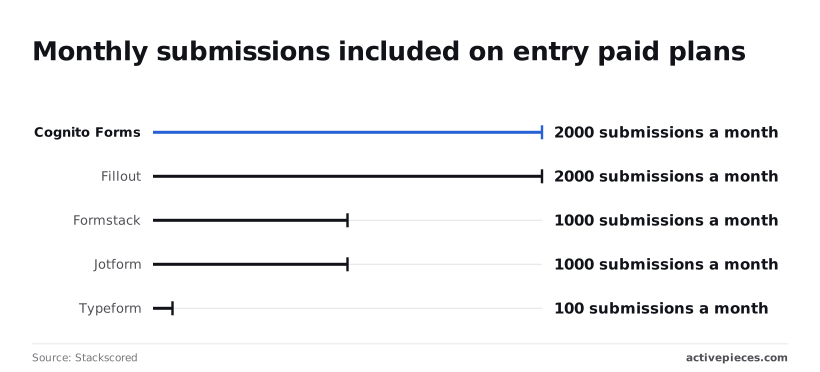
With final prices unknown, a per-submission comparison is the fairest start. Formstack's $83 spread across its 1,000 submissions per form is about 8.3 cents each if you use every one, and the rivals differ most in how many submissions their entry plans allow.
### Comparison table on price, limits and features
Read the submission column first, because it decides how soon you outgrow an entry plan and get pushed into the tier that carries payments and integrations. The table sets the four side by side.
| Tool | Entry price | Payments and integrations tier | Entry submissions a month | Documents and signatures |
|---|---|---|---|---|
| Formstack | $83 | Quote the tier you need, not the entry plan | 1,000 | Document and signature features sit above entry |
| Jotform | Compare at your volume | Confirm which tier unlocks payments | 1,000 | Confirm per tier |
| Typeform | Compare at your volume | Confirm which tier unlocks integrations | 100 | Confirm per tier |
| Cognito Forms | Compare at your volume | Confirm which tier unlocks payments | 2,000 | Confirm per tier |
According to [Stackscored](https://www.stackscored.com/pricing/form-builders/formstack/), Cognito Forms and Fillout, another form builder, each allow 2,000 submissions a month, so either gives you double Formstack's headroom before you hit a ceiling. Formstack and [Jotform](https://www.jotform.com/pricing) both sit at 1,000, which means neither is cheaper on volume alone.
**With only 100 submissions allowed**, Typeform can run out within days on a form with modest public traffic, and the plan you actually need isn't the entry one.
Competitive, not generous: that is the fair description of Formstack's allowance. Its case rests on what comes with the plan, which the next two subsections test.
### When Formstack is worth the premium
It pays off when one workflow needs several things at once: a payment, a generated document, a signature and a handoff to another system. Buying those separately from a cheaper builder means paying for each connector, and you maintain the glue yourself.
**Price the bundle, not the form**. If the tier with those features is still near your budget, the 1,000-submission ceiling is the next check: at 8.3 cents each, a form that regularly exceeds it gets more expensive per run, not cheaper.
### When a cheaper form builder is enough
If you collect contact details, event signups or feedback, with no payments and no signatures, the premium buys nothing you'll use. A builder allowing 2,000 submissions, as Cognito Forms does, covers twice the traffic.
The exception is Typeform: its 100-submission entry allowance only suits low-volume surveys. Past that, expect to move up a tier, so get that tier's price in writing before you commit.
## Cutting Formstack integration spend with Activepieces
You can skip that tier and let [Activepieces](https://www.activepieces.com), an automation tool with 744 integrations counted straight from its open-source monorepo on GitHub, do the routing from a lower plan.
That applies if the main reason you're upgrading is to push submissions into a CRM, a spreadsheet, an inbox or a database.
Setting it up takes one trigger and a few steps: a Formstack submission fires the flow, which cleans or reshapes the data and writes it to each destination, and on the Free plan, which includes unlimited flows and 1,000 credits a month, that whole path costs 1 credit per submission.

Everything on the left is plumbing you can move; everything in the box is a feature you still buy from Formstack.
### What it can take over
Here the arithmetic is simple, and it favors automation. A higher Formstack tier bundles integrations into a flat plan price whether you use one connector or ten.
Activepieces counts the run, not the steps inside it: its pricing page lists 1 credit per flow run, any number of steps, so a submission that passes through three steps or thirty costs 1 credit, and the Free plan includes 1,000 credits a month, the same 1,000 as Formstack's entry submission cap.

Zapier's pricing page bills per task and Make's bills per module, so splitting a messy routing job into smaller, safer steps raises the bill there; here the cost stays put.
A team with one form feeding one CRM can move that routing out and stop paying for the tier's connector list.
Between the trigger and the destination, the flow does more than a native connector usually does: a step can rename fields, split a full name into two, drop a test entry, or send the same record to a CRM, a sheet, an email and a database at once.
That fan-out is the point of the four destinations in the figure: one submission, several systems updated, no one re-keying data.
Before you commit, check what the automation platform itself charges at your submission volume. Run the numbers per submission, including every step the flow performs. If the platform's pricing is only clear after a sales call, treat that as a cost you haven't yet seen.
### What it cannot replace
Stop at the boxed items in the figure: they are the limit. Payment collection, document generation and eSignatures belong to the form product itself.
They depend on how Formstack captures a payment, builds a file, or records a signature, and an outside flow can only react after the fact. It can't replace the capability.
These features were often the reason for the purchase in the first place. If your form takes payment or produces a signed document, the higher tier is still on your list, and automation only shrinks what else you pay for around it.
The same goes for submission volume: a flow can move records, but it doesn't raise the limit on how many Formstack accepts.
So the test is narrow. If integrations were the reason for the upgrade, price the lower plan plus Activepieces, whose Free plan covers 1,000 credits a month and whose paid plans start at $20 a month for 10,000.

If payments, documents or signatures were, price the Formstack tier you need and treat the automation as a saving on top.
## What to check before buying Formstack on Monday
Work out your real requirements first, then read the price list, because the plan you need is rarely the plan on the pricing page's front row. The sequence below turns that into an order of operations, and each step feeds the next.
1. Count your forms, users and monthly submissions.
2. List the integrations, payments and documents the forms must handle.
3. Match both lists against the plan table.
4. Ask about overages and renewal.
5. Trial a real form, not a demo.
You can do steps one to three alone, at a desk. Steps four and five need Formstack, and the sections below take them in that order.
### Formstack usage numbers to gather first
Start with volume, because every other limit is a multiple of it. Count the forms you run today, the people who build or review them, and the submissions per month in your busiest month, not your average one.
Size a plan to the average and it looks cheap until the busy month arrives, when you pay overage or get pushed up a tier.
Then list what each form must do. Mark every form that takes a payment, produces a document or collects a signature, and name each system a submission has to reach.
Size a plan to the average and it looks cheap until the busy month arrives, when you pay overage or get pushed up a tier.
These features are usually in higher tiers or add-ons, so each mark is a potential line item.
Put the marked list next to the plan table and find the cheapest tier that covers all of it. That tier's price, plus any add-ons, is your real entry price. The listed one is only a starting point.
Finish by dividing the annual total by your yearly submissions. That gives a cost per submission you can compare against what the manual process costs you now.
### Questions to put to Formstack sales
When pricing needs a conversation to interpret, it deserves a written answer, so ask for the replies by email.
Ask what happens when you pass the submission limit: whether Formstack bills per extra submission, forces an upgrade, or simply cuts you off. A cutoff on a payment form means lost revenue, so the answer is more important than the rate.
Ask which of your marked features the quoted tier has and which Formstack bills separately. Ask what the renewal price will be, and whether the first-year rate holds. A discount that disappears at renewal changes your cost per submission in year two.
Last, build one of your real forms in a trial, with its payment, document and integration steps connected. If a feature you need is locked in the trial, that's the answer to which tier you're buying.
## Frequently asked questions
Starting with the cheapest number there is, zero, the short answers below cover the questions that decide whether the listed price is the price you pay.
Budget from day one instead of waiting for a free tier to prove itself, because Formstack's pricing is built around paid tiers and a trial rather than a permanent free plan.
If you only need a handful of simple forms with no payments or signatures, a free-tier competitor will cost you less, and the comparison belongs in your spreadsheet before you start a trial.
### Is there a Formstack free trial?
Yes, Formstack has a trial, but it's a test of one tier, not of the product.
Check which features are switched on during the trial before you build anything. If your payment or document workflow is locked, you haven't tested the thing you're buying, and the tier that unlocks it is your real price.
### Can I get a refund if I cancel Formstack?
Assume cancelling stops future billing and doesn't return what you've already paid, unless your contract says otherwise. That matters most on annual billing, where a mistaken tier choice is locked in for the whole term.
Read the refund and renewal terms in your order before you pay. Then put the renewal date on a calendar, because a missed date can cost you a full extra term.
### Does Formstack offer nonprofit discounts?
Though Formstack has offered nonprofit pricing, discounts of this kind are typically arranged by contacting sales rather than shown on the public pricing page. That means the number you can plan around is the one in a written quote.
Ask for the quote for the tier you need, with add-ons included, so the discount applies to the real total and not to the entry plan you'll outgrow.
### Is Formstack priced per user or per form?
Neither label fits cleanly. Plans are tiered mainly by features and usage limits, with caps on things like users, forms or submissions depending on the tier.
Grow past a cap and you don't pay a little more; you move to the next tier. So count your builders, your forms and your expected monthly submissions up front, and price against the tier whose limits you'll hit within the year.
## Related reading
- [Get Realtime Notifications About Stripe Failed Payments on Slack](https://www.activepieces.com/blog/get-realtime-notifications-about-stripe-failed-payments-on-slack)
- [GitLab Pricing in 2026: What Teams Pay](https://www.activepieces.com/blog/gitlab-pricing-in-2026-what-teams-pay)
- [Snowflake Pricing Explained for 2026 Data Teams](https://www.activepieces.com/blog/snowflake-pricing-explained-for-2026-data-teams)
## References
- [Stackscored](https://www.stackscored.com/pricing/form-builders/formstack/)
- [Formstack](https://formstack.com/pricing)