### Reducing latency between file arrival and action Polling intervals in rigid MFT systems often create artificial delays, whereas modern triggers react to the file system state in near real-time. When a legacy ERP system like SAP drops a CSV into a watched folder, a lightweight trigger detects the `File Created` event instantly. This immediate hand-off to a cloud function or a database prevents the "batch-processing lag" that often results in stale data appearing in customer-facing dashboards. ### Maintaining security through modern SSH/SFTP protocols Agility doesn't require compromising on encryption, as modern triggers utilize the same SSH protocols that underpin enterprise-grade security. By using public-key authentication rather than shared passwords, a trigger ensures that even if a specific workflow is compromised, the attacker doesn't gain lateral movement capabilities across the entire file server. A closed platform asks a security team to take its maturity on faith, which often stalls reviews before go-live. Activepieces ships an MIT-licensed core that allows teams to clone the repository and trace the queue architecture before deciding to run it self-hosted or air-gapped. Transparent codebases provide the evidence required to close a review where a vendor's word only reopens it, which is why major financial and service firms run these tools in production. ## Comparing the cost of automation platforms Operational security is only sustainable if the monthly overhead of the automation platform doesn't exceed the efficiency gains of the integration itself. ### Comparing Pro Plan monthly costs Monthly subscription fees for mid-tier plans vary by over 100% between competitors, so customers must carefully evaluate whether the premium price reflects actual added value. $29.99 per month is the starting price for the Pro plan at Zapier, according to MagpieAI. This represents the baseline cost for you if you need multi-step logic for simple FTP watchers. 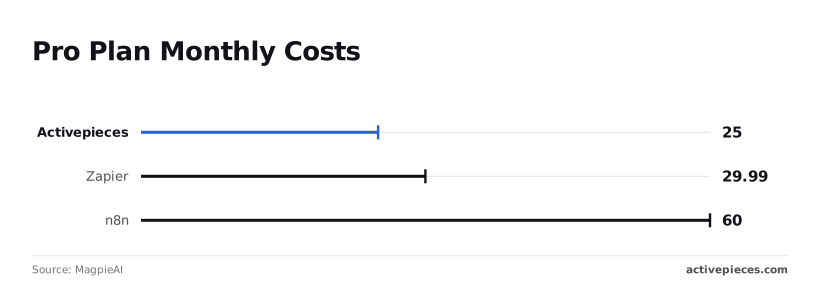 [Arahi](https://arahi.ai/blog/n8n-pricing-explained-2026)’s analysis puts the self-hostable automation engine n8n at a higher entry price of 60 per month. At 25 per month, a third option enters the market to provide a more accessible price point, according to [Magpieai](https://magpieai.store/tools/activepieces). **This provides the lowest barrier to entry for you if you're prioritizing raw cost-efficiency in your file-handling stack.** These figures represent the fixed cost of keeping the lights on before a single file is moved. ### Evaluating value for high-volume file transfers A low monthly fee is deceptive if the platform charges a premium for every individual file detected on the server. MagpieAI notes that because Zapier’s 29.99 tier is often tied to a strict task quota, a high-frequency FTP trigger checking for new CSVs every minute can exhaust a monthly allowance in days.  Conversely, platforms that offer higher execution limits on their 60 or 25 tiers allow for polling intervals that are granular enough to mimic real-time processing without triggering overage alerts, which means developers can maintain seamless data synchronization without the risk of unexpected service interruptions. ### Scaling file triggers across multiple directories Scaling legacy integrations requires a platform that doesn't penalize you for adding additional watchers to diverse directories. **Ignoring the long-term cost of execution density by choosing a plan based solely on the 25 or 60 sticker price is a mistake.** This is the only metric that determines if a file-server-to-cloud pipeline remains profitable at scale. ## Three technical paths to triggering file-drop workflows The technical architecture of an FTP trigger determines whether a pipeline remains a responsive asset or becomes a silent point of failure. ### Building custom Python or Bash polling scripts Writing a custom script allows for precise control over the handshake and file-validation logic. A built-in delay exists between the file landing and the workflow starting. Because these scripts require a dedicated environment to run, you inherit the responsibility of monitoring the host's uptime and managing library dependencies.  ### Cloud-native triggers like AWS Lambda or Azure Logic Apps stacks Serverless functions eliminate the need for server management by executing code only when a specific event occurs, which reduces operational overhead. In this model, an AWS Lambda function can be paired with an Amazon S3 bucket notification to start a workflow the moment a file is moved from a legacy server to cloud storage. AWS Lambda is a compute service that runs code in response to triggers. While this provides near-instant execution, it often requires complex identity and access management configurations. ### Automated integration platforms for non-developers Low-code platforms provide pre-built connectors that monitor file servers via a graphical interface, allowing you to maintain the integration without writing code. 1. Custom Script (Python/Bash cron job) 2. Cloud Function (AWS Lambda/Azure Functions) 3. Low-code Platform (Zapier/Make) **These options represent a spectrum between high-control manual labor and high-cost automated convenience.** The decision rests on whether you value the granularity of the code or the speed of the deployment. ## Automate file processing with Activepieces workflow triggers Activepieces provides an MIT-licensed core that connects legacy file servers to modern APIs by using a dedicated FTP/SFTP trigger to monitor directory changes. This approach allows you to bypass the rigid scheduling of traditional managed file transfer suites. Downstream applications receive data the moment a file is successfully written to the disk. ### Connecting your SFTP/FTP server credentials To establish the initial handshake, you configure the SFTP integration by providing the host address, port, and authentication credentials. Validating this connection immediately confirms that the automation engine has the necessary permissions to traverse the remote file system. Because Activepieces supports self-hosting, these credentials remain within your own infrastructure. This satisfies security requirements that often block third-party cloud integrators from accessing sensitive internal file servers. ### Configuring the SFTP folder path and polling interval The trigger requires a specific directory path to watch and a polling frequency to determine how often the engine checks for new uploads. Defining a precise sub-folder ensures the workflow only reacts to finalized reports rather than temporary files.  Selecting a shorter polling interval minimizes the lag between a file landing on the server and its data appearing in a web application. This turns a batch-oriented legacy system into a near-real-time event source. ### Mapping file data to Slack, Google Sheets, or CRMs Once a file is detected, the workflow passes the file metadata or content into subsequent steps through a visual mapping interface. Slack sends a notification to a specific channel containing the file name and a download link. Google Sheets appends the raw CSV data from the FTP server into new rows, which centralizes disparate logs into a collaborative spreadsheet for analysis. Salesforce uses the parsed file content to update lead records or create new attachments. This ensures the CRM reflects the most recent documentation without manual entry. ## The Monday morning file automation checklist Auditing a file server for automation opportunities requires identifying the specific points where data remains static despite being needed elsewhere. The following checklist provides a framework for evaluating which directories are currently serving as dead ends rather than data conduits: * Identify folders where files sit for more than 24 hours, which indicates a breakdown in real-time processing and suggests that downstream systems aren't effectively synchronized. * List manual data entry tasks triggered by file arrivals, which identifies the specific workflows where an automated parser could replace human transcription. * Check for 'shadow' FTP accounts used by single individuals, as these undocumented access points represent security vulnerabilities that bypass centralized audit logs. Completing this audit provides the technical requirements for the first set of automated triggers. ## Frequently asked questions about FTP triggers ### Can I trigger workflows from an encrypted SFTP server? Standard SSH File Transfer Protocol (SFTP) connections are compatible with triggers. They operate over a single secure channel, which means the automation engine can monitor directory changes without the credential exposure risks inherent to legacy FTP. If your automation tool supports private key authentication rather than just simple passwords, you can automate transfers from hardened production environments where interactive logins are strictly forbidden. ### How do I prevent the same file from triggering twice? The most reliable way to prevent duplicate execution is to configure a "post-processing" action. This action moves the file to a processed sub-folder or appends a timestamp to the filename. This ensures the trigger logic no longer sees the file as a new event. Relying solely on "last modified" timestamps is risky. A system clock drift of even a few seconds can cause a trigger to miss a file or process it twice during a polling cycle. ### What is the maximum file size an FTP trigger can handle? The trigger itself is typically a lightweight metadata check that has no size limit. The subsequent "Get File" action is limited by the memory buffer of your automation worker. If your tool lacks a "streaming" or "chunking" mode for large binaries, attempting to pull a multi-gigabyte database export will crash the execution instance and leave the workflow in a hung state. ### Do I need to open firewall ports for a workflow trigger? You must allow inbound traffic on the specific port used by your server, typically port 22 for SFTP. This traffic must come from the static IP addresses of your automation provider so that their cloud-based runner can reach your internal file system. If your provider uses a shared pool of dynamic IPs, you're forced to choose between a dangerously open firewall or deploying a self-hosted agent inside your network to bridge the gap. ## Related reading - [Asana Automations: A Quick Guide for Modern Teams](https://www.activepieces.com/blog/asana-automations) - [Latest Automation Tools to Streamline Workflows](https://www.activepieces.com/blog/latest-automation-tools-to-streamline-workflows) - [Marketing Automation Benefits: How Workflows Change](https://www.activepieces.com/blog/marketing-automation-benefits) ## References - [MagpieAI](https://magpieai.store/tools/activepieces)**For the vast majority of file-based workflows, the heavy infrastructure of an MFT suite provides diminishing returns on security while significantly inflating the total cost of ownership.