# GitHub Models Pricing 2026: Free Tier and Paid Costs
By Kofi Mensah · 2026-11-10 · Source: https://www.activepieces.com/blog/github-models-pricing-2026-free-tier-and-paid-costs
---
## What GitHub Models pricing is
### GitHub Models pricing in brief
**The free limits are a testing allowance, not a production tier, so an app with real users will hit them and fail with rate-limit errors rather than degrade gracefully.**
### What GitHub Models is, in one paragraph
GitHub Models is GitHub's hosted catalog of AI models from several vendors, reachable through a playground, a single API and your GitHub account.
It can't make a prototype production-ready on its own, and it's not a model maker. It's a gateway where you compare models and call them with a GitHub token.
If you wire one into [Activepieces](https://www.activepieces.com), the gateway role matters: Activepieces runs the call you define, and GitHub still meters it.
The prototype will run happily on the free allowance, and Activepieces' own free plan, with unlimited flows and 1,000 credits a month, won't be the constraint. The bill only appears when real traffic does.
### How we verified GitHub Models pricing
I read GitHub's pages on 10 Nov 2026, and the service had already been retired.
Which model you call decides the cost. The pricing and billing docs show that GitHub caps free use and meters paid use per model.
The changelog shows what has changed recently, so a rate or limit that moved after the check date is the first thing to re-verify.
## GitHub Models plans, prices, and limits
Every limit I couldn't confirm is marked as such instead of estimated. There are two access routes into GitHub Models, free rate-limited use and paid metered use, plus the entitlements that come with each Copilot plan.
### Plan table with check date
Start with the fit column: only the metered row is built for production traffic, and free use is a testing allowance. The table below shows what each route is for. "Unconfirmed" means I have no verified figure for that cell.
| Route | Price | Inclusions | Requests per minute and day | Tokens per request | Fit |
|---|---|---|---|---|---|
| Free use | No charge | Rate-limited model access | Unconfirmed | Unconfirmed | Prototyping and evaluation |
| Paid metered use | Per-token billing | Same catalog, billed on usage | Unconfirmed | Unconfirmed | Production workloads |
| Copilot Free | Unconfirmed | Unconfirmed | Unconfirmed | Unconfirmed | Light individual testing |
| Copilot Pro | Unconfirmed | Unconfirmed | Unconfirmed | Unconfirmed | Individual developers |
| Copilot Pro+ | Unconfirmed | Unconfirmed | Unconfirmed | Unconfirmed | Heavier individual use |
| Copilot Max | Unconfirmed | Unconfirmed | Unconfirmed | Unconfirmed | Highest individual tier |
I haven't checked any figure in this table against a dated read of GitHub's pages, so none should go into a budget as written.
### Per-model token rates GitHub publishes
On the metered route, GitHub publishes per-million-token rates for models. I have no confirmed rates to reproduce, so I won't list any.
A rate card from memory would look authoritative and could be wrong, and those rates are what set your bill once you leave the free allowance. Take them from GitHub's billing documentation on the day you size a workload.
Nor do rates tell you whether a Copilot entitlement covers API calls or only Copilot's own features. Test both against your real request volume before you rely on either.
## What GitHub Models Costs at Realistic Monthly Usage
At OpenAI's published rates, triaging issues with a bot costs **from $1.40 to $700 a month**. The gap comes from volume and model choice, so you can't predict your actual costs without specifying your scale and model first. Here's that test run on one workload.

Picture the bot reading each new issue and returning a label and a short routing note.
I assume 2,500 input tokens and 250 output tokens per issue, which covers the issue text plus a labelling prompt. These are my estimates, so swap in your own averages. Rates come from [OpenAI's pricing page](https://developers.openai.com/api/docs/pricing).
### Monthly bill on a small model
At $0.40 per million input tokens and $1.60 per million output tokens, the older GPT-4.1 mini was cheap. At 1,000 issues, that's 2.5M input and 0.25M output tokens: $1.40 a month. At 10,000 issues it is $14, and at 100,000 it is $140.
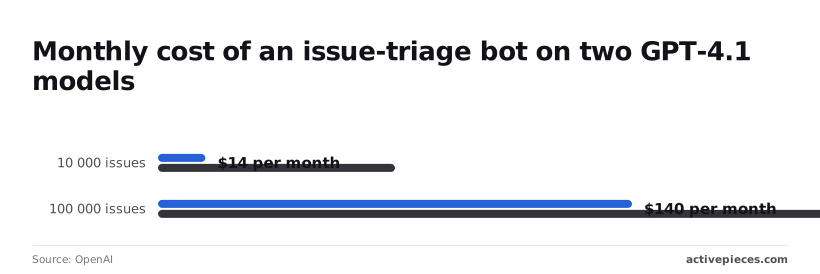
At 1,000 issues, the bill is too small to justify any design effort. At 100,000 it's still less than a monthly SaaS seat.
### Monthly bill on a larger model
Five times the small model on both: the older GPT-4.1 was priced at $2 input and $8 output per million tokens, so it ran five times as much as GPT-4.1 mini on this workload.
The same workload runs $7 at 1,000 issues, $70 at 10,000, and $700 at 100,000.
Because the ratio holds at every volume, the model choice is worth testing against your labels before you scale. If mini routes issues correctly, the larger model buys you nothing except a bigger bill.

Past it you're on the metered rate, and the free allowance is for testing, not production.
## Rate limits and costs in practice
When GitHub Models' free limits fail, they fail in predictable ways. GitHub throttles requests by minute and by day and rejects large prompts, and the fix is nearly always paid opt-in or a smaller request.
The table below shows each limit, what you see when you hit it, and what to do.
| Limit | What happens | Fix |
|---|---|---|
| Per-minute cap (Low and High tiers differ) | Burst traffic gets HTTP 429 errors | Queue and back off |
| Per-day cap | Requests fail until the window resets | Opt in to paid usage |
| Tokens per request | Oversized prompts are rejected | Trim or chunk input |
| Concurrency | Parallel calls are refused | Serialize workers |
| Paid opt-in | Stays free-only until enabled | Turn on metered billing |
| Org billing | Org members can't spend without it | Attach a billing account |
| Actions minutes | Workflow runs draw on a separate allowance | Watch runner usage |
When you hit a cap, you get a 429, not a degraded answer. Without retry logic, a demo that worked at your desk breaks the first time two people use it. Honor the retry hint and cap your worker count.
A model swap can change your ceiling, since limits also differ by model tier and by your account or Copilot plan.
If a long document fits on the vendor's page, it can still be refused here, because free-tier requests carry smaller input and output caps than the model's advertised context window. Chunk the input and cap your output length.
### Setting up GitHub Models billing and budgets
**Nothing is metered until you switch it on**, because paid usage is opt-in. Organizations need their own billing set up before members can spend. Set a budget alert at the same time.
Not all of the bill is token charges. Workflows that call models from CI also consume Actions minutes, and retries multiply both. Log every call so you can see the real cost per task.
## GitHub Models Compared With Its Closest Alternatives
For testing a prototype prompt, GitHub Models is the cheapest place, but the three alternatives below are where a workload with an uptime requirement belongs.
### GitHub Models comparison table with check dates
Compared here are GitHub Models, the hosted model catalog inside GitHub, Azure AI Foundry, Microsoft's platform for deploying models under enterprise controls, and the OpenAI and Anthropic APIs.
The table carries no dollar figures, because GitHub Models has been retired.
Take the pattern from it: only the first row is built for testing.
| | Free tier | Price per 1M tokens, mid-size model | Rate limits | Production SLA | Data handling |
|---|---|---|---|---|---|
| GitHub Models | Yes, as a testing allowance | Metered once you opt in, at the rate for the model you pick | Tight, aimed at experiments | None to rely on at the free level | Governed by GitHub's terms |
| Azure AI Foundry | Limited trial credit at most | Metered per deployment | Set per deployment, adjustable | Offered on paid deployments | Azure enterprise terms |
| OpenAI API | Little or none | Metered, for example GPT-6.1 Sol | Rise with usage tier | Available at higher tiers | API terms |
| Anthropic API | Little or none | Metered, for example Claude Sonnet 5.5 | Rise with usage tier | Available on committed plans | API terms |
Re-check each vendor's pricing page on the day you decide, and write that date next to your number.
Use GitHub Models while you're still choosing a model. One credential lets you try several vendors' models against the same prompt, and nothing is billed until you opt in.
Move to a direct provider when real users depend on the answer. A testing allowance can throttle you at the worst moment, and it gives you no SLA to point to. That's the point to pick a paid, metered provider.
## Run GitHub Models Calls in Workflows With Activepieces
It does nothing to what GitHub charges per call. [Activepieces](https://www.activepieces.com/blog/mistral-api-free-tier-limits-models-credits-2026) is an MIT-licensed automation platform with 747 integrations that can fire on a GitHub event and send an HTTP request to the GitHub Models inference endpoint. It's plumbing, not a discount.
### The task it automates
Don't expect Activepieces to choose a model, trim your prompts or lower your token count. It runs the call you define when an event arrives, and a plain run counts as 1 credit however many steps it has.
For the workload in the worked bill above, that means a trigger on a GitHub event and one HTTP step that posts the prompt to the inference endpoint with your token in the Authorization header. Without it, you'd write and host that glue yourself.
In the run below, a different job appears, revoking a Square payments OAuth token when an instance stops, but it has the same shape.
On screen, a trigger feeds a single HTTP step, with the POST method, the endpoint URL and the Authorization header set in the right-hand panel, and the JSON input and output for each run listed on the left.
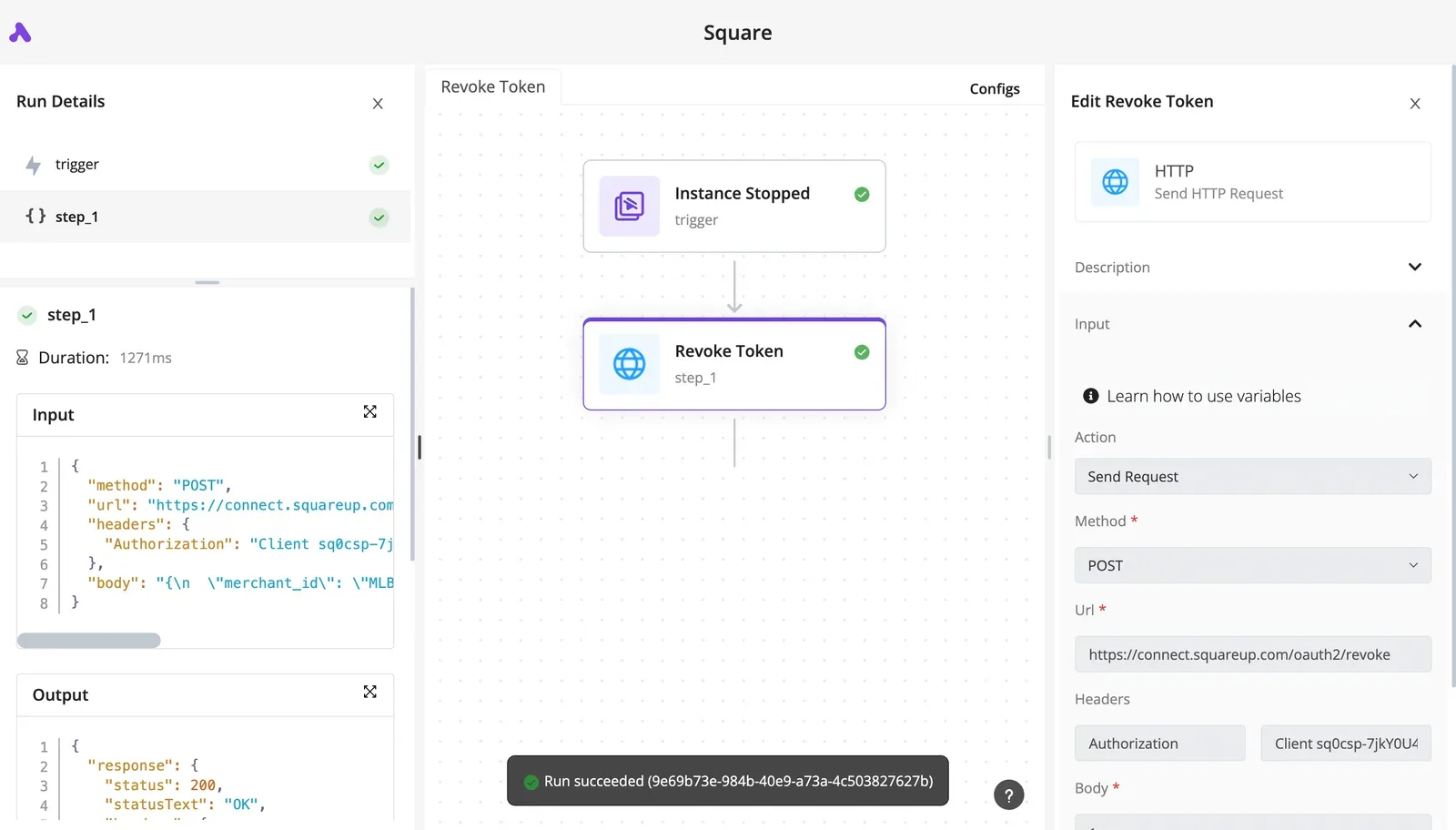
When a call fails or returns something odd, you can read exactly what was sent and what came back, and that run-details view is the part worth testing. Swap the URL and body for the GitHub Models endpoint and the structure holds.
### What it adds to the bill
On a separate invoice from GitHub, Activepieces adds a second cost, metered in credits: $0.007 a credit over the monthly allowance on the Plus and Team plans.
Reselling you a model settles the choice and the price before you've opened the product, so the small-versus-large model question, with its sizeable gap, is answered for you.
Activepieces runs the model you already picked: from the $20 a month Plus plan up, you attach your own AI keys, every AI step counts as 1 credit, and the token charges from the worked bill above land on your provider account at your rate.

Claude, ChatGPT, Cursor or any MCP client can reach it too, so the strategy stays yours to set.
Every HTTP step that reaches the inference endpoint is still a metered call at GitHub's rate. A workflow that retries a failed step is making a second paid call, so set retries deliberately.

## Keeping GitHub Models spending predictable
Keep spend predictable with six small steps, the first four done before you turn on paid usage, because that's when guessing gets expensive.
Because the free allowance on GitHub's hosted catalog of AI models exists for testing, a workflow that quietly retries can leave that allowance faster than you expect. Run through these in order and you'll know where you stand before the first metered call.
1. Read the current limits in GitHub's docs. Don't rely on memory or on a blog post, this one included. The free limits are a testing allowance, and the docs are the only place that shows what applies to your account today.
2. Estimate tokens per task. Run one representative prompt, note the input and output token counts, and multiply by your expected volume. Count retries as separate calls, or your estimate will come in low.
3. **Set a budget before enabling paid usage**. Pick a ceiling you could absorb if it were hit by mistake, and put it in place first. Switching on metered billing with no cap turns a bug into an invoice.
4. Log token counts on every call. Record what each request consumed against the workflow that made it. Without that, you can't tell which step is driving the bill.
5. Set your move-to-direct-provider threshold. Write down, in advance, the monthly spend or the rate of limit errors at which you go straight to the model's own vendor. A threshold you chose calmly beats one you invent mid-incident.
6. Calendar a pricing re-check. GitHub's changelog shows that pricing and limits change, so schedule a recurring review rather than waiting to be surprised.
Switching on metered billing with no cap turns a bug into an invoice.
## Frequently asked questions
Once your logs and your threshold are in place, a few questions remain that the steps don't settle.
### Free use and Copilot
Is GitHub Models really free? Free for prototyping, yes, but it's a rate-limited testing allowance, not a free production tier.
You can try models and build a proof of concept with just a GitHub account. The limits are there so you can evaluate, and they won't carry real traffic.
Do I need a Copilot subscription to use GitHub Models? No. A GitHub account is enough to start.
It doesn't turn the free allowance into something you should depend on in production.
### Production use
Can I use GitHub Models in production? Not on the free allowance. **Production means opting in to paid, metered usage**, which removes the free tier's testing limits and bills you per use at the model's rate.
Do that deliberately, with a budget in place, before real users arrive. Don't find out at launch that you've been running on a prototype allowance.
### Data and spend
Does GitHub Models train on my prompts? GitHub's documentation says your prompts and outputs aren't used to train the underlying models.
Terms can differ by model provider, so read the current data terms for the specific model you ship with, especially if you send customer data.
How do I see what I've spent on GitHub Models? Metered usage appears in your GitHub billing settings, for a personal account or an organization.
Check it against the logs you already keep from your own requests. If the two disagree, trust the invoice for what you owe and your logs for finding which feature caused the difference.
## Related reading
- [Mistral API Free Tier: Limits, Models & Credits (2026)](https://www.activepieces.com/blog/mistral-api-free-tier-limits-models-credits-2026)
- [Render Pricing 2026: Free Tier, Workers & Total Cost](https://www.activepieces.com/blog/render-pricing-2026-free-tier-workers-total-cost)
- [NVIDIA NIM Pricing in 2026: Free Tier and License Cost](https://www.activepieces.com/blog/nvidia-nim-pricing-in-2026-free-tier-and-license-cost)
## References
- [OpenAI](https://developers.openai.com/api/docs/pricing)